
1. Kirish
The ABB AD1NO-R-15m is an analog time switch designed for daily scheduling with a 15-minute switching interval. This modular device features one normally open (NO) channel and includes a power reserve function to maintain timekeeping during power outages. It is suitable for various electrical scheduling applications.
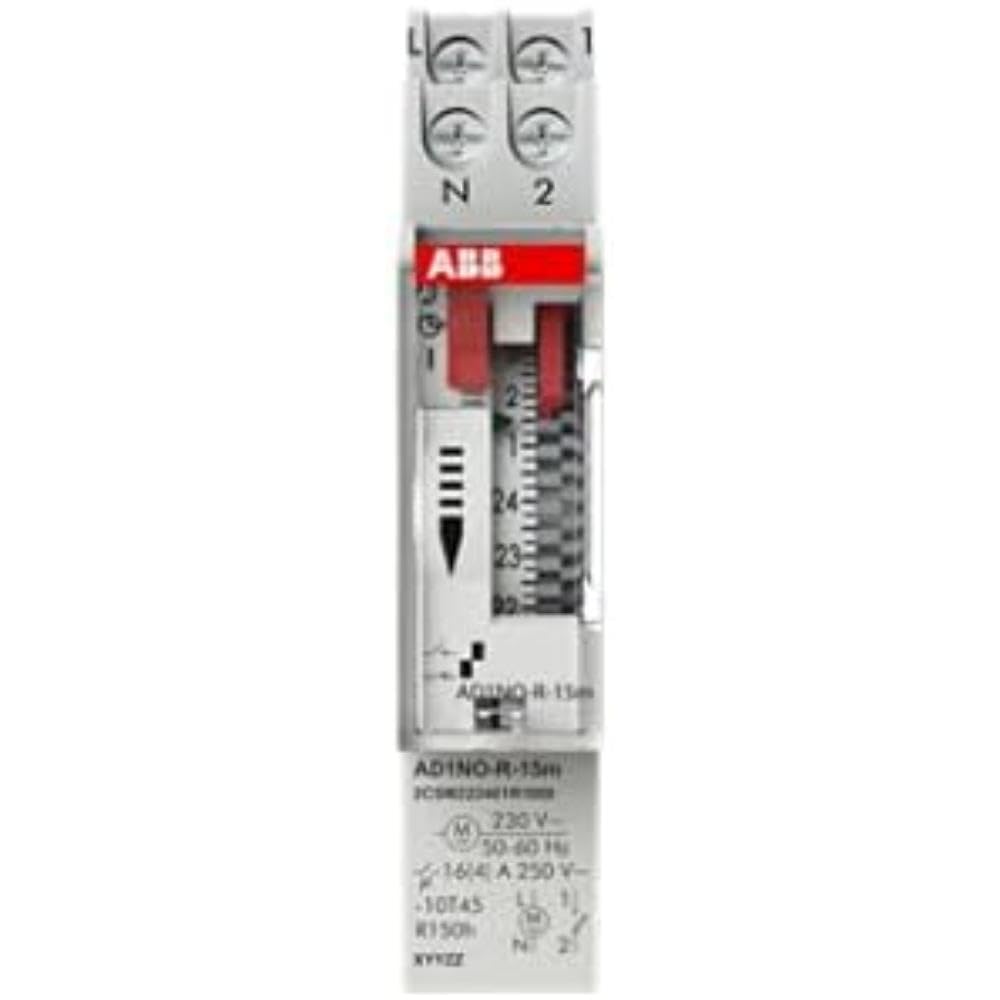
1-rasm: Old view of the ABB AD1NO-R-15m Modular Device Switch, highlighting its compact design and control interface.
2. Xavfsizlik bo'yicha muhim ko'rsatmalar
Please read and understand all safety instructions before installing, operating, or maintaining this device. Failure to follow these instructions may result in electric shock, fire, or serious injury.
- O'rnatish va texnik xizmat ko'rsatish faqat malakali xodimlar tomonidan amalga oshirilishi kerak.
- Disconnect power before installation, maintenance, or servicing to prevent electric shock.
- Barcha simlarning mahalliy va milliy elektr qoidalari va qoidalariga muvofiqligiga ishonch hosil qiling.
- Agar qurilma shikastlangan bo'lsa, uni ishlatmang.
- Ushbu qurilma quruq muhitda bino ichida foydalanish uchun mo'ljallangan.
3. Mahsulot tugadiview
The AD1NO-R-15m is an analog time switch with the following key features:
- Analog terish: For setting daily schedules.
- 15-Minute Switching: Allows precise control over connected circuits with 15-minute intervals.
- 1 Normally Open (NO) Channel: Controls one electrical circuit.
- Quvvat zaxirasi: Maintains timekeeping for a specified duration during power interruptions.
- Modulli dizayn: Suitable for integration into standard electrical panels on a DIN rail.
Note: The power reserve ensures the timer continues to function accurately even if the main power supply is temporarily lost.
4. O'rnatish va o'rnatish
Follow these steps for proper installation of the AD1NO-R-15m Modular Device Switch:
- Quvvatni uzish: Before beginning, ensure the main power supply to the installation area is completely disconnected at the circuit breaker or fuse box. Verify with a voltagsinovchi.
- O'rnatish: Mount the AD1NO-R-15m switch onto a standard DIN rail within an appropriate electrical enclosure. Ensure it is securely fastened.
- Elektr simlari:
- Connect the incoming phase (L) and neutral (N) wires to the designated input terminals of the time switch.
- Connect the load wire from the output terminal of the time switch to the device you wish to control.
- Ensure all connections are tight and secure. Refer to the wiring diagram printed on the device for specific terminal identification.
- Quvvatni tiklash: Once all connections are verified and secure, close the electrical enclosure and restore power to the circuit.
Always consult a qualified electrician for installation if you are unsure or lack experience with electrical wiring.
5. Foydalanish bo'yicha ko'rsatmalar
To set the time and program the switching schedule:
- Joriy vaqtni belgilash: Rotate the analog dial clockwise until the current time aligns precisely with the reference arrow or marker on the device's face.
- Program Switching Times: The dial features small segments around its perimeter. Push in the segments corresponding to the times you want the connected circuit to be ON. Pull out segments for OFF periods. Each segment typically represents a 15-minute interval.
- Operating Mode (if applicable): If your model includes a manual override switch (e.g., ON, AUTO, OFF), ensure it is set to "AUTO" for programmed operation.
The internal power reserve will automatically charge when the device is powered, ensuring continued accurate timekeeping during short power outages.
6. Xizmat ko'rsatish
The AD1NO-R-15m is designed for minimal maintenance. Follow these guidelines to ensure optimal performance:
- Tozalash: Keep the device clean and free from dust. Use a dry, soft cloth for cleaning. Do not use liquid cleaners, abrasive materials, or solvents.
- Tekshirish: Periodically inspect the wiring connections for tightness and any signs of wear, corrosion, or damage. Ensure all terminals are secure.
- Atrof-muhit sharoitlari: Zararni oldini olish uchun ish muhiti belgilangan harorat va namlik oralig'ida qolishiga ishonch hosil qiling.
There are no user-serviceable parts inside this device. Do not attempt to open the casing, chunki bu kafolatni bekor qiladi va sizni elektr xavfiga duchor qilishi mumkin.
7. Muammolarni bartaraf qilish; nosozliklarni TUZATISH
If you encounter issues with your AD1NO-R-15m switch, refer to the table below for common problems and solutions:
| Muammo | Mumkin sabab | Yechim |
|---|---|---|
| Qurilma almashtirilmayapti | Elektr ta'minoti yo'q | Check the circuit breaker or fuse. Ensure wiring connections are correct and secure. |
| Qurilma almashtirilmayapti | Noto'g'ri dasturlash | Re-check the dial settings and ensure the correct segments are pushed in or pulled out for desired ON/OFF times. |
| Qurilma almashtirilmayapti | Manual override engaged | Set the operating mode switch to "AUTO" for programmed operation. |
| Quvvat uzilgandan keyin vaqt noto'g'ritage | Power reserve depleted or faulty | Allow the device to charge its power reserve by keeping it connected to power. If the issue persists, contact customer support. |
If the problem persists after attempting these solutions, please contact ABB customer support for further assistance.
8. Texnik spetsifikatsiyalar
- Model: AD1NO-R-15m
- Qism raqami: 2CSM222461R1000
- Ishlab chiqaruvchi: ANJIR
- Turi: Analog vaqtni almashtirish
- Switching Interval: 15 daqiqa
- Kanallar: 1 Odatda ochiq (NO)
- Quvvat zaxirasi: Ha
- Mahsulot og'irligi: Taxminan 2.82 untsiya (80 gramm)
- Mahsulot o'lchamlari: Taxminan 3.54 x 0.69 x 2.6 dyuym (90 x 17.5 x 66 mm)
- O'rnatish turi: DIN Rail (Wall Mount)
- Kiritilgan komponentlar: Modular device switch
- Kerakli batareyalar: No (features internal power reserve)
- ASIN: B09BP4PFMF
- Birinchi mavjud: 21 yil 2024 dekabr
Eslatma: Texnik xususiyatlar oldindan ogohlantirmasdan o'zgartirilishi mumkin.
9. Kafolat va qo'llab-quvvatlash
Kafolat haqida ma'lumot
For detailed warranty terms and conditions, please refer to the official ABB warranty statement provided with your purchase or visit the official ABB websayt. Kafolat da'volari uchun xaridingizni tasdiqlovchi hujjatingizni saqlang.
Mijozlarni qo‘llab-quvvatlash
For technical assistance, troubleshooting, or service inquiries, please contact ABB customer support through their official websayt yoki mahsulot o'ramida ko'rsatilgan aloqa ma'lumotlari.
ABB rasmiysi Websayt: www.abb.com