
1. Kirish
Thank you for choosing the A4tech FG1112 Fstyler Wireless Keyboard and Mouse Set. This compact and efficient combo provides a reliable 2.4GHz wireless connection, offering convenience and comfort for your daily computing needs. The keyboard features a Q Turkish layout with FN multimedia keys, while the mouse offers precise 1200 DPI optical tracking. This manual will guide you through the setup, operation, and maintenance of your new device.
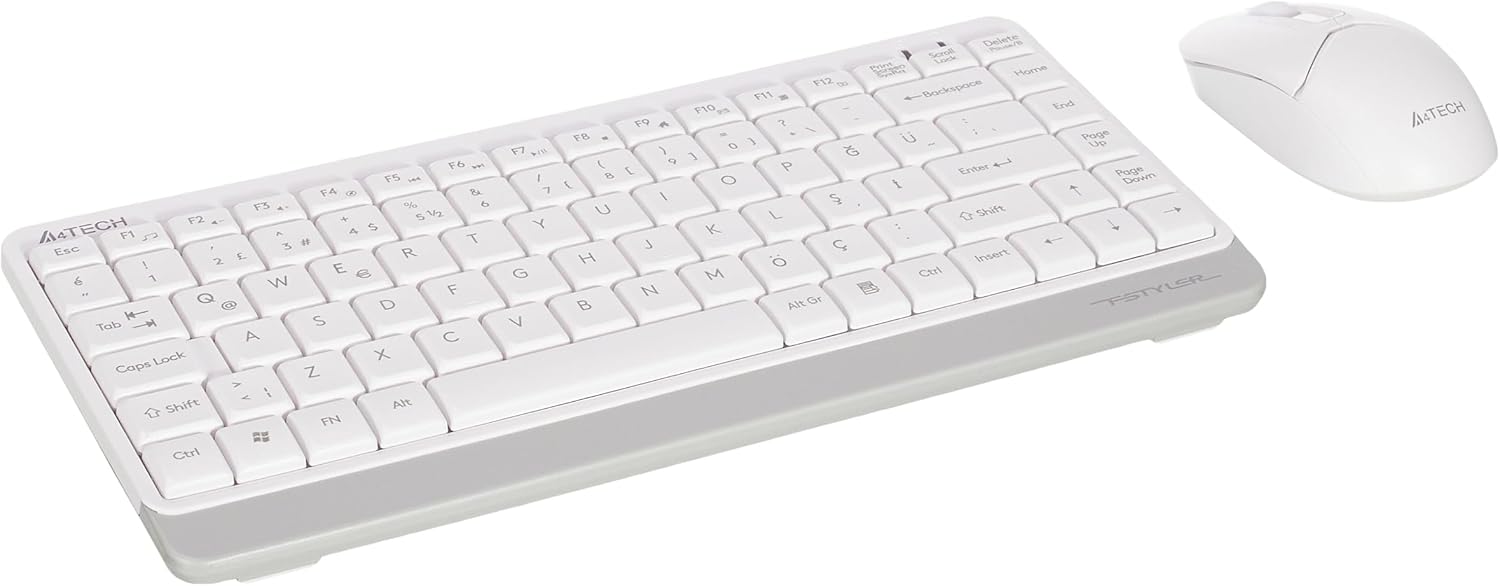
Image 1.1: A4tech FG1112 Fstyler Wireless Keyboard and Mouse Set (White)
2. Paket tarkibi
Iltimos, barcha narsalar mavjudligiga ishonch hosil qilish uchun paket tarkibini tekshiring:
- 1 x A4tech FG1112 Wireless Keyboard
- 1 x A4tech Fstyler Wireless Mouse
- 1 x USB Nano qabul qiluvchi
- 2 ta AAA batareya (klaviatura uchun)
- 1 x AA Battery (for mouse, typically included)
- 1 x foydalanuvchi qo'llanmasi (ushbu hujjat)
3. O'rnatish bo'yicha ko'rsatmalar
- Batareyalarni joylashtiring:
- For the keyboard: Open the battery compartment cover on the underside of the keyboard. Insert two AAA batteries, ensuring correct polarity (+/-). Close the cover.
- For the mouse: Open the battery compartment cover on the underside of the mouse. Insert one AA battery, ensuring correct polarity (+/-). Close the cover.

Image 3.1: Mouse bottom view showing battery compartment and power switch.
- Connect USB Nano Receiver: Locate the USB Nano Receiver, typically stored inside the mouse's battery compartment or packaged separately. Plug the receiver into an available USB port on your computer.
- Yoqilgan:
- For the keyboard: Ensure the keyboard is powered on. There might be a power switch on the top right or underside.
- For the mouse: Slide the power switch on the underside of the mouse to the "ON" position.
- Avtomatik ulanish: Your computer should automatically detect and install the necessary drivers for the keyboard and mouse. This process may take a few moments. Once complete, your devices are ready for use.
Video 3.1: A short demonstration of the A4tech Fstyler Wireless Keyboard and Mouse Set, showing its compact design and wireless connectivity. This video illustrates the product's features and ease of use.
4. Foydalanish bo'yicha ko'rsatmalar
4.1 Klaviaturadan foydalanish
The A4tech FG1112 keyboard features a compact design with a Q Turkish layout. It is designed for comfortable and quiet typing.

4.1-rasm: Yuqori view of the A4tech FG1112 Wireless Keyboard, highlighting its Q Turkish layout.
Multimedia and Function Keys:
The keyboard includes 12 multimedia and internet function keys integrated into the F1-F12 keys. To activate these functions, press the FN kerakli F tugmasi bilan bir vaqtning o'zida tugmani bosing.
- FN + F1: Media pleer
- FN + F2: Ovozni pasaytirish
- FN + F3: Ovoz balandligi
- FN + F4: Ovozni o'chirish
- FN + F5: Oldingi trek
- FN + F6: Keyingi trek
- FN + F7: Oʻynatish/Toʻxtatib turish
- FN + F8: To'xta
- FN + F9: Home Page
- FN + F10: Elektron pochta
- FN + F11: Mening kompyuterim
- FN + F12: Kalkulyator

Image 4.2: Illustration of FN key functionality for multimedia controls.
4.2 Sichqonchadan foydalanish
The A4tech Fstyler mouse provides precise 1200 DPI optical tracking for smooth and accurate cursor movement.

4.3-rasm: Yuqori view of the A4tech Fstyler Wireless Mouse.
Asosiy funktsiyalari:
- Chap tugmasini bosing: Primary function, used for selecting items, opening files va boshqalar.
- O'ng tugmasini bosing: Secondary function, typically opens context menus.
- O'tkazish g'ildiragi: Used for scrolling documents and web pages vertically. Can also function as a middle click button.
5. Xizmat ko'rsatish
- Tozalash: Klaviatura va sichqonchani tozalash uchun yumshoq, quruq matodan foydalaning. Qattiq kirlar uchun ozgina tozalang.amp matodan foydalanish mumkin, lekin suyuqlik qurilmalarga kirmasligiga ishonch hosil qiling.
- Batareyani almashtirish: When the keyboard or mouse becomes unresponsive or exhibits delayed input, it's time to replace the batteries. Follow the "Insert Batteries" steps in the Setup section.
- Saqlash: When not in use for extended periods, turn off the mouse to conserve battery life. Store the devices in a cool, dry place.
6. Muammolarni bartaraf qilish; nosozliklarni TUZATISH
| Muammo | Mumkin yechim |
|---|---|
| Klaviatura/sichqoncha javob bermayapti |
|
| Delayed or intermittent response |
|
| Multimedia tugmachalari ishlamayapti |
|
7. Texnik shartlar
| Xususiyat | Tafsilot |
|---|---|
| Brend | A4tech |
| Model | FG1112 |
| Ulanish texnologiyasi | 2.4GHz simsiz |
| Klaviatura tartibi | Q Turkish |
| Klaviatura turi | Multimedia Membrane |
| Sichqoncha DPI | 1200 DPI Optical |
| Keyboard Power Source | 2 x AAA batareyalar |
| Mouse Power Source | 1 x AA Battery (typical) |
| Maxsus xususiyatlar | Wireless, Mini, Multimedia Keys, Optical Mouse, Laser Printed Keys, Water-resistant design (with drainage channels) |
| Mahsulot og'irligi | 0.62 Kilograms (Set) |
| Olchamlari (Klaviatura) | Approx. 315mm (Width) x 146mm (Depth) x 25mm (Height) |
| Dimensions (Mouse) | Approx. 64mm (Width) x 108mm (Depth) x 35mm (Height) |

Image 7.1: Dimensions of the A4tech FG1112 Keyboard and Mouse.
8. Kafolat va qo'llab-quvvatlash
This A4tech FG1112 Fstyler Wireless Keyboard and Mouse Set comes with a 2 yillik kafolat sotib olingan kundan boshlab. Iltimos, kafolat da'volari uchun sotib olinganligingizni tasdiqlovchi hujjatingizni saqlab qo'ying.
For technical support, troubleshooting assistance, or warranty inquiries, please contact A4tech customer service through their official websayt yoki mahalliy distribyutoringiz.
Qo'shimcha ma'lumot va qo'llab-quvvatlash manbalarida topishingiz mumkin A4tech Store on Amazon.