
1. Kirish
This manual provides essential instructions for the safe and efficient operation of your Panasonic TH-65JX750DX 65-inch 4K Ultra HD Smart Android LED TV. Please read this manual thoroughly before using your television and retain it for future reference. It covers setup, operation, maintenance, and troubleshooting to ensure you get the best experience from your new device.
2. Xavfsizlik ma'lumotlari
Elektr toki urishi, yong'in yoki televizorga zarar yetkazilishining oldini olish uchun har doim quyidagi xavfsizlik choralariga rioya qiling.
- Quvvat manbai: Connect the TV only to an AC power supply within the specified voltage diapazoni.
- Ventilyatsiya: Televizor atrofida to'g'ri shamollatilishini ta'minlang. Shamollatish teshiklarini to'sib qo'ymang.
- Joylashtirish: Place the TV on a stable, level surface or mount it securely to a wall. Avoid direct sunlight, heat sources, and excessive dust.
- Suyuqlik ta'siri: Do not expose the TV to rain or moisture. Keep liquids away from the device.
- Tozalash: Unplug the TV before cleaning. Use a soft, dry cloth. Avoid abrasive cleaners.
- Xizmat ko'rsatish: Do not attempt to service the TV yourself. Refer all servicing to qualified personnel.
3. Qutida nima bor
Paketni ochishda barcha komponentlar mavjudligiga ishonch hosil qiling:
- 1 LED televizor
- 1 Masofadan boshqarish pulti
- 1 Wall Mount (for wall installation)
- 2 Table Top Stand (for stand installation)
- 1 ta AC kabeli
- 1 AV kabeli

Rasm: old view of the Panasonic TH-65JX750DX 65-inch 4K Ultra HD Smart Android LED TV.
4. Sozlash
4.1 Stendni o'rnatish
If you choose to place the TV on a surface, attach the included table-top stands. Ensure the TV is placed on a stable and level surface to prevent tipping.
- Carefully place the TV face down on a soft, clean cloth to prevent screen damage.
- Har bir stendni televizorning pastki qismidagi mos keladigan burama teshiklari bilan tekislang.
- Berilgan vintlar yordamida tagliklarni mahkamlang.

Rasm: burchakli view of the Panasonic TH-65JX750DX TV with its table-top stands installed.
4.2 Devorga o'rnatish
If you intend to wall-mount the TV, use the included wall mount and follow its specific installation instructions. Professional installation is recommended for safety.
4.3 Periferik qurilmalarni ulash
Televizor tashqi qurilmalarni ulash uchun turli xil portlarga ega:
- HDMI portlari (x3): For set-top boxes, Blu-ray players, gaming consoles.
- USB portlari (x2): For hard drives and other USB devices.
- VGA Slot (x1): For connecting a laptop or PC.
- Headphone Jack (x1): For audio output to headphones.
- AV Input Slot (x1): Kompozit video va stereo audiodan foydalanadigan eski qurilmalar uchun.
- RF Slot (x1): Antenna yoki kabel ulanishi uchun.
- LAN porti: Simli internetga ulanish uchun.
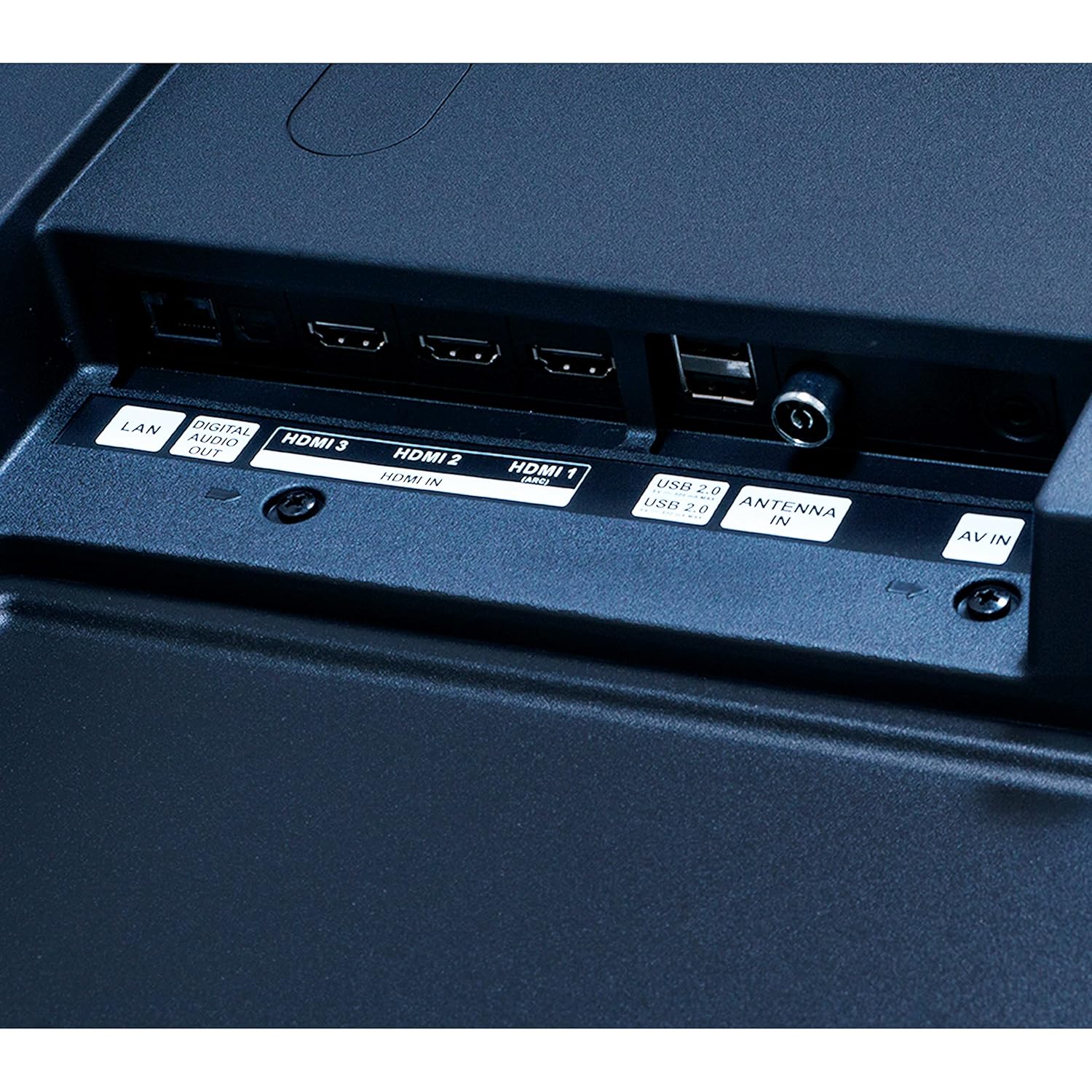
Image: Close-up of the rear panel of the Panasonic TH-65JX750DX TV, highlighting the HDMI, USB, LAN, and other input/output ports.
4.4 Quvvatga ulanish
After connecting all necessary peripherals, plug the AC power cord into the TV's power inlet and then into a wall outlet.
4.5 Dastlabki sozlash ustasi
Upon first power-on, the TV will guide you through an initial setup process. This includes language selection, network connection (Wi-Fi or Ethernet), Google account login, and channel scanning. Follow the on-screen prompts.
5. Televizoringizni boshqarish
5.1 masofadan boshqarish pulti
The included remote control allows you to navigate the TV's features. Insert two AAA batteries (not included) into the remote control, observing polarity.

Image: The remote control for the Panasonic TH-65JX750DX TV, showing buttons for power, volume, channel, navigation, and dedicated app buttons.
- Quvvat tugmasi: Televizorni yoqadi yoki o'chiradi.
- Navigatsiya tugmalari (yuqoriga/pastga/chapga/o‘ngga/OK): Menyuda navigatsiya va tanlash uchun.
- Ovozni oshirish/pasaytirish: Ovoz balandligini moslashtiradi.
- Kirish/manba tugmasi: Ulangan qurilmalar o'rtasida almashinadi.
- Uy tugmasi: Android TV bosh ekraniga kiradi.
- Ilova tugmalari: Direct access to services like Netflix, Prime Video, YouTube, Disney+Hotstar.
- Google Assistant tugmasi: Ovozli boshqaruvni faollashtiradi.
5.2 Smart TV Features (Android OS 10)
Your TV runs on Android OS 10, providing access to a wide range of smart features:
- O'rnatilgan Wi-Fi: Internetga kirish uchun uy tarmog'ingizga ulaning.
- Oʻrnatilgan Chromecast: Smartfoningiz yoki planshetingizdan kontentni to'g'ridan-to'g'ri televizorga uzating.
- Google Assistant & Alexa Compatible: Televizoringizni boshqarish, kontentni qidirish va aqlli uy qurilmalarini boshqarish uchun ovozli buyruqlardan foydalaning.
- Oldindan o'rnatilgan ilovalar: Enjoy popular streaming services like Prime Video, Netflix, Disney+Hotstar, and more.
- Google Play Store: Download additional apps and games.

Image: A kitchen scene showing a Panasonic TV displaying a recipe, with a smart speaker and text bubble indicating 'Ok Google, turn up the volume', demonstrating Google Assistant integration.
5.3 Displey va audio sozlamalari
- 4K Colour Engine: Optimizes color reproduction for vibrant and accurate visuals.
- HDR (Yuqori dinamik diapazon): Enhances contrast and color detail in compatible content.
- Dolby Audio & DTS Studio Sound: Provides immersive and clear audio experiences.
- Access these settings through the TV's main menu to customize your viewing and listening preferences.
6. Xizmat ko'rsatish
6.1 Tozalash
- Ekran: Ekranni yumshoq, tuksiz mato bilan muloyimlik bilan arting. Qattiq dog'lar uchun, LED displeylar uchun maxsus ishlab chiqilgan, to'g'ridan-to'g'ri ekranga emas, balki matoga surtilgan ekran tozalagichdan foydalaning.
- Mahkamasi: Wipe the TV cabinet with a soft, dry cloth. Avoid using water or chemical cleaners.
6.2 Dasturiy ta'minotni yangilash
Your Android TV may receive periodic software updates to improve performance and add new features. Ensure your TV is connected to the internet to receive these updates. You can check for updates manually in the TV's settings menu.
7. Muammolarni bartaraf qilish; nosozliklarni TUZATISH
Muammolarga duch kelsangiz, quyidagi umumiy muammolar va echimlarga murojaat qiling:
| Muammo | Mumkin yechim |
|---|---|
| Quvvat yo'q | Check if the power cord is securely plugged into both the TV and the wall outlet. Ensure the outlet is functional. |
| Rasm yo'q, lekin ovoz mavjud | Verify the correct input source is selected. Check cable connections (HDMI, AV). |
| Ovoz yo'q, lekin rasm mavjud | Check volume level and mute status. Ensure audio cables are connected correctly. |
| Masofadan boshqarish pulti ishlamayapti | Batareyalarni almashtiring. Masofadan boshqarish pulti va televizorning infraqizil sensori o'rtasida hech qanday to'siqlar yo'qligiga ishonch hosil qiling. |
| Wi-Fi ulanish muammolari | Restart your router. Check Wi-Fi settings on the TV. Ensure the TV is within range of your Wi-Fi network. |
| Ilovalar yuklanmayapti/ishlamayapti | Clear app cache/data in TV settings. Ensure sufficient storage (8 GB ROM). Update the app or TV software. |
If problems persist, consult the Panasonic support websayt yoki mijozlarga xizmat ko'rsatish bilan bog'laning.
8. Texnik shartlar
Detailed technical specifications for the Panasonic TH-65JX750DX TV:

Image: The Panasonic TH-65JX750DX TV with its physical dimensions (width, height, depth) clearly labeled in centimeters.
| Xususiyat | Tafsilot |
|---|---|
| Model | TH-65JX750DX |
| Ekran o'lchami | 65 dyuym (165 sm) |
| Displey texnologiyasi | LED |
| Rezolyutsiya | 4K Ultra HD (3840 x 2160 piksel) |
| Yangilanish tezligi | 60 Gts |
| Viewburchak | 178 daraja |
| Operatsion tizim | Android OS 10 |
| Memory Storage (ROM) | 8 GB |
| Ulanish | 3 HDMI, 2 USB, 1 VGA, 1 Headphone Jack, 1 AV Input, 1 RF, Built-In Wi-Fi |
| Ovoz chiqishi | 20 Watts, Dolby Audio, DTS Studio Sound |
| Maxsus xususiyatlar | 4K Colour Engine, Accuview Display, HEXA Chrome Drive, Wide Color Gamut, HDR, Built-In Home Theatre, Built-In Chromecast, MirAle, Built-In Google Assistant, Alexa Compatible |
| Mahsulot o'lchamlari (LxWxH) | 144 x 8.1 x 83.7 sm |
| Element og'irligi | 17.7 kg |
| Model yili | 2021 |
9. Kafolat va qo'llab-quvvatlash
9.1 Kafolat haqida ma'lumot
Your Panasonic TH-65JX750DX TV comes with a 1 Year Standard Manufacturer Warranty from Panasonic, covering manufacturing defects and issues under normal use. Please retain your purchase receipt for warranty claims.
9.2 Mijozlarni qo‘llab-quvvatlash
For technical assistance, warranty claims, or further inquiries, please visit the official Panasonic support website or contact their customer service helpline. Refer to the documentation included with your TV for specific contact details in your region.