
Kirish
This manual provides detailed instructions for the BINIZE Portable Carplay Screen Navigation system. It covers setup, operation, and maintenance to ensure optimal performance and user experience.
Xavfsizlik ma'lumotlari
- Qurilmaning ishonchli o'rnatilganligiga va sizga to'sqinlik qilmasligiga ishonch hosil qiling view yoki avtomobil boshqaruviga xalaqit beradi.
- Connect the power cord only to a 12V cigarette lighter port.
- Qurilmani qismlarga ajratish yoki o'zgartirishga urinmang.
- Always prioritize safe driving. Do not operate the device in a way that distracts you from the road.
Paket tarkibi
Paketda barcha elementlar mavjudligiga ishonch hosil qiling:
- BINIZE Portable Carplay Screen Navigation Unit
- Sigaret zajigalka quvvat kabeli
- USB uzatma kabeli
- Audio chiqish kabeli (RCA)
- Mounting Bracket with 3M Adhesive
- Masofadan boshqarish
- Foydalanuvchi uchun qo'llanma (ushbu hujjat)
Sozlash; o'rnatish
1. Qurilmani o'rnatish
Choose a suitable location on your dashboard that does not obstruct your view yoki avtomobil boshqaruvi.

The base of the mounting bracket comes with 3M adhesive. Clean the dashboard surface thoroughly before attaching the base. Securely attach the unit to the bracket.

Adjust the screen angle for optimal viewing.
2. Quvvatga ulanish
Connect the cigarette lighter power cable to the device and insert it into your vehicle's 12V cigarette lighter port. The device will power on automatically.

Ensure the vehicle's voltage 12V dan 14V gacha.
This video demonstrates the initial power-up sequence of the BINIZE Portable Carplay Screen Navigation unit by connecting it to a cigarette lighter port. It shows the "welcome" screen appearing upon successful power-on.
Foydalanish bo'yicha ko'rsatmalar
1. Dastlabki sozlash va tilni tanlash
Upon first power-on, the device will display the home screen. Navigate to the "Settings" menu to select your preferred language.

2. Ovoz chiqarish parametrlari
The monitor itself does not have internal speakers. Sound is routed through your original car audio system.
FM uzatuvchi
To use the FM transmitter, set the device's FM frequency to match an unused FM channel on your car's stereo.

Ensure both the device and your car stereo are tuned to the same FM frequency for audio output.
RCA audio chiqishi
For additional audio requirements, such as connecting to a subwoofer or amplifier, use the two RCA ports (White: Audio Out Left, Red: Audio Out Right).
3. Apple CarPlay Connection
To use Apple CarPlay, connect your iPhone to the device using an original Apple data cable via the USB port on the right side of the player.
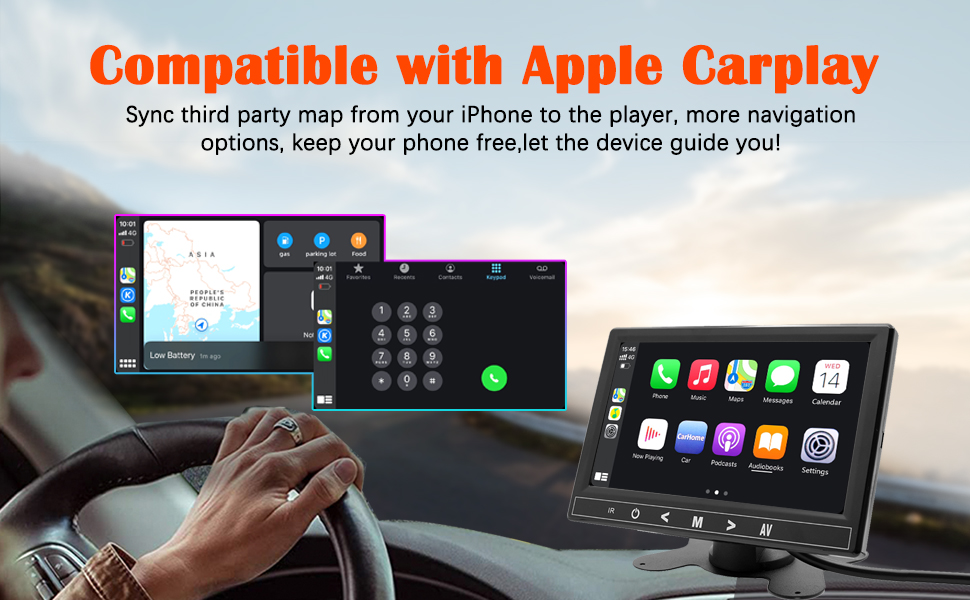
Select "i-Play" in the device settings. Grant any necessary permissions on your iPhone.
This video demonstrates how to connect an iPhone to the BINIZE Portable Carplay Screen Navigation for Apple CarPlay functionality. It shows the steps to select "i-Play" in settings and connect the original data cable.
4. Android Auto Connection
To use Android Auto, connect your Android phone to the device using an original data cable via the USB port on the right side of the player.

Select "A-Auto" in the device settings. Grant any necessary permissions on your Android phone.
This video illustrates the process of connecting an Android phone to the BINIZE Portable Carplay Screen Navigation for Android Auto. It guides the user to select "A-Auto" in settings and connect the data cable.
5. MirrorLink (iPhone)
To mirror your iPhone screen, connect your iPhone to the device using an original Apple data cable via the USB port on the right side of the player.
Select "i-Mirror" in the device settings. Grant permissions on your iPhone. The iPhone screen will be projected onto the player's screen.
This video demonstrates the MirrorLink function for iPhone, showing how to connect the device and mirror the phone's display.
6. MirrorLink (Android Phone)
To mirror your Android phone screen, connect your Android phone to the device using an original data cable via the USB port on the right side of the player.
Select "A-Link" in the device settings. Grant permissions on your Android phone. The Android phone screen will be projected onto the player's screen.
This video demonstrates the MirrorLink function for Android phones, showing how to connect the device and mirror the phone's display.
7. USB Flash Drive Reading
Insert a USB flash drive into the USB extension cable to play music or videos. The device supports various media formats.
8. Telefonni zaryadlash
The USB extension cable can also be used to charge your mobile phone.
Xizmat
- Keep the screen clean using a soft, dry cloth. Avoid abrasive cleaners.
- Barcha kabel ulanishlari xavfsiz ekanligiga ishonch hosil qiling.
- Qurilmani uzoq vaqt davomida haddan tashqari harorat yoki to'g'ridan-to'g'ri quyosh nuriga ta'sir qilishdan saqlaning.
Muammolarni bartaraf qilish; nosozliklarni TUZATISH
| Muammo | Mumkin sabab | Yechim |
|---|---|---|
| Qurilma yoqilmaydi. | No power from cigarette lighter. | Check vehicle's 12V port. Ensure power cable is securely connected. |
| Ovoz chiqishi yo'q. | FM frequency not synchronized or incorrect RCA connection. | Match FM frequency on device and car stereo. Verify RCA cable connections. |
| CarPlay/Android Auto ulanmayapti. | Non-original data cable, incorrect settings, or phone permissions. | Use original data cable. Check "i-Play" or "A-Auto" settings. Grant all necessary phone permissions. |
| MirrorLink not working. | Incorrect settings or phone permissions. | Check "i-Mirror" or "A-Link" settings. Grant all necessary phone permissions. |
| Screen freezes or is unresponsive. | Vaqtinchalik dasturiy ta'minot xatosi. | Restart the device by unplugging and re-plugging the power cable. |
For further assistance, please contact BINIZE customer support.
Texnik xususiyatlari
| Xususiyat | Tafsilot |
|---|---|
| Brend | BINIZE |
| Model raqami | B09DSMJ59X |
| Ulanish texnologiyasi | Bluetooth, RCA, USB |
| Nazoratchi turi | Android, Google Assistant |
| Maxsus xususiyat | Sensorli ekran |
| Mos qurilmalar | Smartfon |
| Audio chiqish rejimi | Stereo |
| Kanallar soni | 4 |
| Videoni kodlash | H.264, H.265/HEVC |
| Nazorat usuli | teging |
| Simsiz texnologiya | Bluetooth |
| Quvvat kiritish | 12V (via cigarette lighter) |
Eslatma: Texnik xususiyatlar oldindan ogohlantirmasdan o'zgartirilishi mumkin.
Kafolat va qo'llab-quvvatlash
BINIZE products come with a standard manufacturer's warranty. Please refer to the warranty card included in your package for specific terms and conditions.
For technical support, warranty claims, or any other inquiries, please visit the official BINIZE websayt yoki mijozlarga xizmat ko'rsatish guruhiga murojaat qiling.