
1. Kirish
Thank you for choosing the iPega PG-P4008 Wireless Game Controller. This manual provides detailed instructions on how to set up, operate, and maintain your controller. The PG-P4008 offers broad compatibility with PS4, PS3, Android (10.0+), iOS (13.0+), and Windows PC, connecting wirelessly via Bluetooth for an enhanced gaming experience.
2. Mahsulot tugadiview
The iPega PG-P4008 is designed for versatile gaming across multiple platforms. It features a comfortable ergonomic design, responsive controls, and several advanced functionalities to immerse you in your games.
Asosiy xususiyatlar:
- Wireless Bluetooth connectivity (BT2.1+EDR) with up to 8 meters range.
- No driver installation required for connection.
- Integrated colored LED light indicator for operational status.
- Dual motors for realistic vibration feedback during gameplay.
- Built-in three-dimensional acceleration sensor and gyroscope sensor with six-axis induction.
- Integrated speaker and 3.5mm earphone jack for game audio.
- Dual-point capacitive touchpad for enhanced control.
- Compatible with PS4, PS3, Android (10.0+), iOS (13.0+), and Windows PC.
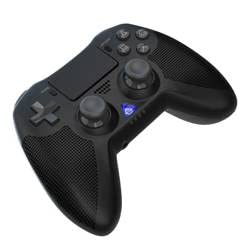
1-rasm: Old view of the iPega PG-P4008 Wireless Game Controller. This image displays the controller's ergonomic design, dual analog sticks, D-pad, action buttons, touchpad, and the central LED indicator.
3. Sozlash va ulanish
The PG-P4008 controller connects wirelessly via Bluetooth. Follow these steps to pair your controller with your device:
- Yoqilgan: Ensure the controller is charged. Press and hold the PS tugmasi (or equivalent power button) to turn on the controller.
- Ulanish rejimi:
- For PS4/PS3: Connect the controller to the console using a USB cable. Once recognized, you can disconnect the cable for wireless play. The connection method is similar to the official P4 controller.
- For Android/iOS: Activate Bluetooth on your mobile device. On the controller, press and hold the SHARE button + PS button simultaneously until the LED indicator flashes rapidly, indicating pairing mode. Select "PG-P4008" (or similar) from your device's Bluetooth list to connect.
- For Windows PC: Ensure your PC has Bluetooth capability. On the controller, press and hold the PS button + OPTIONS button simultaneously until the LED indicator flashes rapidly. On your PC, go to Bluetooth settings, add a new device, and select "PG-P4008" (or similar) to pair.
- Muvaffaqiyatli ulanish: Once connected, the LED indicator on the controller will change to a solid color, indicating a successful pairing.
Eslatma: No additional driver software is required for operation. The controller supports a stable connection up to 8 meters.
4. Foydalanish bo'yicha ko'rsatmalar
LED ko'rsatkichi:
The built-in colored LED light indicates the controller's operational status and player assignment, similar to the official PS4 controller. Different colors will signify different stages or player numbers.
Vibratsiyali fikr-mulohazalar:
The controller features dual motors embedded in the handles, providing tactile vibration feedback to enhance your gaming immersion. This feedback will vary based on in-game events.
Sensorli panel:
The dual-point capacitive touchpad allows for intuitive control in games that support touch input, offering an additional layer of interaction.
Ovoz funksiyasi:
Connect your 3.5mm earphones to the integrated jack on the controller to experience game audio directly, providing a private and immersive sound experience.
5. Xizmat ko'rsatish
- Keep the controller dry and away from moisture to prevent damage to internal components.
- Clean the controller regularly with a soft, dry cloth. Avoid using harsh chemicals or abrasive materials.
- Ishlatilmayotganda boshqaruvchini salqin va quruq joyda saqlang.
- Tekshirish moslamasini haddan tashqari harorat yoki to'g'ridan-to'g'ri quyosh nuri ta'siriga qo'ymang.
- Do not attempt to disassemble or modify the controller, as this will void any potential warranty and may cause damage.
6. Muammolarni bartaraf qilish; nosozliklarni TUZATISH
- Tekshirish moslamasi ulanmayapti:
- Tekshirish moslamasi to'liq zaryadlanganligiga ishonch hosil qiling.
- Qurilmangizda Bluetooth yoqilganligini tekshiring.
- Make sure the controller is in the correct pairing mode for your device (refer to Section 3).
- Tekshirish moslamasini ham, qurilmangizni ham qayta ishga tushirib ko'ring.
- Remove previous pairings from your device's Bluetooth list and try pairing again.
- Kirish kechikishi yoki uzilishi:
- 8 metrlik ish masofasida ekanligingizga ishonch hosil qiling.
- Boshqa simsiz qurilmalardan shovqinlarni minimallashtiring.
- Check for any physical obstructions between the controller and the device.
- Vibratsiya ishlamayapti:
- Ensure the game you are playing supports vibration feedback.
- Vibratsiya yoqilganligiga ishonch hosil qilish uchun o'yin ichidagi sozlamalarni tekshiring.
- Audio not working via 3.5mm jack:
- Ensure your earphones are properly plugged in.
- Check the volume settings on your device and in-game.
- Test with another pair of earphones to rule out earphone issues.
7. Texnik shartlar
| Model raqami | PG-P4008 |
| Brend | iPega |
| Ulanish | Bluetooth (BT2.1+EDR) |
| Simsiz diapazon | 8 metrgacha |
| Mos qurilmalar | PS4, PS3, Android (10.0+), iOS (13.0+), Windows PC |
| Maxsus xususiyatlar | Wireless, Touchpad, Vibration, 6-axis Gyroscope, Built-in Speaker, 3.5mm Audio Jack |
| Tugma miqdori | 17 |
| Quvvat manbai | Batareyadan quvvatlanadi |
8. Kafolat va qo'llab-quvvatlash
Information regarding product warranty and customer support is not provided within this manual. Please refer to the product packaging or the retailer's webKafolat muddati va yordam olish uchun mijozlarni qo'llab-quvvatlash xizmatiga qanday murojaat qilish haqida batafsil ma'lumot olish uchun saytga tashrif buyuring.