
Kirish
Sotib olganingiz uchun tashakkurasing the Northpoint NP-TL LED Desk Lamp. This modern and versatile desk lamp is designed to provide optimal lighting for your workspace while offering convenient features such as QI wireless charging and an integrated display for time and temperature. Please read this manual carefully before use to ensure proper operation and to maximize the lifespan of your product.
Xavfsizlik bo'yicha ko'rsatmalar
- Ensure the power adapter is compatible with your local power supply before connecting.
- L ni qismlarga ajratmang, ta'mirlamang yoki o'zgartirmangamp yourself. Contact qualified service personnel for assistance.
- l ni qo'yishdan saqlaningamp in high-temperature, humid, or dusty environments.
- l ni saqlangamp suv va boshqa suyuqliklardan uzoqroq tuting.
- Do not look directly into the LED light source for extended periods to prevent eye strain.
- l ni elektr tarmog'idan uzingamp from the power outlet before cleaning or when not in use for a long time.
- Ushbu mahsulot faqat bino ichida foydalanish uchun mo'ljallangan.
Paket tarkibi
Paketda quyidagi elementlar mavjudligini tekshiring:
- Northpoint NP-TL LED Desk Lamp
- 12V quvvat adapteri
- Foydalanuvchi uchun qo'llanma
Mahsulot tugadiview
Familiarize yourself with the components of your Northpoint NP-TL LED Desk Lamp.

1-rasm: Old view of the Northpoint NP-TL LED Desk Lamp, showing the adjustable light head, flexible arm, integrated display, and QI wireless charging base with mood lighting.

Rasm 2: Yon view of the Northpoint NP-TL LED Desk Lamp, highlighting the flexible arm design and the integrated display on the lampning tanasi.

Image 3: The Northpoint NP-TL LED Desk Lamp in a typical desk environment, demonstrating its compact size and ambient lighting capabilities.
- Adjustable LED Head: Yo'nalishli yoritishni ta'minlaydi.
- Moslashuvchan qo'l: Allows for easy positioning of the light.
- Birlashtirilgan displey: Shows time, date, and ambient temperature.
- Boshqarish paneliga teging: For adjusting light settings and display functions.
- QI Wireless Charging Pad: Mos keladigan qurilmalar uchun bazada joylashgan.
- Mood Light Base: Provides ambient RGB lighting.
Sozlash; o'rnatish
- Paketni ochish: Paketdagi barcha komponentlarni ehtiyotkorlik bilan olib tashlang.
- Lavozim: l ni joylashtiringamp barqaror, tekis yuzada.
- Quvvatni ulash: Insert the DC plug of the 12V power adapter into the power input port on the back of the lamp taglik. Adapterni standart devor rozetkasiga ulang.
- Dastlabki displey sozlamalari: Upon first power-on, the display will illuminate. You may need to set the time and date using the touch controls (refer to "Operating Instructions - Display Settings").
Foydalanish bo'yicha ko'rsatmalar
Nur funksiyalari
- Quvvatni yoqish/oʻchirish: ga teging Quvvat tugmasi (
 ) on the touch control panel to turn the lamp yoqish yoki o'chirish.
 - Brightness Adjustment (Dimmable): Shu bilan birga lamp is on, press and hold the Yorqinlik tugmasi (often represented by a sun icon or +/-) to smoothly adjust the light intensity. Release when the desired brightness is reached.
- Rang haroratini sozlash: ga teging Mode/Color Temperature button (often represented by a 'M' or color spectrum icon) to cycle through different color temperatures: Warm White, Neutral White, and Cool White.
QI simsiz zaryadlash
- Place your QI-compatible smartphone or device directly onto the wireless charging pad located on the lampning asosi.
- Optimal zaryadlash uchun qurilma zaryadlash panelining markazida ekanligiga ishonch hosil qiling.
- A charging indicator (if available on your device) will confirm that charging has begun.
- Remove any metallic objects or thick cases from your device that may interfere with wireless charging.
Integrated Display Settings (Time, Date, Temperature)
The integrated LCD displays time, date, and ambient temperature. Specific buttons for setting these functions are usually located near the display or on the touch panel.
- Vaqt/sana sozlash: Look for buttons labeled "SET", "MODE", or similar. Typically, you press "SET" to enter setting mode, then use arrow buttons or +/- to adjust values, and "SET" again to confirm and move to the next setting (e.g., hour, minute, year, month, day).
- Harorat ko'rsatkichi: Lamp automatically detects and displays the ambient temperature. No manual setting is required for this function.
Kayfiyatni yoritish
- Lamp features an integrated mood light base. Look for a dedicated Kayfiyatni yoritish tugmasi (often a color wheel or RGB icon).
- Tap the button to cycle through different static colors or activate a color-changing mode.
- Press and hold the button to turn the mood light off.
Xizmat
- Tozalash: Tozalashdan oldin elektr tarmog'ini uzing. Yumshoq, quruq mato bilan arting.amp. Do not use abrasive cleaners, solvents, or harsh chemicals.
- Saqlash: Agar l saqlansaamp uzoq vaqt davomida ishlatmang, uni elektrdan uzing va salqin, quruq joyda saqlang.
- LED yorug'lik manbai: LED yorug'lik manbai o'rnatilgan va foydalanuvchi tomonidan almashtirib bo'lmaydi.
Muammolarni bartaraf qilish; nosozliklarni TUZATISH
| Muammo | Mumkin sabab | Yechim |
|---|---|---|
| Lamp yoqilmaydi. | Elektr aloqasi yo'q. Noto'g'ri quvvat adapteri. | Quvvat adapteri ikkala l ga mahkam ulanganligiga ishonch hosil qilingamp va devor rozetkasi. Try a different outlet. If the issue persists, contact customer support. |
| Simsiz zaryadlash ishlamayapti. | Device not QI-compatible. Qurilma to'g'ri tekislanmagan. Obstruction (e.g., thick case, metallic object). | Verify your device supports QI wireless charging. Reposition your device on the charging pad. Remove any cases or metallic objects. |
| Display shows incorrect time/date. | Vaqt/sana o'rnatilmagan yoki elektr uzilishidan keyin qayta o'rnatilgan. | Refer to "Operating Instructions - Display Settings" to manually set the time and date. |
| Yorug'lik miltillaydi yoki beqaror. | Barqaror quvvat manbai. Ichki komponent muammosi. | L ni ulashga harakat qilingamp into a different power outlet. If the problem continues, discontinue use and contact customer support. |
Texnik xususiyatlari
| Brend | Shimoliy nuqta |
| Model raqami | NP-TL |
| Mahsulot o'lchamlari (U x G x Y) | 16.6 x 6 x 33.5 sm |
| Material | Sun'iy charm |
| Tugatish turi | Teri ko'rinishi |
| Nur manbai turi | LED |
| Quvvat | 18 vatt |
| Yorug'lik oqimi | 480 lm |
| Ranglarni ko'rsatish indeksi (CRI) | 80.00 |
| Maxsus xususiyatlar | Dimmable, QI Wireless Charging, Temperature Display, Mood Lighting |
| Uslubni almashtirish | teging |
| IP reytingi | IP20 |
| jildtage | 12 volt |
| Kiritilgan komponentlar | QI Charging Station, 12V Power Adapter |

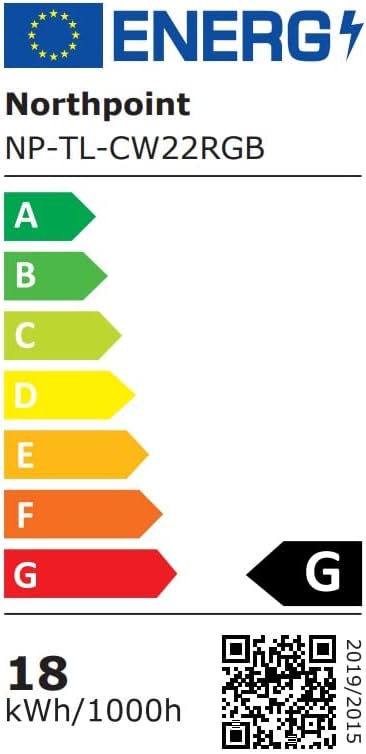
Image 4: Energy efficiency label for the Northpoint NP-TL LED Desk Lamp, indicating energy class G and 18 kWh/1000h consumption.
Kafolat va qo'llab-quvvatlash
Northpoint products are manufactured to high-quality standards. For warranty information or technical support, please refer to the contact details provided with your purchase documentation or visit the official Northpoint websayt. Iltimos, har qanday kafolat da'volari uchun sotib olinganligingizni tasdiqlovchi hujjatingizni saqlab qo'ying.
Note: Information regarding spare parts availability and software updates is not available at the time of printing.