
1. Kirish
Thank you for choosing the HISTTON Fanless Mini PC J4125. This compact and robust industrial-grade mini computer is designed for stable and efficient operation in various environments. Featuring a fanless design for silent performance and dust protection, it is equipped with an Intel Celeron J4125 processor, ample RAM, and versatile connectivity options. This manual provides essential information for setting up, operating, maintaining, and troubleshooting your device.

Image 1.1: The HISTTON Fanless Mini PC J4125, a compact black device with a ribbed top for heat dissipation, featuring various ports on its front and back panels.
2. Paket tarkibi
Iltimos, quyidagi elementlar uchun katakchani belgilang:
- 1 x HISTTON Mini PC (J4125)
- 1 x quvvat adapteri
- 1 x foydalanuvchi qo'llanmasi
- 1 x HDMI kabeli
- 1 x VESA o'rnatish moslamasi
- 1 x vintlar to'plami
- 1 x sotiladigan kabel
3. Mahsulot tugadiview
3.1 Asosiy xususiyatlar
- Protsessor: Intel Celeron J4125 (4 Cores 4 Threads, 2.00GHz Base, 2.70GHz Turbo)
- Grafika: Intel UHD Grafik 600
- Operatsion tizim: Pre-installed Windows 11 Pro (64-bit, activated)
- Xotira: DDR4 RAM (Single SODIMM slot, up to 32GB supported)
- Saqlash: 1x mSATA SSD slot, 1x SATA 3.0 for 2.5-inch HDD/SSD
- Ulanish: Dual Gigabit RJ45 LAN, Dual-band Wi-Fi (2.4G+5.0G), Bluetooth 4.0
- Video chiqishi: 1x HDMI, 1x VGA (Dual display support)
- Portlar: 2x USB 3.0, 2x USB 2.0, 2x RS232 COM, 1x 3.5mm Mic/SPK out
- Maxsus xususiyatlar: Fanless design, RTC wake up, Wake on LAN, Auto Power on (BIOS setting), Network boot
3.2 Old va orqa panellar
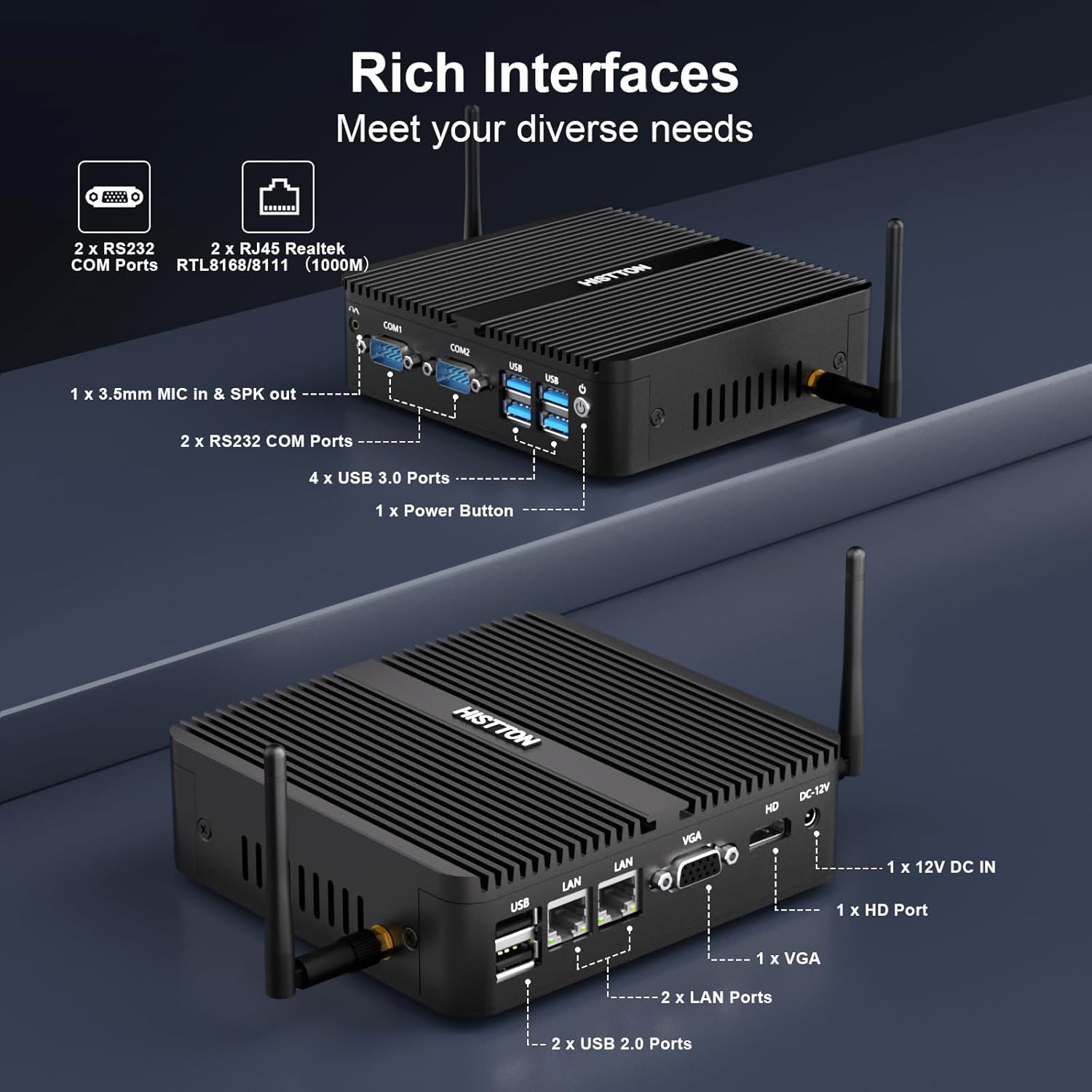
Rasm 3.1: Batafsil view of the HISTTON Mini PC's front and rear panels, highlighting the various input/output ports including USB, COM, LAN, HDMI, and VGA.
- Old panel: Power button, 2x USB 3.0 ports, 2x USB 2.0 ports, 2x RS232 COM ports (COM1, COM2), 3.5mm audio jack (Mic/SPK out).
- Orqa panel: DC-12V power input, 1x HDMI port, 1x VGA port, 2x Gigabit RJ45 LAN ports, Wi-Fi antenna connectors.
3.3 Internal Components and Expandability
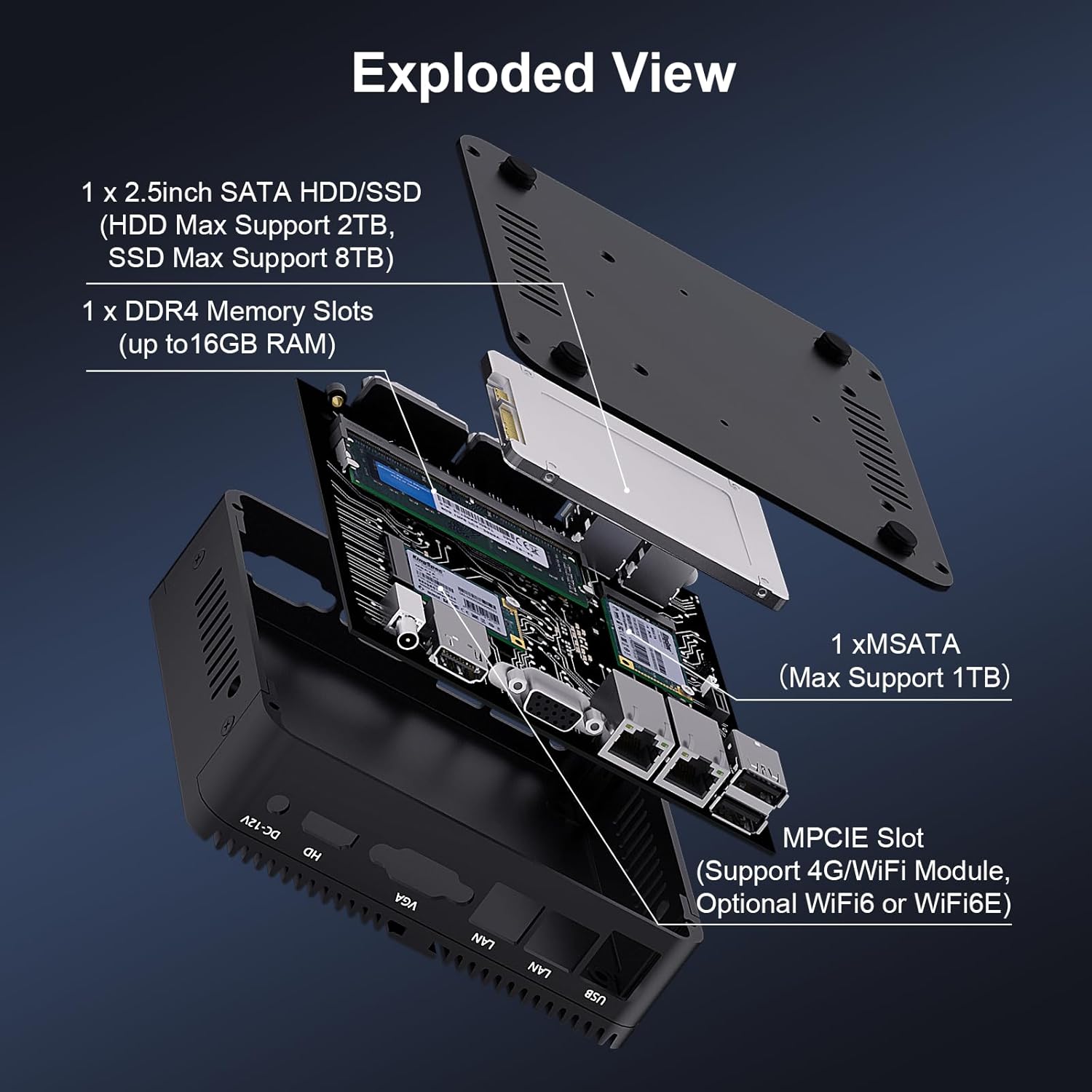
Rasm 3.2: portlagan view of the HISTTON Mini PC, showing the internal layout including the mSATA SSD slot, DDR4 memory slot, and space for a 2.5-inch SATA drive.
- RAM: Single SODIMM slot for DDR4 memory, supporting up to 32GB.
- SSD: 1x mSATA slot (Max Support 1TB).
- HDD/SSD: 1x SATA 3.0 port for a 2.5-inch HDD (Max Support 2TB) or SSD (Max Support 8TB).
- Simsiz: MPCIE slot for 4G/WiFi module (Optional WiFi6 or WiFi6E).
4. O'rnatish bo'yicha ko'rsatmalar
4.1 Periferik qurilmalarni ulash
- Connect your monitor(s) to the HDMI and/or VGA ports on the rear panel.
- Connect your keyboard and mouse to the USB ports on the front panel.
- Attach the Wi-Fi antennas to the connectors on the rear panel.
- For wired network access, connect an Ethernet cable to one of the RJ45 LAN ports.
- Connect the power adapter to the DC-12V input port on the rear panel, then plug it into a power outlet.
4.2 Quvvatni yoqish
Press the power button on the front panel to turn on the Mini PC. The power indicator light will illuminate.
4.3 VESA o'rnatish moslamasini o'rnatish (ixtiyoriy)
The Mini PC supports VESA mounting, allowing you to attach it to the back of a compatible monitor or to a wall mount. Use the provided VESA mount and screws to secure the Mini PC. Ensure the monitor's VESA holes are compatible with the mount.
Video 4.1: An official product video demonstrating the physical features of the HISTTON Fanless Mini PC and its VESA mounting process.
5. Foydalanish bo'yicha ko'rsatmalar
5.1 Windows-ni dastlabki sozlash
Upon first boot, follow the on-screen instructions to complete the Windows 11 Pro setup, including language, region, network connection, and user account creation.
5.2 Ikkita displeyni sozlash
The Mini PC supports dual display output via its HDMI and VGA ports. Connect two monitors and configure display settings within Windows (Right-click on desktop > Display settings) to extend or duplicate your desktop.

Image 5.1: The HISTTON Mini PC connected to two monitors, demonstrating its dual display capability via HDMI and VGA ports.
5.3 BIOS sozlamalari
To access the BIOS, press the DEL key repeatedly during startup. The BIOS allows configuration of advanced features such as:
- RTC uyg'onishi: Schedule the PC to power on at a specific time.
- LANda uyg'onish: Power on the PC remotely via a network signal.
- Avtomatik yoqish: Automatically power on the PC when power is restored after an outage.
- Tarmoqni yuklash: Boot the PC from a network server.
6. Xizmat ko'rsatish
6.1 Tozalash
Regularly clean the exterior of the Mini PC with a soft, dry cloth. Avoid using liquid cleaners or abrasive materials. As it is fanless, internal dust accumulation is minimized, but ensure the ribbed chassis remains clear of obstructions for optimal heat dissipation.
6.2 Dasturiy ta'minotni yangilash
Optimal ishlash va xavfsizlikni ta'minlash uchun Windows operatsion tizimingiz va drayverlaringizni yangilab turing. Windows yangilanishiga Sozlamalar > Windows yangilanishi orqali kirish mumkin.
7. Muammolarni bartaraf qilish; nosozliklarni TUZATISH
| Muammo | Mumkin sabab | Yechim |
|---|---|---|
| Mini PC does not power on. | No power, faulty power adapter, loose connection. | Check power cable connection. Ensure power adapter is working. Try a different power outlet. |
| Monitorda displey yo'q. | Loose video cable, incorrect input source on monitor, monitor off. | Ensure video cables (HDMI/VGA) are securely connected. Select correct input source on monitor. Turn on monitor. |
| Tarmoqqa ulanish yo'q. | Loose Ethernet cable, Wi-Fi disabled, driver issue. | Check Ethernet cable connection. Ensure Wi-Fi is enabled and connected to a network. Reinstall network drivers if necessary. |
| Sekin ishlash. | Juda ko'p ilovalar ishlayotgan, saqlash joyi kam, drayverlar eskirgan. | Keraksiz ilovalarni yoping. Diskda joy bo'shating. Windows va drayverlarni yangilang. |
8. Texnik shartlar
| Xususiyat | Tafsilot |
|---|---|
| Brend | HISTTON |
| Model raqami | J4125 |
| Operatsion tizim | Windows 11 Pro |
| CPU modeli | Celeron J4125 |
| CPU tezligi | 2 GHz (up to 2.7 GHz Turbo) |
| Grafik protsessor | Intel UHD Grafik 600 |
| O'rnatilgan RAM xotirasi | 16 GB DDR4 (maksimal 32 GB) |
| Xotirani saqlash hajmi | 512 GB SSD |
| Qattiq disk tavsifi | HDD, SSD (1x mSATA, 1x 2.5-inch SATA) |
| Video chiqish interfeysi | HDMI, VGA |
| Ulanish texnologiyasi | Ethernet, HDMI, LAN, Wi-Fi, Bluetooth |
| Simsiz texnologiya | Bluetooth 4.0, Dual-band Wi-Fi (2.4G+5.0G) |
| Element o'lchamlari | 5.31 x 5 x 1.54 dyuym (13.5 x 12.6 x 4.0 sm) |
| Element og'irligi | 0.6 kilogramm |
| Jami USB portlari | 4 (2x USB 3.0, 2x USB 2.0) |
| COM portlari | 2x RS232 |
| LAN portlari | 2x Gigabit RJ45 |
9. Kafolat va qo'llab-quvvatlash
HISTTON provides customer support for your Mini PC. If you encounter any issues or have questions, please refer to the following contact methods:
- Amazon yordami: Log in to your Amazon account, navigate to "Your Orders," and select "Ask Product Question" for assistance.
- Sotishdan keyingi yordam: For direct technical assistance, you may send an email to the HISTTON After-Sales Team at minipc_service@yeah.net.
Iltimos, kafolat da'volari uchun sotib olinganligingizni tasdiqlovchi hujjatingizni saqlab qo'ying.