
Kirish
This manual provides comprehensive instructions for the use and care of your new Remote brand compatible remote control. This remote is specifically designed to function seamlessly with Nordmende ND40S3000J SMART televisions, offering full functionality without the need for complex programming.
Please read this manual carefully to ensure proper setup and operation of your remote control.
Sozlash; o'rnatish
1. Batareyani o'rnatish
The remote control requires alkaline batteries (not included). Follow these steps to install them:
- Masofadan boshqarish pultining orqa tarafidagi batareya bo'limi qopqog'ini toping.
- Qopqoqni pastga suring yoki ochish uchun mandalni bosing.
- Insert two new alkaline batteries, ensuring the positive (+) and negative (-) terminals match the diagrams inside the compartment.
- Batareya bo'linmasining qopqog'ini joyiga qo'ying, uni mahkam chertib chiqguncha joyiga suring.
Muhim: Always use new alkaline batteries for optimal performance. Do not mix old and new batteries, or different types of batteries.
2. Dastlabki foydalanish (dasturlash shart emas)
This compatible remote control is pre-programmed for the Nordmende ND40S3000J SMART TV model. No additional programming or setup steps are required. Once batteries are installed, the remote is ready for immediate use with your television.
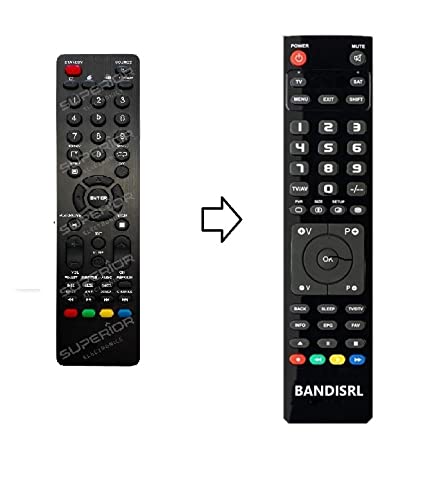
1-rasm: The Remote compatible remote control. This image displays the layout of the buttons and the overall design of the remote, ready for use with your Nordmende TV.
Foydalanish bo'yicha ko'rsatmalar
To operate your Nordmende ND40S3000J SMART TV with this remote control, point the remote directly at the television's infrared receiver. Ensure there are no obstructions between the remote and the TV.
- Quvvat tugmasi: Televizorni yoqish yoki o'chirish uchun bosing.
- Ovozni oshirish/pasaytirish: Ovoz balandligini sozlaydi.
- Kanal yuqoriga/pastga: Telekanallarni ketma-ket o'zgartiradi.
- Raqamli tugmalar (0-9): Televizion kanallarni to'g'ridan-to'g'ri tanlang.
- Navigatsiya tugmalari (o'q tugmalari, OK): Menyular bo'ylab harakatlaning va variantlarni tanlang.
- Smart TV tugmalari: Access specific Smart TV functions or applications (e.g., Home, Apps, Netflix, YouTube, etc., depending on the remote's layout and TV's features).
- Ovozni o'chirish tugmasi: Televizor ovozini o'chiradi.
- Manba/Kirish tugmasi: Mavjud kirish manbalari (HDMI, AV va boshqalar) bo'ylab aylanish.
Refer to your Nordmende TV's original user manual for specific details on its menu structure and Smart TV functionalities.
Xizmat
Masofadan boshqarish pultini tozalash
Masofadan boshqarish pultini tozalash uchun yumshoq, quruq matodan foydalaning. Qattiq kirlar uchun ozgina tozalang.ampen the cloth with water. Do not use abrasive cleaners, alcohol, or solvents, as these can damage the remote's surface and internal components.
Batareyani almashtirish
Replace batteries when the remote control's response becomes sluggish or stops working. Always replace both batteries simultaneously with new alkaline batteries. Dispose of used batteries according to local regulations.
Saqlash
Masofadan boshqarish pultini salqin, quruq joyda, to'g'ridan-to'g'ri quyosh nuri va haddan tashqari haroratdan uzoqroqda saqlang. Agar masofadan boshqarish pulti uzoq vaqt ishlatilmasa, oqishning oldini olish uchun batareyalarni chiqarib olish tavsiya etiladi.
Muammolarni bartaraf qilish; nosozliklarni TUZATISH
- Masofadan boshqarish pulti ishlamayapti:
- Batareyalar to'g'ri joylashtirilganligini tekshiring (+/-).
- Replace the batteries with new alkaline batteries.
- Masofadan boshqarish pulti va televizorning infraqizil qabul qilgichi o'rtasida hech qanday to'siqlar yo'qligiga ishonch hosil qiling.
- Masofadan boshqarish pultini bevosita televizorga qaratganingizga ishonch hosil qiling.
- Televizor yoqilganligini tekshiring.
- Ba'zi tugmalar javob bermayapti:
- This remote is designed for the Nordmende ND40S3000J SMART TV. If you are using it with a different model, some advanced functions may not be compatible.
- Tugmalarning toza va axlatsiz ekanligiga ishonch hosil qiling.
- TV responds intermittently:
- Batareyalar kam bo'lishi mumkin; ularni almashtiring.
- Ensure a clear line of sight to the TV's infrared sensor.
- Avoid strong light sources (like direct sunlight) that might interfere with the infrared signal.
If troubleshooting steps do not resolve the issue, please refer to the Support section.
Texnik xususiyatlari
| Brend: | Remote (Manufacturer: Bandisrl) |
| Mos qurilmalar: | Nordmende ND40S3000J SMART Television |
| Ulanish texnologiyasi: | Infraqizil (IR) |
| Maxsus xususiyat: | Dasturlash shart emas |
| Batareya turi: | Ishqoriy |
| Batareyalar o'z ichiga oladi: | Yo'q |
| Rang: | Qora |
| Tugmalar soni: | 25 |
| Nazorat turi: | Tugmachani boshqarish |
Kafolat va qo'llab-quvvatlash
Kafolat haqida ma'lumot
Specific warranty details for this compatible remote control are not provided in this manual. Please refer to the purchase documentation or contact the seller/manufacturer (Bandisrl) for information regarding warranty coverage and terms.
Mijozlarni qo‘llab-quvvatlash
For further assistance, technical support, or inquiries regarding compatibility with other TV models, please contact the manufacturer, Bandisrl. Contact information can typically be found on the product packaging or the seller's websayt.
If you own a different TV model than the Nordmende ND40S3000J SMART, it is recommended to contact Bandisrl to confirm compatibility before purchase or use.