
AOLION WGXB004005
AOLION Stereo Headset Adapter User Manual
Model: WGXB004005
Kirish
The AOLION Stereo Headset Adapter is designed to enhance your gaming experience on Xbox One controllers. This adapter allows you to connect most wired stereo gaming headsets with a 3.5mm audio jack (CTIA plug standard) directly to your Xbox controller, providing convenient control over game sound and voice chat.
Paket tarkibi
- 1 × AOLION Stereo Headset Adapter
- 1 × Foydalanuvchi qo'llanmasi
Mahsulot tugadiview
The adapter features intuitive controls for managing your audio experience during gameplay.

1-rasm: Old view of the headset adapter showing control buttons.
- Game Balance Button: Adjusts the balance towards game audio.
- Chat Balance Button: Adjusts the balance towards voice chat audio.
- Mikrofon ovozini o'chirish tugmasi: Mikrofonni yoqadi/o'chiradi.
- Ovozni oshirish tugmasi: Increases overall volume.
- Ovozni pasaytirish tugmasi: Decreases overall volume.
- 3.5 mm audio uyasi: For connecting your stereo gaming headset.
- USB ulagichi: For connecting to the Xbox controller.
Moslik
This headset adapter is compatible with a wide range of Xbox One controllers and stereo gaming headsets:
- Xbox Controllers: Xbox One, Xbox One S, Xbox One X, Xbox Elite Wireless Controller Series 1, Xbox Elite Wireless Controller Series 2, Xbox Series S, and Xbox Series X Controllers.
- Naushniklar: Most wired stereo gaming headsets featuring a 3.5mm audio jack (using the CTIA plug standard).

Figure 2: The adapter is compatible with multiple Xbox controller models.

Figure 3: The adapter supports standard 3.5mm CTIA headsets.
Sozlash; o'rnatish
Setting up your AOLION Stereo Headset Adapter is a simple plug-and-play process.
- Connect the Adapter to the Controller: Align the USB connector of the headset adapter with the expansion port at the bottom of your Xbox controller. Gently push until it clicks securely into place.
- Eshitish vositasini ulang: Plug your wired stereo gaming headset's 3.5mm audio jack into the corresponding port on the bottom of the headset adapter.
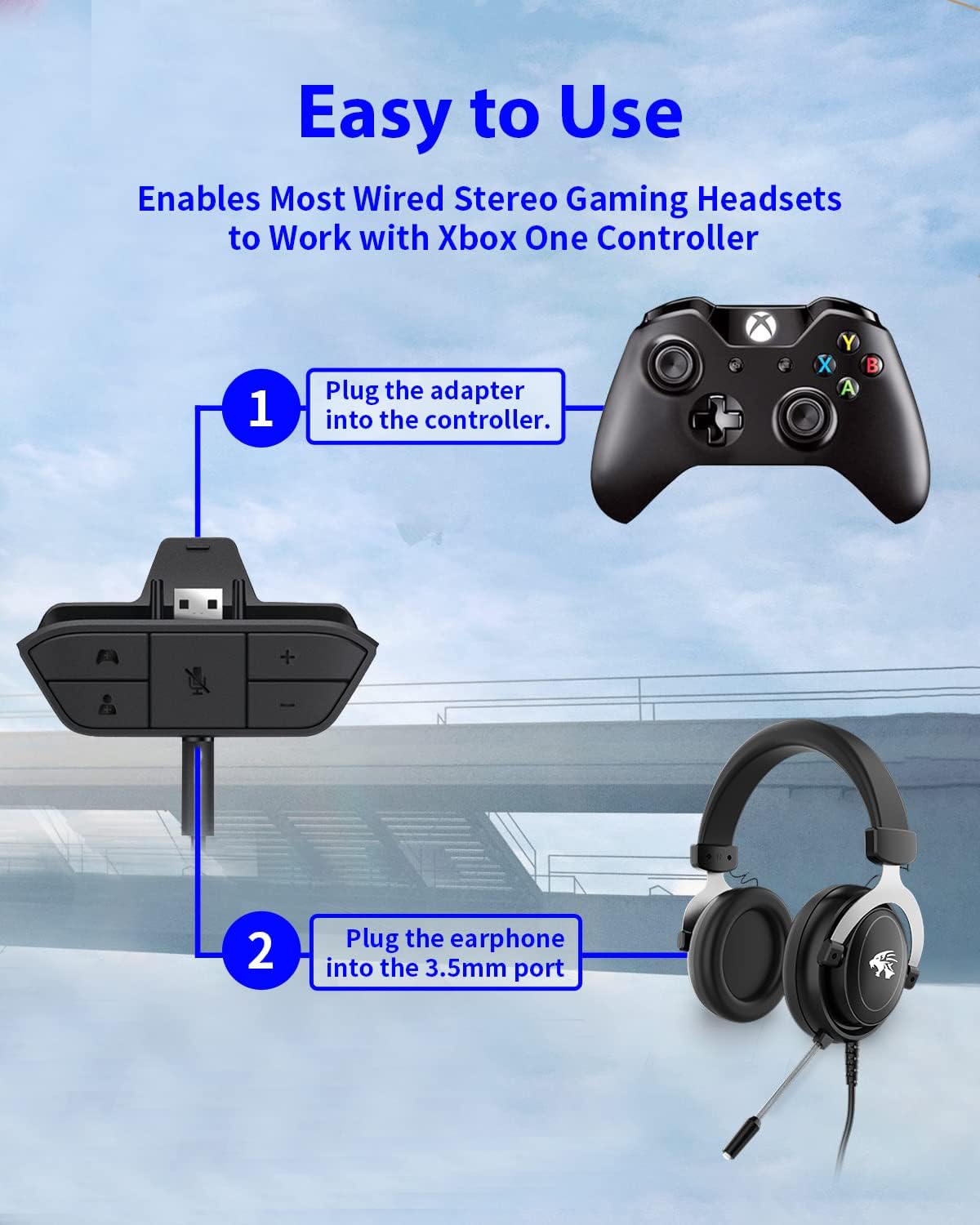
Figure 4: Step-by-step connection guide for the headset adapter.
Video 1: Demonstration of connecting the headset adapter to an Xbox controller.
Muhim eslatma: For optimal performance and to resolve potential audio issues, it is recommended to update your Xbox controller's firmware after connecting the adapter. This can typically be done through your Xbox console's settings (Settings > Devices & connections > Accessories > Select your controller > ... > Controller settings > Update firmware).
Foydalanish bo'yicha ko'rsatmalar
Once connected, use the buttons on the adapter to control your audio:
- Ovozni oshirish/pasaytirish (+/-): Press the '+' button to increase the overall volume of both game and chat audio. Press the '-' button to decrease it.
- Microphone Mute (Microphone Icon): Press this button to mute or unmute your microphone. An indicator light (if present) or on-screen notification may confirm the mute status.
- Game/Chat Balance (Controller Icon / Person Icon):
- ni bosing Nazoratchi belgisi button to increase game audio volume and decrease chat audio volume.
- ni bosing Shaxs belgisi button to increase chat audio volume and decrease game audio volume.
5-rasm: Batafsil view of the adapter's control buttons.
Xizmat
To ensure the longevity and optimal performance of your headset adapter, follow these simple maintenance guidelines:
- Adapterni toza va chang va axlatdan xoli tuting. Tozalash uchun yumshoq, quruq matodan foydalaning.
- Adapterni haddan tashqari harorat, namlik yoki to'g'ridan-to'g'ri quyosh nuriga ta'sir qilishdan saqlaning.
- Adapterni o'zingiz qismlarga ajratishga yoki ta'mirlashga urinmang, chunki bu kafolatni bekor qiladi.
- Jismoniy shikastlanishning oldini olish uchun adapter ishlatilmaganda xavfsiz joyda saqlang.
Muammolarni bartaraf qilish; nosozliklarni TUZATISH
If you encounter issues with your AOLION Stereo Headset Adapter, please refer to the following common solutions:
| Muammo | Mumkin sabab / yechim |
|---|---|
| No audio or poor audio quality (buzzing, peaking) |
|
| Mikrofon ishlamayapti |
|
| Game/Chat balance not working |
|
Agar ushbu amallarni bajarib bo'lgandan keyin ham muammo davom etsa, iltimos, mijozlarni qo'llab-quvvatlash xizmatiga murojaat qiling.
Texnik xususiyatlari
| Xususiyat | Tafsilot |
|---|---|
| Model raqami | WGXB004005 |
| Brend | AOLION |
| Mahsulot o'lchamlari (U x G x Y) | 3.15 x 1.57 x 0.79 dyuym (8 x 4 x 2 sm) |
| Rang | Qora |
| Ulagich turi | Auxiliary (3.5mm CTIA standard) |
| Mos qurilmalar | Xbox One, One S, One X, Elite 1, Elite 2, Series S, Series X Controllers; 3.5mm CTIA Stereo Headsets |
Kafolat va qo'llab-quvvatlash
AOLION stands behind the quality of its products. This Stereo Headset Adapter comes with:
- 60 kunlik pulni qaytarish kafolati: If you are not entirely satisfied with your purchase within 60 days, you may be eligible for a full refund.
- 24 oylik kafolat: We provide a 24-month warranty against manufacturing defects from the date of purchase.
For any questions, concerns, or warranty claims, please contact us through Amazon. We are committed to responding to your inquiries within 12 hours to ensure your complete satisfaction.
Ask a question about this manual
Ask about setup, troubleshooting, compatibility, parts, safety, or missing instructions. Manuals+ will review the question and use this page’s manual context to help answer it.