
WGP T6 Plus
WGP Teleheer T6 Plus Motorcycle Bluetooth Headset User Manual
Model: T6 Plus | Brand: WGP
Kirish
This manual provides detailed instructions for the installation, operation, and maintenance of your WGP Teleheer T6 Plus Motorcycle Bluetooth Headset. Please read this manual thoroughly before using the device to ensure proper function and safety. The T6 Plus is designed for motorcycle riders, offering full-duplex Bluetooth real-time intercom communication, hands-free calling, music playback, and voice assistant integration.
Asosiy xususiyatlar
- Full Duplex Bluetooth Real-time Intercom: Stable signal transmission up to 1500 meters (93 MPH) with ceramic antenna.
- Hands-free & Multi-function Keys: Bluetooth 5.1 connectivity, supports call handling (answer/refuse/redial), music playback. Automatic switch to phone mode for incoming calls. Large button design for easy operation with gloves.
- IP65 Waterproof & Dustproof Design: Withstands various weather conditions, operational down to -15°F.
- HD Speakers & Ultra High Quality Sound: High-definition sound quality, especially for bass, with effective wind noise reduction.
- All-in-One Type-C Port: Integrated audio, data transfer, and charging.
- Uzoq batareya muddati: 850 mAh battery providing 30 hours of continuous use and 500 hours standby.
Paket tarkibi
Iltimos, paketingizda barcha narsalar mavjudligini tekshiring:
- WGP Teleheer T6 Plus Bluetooth Headset Unit (2 units for 2-pack)
- Dubulg'a karnaylari
- Microphone (boom mic for open-face helmets, soft mic for full-face helmets)
- Mounting Clip (clamp and adhesive options)
- USB toifa-C zaryadlovchi kabeli
- Foydalanuvchi uchun qo'llanma

Image: A detailed diagram illustrating the components of the WGP Teleheer T6 Plus headset, including the main unit with its Type-C port, indicator light, and control buttons (OFF/ON, Volume+, Volume-, Telephone, Connect). It also shows the securing clip, microphone, and trumpet (speakers), providing a clear visual guide to the parts included and their connections.
O'rnatish va o'rnatish
1. Qurilmani zaryadlash
Before first use, fully charge the T6 Plus headset. Connect the provided USB Type-C cable to the headset's Type-C port and the other end to a USB power adapter (not included). The indicator light will show charging status and turn off when fully charged.
- Zaryadlash vaqti: Taxminan 2-3 soat.
- Indicator light: Red during charging, off when fully charged.
2. Installing the Headset in Your Helmet
The T6 Plus can be installed using either the clamp mount or the adhesive mount.
- O'rnatish joyini tanlang: Select a flat area on the left side of your helmet where the headset unit can be easily accessed.
- Karnaylarni o'rnatish: Attach the speakers inside the helmet's ear pockets using the adhesive pads. Ensure they are positioned directly over your ears for optimal sound quality.
- Mikrofonni o'rnatish:
- For full-face helmets: Use the soft wire microphone and position it inside the chin bar, close to your mouth.
- For open-face or modular helmets: Use the boom microphone and position it in front of your mouth.
- Asosiy blokni o'rnatish:
- Clamp O'rnatish: Cl-ni suringamp between the helmet shell and the inner padding. Secure it tightly.
- Yopishtiruvchi o'rnatish: Clean the chosen surface on the helmet. Peel off the protective film from the adhesive mount and firmly press it onto the helmet for at least 30 seconds. Allow 24 hours for the adhesive to cure before use.
- Kabellarni ulash: Plug the speaker/microphone cable into the Type-C port on the main headset unit.

Image: A WGP Teleheer T6 Plus headset unit mounted on the side of a motorcycle helmet. This image demonstrates the typical installation position of the headset on a helmet, showing its compact design and how it integrates with the helmet's exterior. The control buttons are visible, indicating ease of access for the rider.
Foydalanish bo'yicha ko'rsatmalar
1. Quvvatni yoqish/o‘chirish
- Yoqilgan: ni bosing va ushlab turing Quvvat tugmasi indikator chirog'i miltillaguncha 3 soniya davomida.
- O'chirish: ni bosing va ushlab turing Quvvat tugmasi indikator chirog'i o'chguncha 3 soniya ushlab turing.
2. Mobil telefon bilan Bluetooth ulanishi
- Ensure the T6 Plus is powered off.
- ni bosing va ushlab turing Quvvat tugmasi for approximately 5-7 seconds until the indicator light flashes red and blue alternately, indicating pairing mode.
- On your mobile phone, enable Bluetooth and search for "Teleheer T6 Plus".
- Select "Teleheer T6 Plus" from the list of available devices to connect. Once connected, the indicator light will flash blue slowly.
3. Intercom Pairing (Two Units)
To establish intercom communication between two T6 Plus units:
- Ensure both T6 Plus units are powered off.
- On Unit 1, press and hold the Quvvat tugmasi for 5-7 seconds until the indicator light flashes red and blue alternately.
- On Unit 2, press and hold the Quvvat tugmasi for 5-7 seconds until the indicator light flashes red and blue alternately.
- ni qisqa bosing Quvvat tugmasi on either Unit 1 or Unit 2 (one short press). The units will search for each other.
- Once connected, the indicator lights on both units will flash blue slowly, and you will hear a confirmation tone.
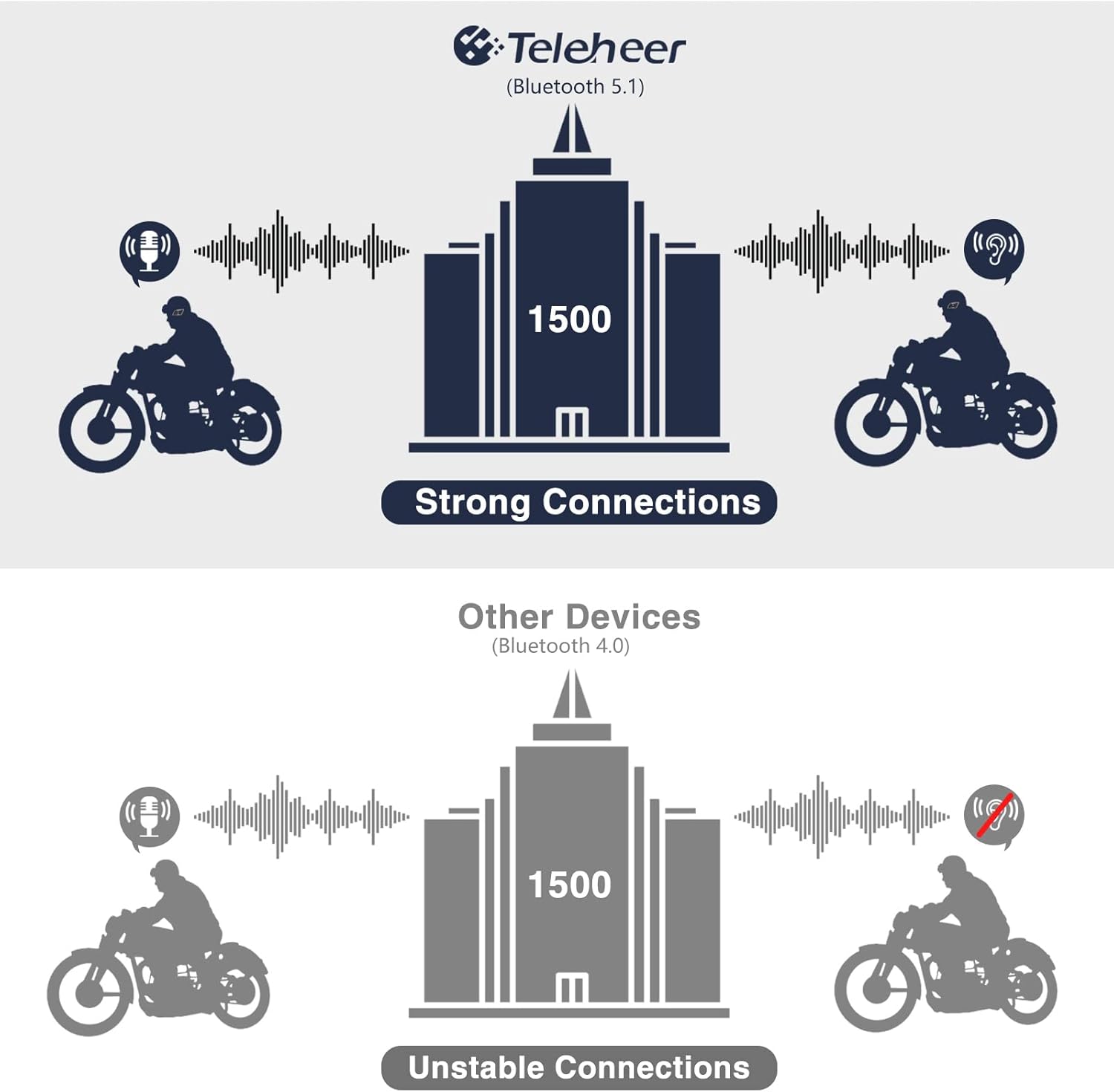
Image: A graphic illustrating the effective intercom range of the Teleheer T6 Plus (Bluetooth 5.1) compared to older Bluetooth 4.0 devices. The T6 Plus shows stable connections over 1500m, while older devices show unstable connections over shorter distances. This highlights the improved signal stability and range due to Bluetooth 5.1 and the ceramic antenna.
4. Phone Call Functions
- Qo'ng'iroqqa javob berish: ni qisqa bosing Telefon tugmasi.
- Qo‘ng‘iroqni tugatish: ni qisqa bosing Telefon tugmasi.
- Qo'ng'iroqni rad etish: ni bosing va ushlab turing Telefon tugmasi 2 soniya davomida.
- Oxirgi raqamni qayta terish: ni ikki marta bosing Telefon tugmasi.
5. Musiqani ijro etish
- Oʻynatish/toʻxtatib turish: ni qisqa bosing Telefon tugmasi.
- Keyingi trek: ni qisqa bosing Ovoz balandligini oshirish tugmasi.
- Oldingi trek: ni qisqa bosing Ovozni pasaytirish tugmasi.
- Ovoz balandligini sozlash: ni bosing va ushlab turing Ovozni ko'tarish/pasaytirish tugmalari ovoz balandligini oshirish yoki kamaytirish uchun.
6. Voice Assistant (Siri/Google Assistant)
- Ovozli yordamchini faollashtirish: ni ikki marta bosing Quvvat tugmasi.

Image: A graphic depicting the voice assistant feature of the Teleheer T6 Plus, showing a helmeted rider interacting with their phone via voice commands like "Hey Siri" or "Ok Google". This illustrates the hands-free convenience for navigation, calls, and other smartphone functions while riding.
Xizmat va parvarish
- Tozalash: Garnitura blokini yumshoq mato bilan arting, damp mato. Qattiq kimyoviy moddalar yoki abraziv tozalash vositalaridan foydalanmang.
- Suvga chidamliligi: The device is IP65 waterproof. While it can withstand water jets, avoid submerging it in water for extended periods. Ensure the Type-C port cover is securely closed when not charging.
- Saqlash: Foydalanilmayotganda qurilmani salqin va quruq joyda saqlang. Haddan tashqari haroratdan saqlaning.
- Batareya parvarishi: To prolong battery life, avoid fully discharging the battery frequently. Charge the device regularly, even if not in use for long periods.

Image: A WGP Teleheer T6 Plus headset unit partially submerged in water with splashes, demonstrating its IP65 waterproof rating. The image emphasizes the device's ability to withstand water exposure, making it suitable for various weather conditions during riding.
Muammolarni bartaraf qilish; nosozliklarni TUZATISH
| Muammo | Mumkin sabab | Yechim |
|---|---|---|
| Qurilma yoqilmaydi. | Kam batareya. | Qurilmani to'liq quvvatlang. |
| Telefon bilan ulanib boʻlmadi. | Device not in pairing mode; Bluetooth off on phone; too many paired devices. | Ensure device is in pairing mode (red/blue flashing). Turn on phone's Bluetooth. Delete old Bluetooth connections on phone. |
| Intercom connection unstable or short range. | Obstructions; out of range; interference. | Ensure clear line of sight. Stay within 1500m range. Avoid strong electromagnetic interference. |
| Karnaylardan ovoz yo'q. | Speakers not connected properly; volume too low. | Check speaker connection to Type-C port. Increase volume. |
| Mikrofon ovozni qabul qilmayapti. | Microphone not connected properly; microphone position. | Check microphone connection. Ensure microphone is close to your mouth. |
| Wind noise during calls/intercom. | High speed; improper microphone placement. | Ensure microphone is positioned correctly to minimize wind exposure. The device has DSP noise suppression, but extreme conditions may affect performance. |
Texnik xususiyatlari
| Xususiyat | Tafsilot |
|---|---|
| Model nomi | Teleheer T6 Plus |
| Bluetooth versiyasi | Bluetooth 5.1 |
| Interkom diapazoni | Up to 1500 meters (93 MPH) |
| Batareya quvvati | 850 mA/soat |
| Doimiy foydalanish vaqti | 30 soat |
| Kutish vaqti | 500 soat |
| Zaryadlash porti | C turi |
| Suvga chidamlilik | IP65 (Reaktiv o'tkazmaydigan) |
| Ishlash harorati | Down to -15°F |
| Antenna uchun material | Seramika |
| Nazorat usuli | Sensorli / Jismoniy tugmalar |
| Element og'irligi | 14.4 untsiya (taxminan 408 gramm) |
| O'lchamlari (paket) | 8.54 x 3.9 x 2.95 dyuym |
Kafolat va qo'llab-quvvatlash
For warranty information and technical support, please refer to the official WGP websayti yoki bevosita mijozlarga xizmat ko'rsatish bilan bog'laning. Kafolat da'volari uchun xarid kvitansiyasini xaridni tasdiqlovchi hujjat sifatida saqlang.
Qo'shimcha yordam uchun siz tashrif buyurishingiz mumkin Amazondagi mahsulot sahifasi or contact the seller directly through the Amazon platform.
Ask a question about this manual
Ask about setup, troubleshooting, compatibility, parts, safety, or missing instructions. Manuals+ will review the question and use this page’s manual context to help answer it.