
1. Kirish
The Sunshine DT-17N Digital Multimeter is a versatile and reliable tool designed for accurate electrical measurements. It is particularly suitable for phone repair technicians and general electronics work, capable of measuring various electrical parameters including voltage, current, resistance, capacitance, and temperature. Its compact design and user-friendly features make it an essential tool for diagnosing and repairing electronic devices.

Figure 1: The Sunshine DT-17N Digital Multimeter, demonstrating its compact size for portability.
2. Xavfsizlik ma'lumotlari
To ensure safe operation and prevent damage to the meter, please read and follow all safety instructions carefully. This multimeter features double insulation protection for enhanced user safety.
- Always ensure the test leads are in good condition and properly connected before taking measurements.
- jildni qo'llamangtage or current that exceeds the maximum rated values for each range.
- Never use the multimeter if it appears damaged or if the test leads are frayed.
- Vol. bilan ishlashda ehtiyot bo'lingtag30V AC RMS, 42V cho'qqi yoki 60V DC dan yuqori bo'lishi mumkin, chunki ular zarba xavfini tug'diradi.
- Always disconnect power to the circuit and discharge high-voltage capacitors before measuring resistance, continuity, or diodes.
- Replace the battery promptly when the low battery indicator appears to ensure accurate readings.
3. Mahsulot tugadiview
3.1. Multimeter Components

2-rasm: Old view of the DT-17N Multimeter, highlighting its main display and controls.
3.2. Displey xususiyatlari
The DT-17N features a large LCD display with a backlight, ensuring clear readability in various lighting conditions.

Figure 3: The multimeter's LCD display with its backlight feature, improving visibility in low-light environments.
- Katta LCD displey: Provides clear numerical readings.
- Orqa yorug'lik: Improves visibility in dark or low-light conditions. Activated by pressing and holding the HOLD button.
- O'lchov birligi: Displays the appropriate unit (e.g., V, A, Ω, °C/°F).
- Batareya holati: Joriy batareya darajasini ko'rsatadi.
- Automatic Polarity Display: Shows positive or negative polarity automatically.
3.3. Controls and Input Ports
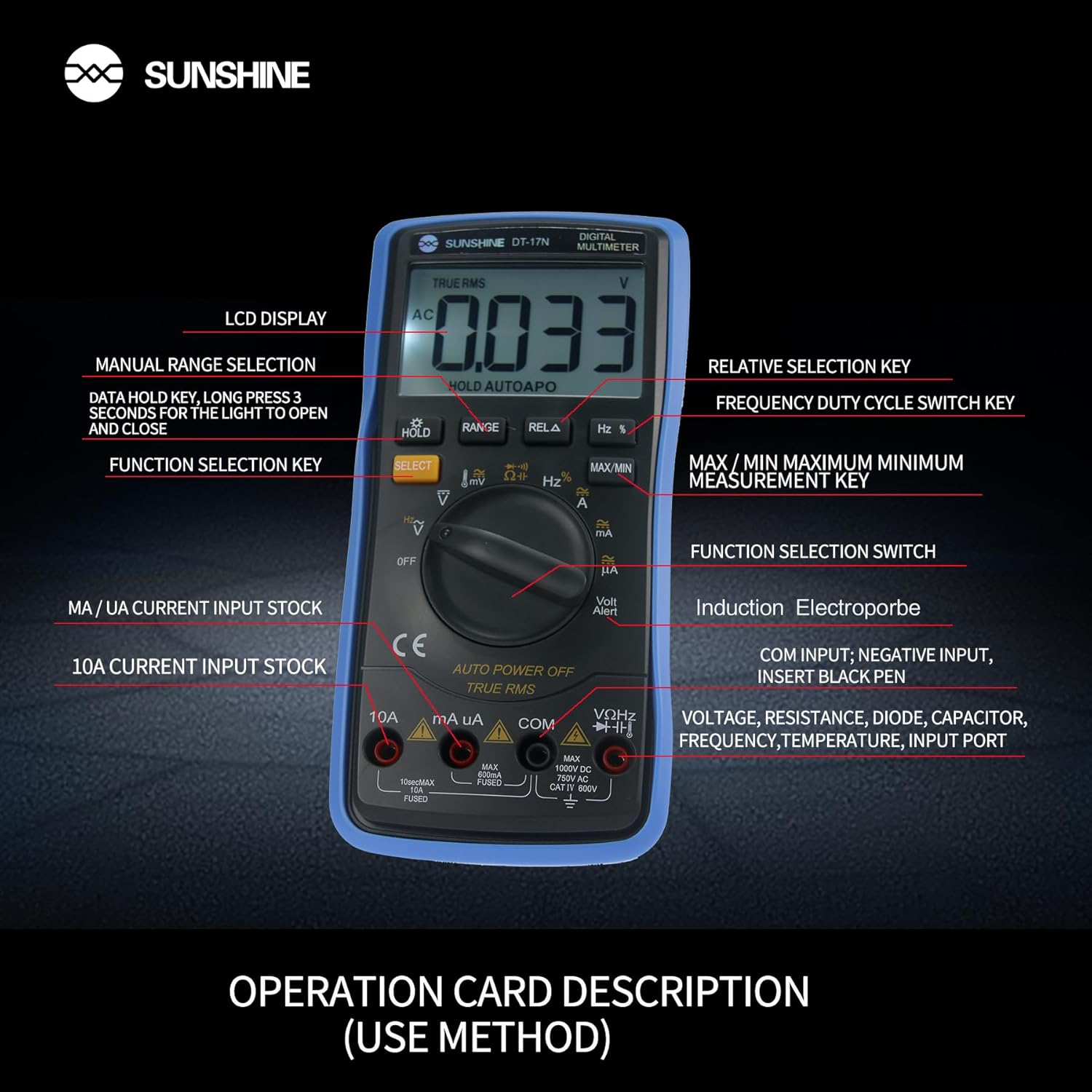
4-rasm: Batafsil view of the multimeter's controls and input ports with their respective functions.
- Aylanadigan funksiya tugmasi: Kerakli o'lchov funktsiyasini tanlash uchun ishlatiladi (masalan, Voltage, Current, Resistance, Temperature).
- SELECT tugmasi: Bitta aylanuvchi kalit holatida turli o'lchov rejimlari o'rtasida almashinadi (masalan, AC/DC voltage, Diod/Uzluksizlik).
- HOLD tugmasi: Freezes the current reading on the display. Press and hold to activate/deactivate the backlight.
- RANGE tugmasi: Allows manual selection of measurement ranges, overriding the automatic ranging feature.
- RELA Button (Relative Selection Key): Measures the difference between a stored reference value and the current reading.
- Hz % Button (Frequency Duty Cycle Switch Key): Chastota va ish sikli o'lchovlari o'rtasida almashinadi.
- MAX/MIN tugmasi: Displays the maximum or minimum measured value during a measurement session.
- VΩHz Input Port: Connect the red test lead for voltage, resistance, frequency, capacitance, diode, and temperature measurements.
- COM Input Port: Connect the black test lead (common ground) for all measurements.
- mA/uA Input Port: Connect the red test lead for measuring small currents (milliamperes and microamperes).
- 10A Input Port: Connect the red test lead for measuring large currents (up to 10 Amperes).
- Volt Alert (NCV): Kontaktsiz jildtage detection feature.
4. Sozlash
4.1. Batareyani o'rnatish
The DT-17N is battery-powered. To install or replace the battery:
- Multimetr o'chirilganligiga ishonch hosil qiling.
- Qurilmaning orqa tomonidagi batareya bo'limi qopqog'ini toping.
- Mahkamlash vintini (vintlarini) oching va qopqoqni olib tashlang.
- Insert the new battery, observing correct polarity (+ and -).
- Batareya bo'linmasining qopqog'ini joyiga qo'ying va uni vint(lar) bilan mahkamlang.
4.2. Sinov simlarini ulash
Always connect the black test lead to the COM input jack. Connect the red test lead to the appropriate input jack based on the measurement you intend to perform:
- Jil uchuntage, Resistance, Capacitance, Frequency, Diode, and Temperature measurements: Connect the red test lead to the VHz jek.
- For Current measurements (mA/uA): Connect the red test lead to the mA/uA jek.
- For High Current measurements (10A): Connect the red test lead to the 10A jek.
5. Foydalanish bo'yicha ko'rsatmalar
The Sunshine DT-17N features automatic identification for most ranges, simplifying operation. Use the rotary switch to select the primary function and the SELECT button to toggle sub-functions.
5.1. Hajmni o'lchashtage (AC/DC)
- Aylanadigan kalitni ga aylantiring V pozitsiya.
- Agar kerak bo'lsa, ni bosing TANLASH button to toggle between AC (~) and DC (—) voltage.
- Qora sinov simini ulang COM Jek va qizil sinov o'tkazgichi VHz jek.
- Sinov zondlarini o'lchashni istagan sxemaga yoki komponentga parallel ravishda ulang.
- jildini o'qingtagdispleyda e qiymati.

Figure 5: The multimeter showing a DC millivolt measurement on its display.
5.2. Measuring Current (AC/DC)
Ogohlantirish: Never connect the multimeter in parallel when measuring current, as this can damage the meter and the circuit. Always connect in series.
- Aylanadigan kalitni ga aylantiring mA/uA or 10A position, depending on the expected current.
- Agar kerak bo'lsa, ni bosing TANLASH button to toggle between AC (~) and DC (—) current.
- Qora sinov simini ulang COM jack. Connect the red test lead to the mA/uA or 10A jack accordingly.
- Open the circuit and connect the test probes in series with the load.
- Displeydagi joriy qiymatni o'qing.
5.3. Qarshilikni o'lchash
- Aylanadigan kalitni ga aylantiring Ω pozitsiya.
- Qora sinov simini ulang COM Jek va qizil sinov o'tkazgichi VHz jek.
- Zanjirning quvvati uzilganligiga va barcha kondensatorlarning zaryadsizlanganligiga ishonch hosil qiling.
- Connect the test probes across the component to measure its resistance.
- Ekrandagi qarshilik qiymatini o'qing.
5.4. Sig'imlarni o'lchash
- Aylanadigan kalitni ga aylantiring Imkoniyatlar symbol (often shared with diode/continuity).
- ni bosing TANLASH button until the capacitance mode is active.
- Qora sinov simini ulang COM Jek va qizil sinov o'tkazgichi VHz jek.
- Ensure the capacitor is fully discharged before connecting the test probes.
- Sinov problarini kondansatör bo'ylab ulang.
- Ekrandagi sig'imning qiymatini o'qing.
5.5. Measuring Frequency / Duty Cycle
- Aylanadigan kalitni ga aylantiring Hz % pozitsiya.
- ni bosing Hz % button to toggle between frequency (Hz) and duty cycle (%).
- Qora sinov simini ulang COM Jek va qizil sinov o'tkazgichi VHz jek.
- Connect the test probes in parallel to the signal source.
- Displeydagi chastota yoki ish aylanishi qiymatini o'qing.
5.6. Haroratni o'lchash
The DT-17N can measure temperature using a K-type thermocouple (not always included, check package contents).

6-rasm: Masalanample of temperature measurement using the DT-17N Multimeter with a thermocouple.
- Aylanadigan kalitni ga aylantiring ° C/° F pozitsiya.
- Agar kerak bo'lsa, ni bosing TANLASH button to choose between Celsius or Fahrenheit.
- Connect the K-type thermocouple to the VHz va COM jaklar, qutblanishni kuzatish.
- Place the thermocouple tip on or in the object whose temperature you wish to measure.
- Displeydagi harorat qiymatini o'qing.
5.7. Diode Test and Continuity
- Aylanadigan kalitni ga aylantiring Diyot/uzluksizlik ramzi.
- ni bosing TANLASH Diod sinovi va uzluksizlik sinovi o'rtasida almashinish uchun tugmani bosing.
- Qora sinov simini ulang COM Jek va qizil sinov o'tkazgichi VHz jek.
- For Diode Test: Connect the probes across the diode. The display will show the forward voltage drop. Reverse the probes to check for open circuit.
- For Continuity Test: Connect the probes across the circuit or component. A beep indicates continuity (low resistance).
5.8. Kontaktsiz jildtage (NCV) aniqlash
The NCV function allows detection of AC voltago'tkazgichlar bilan bevosita aloqa qilmasdan e.
- Aylanadigan kalitni ga aylantiring NCV position (often indicated by a Volt Alert symbol).
- Move the top part of the multimeter near the conductor.
- The meter will beep and/or flash an indicator light if AC voltage aniqlanadi.
5.9. Data Hold and Backlight
- Maʼlumotlarni saqlash: ni bosing TUTING Displeydagi joriy ko'rsatkichni muzlatish uchun tugmani qisqa bosing. Qo'yib yuborish uchun yana bir marta bosing.
- Orqa yorug'lik: ni bosing va ushlab turing TUTING button for approximately 3 seconds to turn the display backlight ON or OFF.
5.10. MAX/MIN Measurement
This function records the maximum and minimum values measured during a session.
- Select the desired measurement function (e.g., Voltagva).
- ni bosing MAX/MIN button. The display will show 'MAX' and the maximum value recorded.
- bosing MAX/MIN again to cycle to 'MIN' and view the minimum value.
- bosing va ushlab turing MAX/MIN ushbu rejimdan chiqish uchun.
6. Xizmat ko'rsatish
To'g'ri parvarishlash multimetringizning uzoq umr ko'rishini va aniqligini ta'minlaydi.
6.1. Tozalash
Kosonni reklama bilan o'chiringamp mato va yumshoq yuvish vositasidan foydalaning. Abraziv yoki erituvchilardan foydalanmang. Ishlatishdan oldin o'lchagich to'liq quruqligiga ishonch hosil qiling.
6.2. Batareyani almashtirish
Refer to Section 4.1 for battery replacement instructions. Always use the specified battery type.
6.3. Holster Care
The multimeter is protected by a thick rubber shockproof holster, designed for durability and a non-slip grip. Keep the holster clean and free from debris.

Figure 7: The durable rubber holster provides protection and a comfortable grip for the multimeter.
7. Muammolarni bartaraf qilish; nosozliklarni TUZATISH
If you encounter issues with your DT-17N multimeter, refer to the table below for common problems and solutions.
| Muammo | Mumkin sabab | Yechim |
|---|---|---|
| Displey yoki xira displey yo'q | Low or dead battery; Poor battery contact | Replace battery; Check battery contacts |
| Noto'g'ri o'qishlar | Wrong function selected; Improper test lead connection; Damaged test leads; Out of range | Select correct function; Ensure leads are in correct jacks; Replace leads; Select higher range or check specifications |
| Uzluksiz signal yo'q | Circuit resistance too high; Continuity mode not selected | Ensure resistance is below threshold; Press SELECT to enter continuity mode |
| Fuse blown (for current measurements) | Overcurrent applied | Replace fuse with specified type and rating; Ensure correct current measurement procedure |
8. Texnik shartlar
Technical specifications for the Sunshine DT-17N Digital Multimeter.
| Xususiyat | Spetsifikatsiya |
|---|---|
| Model | DT-17N |
| O'lchov turi | Multimetr |
| Displey | 5999 (5 5/6) counts, Automatic Polarity Display, Backlit LCD |
| Sampling darajasi | Taxminan sekundiga 3 marta |
| Quvvat manbai | Batareyadan quvvatlanadi |
| Minimal operatsion hajmitage | 3 volt (DC) |
| Haroratni o'lchash diapazoni | 0°C dan 1000°C gacha (32°F dan 1832°F gacha) |
| Induction Electroprobe Function | Yes (NCV) |
| Ikki tomonlama integral A/D konvertatsiyasi | Ha |
| Element o'lchamlari | 5.51 x 2.76 x 1.18 dyuym |
| Element og'irligi | 0.55 kilogramm |
| Rang | Moviy |
9. Kafolat va qo'llab-quvvatlash
9.1. Kafolat haqida ma'lumot
This product comes with a warranty of Sotib olingan kundan boshlab 3 oy. Please retain your proof of purchase for warranty claims. The warranty covers manufacturing defects under normal use.
9.2. Mijozlarni qo'llab-quvvatlash
For technical assistance or inquiries regarding your Sunshine DT-17N Digital Multimeter, please contact your retailer or the manufacturer's customer service department. Refer to your purchase documentation for specific contact details.