
1. Kirish
This manual provides detailed instructions for the safe installation, operation, and maintenance of your Lucci Air Peregrine 56-inch White Ceiling Fan with Remote, Model 21328001. The Peregrine fan features a modern design with three blades, energy-efficient direct current (DC) technology, six speeds, and high airflow. It is rated for both indoor and outdoor use in covered areas. The fan includes a 6-inch warm white GX53 light kit with 3-step dimming functionality and comes with a remote control and wall mount bracket.

1.1-rasm: Old view of the Lucci Air Peregrine 56-inch White Ceiling Fan.
2. Xavfsizlik ma'lumotlari
Please read all instructions carefully before beginning installation and retain this manual for future reference. Improper installation or use can lead to electric shock, fire, or personal injury.
- Elektr xavfsizligi: Ensure the power supply is disconnected at the circuit breaker before installation or maintenance. All electrical wiring must be performed by a qualified electrician and comply with local codes and regulations.
- O'rnatish: The ceiling fan must be mounted to a structurally sound ceiling joist or outlet box capable of supporting the fan's weight (15.92 lbs).
- Pichoqni tozalash: Maintain a minimum clearance of 7 feet from the floor to the fan blades and 18 inches from the fan blades to any walls or obstructions.
- Nur to'plami: Use only the specified GX53 12W 3000K bulb. Do not exceed the maximum wattage.
- Tashqi foydalanish: This fan is rated for indoor and outdoor use in covered areas. Do not expose to direct water spray.
- Masofadan boshqarish: Keep the remote control away from water and extreme temperatures. Replace batteries as needed.
3. Paket tarkibi
O'rnatishni davom ettirishdan oldin barcha komponentlarning mavjudligini va shikastlanmaganligini tekshiring. Agar biron bir qism yo'qolgan yoki shikastlangan bo'lsa, mijozlarni qo'llab-quvvatlash xizmatiga murojaat qiling.
- Ceiling Fan Motor Housing with Downrod
- Fan pichoqlari (3)
- Masofadan boshqarish
- Wall Mount Bracket for Remote
- GX53 12W 3000K Light Kit (pre-installed or separate)
- Optional Metal Cap (for non-light use)
- O'rnatish uskunasi
- Qo'llanma

3.1-rasm: tugadiview of the remote control and its features, including 6 fan speeds, reverse switch, light on/off/dimming, fan on/off, and wall mount holster. A CP2032 battery is included.
4. Oʻrnatish va oʻrnatish
Professional installation is recommended for this ceiling fan. Ensure all power is disconnected at the main circuit breaker before beginning installation.
- O'rnatish joyini tayyorlash: Securely attach the mounting bracket to a suitable ceiling joist or fan-rated outlet box. Ensure the structure can support the fan's weight.
- Pastki novda va motorni yig'ing: Attach the downrod to the fan motor housing. Carefully feed the electrical wires through the downrod.
- Osma ventilyator yig'ish: Lift the fan assembly and hang it from the mounting bracket.
- Elektr aloqalari: Connect the fan's electrical wires to the household wiring according to the wiring diagram provided in the separate installation guide (not included in this manual). Ensure all connections are secure.
- Pichoqlarni biriktiring: Securely attach the three fan blades to the motor housing using the provided screws.
- Install Light Kit (Optional): If using the light, install the GX53 12W 3000K bulb into the light kit socket. Attach the light kit to the bottom of the fan motor housing. If not using the light, install the optional metal cap.
- Xavfsiz soyabon: Slide the canopy up to the ceiling and secure it to the mounting bracket, covering all wiring.
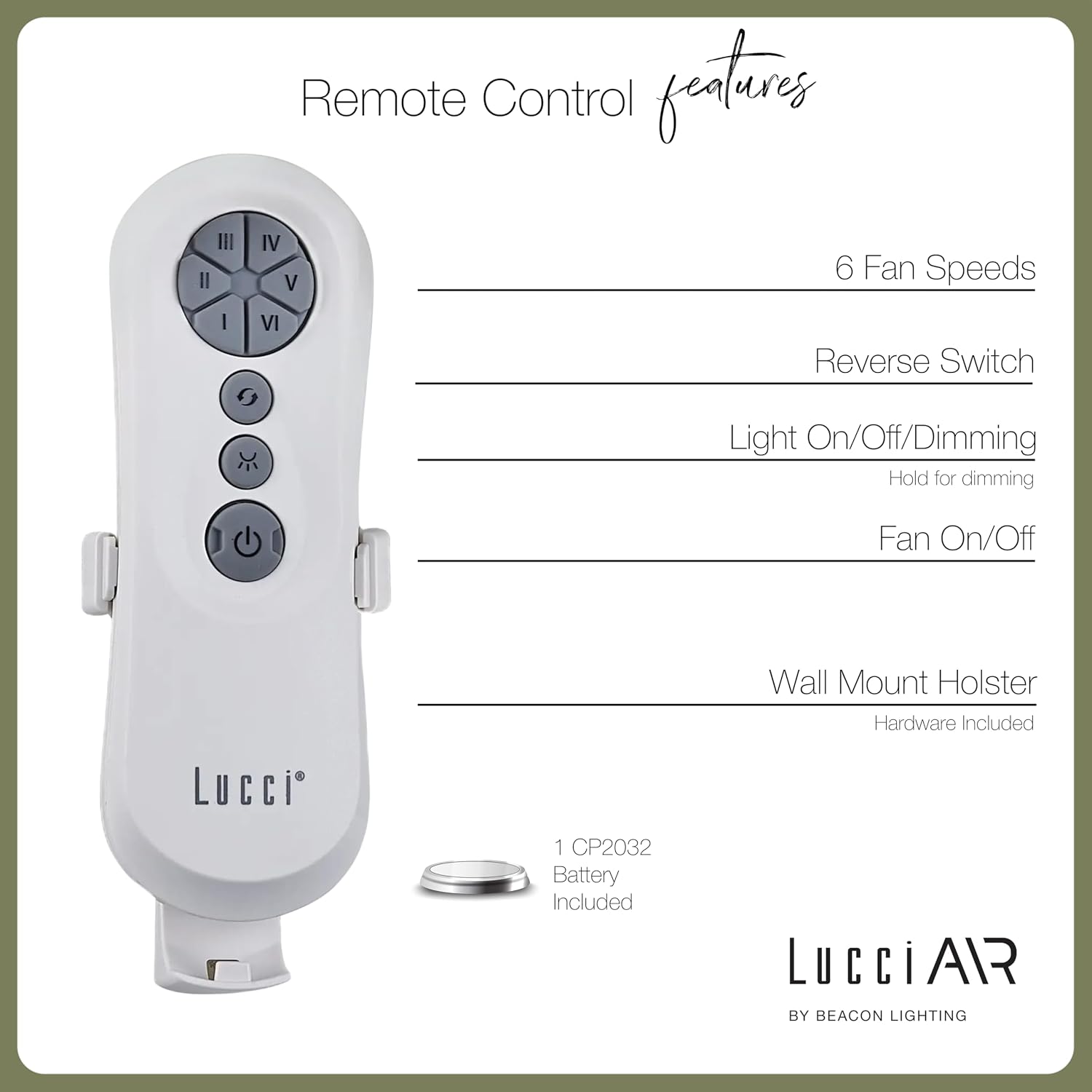
Image 4.1: Dimensional diagram of the Lucci Air Peregrine 56-inch Ceiling Fan, showing overall height, width, and blade length measurements.

Rasm 4.2: Pastki view of the Lucci Air Peregrine fan, highlighting the integrated light kit.
5. Operatsiya
The Lucci Air Peregrine fan is operated using the included remote control. Ensure the remote has a working CP2032 battery installed.
5.1 Masofadan boshqarish funksiyalari
- Ventilyatorni yoqish/o'chirish: Press the power button (ⓘ) to turn the fan on or off.
- Fan tezligi: Use buttons I, II, III, IV, V, VI to select one of the six available fan speeds. I is the lowest speed, VI is the highest.
- Orqaga almashtirish: Press the reverse button (↻) to change the direction of the fan blades. This function is typically used to switch between summer (downward airflow) and winter (upward airflow) modes. Note: Some models may have a manual switch on the motor housing for this function.
- Chiroqni yoqish / o'chirish / xiralashtirish: Press the light button (☀) to turn the light on or off. Hold the light button to dim or brighten the light through its 3-step dimming range.
5.2 Winter/Summer Mode
The fan features a manual switch on the motor housing to change between winter and summer modes. For summer operation, the blades should rotate counter-clockwise to push air downwards, creating a cooling breeze. For winter operation, the blades should rotate clockwise to draw cool air up, circulating warm air trapped near the ceiling. Adjust the switch accordingly.
6. Xizmat ko'rsatish
Regular maintenance ensures optimal performance and extends the life of your ceiling fan.
- Tozalash: Ventilyator pichoqlari va motor korpusini vaqti-vaqti bilan yumshoq, d bilan changlangamp mato. Abraziv tozalash vositalarini yoki erituvchilarni ishlatmang, chunki ular qoplamaga zarar etkazishi mumkin.
- Pichoqning qattiqligi: Check all blade screws annually to ensure they are tight. Loose blades can cause wobbling and noise.
- Lampochkani almashtirish: Disconnect power before replacing the GX53 light bulb. Allow the bulb to cool completely before handling.
- Masofaviy batareya: Replace the CP2032 battery in the remote control when its range decreases or it stops responding.
7. Muammolarni bartaraf qilish; nosozliklarni TUZATISH
Umumiy muammolar va ularning yechimlari uchun quyidagi jadvalga qarang.
| Muammo | Mumkin sabab | Yechim |
|---|---|---|
| Fan ishga tushmaydi | Fanga quvvat yo'q Bo'shashgan simli ulanishlar Masofadan boshqarish pultining batareyasi tugadi | O'chirish to'xtatuvchisini tekshiring Verify all wire connections are secure (power off) Masofadan boshqarish pulti batareyasini almashtiring |
| Muxlis qimirlayapti | Bo'shashgan pichoq vintlari Balanssiz pichoqlar Bo'shashgan o'rnatish kronshteri | Barcha pichoq vintlarini torting Ensure blades are installed correctly and balanced Verify mounting bracket is securely fastened |
| Nur ishlamaydi | Light bulb faulty Loose wire connection to light kit | Lampochkani almashtiring Check light kit wiring (power off) |
| Masofadan boshqarish pulti ishlamayapti | O'lik batareya Masofadan boshqarish pulti ulanmagan (mavjud bo'lsa) | Batareyani almashtiring Refer to separate remote pairing instructions (if provided with fan) |
8. Texnik shartlar
Key technical details for the Lucci Air Peregrine 56-inch White Ceiling Fan (Model 21328001).
| Xususiyat | Tafsilot |
|---|---|
| Model nomi | Peregrine |
| Model raqami | 21328001 |
| Brend | Lucci Air |
| Rang | Oq |
| Fan dizayni | Ship fanati |
| Quvvat manbai | DC (to'g'ridan-to'g'ri oqim) |
| Mahsulot o'lchamlari | 56"D x 56"W x 15"Y |
| Pichoqlar soni | 3 |
| Pichoq uzunligi | 31.1 dyuym |
| Havo oqimining hajmi | 6363 kub fut/daqiqa (CFM) |
| Tezlik soni | 6 |
| Quvvat iste'moli (o'rtacha) | 38 Vt |
| jildtage | 120V, 60Hz |
| Yorug'lik to'plami kiritilgan | 1x GX53 12W 3000K bulb, 1100 Lumens, 3-step dimmable |
| Nazorat usuli | Masofadan boshqarish |
| Ichki/tashqi makonda foydalanish | Indoor, Outdoor (covered areas) |
| Element og'irligi | 15.92 funt |
| UPC | 811769032344 |
9. Kafolat va qo'llab-quvvatlash
The Lucci Air Peregrine 56-inch White Ceiling Fan comes with a cheklangan umr bo'yi kafolat. For warranty claims, technical support, or replacement parts, please contact Lucci Air customer service. Keep your proof of purchase for warranty validation.
Qo'shimcha yordam olish uchun, iltimos, tashrif buyuring Lucci Air Store on Amazon yoki sotuvchingizga murojaat qiling.