
OMOTON WK003
OMOTON 2.4GHz Wireless AZERTY Keyboard Instruction Manual
Model: WK003
Brend: OMOTON
1. Kirish
Thank you for choosing the OMOTON 2.4GHz Wireless AZERTY Keyboard. This ultra-slim, silent keyboard is designed for comfortable and efficient typing across various Windows operating systems. This manual provides detailed instructions for setting up, operating, maintaining, and troubleshooting your new keyboard to ensure optimal performance.
2. Paket tarkibi
Please check the package contents carefully. If any items are missing or damaged, please contact OMOTON customer support.
- 1 x OMOTON 2.4GHz Wireless AZERTY Keyboard
- 1 x USB qabul qilgich
- 1 x foydalanuvchi qo'llanmasi
3. O'rnatish bo'yicha qo'llanma
Follow these steps to set up your OMOTON wireless keyboard:
- Batareyalarni o'rnatish: Open the battery compartment on the back of the keyboard. Insert two AAA batteries (not included), ensuring correct polarity. Close the compartment.
- USB qabul qiluvchini joylashtiring: Locate the USB receiver, which is magnetically stored in the battery compartment. Plug the USB receiver into an available USB port on your computer.

Image: Battery compartment with USB receiver and AAA batteries.
- Yoqilgan: Slide the ON/OFF switch located on the top right side of the keyboard to the "ON" position.
- Ulanish: Your computer should automatically detect and install the necessary drivers for the keyboard. No additional software is required.

Image: Plug & Play setup with USB receiver.
Klaviatura endi foydalanishga tayyor.
4. Foydalanish bo'yicha ko'rsatmalar
4.1 Asosiy yozish
Simply begin typing. The keyboard features a standard AZERTY layout for familiar use.
4.2 Fn Lock Function
The keyboard includes a convenient Fn Lock function. By default, the F1-F12 keys perform their standard function. To access the multimedia shortcuts directly without pressing the Fn key, activate the Fn Lock.
- Activate/Deactivate Fn Lock: bosing Fn + Échap simultaneously. When activated, the multimedia functions (e.g., volume control, home page) will be directly accessible by pressing F1-F12. When deactivated, F1-F12 will perform their standard functions, and multimedia actions will require pressing Fn + Fx.

Image: Fn Lock function and multimedia keys.
4.3 Multimedia yorliqlari
The keyboard provides 12 multimedia shortcuts for quick access to common functions. These can be used directly when Fn Lock is active, or by pressing Fn in combination with the respective F-key when Fn Lock is inactive.
| Kalit | Funktsiya |
|---|---|
| F1 | Ovozsiz |
| F2 | Ovozni pasaytirish |
| F3 | Ovozni oshirish |
| F4 | Oldingi trek |
| F5 | Oʻynatish/toʻxtatib turish |
| F6 | Keyingi trek |
| F7 | Brightness Down (System Dependent) |
| F8 | Brightness Up (System Dependent) |
| F9 | Qidirish |
| F10 | Bosh sahifa |
| F11 | Nusxalash |
| F12 | joylashtirish |
4.4 Muvofiqlik
This keyboard is compatible with Windows 11, 10, 8, 7, XP, and Vista, making it suitable for a wide range of desktop and laptop computers.
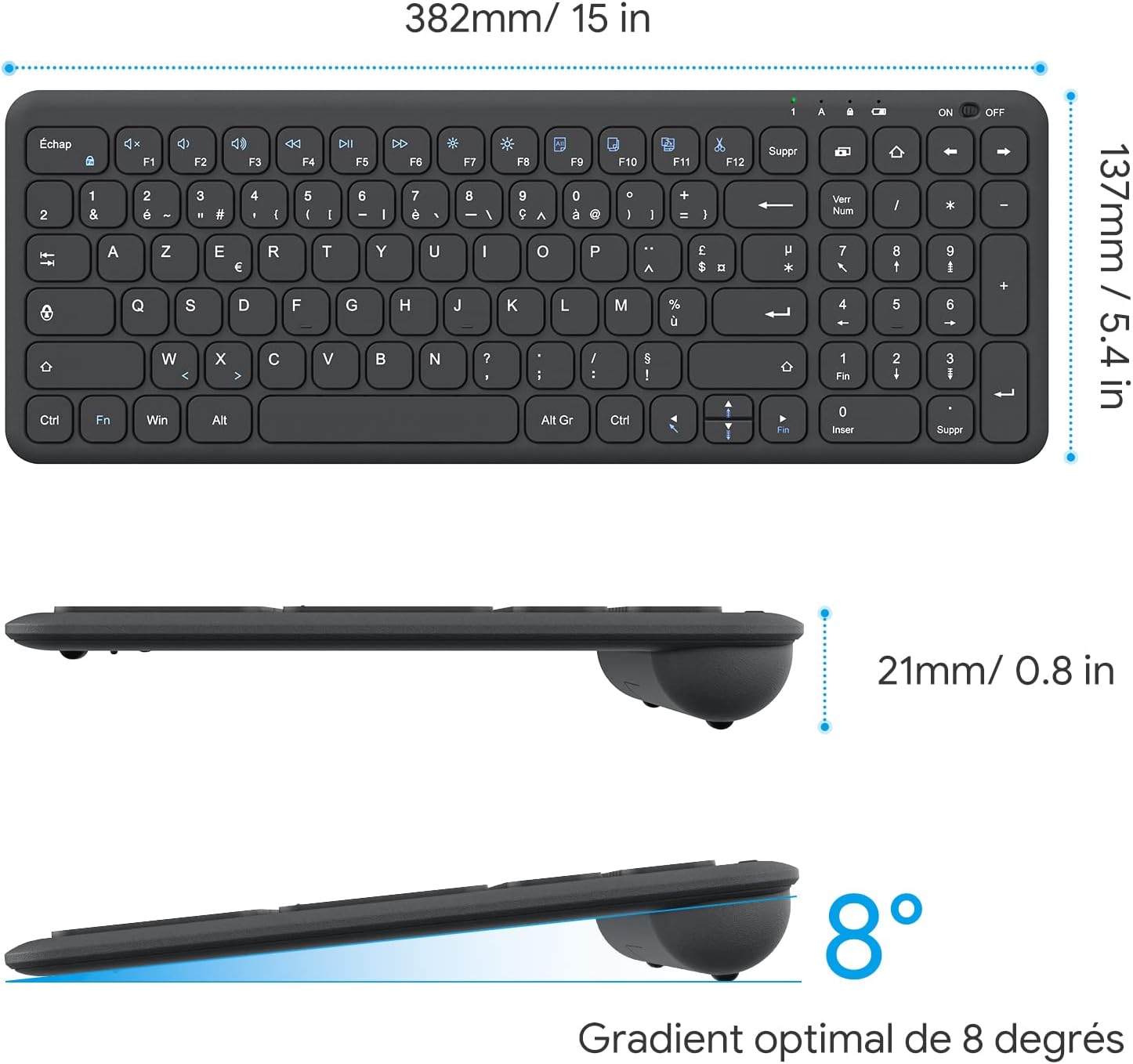
Image: Keyboard compatibility with Windows systems.
5. Xizmat ko'rsatish
5.1 Batareyani almashtirish
When the keyboard's performance degrades or the indicator light flashes, it's time to replace the batteries. Open the battery compartment on the back and replace the two AAA batteries with new ones, observing polarity.
5.2 Tozalash
Klaviaturangizni tozalash uchun sirtni yumshoq, damp cloth. Avoid using harsh chemicals or abrasive materials. Ensure the keyboard is turned off before cleaning.
5.3 USB Receiver Storage
For convenience and to prevent loss, the USB receiver can be magnetically stored inside the keyboard's battery compartment when not in use or during transport.
6. Muammolarni bartaraf qilish; nosozliklarni TUZATISH
Agar klaviaturangiz bilan bog'liq muammolarga duch kelsangiz, iltimos, quyidagi keng tarqalgan yechimlarga murojaat qiling:
- Klaviatura javob bermayapti:
- Ensure the keyboard is turned ON.
- Batareyalar to'g'ri o'rnatilganligini va yetarli zaryadga ega ekanligini tekshiring. Agar kerak bo'lsa, almashtiring.
- USB qabul qilgich kompyuteringizdagi ishlaydigan USB portiga mahkam ulanganligini tekshiring. Boshqa USB portini sinab ko'ring.
- Kompyuteringizni qayta ishga tushiring.
- Lagging or intermittent input:
- Ensure the keyboard is within the effective operating range (up to 10 meters) of the USB receiver.
- Reduce potential interference by moving the keyboard closer to the receiver or away from other wireless devices (e.g., Wi-Fi routers, cordless phones).
- Check battery level. Low batteries can affect wireless performance.
- Muayyan tugmalar ishlamayapti:
- Gently clean around the affected key to remove any debris.
- If the issue persists, contact OMOTON customer support for further assistance.
7. Texnik shartlar
Detailed technical specifications for the OMOTON Wireless AZERTY Keyboard:
| Xususiyat | Tafsilot |
|---|---|
| Brend | OMOTON |
| Model | WK003 |
| Ulanish texnologiyasi | 2.4 gigagertsli simsiz (USB qabul qiluvchi) |
| Klaviatura tartibi | AZERTY |
| Mos qurilmalar | PC, Desktop, Laptop |
| Mos keladigan operatsion tizimlar | Windows 11/10/8/7/XP/Vista |
| Maxsus xususiyatlar | 12 Multimedia Shortcuts, Fn Lock, Silent Keys, Ultra-Slim Design, Magnetic USB Receiver Storage |
| Rang | Qora |
| Quvvat manbai | 2 x AAA batareyalar (qo'shilmagan) |
| Olchamlari (U x G x Y) | 38.1 x 13.7 x 2 sm (15 x 5.4 x 0.8 dyuym) |
| Tugmalar soni | 99 |
| Kalit kaliti turi | Tactile (Scissor-mechanism) |
| Optimal Gradient | 8 daraja |

Image: Keyboard dimensions and ergonomic design.

Image: Scissor-mechanism key design.
8. Kafolat haqida ma'lumot
OMOTON products typically come with a manufacturer's warranty. Please refer to the warranty card included with your product or visit the official OMOTON webBatafsil kafolat shartlari va qoidalari uchun saytga tashrif buyuring. Har qanday kafolat da'volari uchun xaridni tasdiqlovchi hujjat sifatida xarid chekingizni saqlang.
9. Mijozlarni qo'llab-quvvatlash
If you have any questions, require technical assistance, or experience issues not covered in this manual, please do not hesitate to contact OMOTON customer support. You can usually find contact information on the OMOTON official websayt yoki mahsulotni sotib olgan chakana sotuvchi orqali.
Ask a question about this manual
Ask about setup, troubleshooting, compatibility, parts, safety, or missing instructions. Manuals+ will review the question and use this page’s manual context to help answer it.