
Kirish
Sotib olganingiz uchun tashakkurasing the RCA 32V-type FHD Tunerless Smart TV, model RCA-32D1. This television is designed for seamless access to online streaming content without the need for traditional terrestrial broadcast tuners. It features a Full HD display, built-in Wi-Fi, Chromecast functionality, and voice control for an enhanced viewing experience. This manual provides essential information for setting up, operating, maintaining, and troubleshooting your new TV.

1-rasm: Old view of the RCA 32V-type FHD Tunerless Smart TV.
Xavfsizlik ma'lumotlari
Mahsulotni ishlatishdan oldin barcha xavfsizlik ko'rsatmalarini diqqat bilan o'qing. Kelajakda foydalanish uchun ushbu qo'llanmani saqlang.
- Yong'in yoki elektr toki urishining oldini olish uchun televizorni yomg'ir yoki namlikda qoldirmang.
- To'g'ri shamollatishni ta'minlang. Shamollatish teshiklarini to'sib qo'ymang.
- Faqat televizor bilan birga kelgan quvvat simidan foydalaning.
- Televizorni ochmang casing. Barcha xizmat ko'rsatishni malakali xodimlarga yuboring.
- Batareyalarni bolalar qo'li yetmaydigan joyda saqlang. Ishlatilgan batareyalarni ehtiyotkorlik bilan yo'q qiling.
- Televizorni barqaror bo'lmagan sirtlarga qo'ymang.
Paket tarkibi
Paketda barcha elementlar mavjudligiga ishonch hosil qiling:
- RCA 32V-type FHD Tunerless Smart TV Unit
- Masofadan boshqarish
- AAA batareyalari (x2)
- Televizor stend (taglik va vintlar)
- Quvvat kabeli
- Foydalanuvchi qo'llanmasi (ushbu hujjat)
Sozlash; o'rnatish
1. Jismoniy sozlash
Attach the TV stand or mount the TV to a wall. For wall mounting, ensure you use a VESA-compatible bracket (40 x 40mm) and appropriate screws (M6 10mm x 2 for upper two points, screws for lower two points are included with the TV). Always ensure the TV is securely mounted to prevent accidents.

Figure 2: TV dimensions and connection terminal layout.
2. Ulanishlar
Connect the power cable to the TV and then to a power outlet. This TV requires only a power connection and Wi-Fi for internet streaming.

Figure 3: Power and Wi-Fi connectivity for the tunerless TV.
For external devices, use the available ports:
- HDMI portlari (x3): Connect game consoles, Blu-ray players, or other HDMI-compatible devices.
- USB 2.0 portlari (x2): Media tinglash uchun USB xotira qurilmalarini ulang.
- LAN porti: For wired internet connection (optional, Wi-Fi is also available).
- Ovoz chiqishi: Tashqi audio tizimlarni ulash uchun.

Figure 4: Connecting external devices via HDMI ports.
3. Dastlabki yoqish
After connecting the power, press the power button on the remote control. Follow the on-screen instructions to complete the initial setup, including connecting to your Wi-Fi network and logging into your Google account to access smart TV features.
Ishlayotgan
1. Masofadan boshqarish pulti
The included remote control allows for easy navigation and features voice control capabilities. Dedicated buttons provide quick access to popular streaming services.
- Ovozli boshqaruv: Press the voice assistant button and speak commands like "Play cat videos on YouTube" or "Increase volume."
- Maxsus ilova tugmalari: Quickly launch NETFLIX, YouTube, and Prime Video with a single press.
- Navigatsiya: Menyularda harakatlanish va variantlarni tanlash uchun yo'nalish paneli va OK tugmasidan foydalaning.
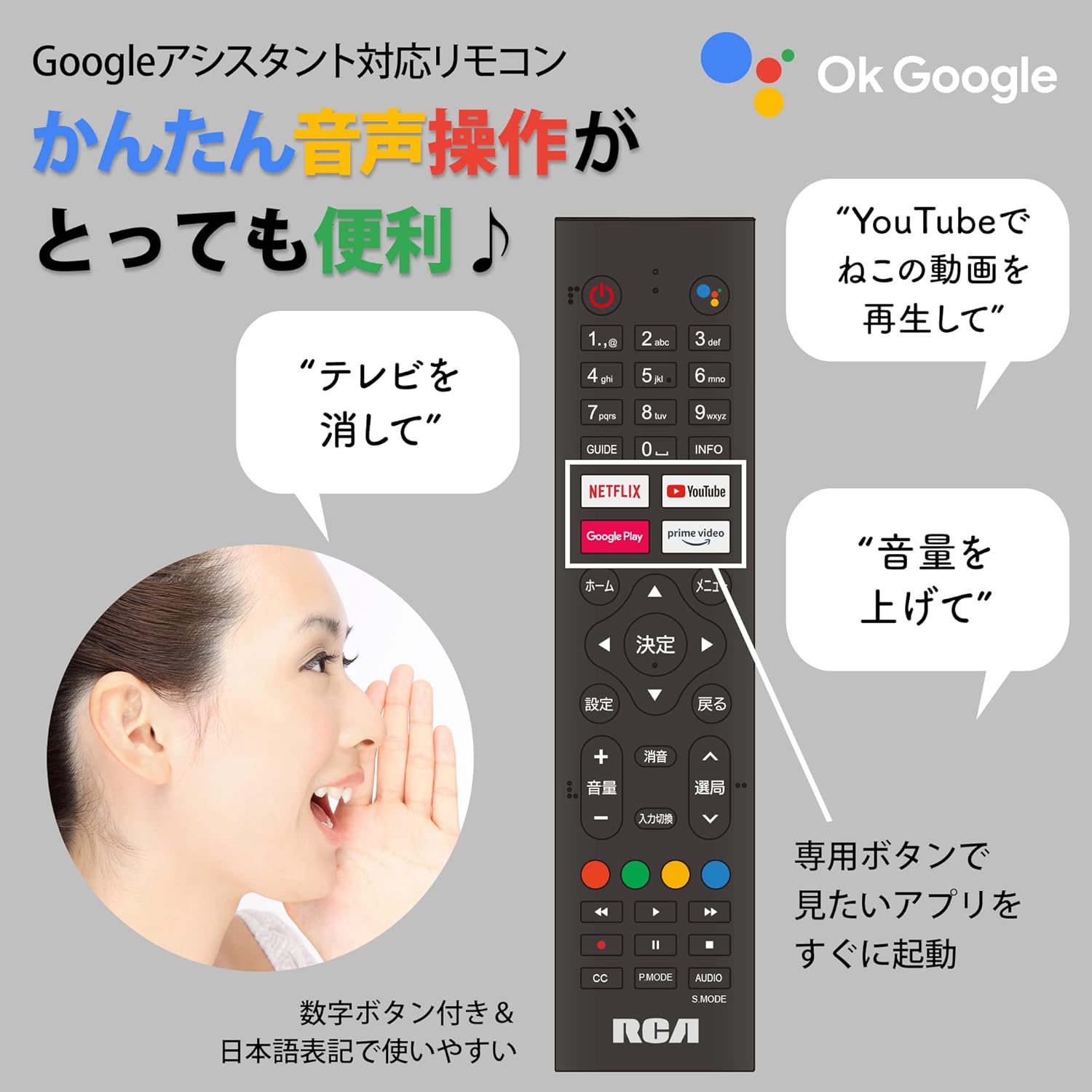
Figure 5: Remote control with voice command functionality and dedicated app buttons.
2. Smart TV xususiyatlari
This tunerless TV provides access to a wide range of online video distribution services and features:
- Striming xizmatlari: Enjoy content from NETFLIX, YouTube, Prime Video, Tver, U-NEXT, AbemaTV, and more.
- Oʻrnatilgan Chromecast: Cast content directly from your smartphone or tablet to the TV screen.
- Android operatsion tizimi: Access a variety of apps from the Google Play Store.

Figure 6: Using Chromecast to cast content from a smartphone to the TV.
Video 1: Demonstration of the Google TV interface and voice control for content discovery.
3. Asosiy operatsiyalar
- Quvvatni yoqish/oʻchirish: Masofadan boshqarish pultidagi quvvat tugmasini bosing.
- Ovozni boshqarish: Masofadan boshqarish pultidagi Ovozni oshirish/pasaytirish tugmalaridan foydalaning.
- Kirish tanlovi: Press the Input button to switch between HDMI and other connected sources.
Xizmat
1. Tozalash
Televizor ekranini tozalash uchun uni yumshoq, tuksiz mato bilan muloyimlik bilan arting. Qattiq dog'lar uchun ozgina arting.ampMatoni suv yoki ekranni tozalash eritmasi bilan arting. Suyuqlikni to'g'ridan-to'g'ri ekranga purkamang. Televizorni tozalangasing yumshoq, quruq mato bilan.
2. Saqlash
If storing the TV for an extended period, disconnect it from the power outlet and store it in a cool, dry place away from direct sunlight and extreme temperatures.
Muammolarni bartaraf qilish; nosozliklarni TUZATISH
Televizoringiz bilan bog'liq muammolarga duch kelsangiz, quyidagi umumiy muammolar va echimlarga murojaat qiling:
| Muammo | Yechim |
|---|---|
| Quvvat yo'q | Quvvat kabeli televizorga ham, rozetkaga ham mahkam ulanganligiga ishonch hosil qiling. Boshqa rozetkani sinab ko'ring. |
| No picture/Sound but no picture | Kirish manbasini tekshiring. Tashqi qurilmalar yoqilgan va to'g'ri ulanganligiga ishonch hosil qiling. |
| Masofadan boshqarish pulti ishlamayapti | Batareyalarni almashtiring. Masofadan boshqarish pulti va televizorning IR sensori o'rtasida hech qanday to'siq yo'qligiga ishonch hosil qiling. |
| Wi-Fi tarmog‘iga ulanib bo‘lmadi | Check your router and internet connection. Re-enter the Wi-Fi password. Move the TV closer to the router. |
| App is slow or freezes | Restart the TV. Clear the app's cache in the TV settings. Ensure your internet connection is stable. |
Muammo davom etsa, mijozlarni qo‘llab-quvvatlash xizmatiga murojaat qiling.
Texnik xususiyatlari
The following are the technical specifications for the RCA-32D1 Tunerless Smart TV:
| Xususiyat | Tafsilot |
|---|---|
| Model raqami | RCA-32D1 |
| Ekran o'lchami | 31.5 inches (32V-type) |
| Displey texnologiyasi | LCD, VA Panel, LED Backlight |
| Rezolyutsiya | Full HD (1920 x 1080) |
| Yangilanish tezligi | 60 Gts |
| Kontrast nisbati | 3000:1 |
| Operatsion tizim | Android |
| Ulanish | Wi-Fi, HDMI (x3), USB 2.0 (x2), LAN, Audio Output |
| Maxsus xususiyatlar | Chromecast Built-in, Voice Control |
| Supported Streaming Services | Netflix, YouTube, Prime Video, Tver, U-NEXT, AbemaTV |
| Mahsulot o'lchamlari (D x G x Y) | 16.1 x 73.1 x 47 sm |
| Element og'irligi | 4.9 kg |
| VESA o'rnatish standarti | 40 x 40 mm |
| Kiritilgan batareyalar | 2 ta AAA batareya |

Figure 7: High-definition VA panel for vivid image quality.
Kafolat va qo'llab-quvvatlash
This product is covered by the manufacturer's warranty. Please refer to the warranty card included in your package for specific terms and conditions.
Mijozlarni qo‘llab-quvvatlash
For technical assistance or inquiries, please contact the KEIYO Support Center:
- Telefon: 050-8880-2812
- Qabul qilish soatlari: Weekdays 10:00-12:00, 13:00-17:00 (Excluding summer holidays, year-end/New Year holidays, Golden Week, and public holidays).