Kirish
This manual provides comprehensive instructions for the Thomson ROC4301 4-in-1 Web-Programmable Universal Remote Control. This device allows you to control up to four different infrared-controlled electronic devices, such as TVs, DVD players, Blu-ray players, Set-Top Boxes (STB), VCRs, and audio equipment, using a single remote.
The ROC4301 features web-based programming for easy setup and a continuously updated code database to ensure compatibility with a wide range of brands and models.
Asosiy xususiyatlar
- Controls up to 4 devices via one infrared remote control.
- Fast and easy programming via a web-based database accessible on PC, laptop, or tablet.
- Data transfer to the remote control is facilitated by a 3.5 mm jack cable (30 cm).
- Up to 4 devices can be programmed simultaneously.
- Compatible with TV, DVD, Blu-ray player, STB, VCR, and audio equipment.
- Continuously updated code database available online.
O'rnatish va dasturlash
The Thomson ROC4301 remote control is programmed using an online database, ensuring access to the latest device codes. This method requires a computer (PC, laptop, or tablet) with internet access and the included 3.5 mm jack cable.
uchun qadamlar Web-Based Programming:
- Prepare the Remote: Ensure fresh AAA batteries are installed in the remote control. (See "Maintenance" section for battery installation).
- Access the Programming Websayt: Ochish a web browser on your PC, laptop, or tablet and navigate to the official Thomson remote control programming website. (Refer to the product packaging or manufacturer's webaniq sayt uchun URL).
- Masofadan boshqarish pultini ulang: Plug one end of the supplied 3.5 mm jack cable into the designated port on the remote control and the other end into the headphone jack of your computer.
- Select Devices: On the programming website, follow the on-screen instructions to select the types of devices (e.g., TV, DVD, STB) and their respective brands and models you wish to control. The database will provide the necessary codes.
- Transfer Codes: Once you have selected your devices, initiate the data transfer process on the website. The codes will be transmitted through the audio jack to your remote control. Ensure your computer's volume is set to a suitable level as instructed by the websayt.
- Masofadan boshqarish pultini sinab ko'ring: After the transfer is complete, disconnect the remote control from your computer. Test the remote with each programmed device to ensure all functions work correctly. If a device does not respond or functions are incorrect, repeat the programming process, trying alternative codes if available on the websayt.
The web database is continuously updated, providing access to codes for new devices. You can program up to four devices simultaneously.
Masofadan boshqarish pulti bilan ishlash
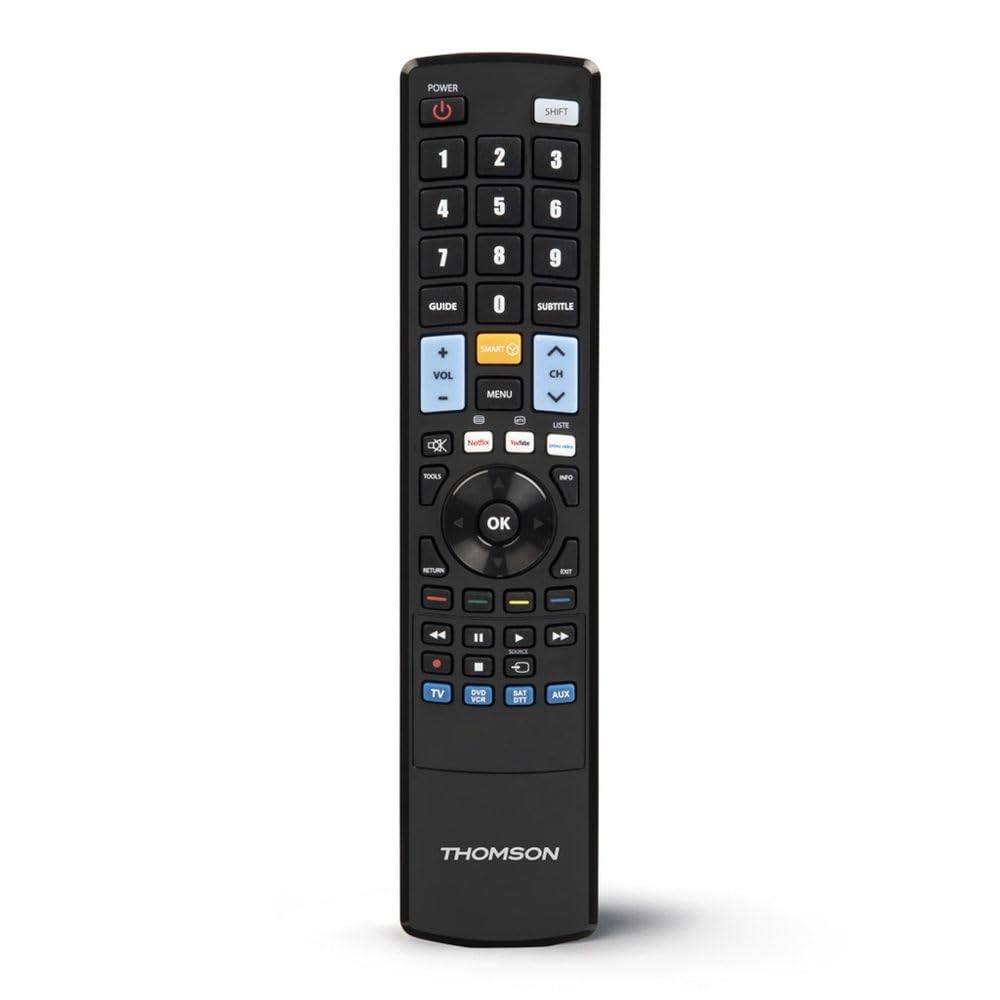
Once programmed, the Thomson ROC4301 functions like a standard remote control for your selected devices. It features 48 buttons designed for intuitive control.
Umumiy operatsiya:
- Qurilmani tanlash: Use the dedicated device buttons (e.g., TV, DVD, STB, AUDIO) at the top of the remote to switch between controlling different devices. The remote will typically indicate which device is currently selected (e.g., via an LED indicator).
- Quvvatni yoqish/oʻchirish: ni bosing KUCH Tanlangan qurilmani yoqish yoki o'chirish uchun tugmani bosing.
- Channel/Volume: dan foydalaning KANAL +/- va Ovoz balandligi +/- buttons to adjust channels and volume respectively.
- Navigatsiya: The directional pad (up, down, left, right) and OK button are used for menu navigation on most devices.
- Raqamli klaviatura: Use the numeric buttons (0-9) to directly enter channel numbers or other numerical inputs.
- Funktsiya tugmalari: Other buttons such as Play, Pause, Stop, Fast Forward, Rewind, Menu, Exit, and colored function buttons will perform their corresponding actions on the selected device.
Ensure there is a clear line of sight between the remote control and the infrared receiver of the device you are operating. The maximum effective range is approximately 10 meters.
Xizmat
Batareyani o'rnatish va almashtirish:
The Thomson ROC4301 remote control requires two AAA batteries (included). When the remote's performance degrades or it stops responding, it's time to replace the batteries.
- Masofadan boshqarish pultining orqa tarafidagi batareya bo'limi qopqog'ini toping.
- Bo'limni ochish uchun qopqoqni pastga suring yoki mandalni bosing va ko'taring.
- Remove the old batteries, if any.
- Ijobiy (+) va salbiy (-) terminallari bo'linma ichidagi belgilarga mos kelishiga ishonch hosil qilib, ikkita yangi AAA batareyasini joylashtiring.
- Batareya bo'linmasi qopqog'ini joyiga mahkam o'rnashguncha qayta joyiga qo'ying.
Muhim: Always dispose of used batteries responsibly according to local regulations. Do not mix old and new batteries, or different types of batteries.
Tozalash:
Masofadan boshqarish pultini tozalash uchun yumshoq, quruq matodan foydalaning. O'jar axloqsizlik uchun, bir oz dampen the cloth with water. Do not use abrasive cleaners, solvents, or alcohol, as these can damage the remote's surface or internal components.
Muammolarni bartaraf qilish; nosozliklarni TUZATISH
If you encounter issues with your Thomson ROC4301 universal remote control, try the following troubleshooting steps:
- Masofadan boshqarish pulti javob bermayapti:
- Check the batteries. Ensure they are correctly inserted and have sufficient charge. Replace them if necessary.
- Ensure there is a clear line of sight between the remote's IR emitter and the device's IR receiver. Obstructions can block the signal.
- Make sure you have selected the correct device mode (e.g., TV, DVD) on the remote.
- Device Not Responding After Programming:
- Re-program the remote for that specific device. The web database often provides multiple codes for a single brand/model. Try the next available code if the first one doesn't work.
- Ensure the 3.5 mm jack cable connection was secure and the computer's volume was adequate during programming.
- Verify that the device you are trying to control is indeed an infrared-controlled device.
- Ba'zi funksiyalar ishlamayapti:
- Even with the correct code, some advanced functions might not be fully supported by a universal remote.
- Try alternative codes for your device, as some codes might offer better functionality mapping.
- Programming Issues (e.g., data transfer failure):
- Internet aloqangizni tekshiring.
- Kompyuteringizning audio drayverlari yangilanganligiga ishonch hosil qiling.
- Temporarily disable any sound enhancements or equalizers on your computer that might interfere with the audio signal.
- Try using a different computer or web browser if problems persist.
Agar ushbu qadamlar muammoni hal qilmasa, qo'shimcha yordam uchun "Yordam" bo'limiga qarang.
Texnik xususiyatlari
| Brend | Tomson |
| Model nomi | ROC4301 Web-Programmable Universal Remote Control 4-in-1 |
| Model raqami | 00132679 |
| Ulanish texnologiyasi | Infraqizil (IR) |
| Maximum Number of Supported Devices | 4 |
| Mos qurilmalar | TV, DVD, Blu-ray player, STB, VCR, Audio equipment |
| Nazoratchi turi | Tugmachani boshqarish |
| Tugmalar soni | 48 |
| Maksimal diapazon | 10 metr |
| Rang | Qora |
| Batareyalar | 2 ta AAA batareyasi (shu jumladan) |
| Mahsulot o'lchamlari | 22.9 x 5.2 x 2.5 sm |
| Element og'irligi | 149.32 gr |
| Ishlab chiqaruvchi | Tomson |
| Ishlab chiqaruvchi mamlakat; ta'minotchi mamlakat | Xitoy |
Kafolat haqida ma'lumot
The Thomson ROC4301 Universal Remote Control comes with a 2 yillik ishlab chiqaruvchi kafolati. Please retain your proof of purchase for warranty claims. For specific terms and conditions, refer to the warranty documentation included with your product or visit the official Thomson websayt.
Qo'llab-quvvatlash
For further assistance, updated device codes, or to access the web-based programming tool, please visit the official Thomson support website. You may also find FAQs and additional resources there.
If you require technical support, please contact Thomson customer service through the channels provided on their official websayt.
Mahsulot tugadiview