
1. Mahsulot tugadiview
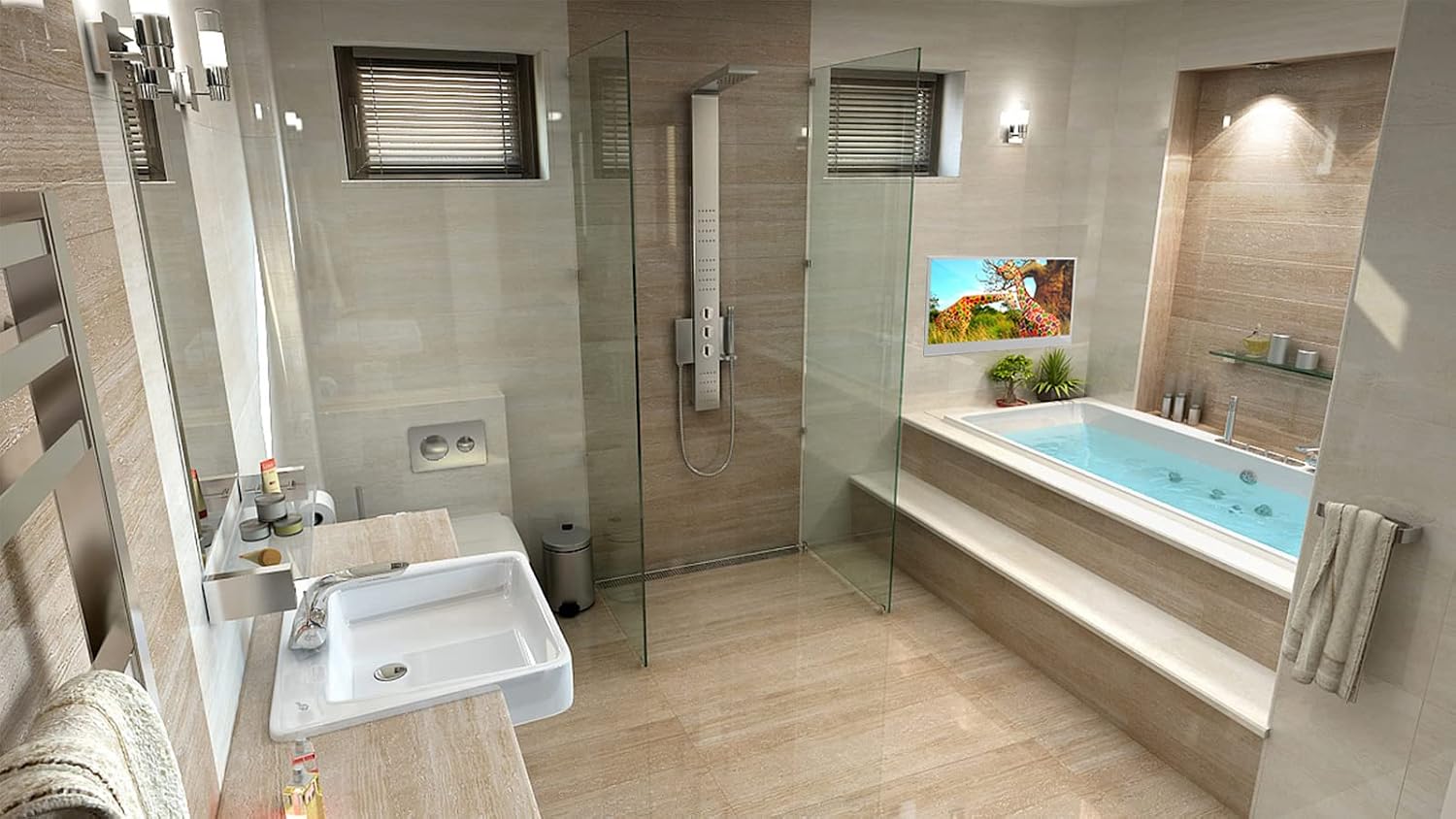
The Elecsung M27 Smart Bathroom Mirror TV is designed for environments where moisture is present, such as bathrooms and kitchens. It functions as a television when powered on and transforms into a mirror when turned off. This unit features an IP66 waterproof rating, ensuring durability and safety in wet conditions. It operates on an Android 11.0 system, providing access to various smart TV functionalities and applications.
Asosiy xususiyatlarga quyidagilar kiradi:
- Magic Mirror TV Functionality: Displays TV programs when on, acts as a mirror when off.
- IP66 suv o'tkazmaydigan reytingi: Suitable for installation in bathrooms, hotels, and kitchens.
- Smart Full HD LED TV: Runs on Android 11.0, offering access to channels without an external TV box.
- Integrated HDTV (ATSC) Tuner: Allows direct reception of over-the-air digital television broadcasts.
- Built-in Wi-Fi & Bluetooth: For seamless connectivity and external device pairing.
- Oldindan o'rnatilgan ilovalar: Includes Google Chromecast, Google Chrome, YouTube, and Netflix.
- Ko'p qirrali quvvat: Operates on 12 Volt DC and includes 240V mains adaptors.
- Integratsiyalashgan dinamiklar: Two high-quality speakers for clear audio.
2. Qutida nima bor
Upon unboxing your Elecsung M27 Smart Bathroom Mirror TV, please ensure all the following components are present:
- Elecsung M27 Smart Bathroom Mirror TV Unit
- Masofadan boshqarish
- Masofadan boshqarish uchun batareyalar
- Power Adaptor (for 240V mains)
- Embedded Bracket (for in-wall installation)
- Wall Bracket (for on-wall installation)
- O'rnatish bo'yicha ko'rsatmalar
3. O'rnatish va o'rnatish
The Elecsung M27 TV offers flexible installation options: in-wall, on-wall, or on-desk. Choose the method best suited for your space. Ensure proper power and signal circuits are available at your chosen installation location.
3.1. Olchamlari
Before installation, verify the dimensions to ensure proper fit and clearance.
- Unit Size (WxHxD): 614mm x 375mm x 51mm (24.2"W x 14.76"H x 2"D)
- Recess Dimensions for In-wall (WxHxD): 575mm x 276mm x 30mm (22.63"W x 10.9"H x 1.2"D)

3.2. Oʻrnatish opsiyalari
Three optional installation methods are provided:
Option 1: In-wall with Embedded Bracket
- Create an opening in the wall according to the Embedded Bracket outlines. Ensure sufficient space for cables and the adapter.
- Set up power and signal circuits and the outlet.
- Place the Embedded Bracket into the recess and use pilot holes to drill into the wall on sides or back.
- Secure the raw plugs into the drilled holes and screw the Embedded Bracket into position.
- Organize the cables and offer the TV up to the Embedded Bracket that is fixed within the wall.
- Align the 4 pilot holes on the back of the TV case with the 4 metal lugs on the Embedded Bracket and gently push the TV into place.
Option 2: On-wall with Embedded Bracket
- Drill holes in the chosen area of the wall according to the Embedded Bracket outlines.
- Place the raw plugs into the holes and screw the Embedded Bracket into position so it is attached to the wall.
- Set up power and signal circuit and the outlet.
- Simply offer the TV up to the Embedded Bracket that is fixed on the wall.
- Align the 4 pilot holes on the back of the TV case with the 4 metal lugs on the Embedded Bracket and gently push the TV into place.

3.3. Connections and Interface
The TV features a variety of input and output ports for connecting external devices.

| Yo'q. | Port | Tavsif |
|---|---|---|
| 1 | Quvvat kiritish | Quvvat adapterini bu yerga ulang. |
| 2 | Internet (RJ45) | Simli internetga ulanish uchun Ethernet kabelini ulang. |
| 3 | Ovoz chiqishi | Connect external audio systems. |
| 4 | AV kiritish | Connect analog audio/video devices. |
| 5 | HDMI kirish 1 | Connect HDMI-compatible devices (e.g., Blu-ray player, game console). |
| 6 | HDMI kirish 2 | Connect HDMI-compatible devices. |
| 7 | TV Input (DVB-S/S2) | Connect satellite antenna. |
| 8 | TV Input (ATV/DVB-T/C/T2) | Connect terrestrial or cable antenna. |
| 9 | USB kirish 1 | Media tinglash uchun USB xotira qurilmalarini ulang. |
| 10 | USB kirish 2 | Media tinglash uchun USB xotira qurilmalarini ulang. |
4. Foydalanish bo'yicha ko'rsatmalar
The Elecsung M27 TV can be operated using the included remote control or its integrated touch controls.
4.1. Masofadan boshqarish funktsiyalari
Familiarize yourself with the remote control buttons for optimal use.

- Quvvatni yoqish/oʻchirish: Televizorni yoqadi yoki o'chiradi.
- Ovozsiz: Turns audio output on or off.
- Information Display / Cursor Pointer: Displays current channel and program information. Press and hold for 2 seconds to activate cursor, then use directional buttons to move.
- -/-- Digit: For 1 or 2 digit channel number input.
- Ovoz rejimi: Select sound modes (Standard, Movie, Music, User).
- Kutish rejimi: Designates power off after a specified time.
- Asosiy menyu: Launches the On Screen Display menu.
- Uy menyusi: Returns to the Home page.
- Yuqoriga: Navigation up.
- Left / Rewind: Navigation left or rewind media.
- Right / Fast Forward: Navigation right or fast forward media.
- OK / Pause: Confirms selection or pauses media.
- Pastga: Navigation down.
- Kirish: Launches input source menu.
- Chiqish: Closes the On Screen Display menu.
- Raqamli kalitlar: Numerical selection for channels and settings.
- Kanal +/-: Kanallarni yuqoriga yoki pastga o'zgartiradi.
- Tovush +/-: Ovoz balandligini yoki pasayishini sozlaydi.
- Orqaga o'tkazish: Media ijrosini orqaga qaytaradi.
- Tez oldinga: Media ijrosini tez oldinga yo'naltirish.
- Oʻchirish: Deletes items in menus.
- Oʻtkazib yuborish: Skips items.
- Tahrirlash: Edits selected items.
- Ko‘chirish: Moves selected items.
- Orqaga o'tish: Orqaga o'tadi.
- Oldinga o'tish: Oldinga o'tadi.
4.2. Smart TV xususiyatlari
The Android 11.0 system provides a user-friendly interface for accessing various applications and streaming services. Connect to Wi-Fi via the settings menu to enable internet-based features. Use the pre-installed apps like YouTube and Netflix, or download others from the app store.
4.3. Bluetooth ulanishi
Pair Bluetooth-enabled external speakers or headphones for an enhanced audio experience. Navigate to the Bluetooth settings in the main menu to discover and connect devices.
5. Xizmat ko'rsatish
To ensure the longevity and optimal performance of your Elecsung M27 Smart Bathroom Mirror TV, follow these maintenance guidelines:
- Tozalash: Yumshoqdan foydalaning, damp cloth to clean the mirror surface. Avoid abrasive cleaners or harsh chemicals that could damage the finish or waterproof seal.
- Suvga ta'sir qilish: While the TV is IP66 waterproof, avoid directing high-pressure water jets directly at the unit. Ensure all port covers (if applicable) are securely closed.
- Dasturiy ta'minot yangilanishlari: Periodically check for and install system updates to ensure the TV operates with the latest features and security patches.
- Ventilyatsiya: Ensure adequate ventilation around the TV, especially for in-wall installations, to prevent overheating.
6. Muammolarni bartaraf qilish; nosozliklarni TUZATISH
If you encounter issues with your Elecsung M27 TV, refer to the following common troubleshooting steps:
- Quvvat yo'q: Check if the power cable is securely connected and the power outlet is functioning. Ensure the power adapter is correctly connected.
- Rasm/ovoz yo'q: Verify the correct input source is selected. Check all cable connections (HDMI, antenna, AV). For no sound, check volume levels and mute status.
- Masofadan boshqarish pulti ishlamayapti: Replace batteries. Ensure there are no obstructions between the remote and the TV's IR receiver.
- Wi-Fi ulanishi bilan bog'liq muammolar: Restart your router and the TV. Re-enter Wi-Fi password in settings. Ensure the TV is within range of your Wi-Fi network.
- Ilovalar yuklanmayapti: Check internet connection. Clear app cache or reinstall the app if necessary. Ensure sufficient storage space.
- Mirror Function Not Working: Ensure the TV is powered off. If the TV is on but displaying a black screen, it might be in standby mode or an input without a signal.
For persistent issues, please contact Elecsung customer support.
7. Texnik spetsifikatsiyalar
| Xususiyat | Spetsifikatsiya |
|---|---|
| Brend nomi | elecsung |
| Model raqami | M27 |
| Ekran o'lchami | 27 dyuym |
| Displey texnologiyasi | LED |
| Rezolyutsiya | 1080p (1920x1080) |
| Aspekt nisbati | 16:9 |
| Operatsion tizim | Android 11.0 |
| Maxsus xususiyat | Smart, IP66 Waterproof |
| Ulanish texnologiyasi | Bluetooth, USB, Wi-Fi |
| Qo'llab-quvvatlanadigan Internet xizmatlari | YouTube (pre-installed) |
| Karnay turi | Oʻrnatilgan |
| Wattage | 48 vatt |
| Element og'irligi | 19 funt |
| Mahsulot o'lchamlari (DxWxH) | 2"D x 24.2"W x 14.76"Y |
8. Mahsulot videolari
Watch these official videos for a visual guide to the Elecsung M27 Smart Bathroom Mirror TV's features and installation.
8.1. Elecsung 2024 Model TV for Bathroom
Video: Bu video yakuniy ma'lumot beradiview of the Elecsung 2024 Model TV for Bathroom, highlighting its mirror finish, IP66 waterproof design, touch control interface, and various installation options (in-wall, on-wall, on-desk).
8.2. Elecsung Touchscreen Smart Mirror TV for Bathroom
Video: This video demonstrates the touchscreen capabilities of the Elecsung Smart Mirror TV, its waterproof design, and the ease of installation, showcasing its seamless integration into a bathroom environment.
9. Kafolat va qo'llab-quvvatlash
For warranty information, technical support, or service inquiries, please refer to the warranty card included with your product or visit the official Elecsung websayt. Xarid kvitansiyasini har qanday kafolat da'volari uchun xaridni tasdiqlovchi hujjat sifatida saqlang.