
LEVOIT LTF-F422-WUS
LEVOIT Classic 42 dyuymli minora fanining foydalanuvchi qo'llanmasi
This manual provides essential information for the safe and efficient operation, maintenance, and troubleshooting of your LEVOIT Classic 42-inch Tower Fan.
Xavfsizlik bo'yicha muhim ko'rsatmalar
To reduce the risk of fire, electric shock, or injury, please read and follow all instructions and warnings before using this appliance.
- Always place the fan on a stable, level surface.
- Ventilyatorni shikastlangan sim yoki vilka bilan ishlatmang.
- Ventilyatorni suvdan uzoqroq tuting yoki damp hududlar.
- Barmoqlaringizni yoki begona narsalarni teshiklarga tiqmang.
- Unplug the fan before cleaning or performing any maintenance.
- Ushbu mahsulot Kaliforniya shtatida saraton va tug'ma nuqsonlarni yoki boshqa reproduktiv zararni keltirib chiqaradigan kimyoviy moddalarni o'z ichiga oladi.
Mahsulot tugadiview
The LEVOIT Classic 42-inch Tower Fan (Model: LTF-F422-WUS) is designed to provide powerful and quiet air circulation for your home. It features a DC motor for energy efficiency and a user-friendly design.

Rasm: old view of the LEVOIT Classic 42-inch Tower Fan in white, showing its sleek design, digital display, and the included remote control. Blue arrows indicate airflow and oscillation.
Asosiy xususiyatlar:
- Kuchli havo oqimi: Experience 1252 CFM airflow with speeds up to 25ft/s.
- Sokin operatsiya: Operates as low as 25dB, ideal for bedrooms and quiet environments.
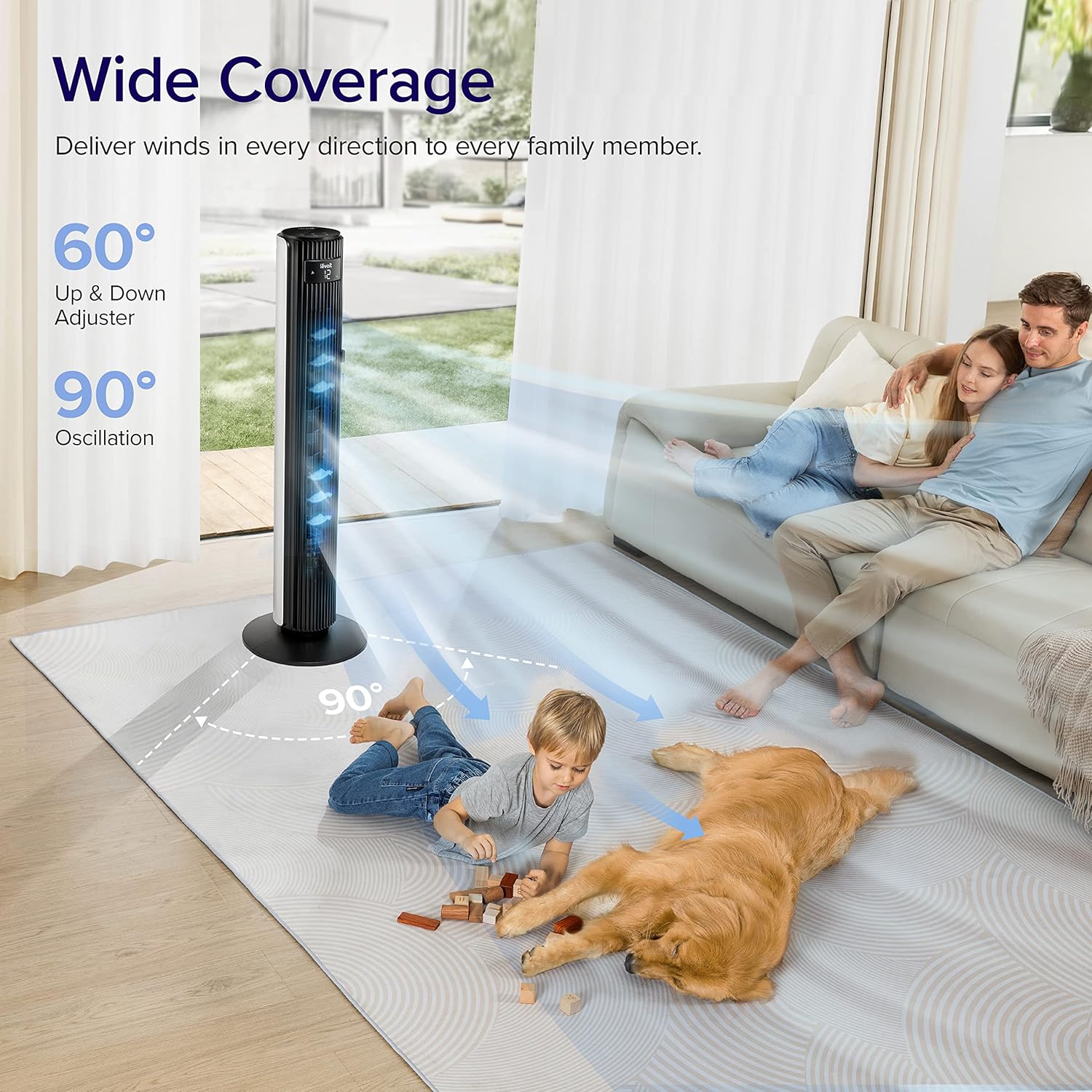
- Keng tebranish: Features 90° horizontal and 60° vertical oscillation for comprehensive air distribution.
- Moslashtirilgan qulaylik: Offers 12 speed settings and 4 modes (Normal, Auto, Turbo, Advanced Sleep).
- Temperature-Responsive: Built-in sensor adjusts fan speed based on room temperature in Auto mode.
- Oson ta'mirlash: Detachable back cover and filter for thorough cleaning.
- Foydalanuvchi uchun qulay dizayn: Includes a hidden handle and built-in remote storage.
O'rnatish uchun qo'llanma
1. Qutidan chiqarish va komponentlarni tekshirish
Carefully open the box from the indicated side and remove all components. Ensure all parts are present before proceeding with assembly.
Video: This video demonstrates the unboxing process, base assembly, remote control storage, and fan blade removal for cleaning.
2. Asosiy yig'ilish
The fan base comes in two halves. Align the two pieces and attach them together securely. Unscrew the nut from the bottom of the tower fan, then attach the assembled base to the fan and fasten the nut to secure it.

Image: Diagram illustrating the assembly of the fan base, showing how the two halves connect and attach to the main fan unit.
3. Masofadan boshqarish pultini sozlash
The remote control comes with an insulating tab to preserve battery life. Pull out this tab before first use. The remote can be stored neatly in a dedicated slot on the back of the fan.
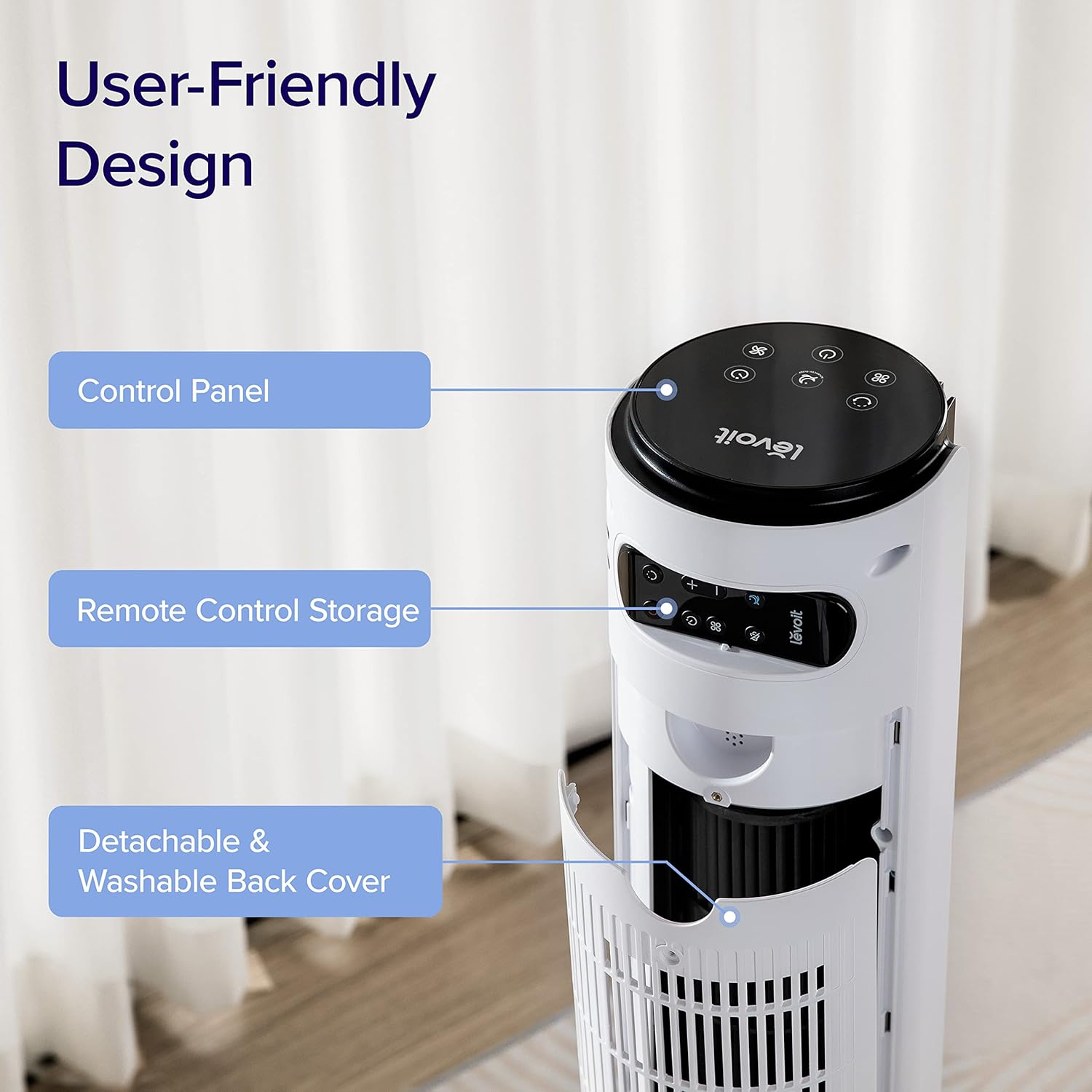
Rasm: yaqindan view of the top rear of the LEVOIT Tower Fan, highlighting the integrated storage compartment for the remote control.
Operating Your Tower Fan
Your LEVOIT tower fan offers various settings for personalized comfort.
1. Boshqaruv paneli va displey
The fan features a touch-sensitive control panel on top and an LED display on the front. The display shows current settings such as speed, mode, and timer.
Rasm: yuqoridan pastga view of the LEVOIT Tower Fan's control panel with various touch buttons for power, mode, speed, oscillation, and timer. The front LED display shows the current fan speed.
2. Ishlash rejimlari
- Oddiy rejim: Default mode allowing manual speed adjustment.
- Avtomatik rejim: Fan speed adjusts automatically based on room temperature detected by the built-in sensor.
- Turbo rejimi: Provides quick cooling and air circulation, starting at the highest speed with oscillation. Speed decreases as room temperature drops.
- Kengaytirilgan uyqu rejimi: Display and sound automatically turn off after 5 seconds. Fan does not oscillate for the first hour, then oscillates and decreases speeds to maintain comfort. Speed then changes by temperature.
3. Speed and Oscillation
- 12-tezlik sozlamalari: Choose from gentle breezes (1-3) to storm-strength winds (10-12).
- 90° Horizontal Oscillation: Distributes air across a wide area.
- 60° Vertical Oscillation: Adjusts airflow up to 30° up or down for targeted cooling.

Image: A family and a dog enjoying the wide coverage of the LEVOIT Tower Fan's 90-degree horizontal and 60-degree vertical oscillation, illustrating effective air distribution.
4. Taymer funksiyasi
Energiyani tejash va qulaylik uchun fanni belgilangan vaqtdan so'ng, 12 soatgacha avtomatik ravishda o'chirishga sozlang.
Xizmat va tozalash
Regular cleaning ensures optimal performance and longevity of your fan.
1. Detachable Back Cover and Filter
Unlike traditional tower fans, the LEVOIT Classic features a detachable back cover and filter for easy and thorough cleaning. This allows access to the wind wheel for maintenance.

Image: Illustration of the LEVOIT Tower Fan's detachable back cover and internal fan blade, submerged in water to demonstrate its washable components for hassle-free cleaning.
2. Tozalash bo'yicha ko'rsatmalar
- Tozalashdan oldin fanni ajratib oling.
- Use a soft cloth or brush to clean the exterior surfaces.
- To clean the internal wind wheel, remove the screw under the remote storage slot, then remove the back cover. Locate and remove the screw at the bottom of the fan blade, then carefully pull out the fan blade. Clean with a soft cloth or water.
- Qayta o'rnatishdan oldin barcha qismlar to'liq quruqligiga ishonch hosil qiling.
Muammolarni hal qilish bo'yicha qo'llanma
| Muammo | Yechim |
|---|---|
| Fan suddenly starts to oscillate. | This is normal in Advanced Sleep Mode. It automatically starts oscillating after one hour of operation. |
| Air output decreased after cleaning the wind wheel. | Ensure screws are aligned with the flat surface of the motor shaft during installation, not the arc surface. Incorrect alignment will reduce air output. |
| Fan suddenly stops. | Check if the timer was accidentally set. Kindly check and try again. |
| Top control panel is not responsive. | Check if the fan is in Advanced Sleep Mode or if the screen is manually turned off. In screen-off state, the operation panel enters a semi-sleep state to prevent accidental touch. Press twice to wake up the panel and then adjust settings. |
Mahsulot spetsifikatsiyalari
- Brend: LEVOIT
- Model nomi: Classic 42-inch
- Model raqami: LTF-F422-WUS
- Rang: Oq
- Mahsulot o'lchamlari: 6.3"D x 6.7"W x 42.4"Y
- Mahsulot og'irligi: 11 funt
- Quvvat manbai: DC
- Wattage: 26 vatt
- Shovqin darajasi: 25 dB
- Havo oqimi quvvati: 1252 kub fut/daqiqa (CFM)
- Quvvat darajalari soni: 12
- Tebranish: 90° Gorizontal, 60° Vertikal
- Taymer: 12 soat
- Tekshirish usuli: Masofadan boshqarish, teginish
- Kiritilgan komponentlar: Masofadan
- Material: Plastik
- Sertifikatlar: CA65, FCC, TSCA
Kafolat va qo'llab-quvvatlash
LEVOIT products come with a limited warranty. For detailed warranty information and customer support, please refer to the official LEVOIT websayt yoki mijozlarga xizmat ko'rsatish bilan bog'laning.
LEVOIT Customer Support:
- Visit the official LEVOIT Store: LEVOIT Store on Amazon
- For further assistance, refer to the contact information provided in your product packaging or on the LEVOIT websayt.
Ask a question about this manual
Ask about setup, troubleshooting, compatibility, parts, safety, or missing instructions. Manuals+ will review the question and use this page’s manual context to help answer it.