
Kirish
This manual provides detailed instructions for the installation, operation, and maintenance of your Strong SRT 7040 Digital Satellite HD Receiver. Please read this manual carefully before using the device to ensure proper functionality and to prevent damage.

Image: The Strong SRT 7040 DTT Tuner and its retail packaging.
The Strong SRT 7040 is a Full HD digital satellite receiver designed for Free-To-Air (FTA) channels. It features a USB port for multimedia playback and software updates, and supports Dolby Audio for enhanced sound quality.
1. Sozlash
1.1 Paketni ochish
Paketdagi barcha komponentlarni ehtiyotkorlik bilan olib tashlang. Quyidagi elementlar mavjudligiga ishonch hosil qiling:
- Strong SRT 7040 DTT Tuner
- Masofadan boshqarish pulti (2 ta AAA batareya bilan)
- Quvvat adapteri
- Foydalanuvchi uchun qo'llanma
1.2 Qurilmani ulash
Follow these steps to connect your SRT 7040 receiver:
- Sun'iy yo'ldosh kiritish: Connect your satellite dish cable to the SAT IN port on the back of the receiver.
- Video chiqishi (HDMI): HDMI kabelini qurilmadan ulang HDMI port on the receiver to an HDMI input on your television.
- Video Output (SCART): Alternatively, for older televisions, connect a SCART cable from the SCART TV port on the receiver to the SCART input on your television.
- Audio Output (Digital): For digital audio, connect a coaxial cable from the COAXIAL S/PDIF port to your digital audio amphayotiyroq.
- Audio Output (Analog): For analog audio, connect RCA cables from the AUDIO R/L ports to your audio Hi-Fi amphayotiyroq.
- USB qurilmasi: If desired, connect a USB storage device to the USB port for multimedia playback or software updates.
- Quvvat: Quvvat adapterini 12V === 1.5A input on the receiver, then plug the adapter into a wall outlet.

Image: Rear panel connections of the Strong SRT 7040 DTT Tuner, showing SAT IN, HDMI, TV SCART, COAXIAL S/PDIF, AUDIO R/L, USB, and Power input.
1.3 First-Time Installation and Channel Scan
Upon first power-on, the receiver will guide you through an initial setup wizard. Follow the on-screen prompts to select your language, country, and perform an automatic channel scan. This process will detect and store all available satellite channels.
2. Foydalanish bo'yicha ko'rsatmalar
2.1 Masofadan boshqarish pultiview
The included remote control allows you to access all functions of the SRT 7040. Insert the two AAA batteries into the remote control, ensuring correct polarity.

Image: The remote control for the Strong SRT 7040 DTT Tuner, showing buttons for power, numbers, volume, channel, menu, and special functions.
2.2 Asosiy funksiyalar
- Quvvat: ni bosing KUCH button to turn the receiver on or off (standby mode).
- Kanal tanlash: dan foydalaning CH+ / CH- buttons to change channels sequentially, or use the numeric keypad to enter a channel number directly.
- Ovozni boshqarish: dan foydalaning VOL+ / VOL- audio ovoz balandligini sozlash uchun tugmalar.
- Ovozsiz: ni bosing Ovozsiz ovozni vaqtincha o'chirish uchun tugma.
2.3 Menyu navigatsiyasi
ni bosing MENU button to access the main menu. Use the arrow keys (UP, PASTGA, CHAP, TO'G'RI) to navigate through options and OK tanlovlarni tasdiqlash uchun. bosing CHIQISH to return to the previous screen or live TV.
2.4 Maxsus xususiyatlar
- Taymerlar: The receiver supports programming timers for recording or switching to specific channels at scheduled times. Access this feature via the menu.
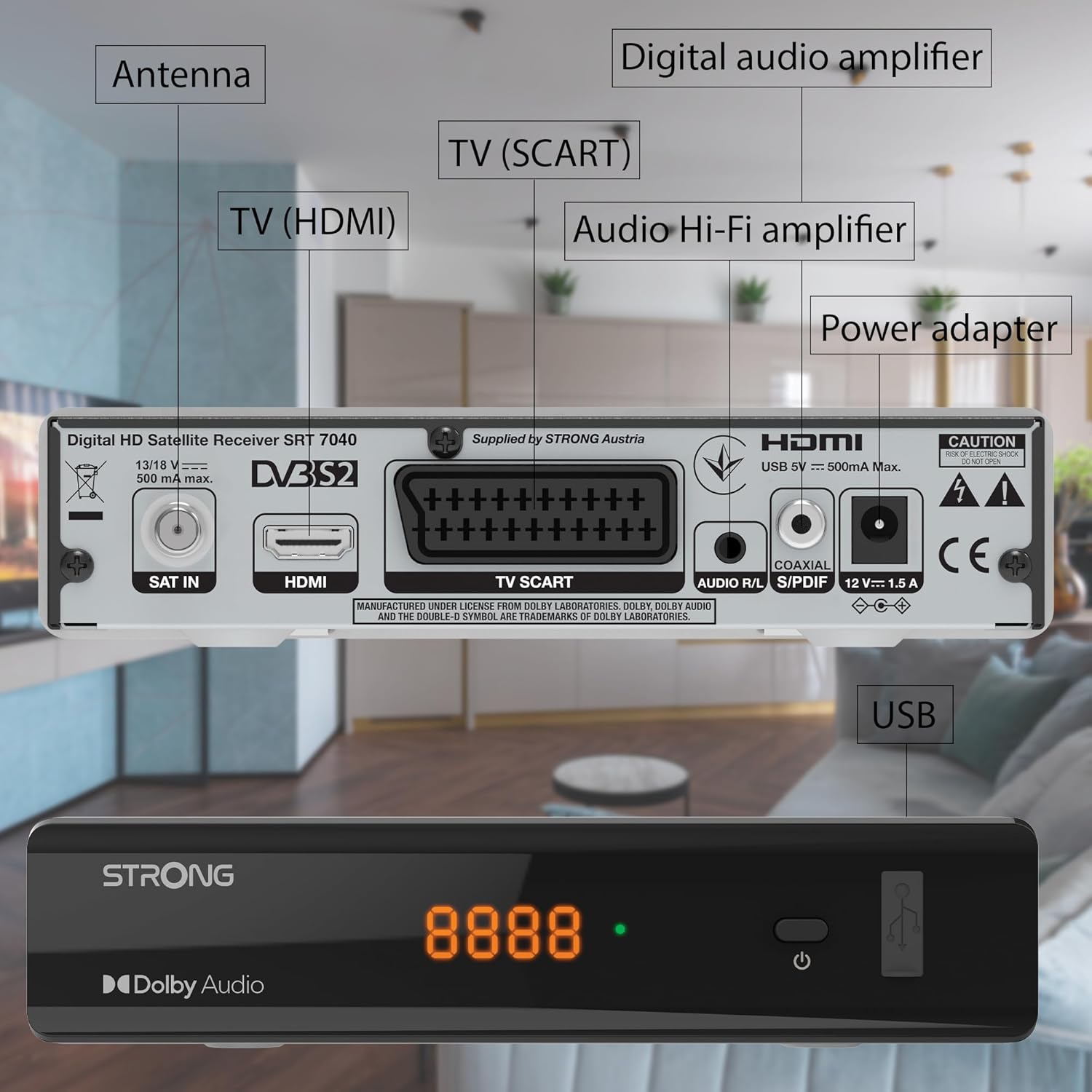
Image: The Strong SRT 7040 DTT Tuner displaying a timer icon, indicating its scheduling capabilities.
- Sevimli ro'yxatlar: Create customized lists of your preferred channels for quick access.
- Subtitrlar: Enable or disable subtitles for compatible broadcasts using the SUB masofadan boshqarish pultidagi tugma.
- Elektron dastur qo'llanmasi (EPG): ni bosing EPG tugmasini bosing view program information for upcoming broadcasts.
- Dolby Audio: The receiver supports Dolby Audio for a high-quality sound experience.

Image: The Strong SRT 7040 DTT Tuner with the Dolby Audio logo, illustrating its sound processing capability.
3. Xizmat ko'rsatish
3.1 Tozalash
To clean the receiver, disconnect it from the power supply. Use a soft, dry cloth to wipe the exterior. Do not use liquid cleaners, aerosols, or abrasive materials, as these can damage the finish or internal components.
3.2 Dasturiy ta'minotni yangilash
Vaqti-vaqti bilan ishlab chiqaruvchini tekshiring website for available software updates. Updates can improve performance, add new features, or resolve issues. Software updates are typically performed via the USB port following specific instructions provided with the update file.
3.3 Xavfsizlik ma'lumotlari
- Do not open the receiver casing. Ichkarida foydalanuvchi tomonidan ta'mirlanadigan qismlar yo'q. Barcha xizmat ko'rsatish ishlarini malakali xodimlarga topshiring.
- Keep the receiver away from direct sunlight, heat sources, and moisture.
- Haddan tashqari qizib ketishining oldini olish uchun qurilma atrofida yetarli shamollatishni ta'minlang.
- Faqat taqdim etilgan quvvat adapteridan foydalaning.
4. Muammolarni bartaraf qilish; nosozliklarni TUZATISH
If you encounter problems with your SRT 7040, consult the following table before contacting support.
| Muammo | Mumkin sabab | Yechim |
|---|---|---|
| Quvvat yo'q | Power adapter not connected; Power outlet faulty | Check power adapter connection; Try a different power outlet |
| Signal yo'q / Qora ekran | Satellite cable loose or disconnected; Incorrect input selected on TV; Satellite dish alignment issue | Check SAT IN cable connection; Ensure TV is on correct HDMI/SCART input; Perform a channel scan; Consult a professional for dish alignment if necessary |
| Masofadan boshqarish pulti ishlamayapti | Batteries depleted or incorrectly inserted; Obstruction between remote and receiver | Replace batteries; Ensure correct polarity; Remove any obstructions; Point remote directly at receiver |
| Rasm sifati past | Weak satellite signal; Incorrect display settings | Check satellite signal strength in menu; Adjust TV display settings; Ensure Full HD content is being broadcast |
5. Texnik shartlar
The following are the technical specifications for the Strong SRT 7040 Digital Satellite HD Receiver:
- Model: SRT 7040 (SAT FTA Full HD)
- Brend: Kuchli
- O'lchamlari: 3.39 x 6.46 x 1.38 dyuym (8.6 x 16.4 x 3.5 sm)
- Mahsulot og'irligi: 9.2 untsiya (260 gramm)
- Rang: Qora
- Ulanish texnologiyasi: USB
- jildtage: 100 - 240 V
- Chastotasi: 50 - 60 Gts
- Quvvat iste'moli: 18 kWh (operational, typical)
- Ishlash harorati oralig'i: 0ºC dan 40ºC gacha
- Nisbiy namlik: 10% - 95%
- Batareyalar: 2 ta AAA batareya (masofadan boshqarish pulti bilan birga)
- Xususiyatlari mos: DVB-S2
- Kiritilgan: Wally Receiver
6. Kafolat va qo'llab-quvvatlash
For warranty information and technical support, please refer to the warranty card included in your product packaging or visit the official Strong websayt. Kafolat da'volari uchun xarid kvitansiyasini xaridni tasdiqlovchi hujjat sifatida saqlang.
For further assistance, you may contact Strong customer service through the contact details provided on their official websayt.