
1. Kirish
The SHIDU M500 is a compact and portable wired voice amplifier designed to project your voice clearly and powerfully. It is an ideal tool for teachers, presenters, tour guides, and anyone who needs to amplify their voice in various settings. This device also supports music playback from multiple sources.

Image 1.1: SHIDU M500 Wired Voice Amplifier. This image shows the front view of the compact, black and white voice amphayotiyroq.
2. Mahsulot tugadiview
2.1. Komponentlar va boshqaruv elementlari
Familiarize yourself with the various parts and controls of your SHIDU M500 ampumrbod:

Image 2.1: SHIDU M500 Controls and Ports Diagram. This diagram illustrates the top panel controls including Play/Pause, Recording, Previous, Next, Mode Switch, LED Screen, and the Switch/Volume knob. It also shows the side ports: USB, TF card socket, DC 5V charging port, AUX-IN, and MIC-IN.
- Switch/Vol Knob: Rotate to power on/off and adjust volume.
- LED ekrani: Displays current mode, battery level, and track information.
- Oʻynatish/Toʻxtatib turish tugmasi: Starts or pauses audio playback.
- Yozib olish tugmasi: Initiates or stops audio recording.
- Oldingi tugma: Skips to the previous track or navigates menus.
- Keyingi tugma: Skips to the next track or navigates menus.
- Rejimni almashtirish tugmasi: Toggles between different input modes (e.g., USB, TF card, AUX).
- USB port: For connecting USB flash drives for music playback.
- TF karta uyasi: For inserting a TF (MicroSD) card for music playback.
- DC 5V port: Zaryadlash uchun kirish quvvati amphayotiyroq.
- AUX-IN Port: 3.5 mm audio kabel orqali tashqi audio qurilmalarni ulash uchun.
- MIC-IN Port: Simli mikrofonni ulash uchun.
3. Sozlash
3.1. Zaryadlash Amphayotiyroq
- Connect the provided charging cable to the DC 5V ustidagi port amphayotiyroq.
- Kabelning ikkinchi uchini standart USB quvvat adapteriga (qo'shilmagan) yoki kompyuterning USB portiga ulang.
- The LED screen will indicate charging status. A full charge typically takes 3-5 hours.
- ni ta'minlash amplifier is fully charged before first use for optimal battery life.
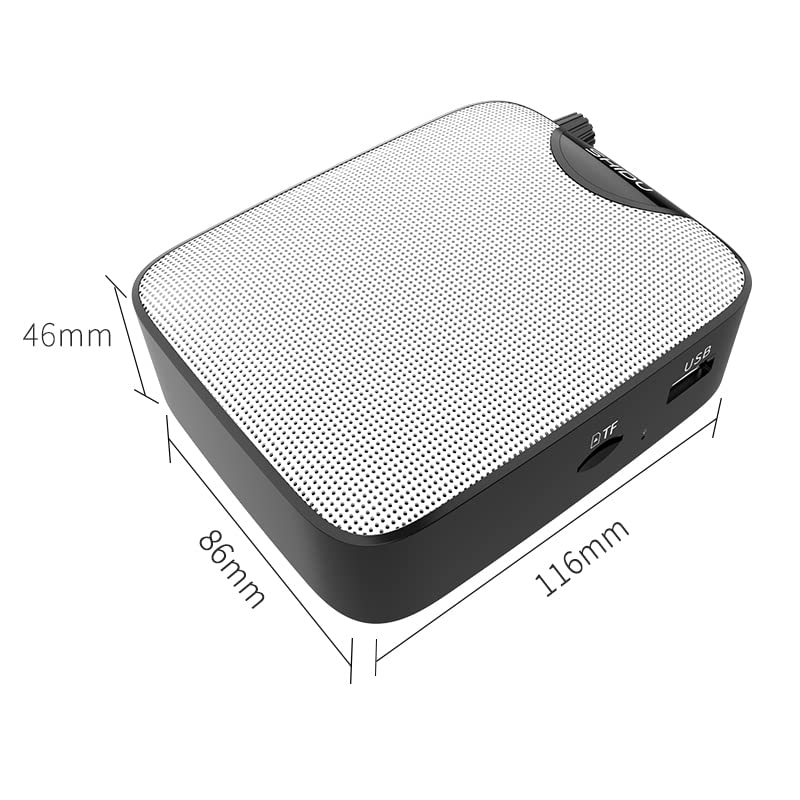
Image 3.1: SHIDU M500 Built-in 1800mAh Battery. This image highlights the amplifier's internal 1800mAh high-quality lithium battery, indicating long standby time and extended battery life.
3.2. Mikrofonni ulash
- Insert the 3.5mm plug of the wired microphone into the MIC-IN ustidagi port amphayotiyroq.
- Position the microphone headset comfortably on your head, ensuring the microphone is close to your mouth for best voice pickup.
3.3. Powering On/Off and Volume Adjustment
- To power on, rotate the Switch/Vol Knob clockwise until you hear a click and the LED screen illuminates.
- Ovoz balandligini oshirish uchun tugmani soat yo'nalishi bo'yicha aylantirishda davom eting. Ovoz balandligini pasaytirish uchun soat miliga teskari yo'nalishda aylantiring.
- To power off, rotate the Switch/Vol Knob counter-clockwise until you hear a click and the LED screen turns off.
4. Foydalanish bo'yicha ko'rsatmalar
4.1. ovoz Amphayot
- Ensure the microphone is connected and the ampko'targich yoqilgan.
- ni sozlang Switch/Vol Knob hohlaganingizga amphayot darajasi.
- Speak clearly into the microphone. Avoid placing the microphone too close to the amplifier to prevent feedback (a high-pitched squeal).
4.2. Music Playback (USB/TF Card/AUX-IN)
- USB/TF karta: USB flesh-diskini qurilmaga joylashtiring USB port yoki TF kartasini ichiga TF karta rozetkasi. The amplifier will automatically switch to the corresponding mode and begin playback. If not, press the Rejimni almashtirish tugmasi.
- Yagona kirish: Tashqi audio qurilmani (masalan, smartfon, MP3 pleer) ga ulang AUX-IN porti using a 3.5mm audio cable. Press the Rejimni almashtirish tugmasi until 'AUX' is displayed on the LED screen.
- dan foydalaning Oʻynatish/toʻxtatib turish, Oldingi, va Keyingisi buttons to control music playback.
- Ovoz balandligini sozlash yordamida sozlang Switch/Vol Knob.
4.3. Yozib olish funksiyasi
- Ensure a USB flash drive or TF card is inserted to save recordings.
- ni bosing Yozib olish tugmasi to start recording. The LED screen will indicate recording status.
- Mikrofonga gapiring.
- ni bosing Yozib olish tugmasi again to stop recording. The recording will be saved to the inserted storage device.
5. Xizmat ko'rsatish
5.1. Tozalash
- ni o'chiring amplifier's exterior with a soft, dry cloth.
- Qattiq kimyoviy moddalar, erituvchilar yoki abraziv tozalash vositalaridan foydalanmang.
- Portlarni chang va axlatdan toza tuting.
5.2. Batareyani parvarish qilish
- ni zaryadlang amplifier regularly, even if not in frequent use, to maintain battery health.
- Zaryadlashdan oldin batareyani to'liq quritishdan saqlaning.
- ni oshkor qilmang amphaddan tashqari haroratga ko'taruvchi.
5.3. Saqlash
- saqlang amplifier in a cool, dry place away from direct sunlight and moisture.
- When storing for extended periods, ensure the battery is partially charged (around 50%).
6. Muammolarni bartaraf qilish; nosozliklarni TUZATISH
| Muammo | Mumkin sabab | Yechim |
|---|---|---|
| Ovoz yo'q amphayotiyroq | Amplifier is off; Volume is too low; Microphone not connected properly; Incorrect mode selected. | Quvvatni yoqing amplifier and increase volume; Ensure microphone is fully plugged into MIC-IN; Press Mode Switch to select correct input. |
| Buzilgan ovoz yoki fikr-mulohaza | Volume too high; Microphone too close to amplifier; Microphone damaged. | Decrease volume; Increase distance between microphone and amplifier; Try a different microphone if available. |
| Batareya zaryad olmayapti | Charging cable not connected properly; Faulty cable or adapter; Amplifier not powered off during charging. | Ensure cable is securely connected to DC 5V port and power source; Try a different USB cable or adapter; Power off the amplifier while charging. |
| Musiqa ijrosi ishlamayapti | USB/TF card not inserted correctly; Incorrect mode selected; Corrupt audio files. | Reinsert USB/TF card; Press Mode Switch to select USB/TF mode; Ensure audio files mos formatda. |
7. Texnik shartlar
- Model: SHIDU M500
- Olchamlari (U x G x Y): 8.6 x 2.8 x 10.4 santimetr
- Og'irligi: 280 gramm
- Ulanish texnologiyasi: Simli
- Chiqish quvvati: 10 Vt
- Batareya: Built-in 1800mAh High Quality Lithium Battery
- Mos qurilmalar: Laptop, MP3 Player, Smartphone (via AUX-IN)
- Kirish portlari: MIC-IN (3.5mm), AUX-IN (3.5mm), USB, TF Card Slot, DC 5V (Charging)
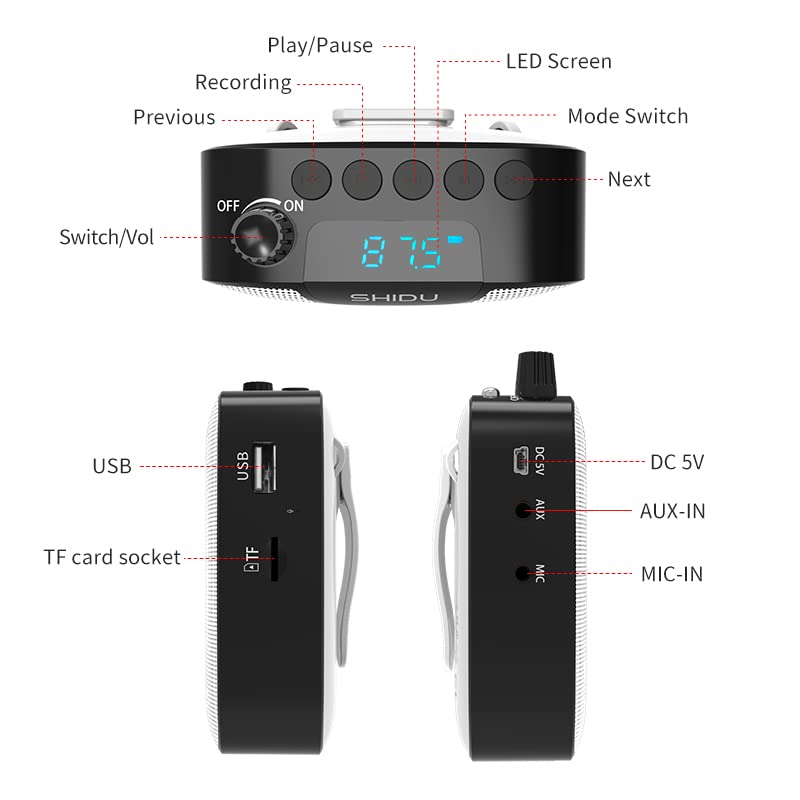
Image 7.1: SHIDU M500 Dimensions Diagram. This image shows the amplifier's dimensions: 116mm length, 86mm width, and 46mm height.

Image 7.2: SHIDU M500 10W High Power Acoustic Amplifier. This image illustrates the amplifier's 10W power output, capable of providing loud and clear sound in a standard 500m² space.

Image 7.3: SHIDU M500 Mini and Portable. This image emphasizes the amplifier's compact size and light weight of only 282g, comparable to the size of a mobile phone.

Image 7.4: SHIDU M500 High-Fidelity Dual Magnetic Speaker. This image highlights the advanced speaker technology for realistic vocal reproduction and powerful bass and treble.
8. Kafolat haqida ma'lumot
SHIDU warrants its voice amplifier hardware products against defects in materials and workmanship for a period of bir yil from the date of original purchase, provided the purchase was made from an authorized SHIDU dealer. This warranty is void if the equipment is altered, misused, mishandled, suffers excessive wear, or is serviced by any parties not authorized by SHIDU.
9. Qo'llab-quvvatlash
For further assistance, technical support, or warranty claims, please refer to the contact information provided with your purchase or visit the official SHIDU website. Ensure you have your product model number (M500) and proof of purchase ready when contacting support.