
Kirish
Thank you for choosing the A4 TECH 2DRUMTEK B25 True Wireless Earbuds. These earbuds feature advanced Bluetooth 5.2 technology for stable connectivity, Hybrid Active Noise Cancelling for an immersive audio experience, and an IPX4 rating for water and dust resistance, making them suitable for active lifestyles. The M.O.C.I (Mycelium of Carbon IT) hybrid diaphragm ensures clear highs, balanced mids, and deep bass. This manual provides detailed instructions for setup, operation, maintenance, and troubleshooting to help you get the most out of your device.
Paket tarkibi
- 2DRUMTEK B25 True Wireless Earbuds (Left and Right)
- Zaryadlovchi qutisi
- Zaryadlovchi kabel
- Foydalanuvchi uchun qo'llanma
Mahsulot tugadiview
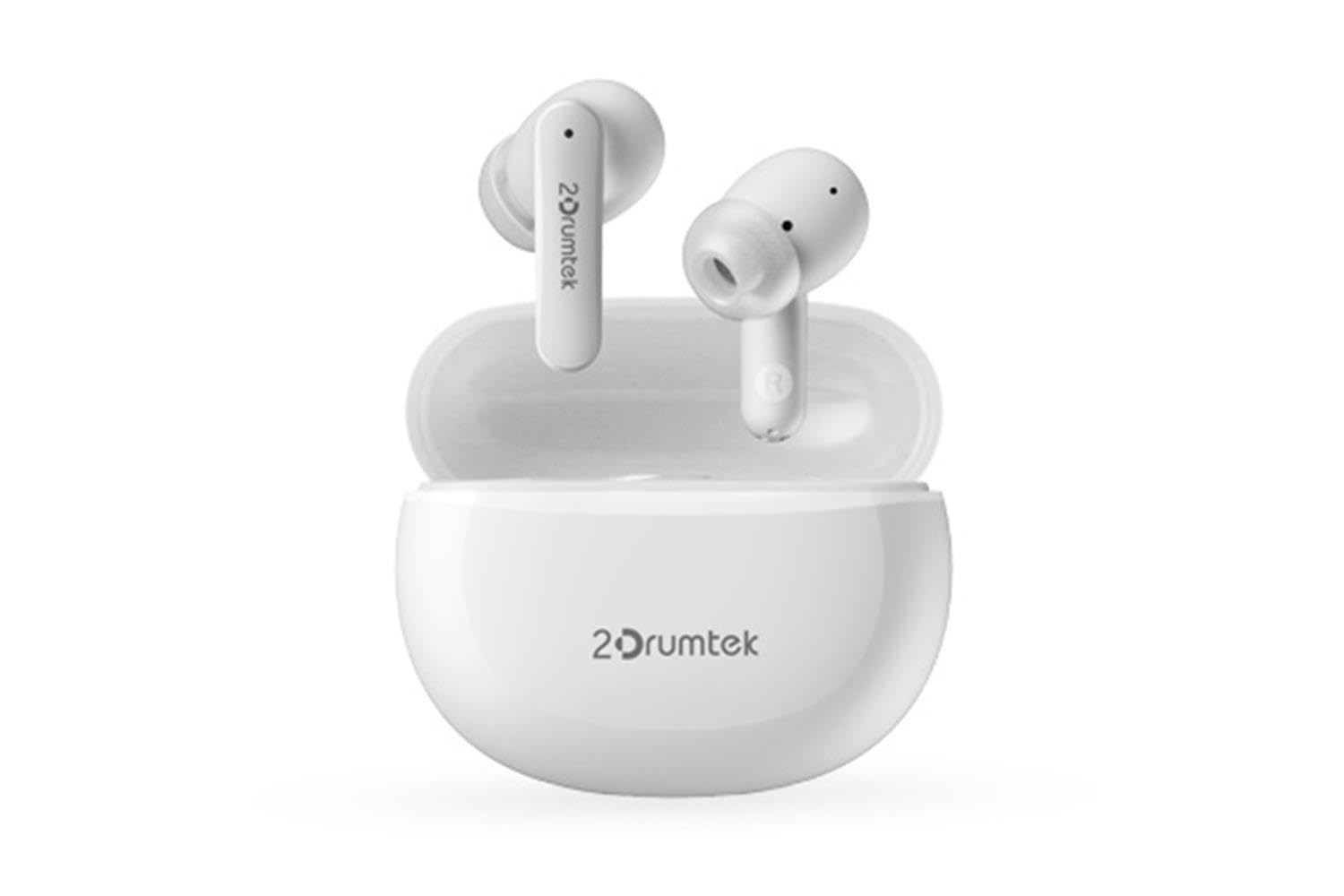
Image: A pair of white A4 TECH 2DRUMTEK B25 True Wireless Earbuds, showing their in-ear design and the '2Drumtek' branding on the stems.
The 2DRUMTEK B25 earbuds feature an ergonomic in-ear design. Each earbud includes a touch control area for various functions, a microphone for calls and voice assistant, and charging contacts at the bottom of the stem. An LED indicator provides status updates for pairing and battery life.
Sozlash; o'rnatish
1. Charging the Earbuds and Charging Case
Before first use, fully charge the earbuds and the charging case. Place the earbuds into the charging case. Connect the charging cable to the case and a USB power source. The LED indicators on the case and earbuds will show charging status. A full charge provides up to 5 hours of playback for the earbuds, with an additional 15 hours from the charging case.
2. Dastlabki juftlashtirish
- Zaryadlash qutisini oching. Quloqliklar avtomatik ravishda ulanish rejimiga o'tadi.
- Qurilmangizda (smartfon, planshet, kompyuter) Bluetooth-ni yoqing.
- Ni qidirish available Bluetooth devices and select "2DRUMTEK B25".
- Once connected, you will hear a confirmation tone, and the LED indicator on the earbuds will change.
3. Avtomatik qayta ulanish
After the initial pairing, the earbuds will automatically connect to your previously paired device when you open the charging case and take them out, provided Bluetooth is enabled on your device.
Foydalanish bo'yicha ko'rsatmalar
1. Quvvatni yoqish/o‘chirish
- Yoqilgan: Zaryadlash qutisini oching va quloqchinlar avtomatik ravishda yoqiladi.
- O'chirish: Quloqchalarni qayta zaryadlash qutisiga joylashtiring va qopqog'ini yoping. Ular avtomatik ravishda o'chadi.
2. Music Playback (Touch Control)
- Oʻynatish/toʻxtatib turish: Ikkala quloqchinga bir marta teging.
- Keyingi qo'shiq: O‘ng quloqchinni ikki marta bosing.
- Oldingi qo'shiq: Chap quloqchinni ikki marta bosing.
3. Call Management (Touch Control)
- Qo'ng'iroqqa javob berish/tugatish: Ikkala quloqchinga bir marta teging.
- Qo'ng'iroqni rad etish: Ikkala quloqchinni ham 2 soniya bosib turing.
4. Voice Assistant (Touch Control)
Triple tap on either earbud to activate your device's voice assistant (e.g., Siri, Google Assistant, Amazon Alexa).
5. Faol shovqinni bekor qilish (ANC)
The earbuds feature Hybrid Active Noise Cancelling. Refer to the specific touch control gestures in the quick start guide for activating and deactivating ANC mode, as these can vary.
Xizmat
- Tozalash: Regularly clean the earbuds, especially the ear tips and charging contacts, with a soft, dry cloth. Avoid using harsh chemicals or abrasive materials.
- Saqlash: Foydalanilmayotganda quloqchinlarni chang va shikastlanishdan himoya qilish uchun ularni zaryadlash qutisida saqlang.
- Water and Dust Resistance (IPX4): The earbuds are rated IPX4, meaning they are resistant to splashing water and sweat from any direction. They are suitable for workouts and outdoor activities but should not be submerged in water. Ensure the earbuds are dry before placing them back in the charging case to prevent damage.
- Batareya parvarishi: Batareyaning ishlash muddatini uzaytirish uchun quloqchinlarni tez-tez to'liq zaryadsizlantirishdan saqlaning. Doimiy foydalanishda bo'lmasa ham, ularni muntazam ravishda zaryadlang.
Muammolarni bartaraf qilish; nosozliklarni TUZATISH
- Naushniklar ulanmayapti: Ikkala quloqchin ham zaryadlanganligiga ishonch hosil qiling. Ularni g'ilofga qaytarib joylashtiring, qopqog'ini yoping, keyin ulanish rejimiga qayta kirish uchun uni qayta oching. Qurilmangizning Bluetooth sozlamalarini tekshiring va qayta ulanishga harakat qiling.
- Faqat bitta quloqchin ishlaydi: Ensure both earbuds are charged. Try resetting the earbuds by placing them in the case and then taking them out. Re-pair with your device if necessary.
- Ovoz yo'q: Check the volume level on your connected device. Ensure the earbuds are properly paired and connected.
- Zaryadlash muammolari: Zaryadlash kabelining korpusga ham, quvvat manbaiga ham mahkam ulanganligiga ishonch hosil qiling. Quloqchinlardagi va korpus ichidagi zaryadlash kontaktlarini tozalang.
- Yomon ovoz sifati: Ensure the earbuds are properly seated in your ears. Try different ear tip sizes for a better seal.
Texnik xususiyatlari
| Xususiyat | Tavsif |
|---|---|
| Model nomi | 2DRUMTEK B25 |
| Ulanish texnologiyasi | Simsiz (Bluetooth 5.2) |
| Shovqinni bekor qilish | Gibrid faol shovqinni bekor qilish |
| Suvga chidamlilik darajasi | IPX4 (suvga chidamli) |
| Quloqlarni joylashtirish | Quloq ichidagi |
| Boshqarish turi | Sensorli boshqaruv |
| Mos qurilmalar | PCs, Laptops, Mobile Phones, Tablets, Other Bluetooth Devices |
| Material | Plastic, Metal, Carbon Fiber |
| Batareya quvvati (naushniklar) | Bir zaryad uchun 5 soatgacha |
| Jami oʻynash vaqti (xoʻjalik bilan) | 20 soatgacha |
Xavfsizlik ma'lumotlari
- Mahsulotni qismlarga ajratmang yoki o'zgartirmang.
- Keep away from extreme temperatures and direct sunlight.
- Avoid exposing the product to fire or high heat.
- Eshitish qobiliyatiga zarar yetkazmaslik uchun quloqchinlarni uzoq vaqt davomida haddan tashqari baland ovozda ishlatmang.
- Bolalar va uy hayvonlari qo'li etmaydigan joyda saqlang.
Kafolat va qo'llab-quvvatlash
This product comes with a standard manufacturer's warranty. For detailed warranty information, please refer to the warranty card included in your package or visit the official A4 TECH website. If you encounter any issues or require technical assistance, please contact A4 TECH customer support through their official channels. Please have your model number (B25) and proof of purchase ready when contacting support.