
1. Kirish
The UniFi Gateway Dream Wall (UDW) is an enterprise-grade UniFi OS Console designed for wall-mounted deployments. It integrates a high-performance security gateway, a UniFi Network Controller, and a multi-port switch with PoE capabilities, providing a comprehensive solution for managing and securing your network infrastructure. This manual provides essential information for the proper setup, operation, maintenance, and troubleshooting of your UDW device.
2. Xavfsizlik ma'lumotlari
Please read, follow, and keep these instructions. Heed all warnings. Only use attachments/accessories specified by the manufacturer.
- Ushbu mahsulotni suv yaqinida ishlatmang.
- Mahsulotni qismlarga ajratmang. Barcha xizmat ko'rsatish ishlarini malakali xizmat ko'rsatish xodimlariga topshiring.
- Hech qanday shamollatish teshiklarini to'sib qo'ymang.
- Use only the power supply provided by the manufacturer.
- Xavfsizlik uchun to'g'ri topraklama bilan ta'minlang.
- Elektr shnurini yurish yoki siqilishdan saqlang.
3. Paket tarkibi
Paketingizda quyida sanab o'tilgan barcha narsalar mavjudligiga ishonch hosil qiling:
- UniFi Gateway Dream Wall (UDW)
- Power Cord (region-specific)
- Devorga o'rnatish uchun qavs
- O'rnatish vintlari va devor ankrajlari
- Tez boshlash uchun qo'llanma

Image: The UniFi Gateway Dream Wall device shown alongside its power cord, wall mount bracket, and mounting hardware.
4. Mahsulot tugadiview
The UDW features a robust design with various ports and indicators for comprehensive network management.

Rasm: old view of the UniFi Gateway Dream Wall, showcasing its sleek white design and central display screen.

Rasm: yon view of the UniFi Gateway Dream Wall, highlighting its slim profile o'rnatilganda.

Image: The UniFi Gateway Dream Wall with its front cover opened, revealing internal components and the touchscreen display.
4.1 Old panel
- 4.7" Touchscreen Display: Provides real-time status, network statistics, and allows for basic device management.
- LED ko'rsatkichi: Indicates device status (e.g., booting, online, error).
4.2 Portlar va ulagichlar
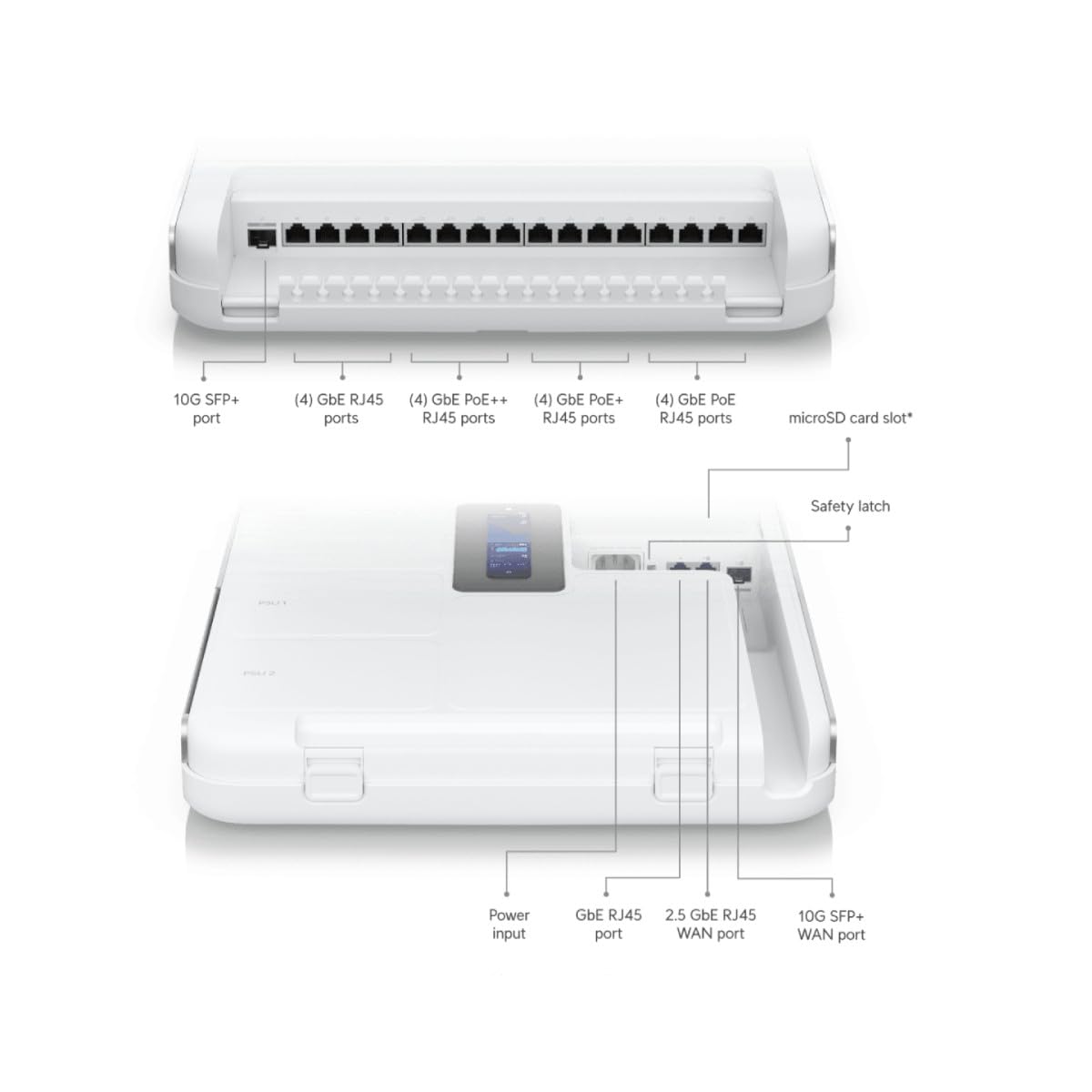
Image: Detailed diagram illustrating the various ports and connectors on the UniFi Gateway Dream Wall, including SFP+, RJ45, and power inputs.
| Port/xususiyat | Tavsif |
|---|---|
| 10G SFP+ porti | High-speed fiber uplink/downlink. |
| (4) GbE RJ45 portlari | Gigabit Ethernet ports for general network connections. |
| (4) GbE PoE++ RJ45 Ports | Gigabit Ethernet ports with Power over Ethernet Plus Plus (802.3bt) for high-power devices. |
| (4) GbE PoE+ RJ45 Ports | Gigabit Ethernet ports with Power over Ethernet Plus (802.3at) for standard PoE devices. |
| (4) GbE PoE RJ45 Ports | Gigabit Ethernet ports with Power over Ethernet (802.3af) for basic PoE devices. |
| microSD karta uyasi | For additional storage (e.g., UniFi Protect recordings). |
| Quvvat kiritish | Connects to the included power cord. |
| GbE RJ45 WAN Port | Gigabit Ethernet port for Wide Area Network connection. |
| 2.5 GbE RJ45 WAN Port | 2.5 Gigabit Ethernet port for high-speed Wide Area Network connection. |
| 10G SFP+ WAN Port | 10 Gigabit SFP+ port for high-speed fiber WAN connection. |
| Qayta tiklash tugmasi | Used for factory reset or recovery mode. |
5. Sozlash
5.1 Qurilmani o'rnatish
- Choose a suitable wall location, ensuring adequate ventilation and access to power outlets.
- Use the wall mount bracket as a template to mark drilling points.
- Uchuvchi teshiklarni burg'ulash va kerak bo'lganda devorga langarlarni joylashtiring.
- Berilgan vintlar yordamida devorga o'rnatish kronshteynini devorga mahkamlang.
- Carefully align the UDW with the bracket and slide it into place until it clicks securely.

Image: The UniFi Gateway Dream Wall shown mounted on a wall, with its cover open to reveal the internal structure and mounting points.
5.2 Quvvatni ulash
Connect the included power cord to the power input port on the UDW and then to a grounded electrical outlet. The device will power on automatically.
5.3 Tarmoq ulanishlari
Connect your internet service provider's modem or router to one of the WAN ports (GbE RJ45 WAN, 2.5 GbE RJ45 WAN, or 10G SFP+ WAN) on the UDW. Connect your local network devices (e.g., computers, switches, UniFi Access Points) to the available LAN ports (GbE RJ45, GbE PoE, GbE PoE+, GbE PoE++).

Image: A network diagram illustrating how the UniFi Dream Wall integrates into a network, connecting to the internet, security cameras, access points, phone systems, and door access.
5.4 Dastlabki konfiguratsiya
The UDW can be configured via the UniFi mobile app or a web brauzer.
- Using UniFi Mobile App: Download the UniFi Network application from your mobile app store. Ensure Bluetooth is enabled on your mobile device. The app should discover the UDW. Follow the on-screen prompts to complete the setup, including naming the device, setting up Wi-Fi, and creating an administrator password.
- Foydalanish Web Brauzer: Connect a computer directly to one of the UDW's LAN ports. Open a web browser and navigate to the default IP address (usually 192.168.1.1). Follow the setup wizard to configure your network.
6. Operatsion
6.1 Accessing the UniFi Interface
Once configured, you can manage your UDW and UniFi network through the UniFi Network Controller interface. Access it via the UniFi mobile app or by navigating to the UDW's IP address in a web browser from a device on your local network.
6.2 Tarmoqni boshqarish
The UniFi Network Controller provides a centralized dashboard for managing all aspects of your network, including:
- Monitoring network performance and connected devices.
- Configuring VLANs and firewall rules.
- Managing user access and guest networks.
- Adopting and managing other UniFi devices (e.g., access points, switches).
6.3 Wi-Fi konfiguratsiyasi
The UDW includes integrated Wi-Fi 6 capabilities. You can configure Wi-Fi networks (SSIDs), security settings, and advanced wireless features directly from the UniFi Network Controller.
7. Xizmat ko'rsatish
Regular maintenance ensures optimal performance and longevity of your UDW.
- Dasturiy ta'minotni yangilash: Regularly check for and install the latest firmware updates through the UniFi Network Controller. This ensures you have the latest features, security patches, and bug fixes.
- Tozalash: Keep the device clean and free of dust. Use a soft, dry cloth to wipe the exterior. Do not use liquid cleaners or aerosols.
- Ventilyatsiya: Haddan tashqari qizib ketishining oldini olish uchun shamollatish teshiklari tiqilib qolmaganligiga ishonch hosil qiling.
- Zaxira konfiguratsiyasi: Periodically back up your UniFi Network Controller configuration to a safe location.
8. Muammolarni bartaraf qilish; nosozliklarni TUZATISH
This section addresses common issues you might encounter with your UDW.
- Qurilma yoqilmaydi: Ensure the power cord is securely connected to both the UDW and a working electrical outlet. Verify the outlet has power.
- "Check Connection" Message on Display: If the UDW is stuck on a "Check Connection" screen after initialization, ensure your WAN connection is active and properly connected. If using the UniFi mobile app for setup, ensure Bluetooth is enabled and the app can discover the device. Sometimes, a factory reset (see below) may be required if initial setup fails repeatedly.
- Internetga kirish imkoni yo'q: Verify that your modem/ISP service is active. Check the WAN port connection on the UDW. Ensure proper network configuration within the UniFi Network Controller.
- Cannot Access UniFi Interface: Ensure your device is connected to the UDW's network. Try accessing the interface using the UDW's IP address. Restart the UDW.
- Sekin tarmoq ishlashi: Check for high network utilization in the UniFi Network Controller. Ensure firmware is up to date. Verify cable integrity.
- Zavod parametrlarini tiklash: To perform a factory reset, locate the reset button (often a small pinhole) on the device. With the UDW powered on, use a paperclip or similar thin object to press and hold the reset button for approximately 10-15 seconds until the device reboots. This will revert all settings to their factory defaults.
9. Texnik shartlar
Key technical specifications for the UniFi Gateway Dream Wall (UDW):

Rasm: ichki view of the UniFi Gateway Dream Wall with key features and dimensions highlighted, including integrated SSD, Wi-Fi 6, routing speed, and power supply units.
| Xususiyat | Tafsilot |
|---|---|
| Model raqami | UDW |
| Olchamlari (Y x G x D) | 26.14 x 17.48 x 4.96 dyuym (taxminan 664 x 444 x 126 mm) |
| Og'irligi | 1.32 funt (taxminan 0.6 kg) |
| Integratsiyalashgan saqlash | 128 GB SSD |
| Wi-Fi standarti | Wi-Fi 6 (Enterprise dual-radio) |
| Marshrutlash o'tkazuvchanligi | 3.5+ Gbps |
| Quvvatlantirish manbai | Integrated redundant power supply system |
| Displey | 4.7" touchscreen for management |
| Birinchi mavjud | 6 yil 2023 avgust |
10. Kafolat haqida ma'lumot
Ubiquiti products are covered by a limited warranty. For detailed warranty terms and conditions, please refer to the official Ubiquiti websayt yoki mahsulotingizga kiritilgan kafolat kartasi. Kafolat da'volari uchun xaridingizni tasdiqlovchi hujjatingizni saqlang.
11. Qo'llab-quvvatlash
For technical support, product documentation, and community forums, please visit the official Ubiquiti support websayt:
You can also find additional resources and contact support directly through the UniFi Network Controller interface or the UniFi mobile app.