
1. Kirish
Thank you for choosing the MASINGO Cantando C2 Portable Karaoke Machine. This manual provides essential information for setting up, operating, and maintaining your device to ensure optimal performance and enjoyment. Please read this manual thoroughly before use and retain it for future reference.

Image 1.1: The MASINGO Cantando C2 Portable Karaoke Machine, showcasing its compact design, integrated LED ring light, and two wireless microphones.
2. Qutida nima bor
Qutidan chiqarilganda barcha komponentlar mavjudligiga ishonch hosil qiling:
- 1x MASINGO Cantando C2 Karaoke Machine
- 2x simsiz mikrofonlar
- 1x 3.5 mm AUX kabeli
- 1x 3.5 mm AUX-RCA TV Cable
- 1x USB-C dan USB-A zaryadlovchi kabeli
- 1x Foydalanuvchi uchun qo'llanma

Image 2.1: All items included in the MASINGO Cantando C2 package, laid out for inspection.
3. Sozlash
3.1 Dastlabki zaryadlash
Before first use, fully charge the karaoke machine using the provided USB-C to USB-A charging cable. The charging port is located on the rear panel. A full charge typically takes 3-4 hours.
3.2 Mikrofon batareyasini o'rnatish
Each wireless microphone requires 2x AA batteries (not included). Unscrew the bottom part of each microphone to insert the batteries, ensuring correct polarity. The microphones will automatically connect to the karaoke machine when powered on.
3.3 Attaching Microphone Holders
Insert the two plastic microphone holders into the designated slots on the sides of the karaoke machine for convenient storage.
4. Foydalanish bo'yicha ko'rsatmalar
4.1 Quvvatni yoqish/o‘chirish
Locate the power switch on the rear panel of the karaoke machine. Slide it to the 'ON' position to power on the device. To power off, slide the switch to the 'OFF' position.
4.2 Bluetooth ulanishi
Upon powering on, the machine will automatically enter Bluetooth pairing mode. Activate Bluetooth on your smartphone or other device and select 'MASINGO C2' from the list of available devices. A voice prompt will confirm successful pairing.
4.3 Mikrofondan foydalanish
Press and hold the power button on each wireless microphone to turn it on. The microphones will automatically connect to the karaoke machine. Use the '+' and '-' buttons on the microphone to adjust its individual volume. To turn off a microphone, press and hold its power button until the indicator light turns off.

Image 4.1: Close-up of the two wireless microphones, highlighting their power and volume adjustment buttons.
4.4 LED yorug'lik shousi
The Cantando C2 features a mesmerizing ring light LED. Press the 'LED' button on the control panel to cycle through five pre-installed light patterns or turn them off.
4.5 Versatile Connectivity Options
The karaoke machine supports multiple input sources:
- Bluetooth: Connect wirelessly to your smartphone or tablet.
- AUX: Use the provided 3.5mm AUX cable to connect external audio devices.
- USB: Musiqa bilan USB drayverni joylashtiring files USB portiga kiriting.
- MicroSD (TF Card): Insert a MicroSD card with music files TF karta uyasiga kiriting.
- FM radiosi: Switch to FM Radio mode to tune into local radio stations.
- Televizorga ulanish: Use the included Aux to RCA cable to connect to your TV for audio output.

Image 4.2: The top control panel of the Cantando C2, illustrating the various ports (USB, AUX, TF Card) and control buttons for mode selection, volume, and LED lights.
4.6 Voice Changer and Echo Effects
The karaoke machine offers voice distortion and echo effects. Experiment with the 'Voice' and 'ECH' (Echo) buttons on the control panel to modify your vocal output. The 'EQ' button allows for equalization adjustments.
4.7 Portable Design
The Cantando C2 is designed for portability with a removable handle and lightweight build. This allows for easy transport to various locations.

Image 4.3: The portable design of the Cantando C2, featuring a convenient carrying handle.
4.8 Dynamic Sound Output
The Cantando C2 delivers 25W of powerful sound through a 4-inch front speaker and dual 2-inch side speakers, ensuring clear audio for all performances.
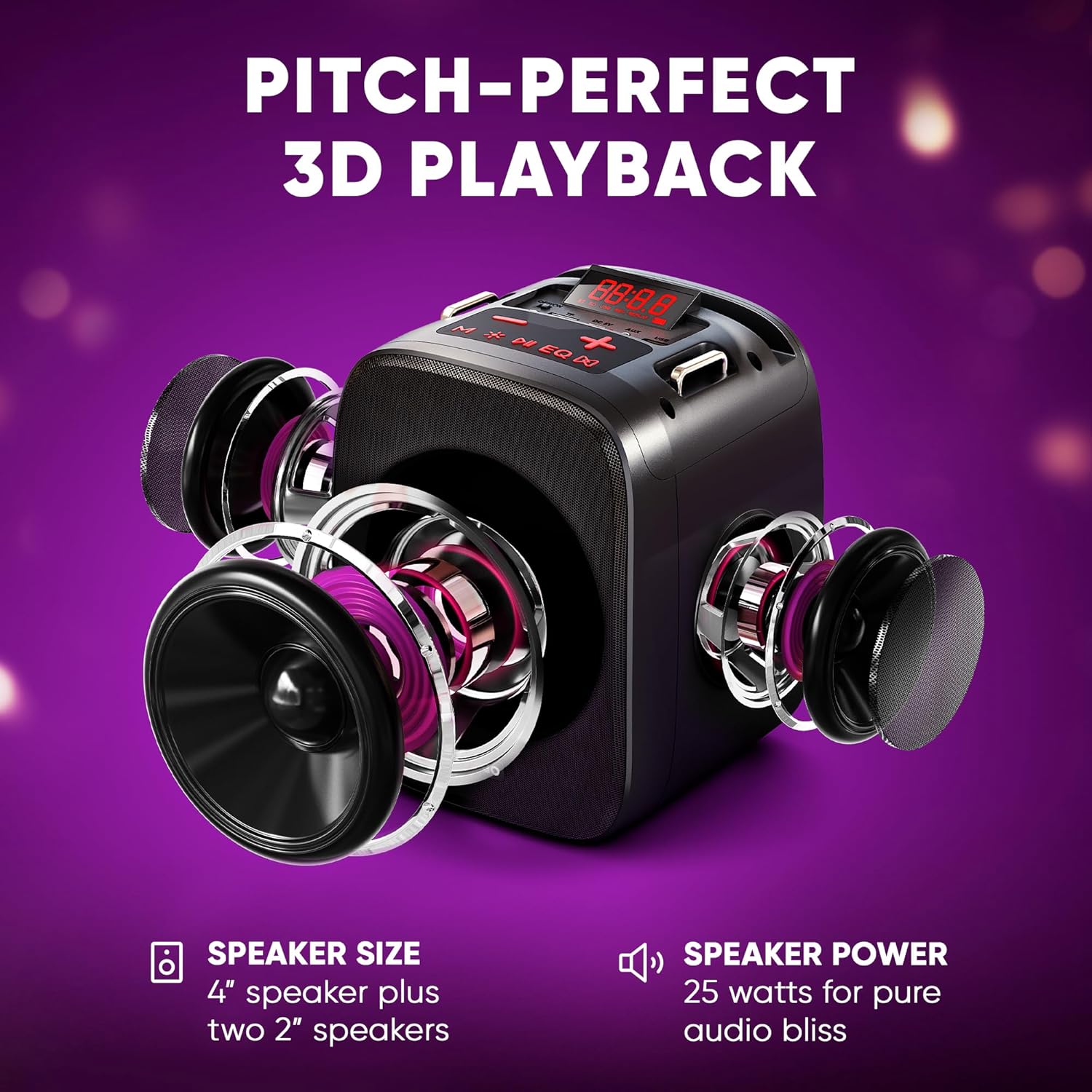
Rasm 4.4: portlagan view illustrating the three-speaker system (one 4-inch, two 2-inch) for dynamic sound output.
4.9 Televizorga ulanish
The Cantando C2 can be connected to a TV via Bluetooth or the provided Aux to RCA cable. This allows for displaying lyrics on the TV screen while using the karaoke machine for enhanced audio.

Image 4.5: The Cantando C2 connected to a TV, demonstrating how lyrics can be displayed for a full karaoke experience.
4.10 Mahsulot tugadiview Video
Video 4.6: An official product video from MASINGO, introducing the Cantando C2 karaoke machine and its key features.
5. Xizmat ko'rsatish
- Qurilmani yumshoq va quruq mato bilan artib, toza tuting.
- Avoid exposing the device to water or excessive moisture.
- Store the karaoke machine and microphones in a cool, dry place when not in use.
- Agar mikrofon uzoq vaqt saqlansa, oqishning oldini olish uchun batareyalarni chiqarib oling.
6. Muammolarni bartaraf qilish; nosozliklarni TUZATISH
| Muammo | Mumkin sabab | Yechim |
|---|---|---|
| Quvvat yo'q | Kam batareya; Quvvatni o'chirish | Charge the machine; Turn on the power switch |
| Mikrofon ishlamayapti | Low microphone batteries; Microphone not paired | Replace AA batteries; Power on microphone and ensure it pairs automatically |
| Karnaydan ovoz yo'q | Ovoz balandligi juda past; Kiritish rejimi noto'g'ri; Qurilma ulanmagan | Increase volume; Select correct input mode (Bluetooth, AUX, USB, TF); Ensure device is properly connected |
| Bluetooth bilan ulanish amalga oshmadi | Device too far; Bluetooth not enabled on source device | Move device closer; Enable Bluetooth on source device and re-scan |
7. Texnik shartlar
- Mahsulot og'irligi: 4.74 funt
- Mahsulot o'lchamlari: 10.24 x 6.93 x 10.63 dyuym
- Model raqami: C2
- Batareyalar: 1 Lithium Ion battery required (included for machine), 2 AA batteries per microphone (not included)
- Rang: Ebony
- Mos qurilmalar: Smartfon
- Ulagich turi: 3.5 mm raz'em
- Spikerlar soni: 1 (main) + 2 (side)
- Batareya turi: Lityum ion
- Media formati: WAV
- Quvvat manbai: Batareyadan quvvatlanadi
- jildtage: 3.7 volt (DC)
- Wattage: 15 watts (total 25W dynamic output)
8. Kafolat va qo'llab-quvvatlash
For warranty information or technical support, please refer to the contact details provided in the packaging or visit the official MASINGO websayt. Xarid kvitansiyasini xaridni tasdiqlovchi hujjat sifatida saqlang.