
Infinity NX 10
Infinity Smartwatch User Manual
Model: NX 10
Kirish
Welcome to the user manual for your Infinity Smartwatch, Model NX 10. This device is designed to enhance your daily life with advanced fitness tracking, communication features, and smart notifications. Featuring a vibrant 1.43" AMOLED screen and robust IP68 water resistance, your smartwatch is built for both everyday use and active lifestyles. Please read this manual carefully to ensure proper operation and maintenance of your device.

Figure 1: Infinity Smartwatch NX 10. This image shows the smartwatch from an angled perspective, highlighting its round AMOLED display, black silicone strap, and two side buttons.
Sozlash; o'rnatish
1. Qutidan chiqarish va dastlabki to‘lov
Upon unboxing, ensure all components are present: the Infinity Smartwatch NX 10 and the charging cable.
- Connect the magnetic charging cable to the charging points on the back of the smartwatch.
- Kabelning USB uchini standart USB quvvat adapteriga (qo'shilmagan) yoki kompyuterning USB portiga ulang.
- The watch display will show a charging indicator. Fully charge the device before first use, which typically takes approximately 2 hours.

Figure 2: Smartwatch charging. The image illustrates the smartwatch being charged magnetically, with a green lightning bolt icon on the screen indicating charging status and a "400mAh Battery Capacity" label.
2. Ilovani o'rnatish va ulash
To unlock the full potential of your Infinity Smartwatch, download and install the companion application, Fit Cloud Pro, smartfoningizda.
- Scan the QR code provided in the quick start guide (if available) or search for "Fit Cloud Pro" in your smartphone's app store (Google Play Store for Android, Apple App Store for iOS).
- Ilovani o'rnating.
- Fit Cloud Pro ilovasini oching va hisob yaratish yoki tizimga kirish uchun ekrandagi ko'rsatmalarga amal qiling.
- Smartfoningizda Bluetooth yoqilganligiga ishonch hosil qiling.
- In the app, navigate to the device pairing section and search for your smartwatch (e.g., "NX 10" or similar Bluetooth name).
- Select your smartwatch from the list to initiate pairing. Confirm the pairing request on both your phone and the smartwatch if prompted.
- Once paired, the app will synchronize data with your smartwatch, and you can customize settings.
Foydalanish bo'yicha ko'rsatmalar
1. Asosiy navigatsiya
- Sensorli ekran: Swipe left/right to navigate between main screens (e.g., activity, heart rate, weather). Swipe up/down to access quick settings or notifications. Tap to select an option.
- Yon tugmalar: The top button typically acts as a power button (long press) or a back/home button (short press). The bottom button may be customizable or provide quick access to sports modes.

Figure 3: 1.43" AMOLED Screen. This image highlights the vibrant display of the smartwatch, showing a detailed watch face with various data points like time, date, steps, and heart rate.
2. Qo'ng'iroqlarni amalga oshirish va javob berish
Your Infinity Smartwatch supports Bluetooth calling, allowing you to make and receive calls directly from your wrist when connected to your smartphone.
- Qo'ng'iroq qilish uchun: Access the dialer or contacts list on your smartwatch. You can dial a number directly or select a contact to call.
- Qo'ng'iroqqa javob berish uchun: When a call comes in, the smartwatch will display the caller ID. Tap the green answer icon to accept the call or the red icon to decline.

Figure 4: Stay Connected On The Go. This image shows a user interacting with the smartwatch to make a call, illustrating the microphone, dialing, call records, and contacts features.
3. Fitnes va sog'liqni kuzatish
The smartwatch is equipped with multiple sensors to monitor your health and fitness activities.
- Pedometr: Automatically tracks your steps, distance, and calories burned throughout the day.
- Yurak urishi monitoringi: Provides real-time heart rate data. Access this feature from the main menu or set up continuous monitoring in the app.
- Qon bosimi monitoringi: Offers blood pressure readings. For accurate results, ensure the watch is worn correctly and remain still during measurement. Note: This feature is for reference only and should not be used for medical diagnosis.
- Uyqu monitoringi: Tracks your sleep patterns, including deep sleep, light sleep, and awake times. View detailed analysis in the Fit Cloud Pro app.
- Sport rejimlari: Supports over 100 sports modes, including running, cycling, swimming, and more. Select your desired activity to track specific metrics.

Figure 5: Track Every Move. This image displays the smartwatch tracking a swimming activity, with additional visuals of rock climbing and cycling, indicating its multi-sport tracking capabilities.

Figure 6: More than 110 sports modes. This image shows a variety of colorful icons representing different sports activities supported by the smartwatch, overlaid on a background of a person cycling.
4. Moslashtirish
Personalize your smartwatch experience through the Fit Cloud Pro app.
- Yuzlarni tomosha qiling: Choose from a wide range of pre-installed watch faces or download new ones via the app. You can also create custom watch faces using your own photos.
- Bildirishnomalar: Configure which app notifications you wish to receive on your smartwatch (e.g., calls, SMS, social media alerts).
- Signal va eslatmalar: Set alarms, sedentary reminders, and hydration reminders through the app.
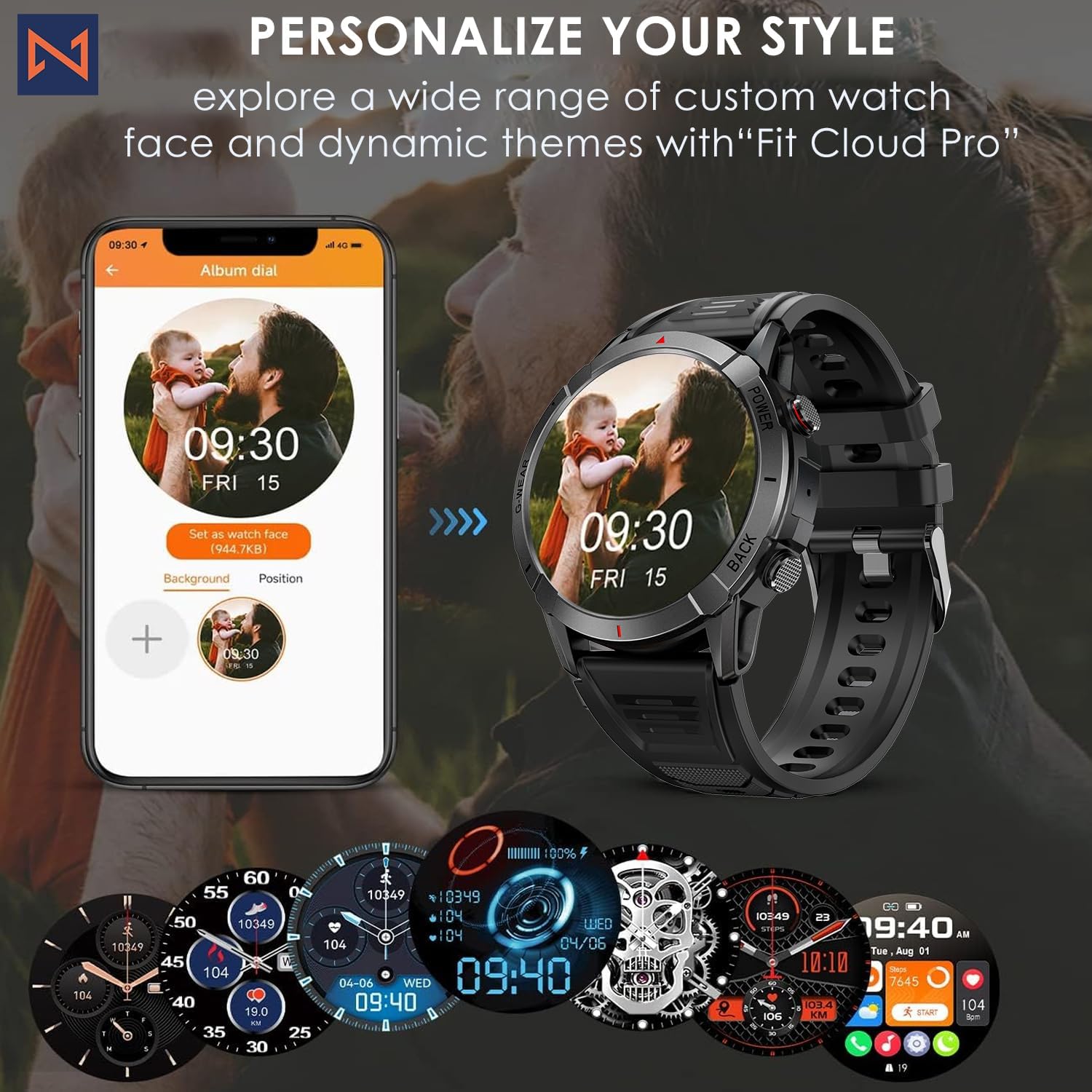
Figure 7: Personalize Your Style. This image demonstrates how to customize watch faces using the "Fit Cloud Pro" app, showing various digital and analog watch face options.
Xizmat
1. Smartwatchingizni tozalash
Doimiy tozalash qurilmangizning ko'rinishi va funksionalligini saqlashga yordam beradi.
- Ekran va korpusni yumshoq, tuklarsiz mato bilan artib oling.
- Qaysar dog'lar uchun, dampMatoni ozgina suv bilan arting. Qattiq kimyoviy moddalar yoki abraziv materiallardan foydalanishdan saqlaning.
- Clean the charging contacts periodically to ensure proper connection.
2. Suvga chidamlilik (IP68)
Your Infinity Smartwatch is rated IP68, meaning it is resistant to dust and can withstand immersion in water up to 1.5 meters for up to 30 minutes.
- It is suitable for daily use, hand washing, and light rain.
- Avoid prolonged immersion, hot water, steam, or high-pressure water jets (e.g., showering, sauna, diving).
- If the watch gets wet, dry it thoroughly before charging or operating buttons.

Figure 8: Engineered for Adventure. This image highlights the smartwatch's durability features, including waterproof, dustproof, anti-magnetic, and shockproof capabilities, with corresponding icons.
3. Batareyani parvarish qilish
- Batareyaning ishlash muddatini uzaytirish uchun haddan tashqari haroratdan saqlaning.
- Charge the watch regularly; avoid letting the battery completely drain for extended periods.
- Faqat taqdim etilgan zaryadlash kabelidan foydalaning.
Muammolarni bartaraf qilish; nosozliklarni TUZATISH
| Muammo | Mumkin yechim |
|---|---|
| Soat yoqilmaydi | Ensure the watch is fully charged. Connect to the charger and wait a few minutes before attempting to power on. |
| Smartfon bilan ulanib bo'lmaydi |
|
| Noto'g'ri sog'liq ma'lumotlari |
|
| Bildirishnomalar olinmadi |
|
| Qisqa batareya muddati |
|
Texnik xususiyatlari
| Xususiyat | Tafsilot |
|---|---|
| Model raqami | NX 10 |
| Displey | 1.43" AMOLED Screen |
| Displey ravshanligi | 466x466 HD |
| Batareya quvvati | 400 mA / soat lityum polimer |
| Suvga chidamlilik | IP68 |
| Ulanish | Bluetooth |
| Operatsion tizim | Android (iOS bilan mos) |
| Tasma materiali | 22mm Silicon Belt |
| Ko'rgazma materiali | Sink qotishmasi |
| Element og'irligi | 1.76 untsiya |
| Xotirani saqlash hajmi | 128 MB |
Kafolat va qo'llab-quvvatlash
For warranty information and technical support, please refer to the documentation included with your purchase or visit the official Infinity websayt.
Manufacturer: Infiniity
For further assistance, you may contact Infiniity customer service through the contact information provided on their official website or within the Fit Cloud Pro application.
Ask a question about this manual
Ask about setup, troubleshooting, compatibility, parts, safety, or missing instructions. Manuals+ will review the question and use this page’s manual context to help answer it.