
1. Kirish
This manual provides essential information for the setup, operation, maintenance, and troubleshooting of your DELTACO GAMING WM87 Gaming Mouse. Please read these instructions carefully to ensure proper use and to maximize your gaming experience.
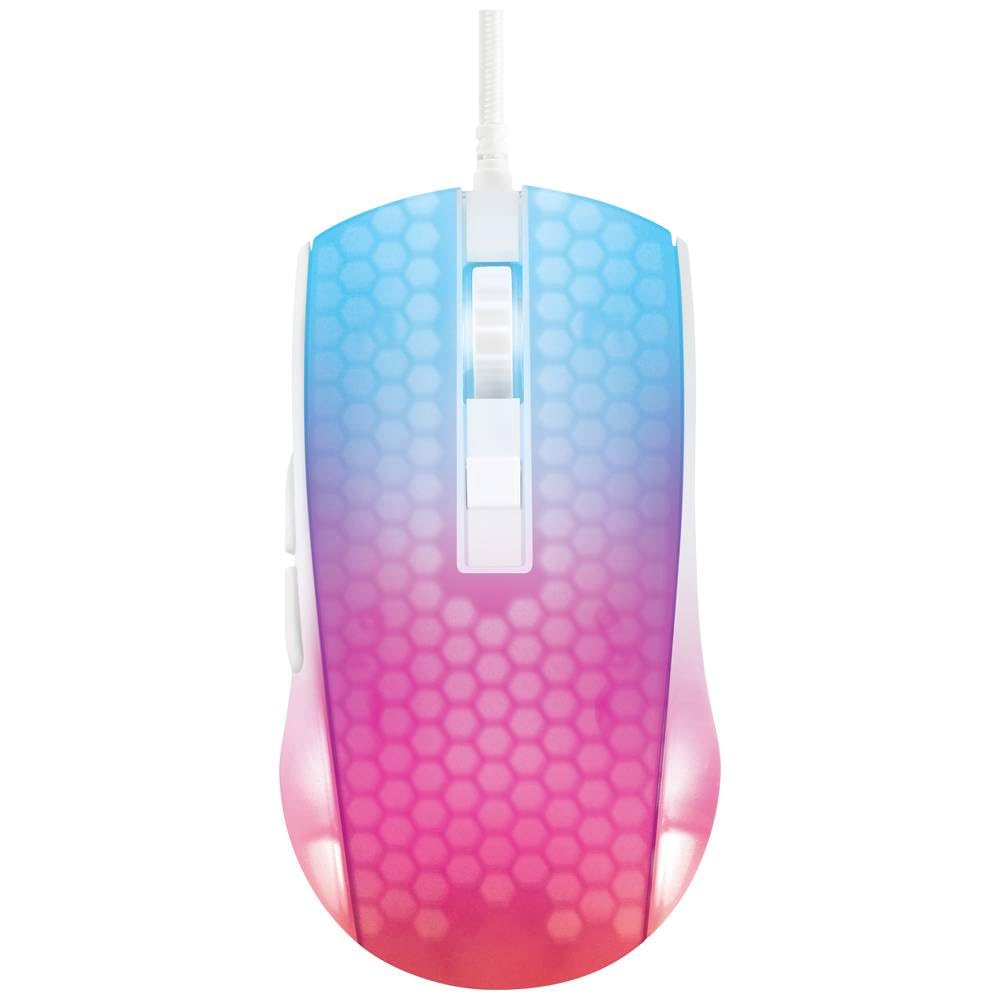
Yuqori yuk view of the DELTACO GAMING WM87 Gaming Mouse. The mouse features a translucent white body with an illuminated honeycomb pattern that transitions from blue at the front to pink and red at the rear. It has a scroll wheel and two main buttons, along with two side buttons visible on the left.
2. Mahsulot tugadiview
The DELTACO GAMING WM87 is a high-performance gaming mouse designed for precision and comfort. It features a transparent design with integrated illumination, a high-accuracy optical sensor, and six programmable buttons.
Asosiy xususiyatlar:
- Ulanish: USB simli
- Sensor: Optical, up to 6200 DPI
- Tugmalar: 6 (Left, Right, Scroll Click, DPI Cycle, Forward, Back)
- Dizayn: Transparent shell with illuminated honeycomb pattern
- Moslik: Personal Computer, Laptop
3. O'rnatish bo'yicha ko'rsatmalar
- Sichqonchani o'ramidan chiqaring: Carefully remove the DELTACO GAMING WM87 mouse from its packaging.
- Kompyuterga ulanish: Locate an available USB port on your personal computer or laptop. Insert the USB connector of the mouse firmly into the USB port.
- Haydovchi o'rnatish: The mouse is plug-and-play. Your operating system should automatically detect and install the necessary drivers. No additional software installation is typically required for basic functionality.
- Funktsionalligini tekshirish: Once connected, move the mouse and click the buttons to ensure it is working correctly. The integrated illumination should light up.
4. Foydalanish bo'yicha ko'rsatmalar
Asosiy funktsiyalari:
- Chap tugmasini bosing: Birlamchi harakat, tanlov.
- O'ng tugmasini bosing: Kontekst menyusi, ikkinchi darajali harakat.
- O'tkazish g'ildiragi: Scroll up/down pages. Pressing the scroll wheel typically acts as a middle click.
- Oldinga/Orqaga tugmalari: Located on the left side of the mouse, these buttons are commonly used for navigation in web brauzerlar yoki file tadqiqotchilar.
DPI sozlamalari:
The DELTACO GAMING WM87 mouse features adjustable DPI (Dots Per Inch) settings, allowing you to change the cursor sensitivity on the fly. A dedicated DPI button (often located behind the scroll wheel) cycles through preset DPI levels up to 6200 DPI. Press this button to adjust the sensitivity to your preference.
Yoritish:
The mouse features integrated illumination. The lighting pattern and colors are typically pre-programmed and may change based on DPI settings or automatically cycle through colors. Refer to any potential software for advanced customization, if available.
5. Xizmat ko'rsatish
- Tozalash: Use a soft, dry, lint-free cloth to clean the exterior of the mouse. For stubborn dirt, slightly dampsuv bilan mato. Qattiq kimyoviy moddalar, erituvchilar yoki abraziv materiallardan foydalanishdan saqlaning.
- Sensorni tozalash: Ba'zan sichqonchaning pastki qismidagi optik sensor atrofida chang yoki axlat to'planishi mumkin. Sensor maydonini muloyimlik bilan tozalash uchun paxta tayoqchasi yoki siqilgan havodan foydalaning.
- Saqlash: Ishlatilmaganda, sichqonchani toza, quruq muhitda, haddan tashqari harorat va to'g'ridan-to'g'ri quyosh nurlaridan uzoqroq joyda saqlang.
- Kabelni parvarish qilish: Zararni oldini olish uchun USB kabelini haddan tashqari burish yoki burishdan saqlaning.
6. Muammolarni bartaraf qilish; nosozliklarni TUZATISH
- Sichqoncha javob bermayapti:
- USB kabeli ishlaydigan USB portiga mahkam ulanganligiga ishonch hosil qiling.
- Try plugging the mouse into a different USB port on your computer.
- Kompyuteringizni qayta ishga tushiring.
- Kursorning tartibsiz harakati:
- Sichqonchaning pastki qismidagi optik sensorni tozalang.
- Sichqonchani mos sirtda (masalan, sichqoncha yostig'ida) ishlatayotganingizga ishonch hosil qiling. Yuqori darajada aks ettiruvchi yoki shaffof sirtlardan saqlaning.
- Yoritish ishlamayapti:
- USB ulanishini tekshiring.
- If the mouse has a dedicated lighting control button or software, ensure it is enabled.
7. Texnik shartlar
| Xususiyat | Tafsilot |
|---|---|
| Brend | DELTACO GAMING |
| Model raqami | GAM-144-W (WM87) |
| Ulanish texnologiyasi | USB |
| Harakatni aniqlash texnologiyasi | Optik |
| Tugmalar soni | 6 |
| DPI | 6200 gacha |
| Qo'lni yo'naltirish | To'g'ri |
| Tavsiya etilgan mahsulotdan foydalanish | Oʻyin |
| Mos qurilmalar | Noutbuk, shaxsiy kompyuter |
| Mahsulot o'lchamlari | 180 x 0.07 x 0.12 cm (Note: These dimensions appear to be for the cable or packaging, not the mouse itself. Please refer to product packaging for accurate mouse dimensions.) |
| Og'irligi | Approximately 65 Grams (Lithium battery weight, likely referring to overall mouse weight if no battery is present) |
| Birinchi mavjud sana | 16 yil 2023 sentyabr |
8. Kafolat va qo'llab-quvvatlash
For warranty information, technical support, or service inquiries regarding your DELTACO GAMING WM87 Gaming Mouse, please refer to the warranty card included with your product or visit the official DELTACO GAMING websayt. Kafolat da'volari uchun xaridingizni tasdiqlovchi hujjatingizni saqlang.