
Kirish
This manual provides detailed instructions for the SHIDU X1 Portable Bluetooth Speaker with Wireless Microphone. Please read this manual thoroughly before using the product to ensure proper operation and to maximize your user experience. This device is designed to deliver high-quality audio with versatile connectivity and entertainment features.
Paket tarkibi
Paketdan chiqargandan so'ng, quyida sanab o'tilgan barcha narsalar mavjudligini va yaxshi holatda ekanligini tekshiring:
- 1 x SHIDU X1 Portable Bluetooth Speaker
- 1 x Wireless UHF Microphone
- 1 x Type-C Charging Plug
- 1 x AUX kabeli
- 1 x Live Stream Cable
- 1 x foydalanuvchi qo'llanmasi
Mahsulot tugadiview
Karnay nazorati
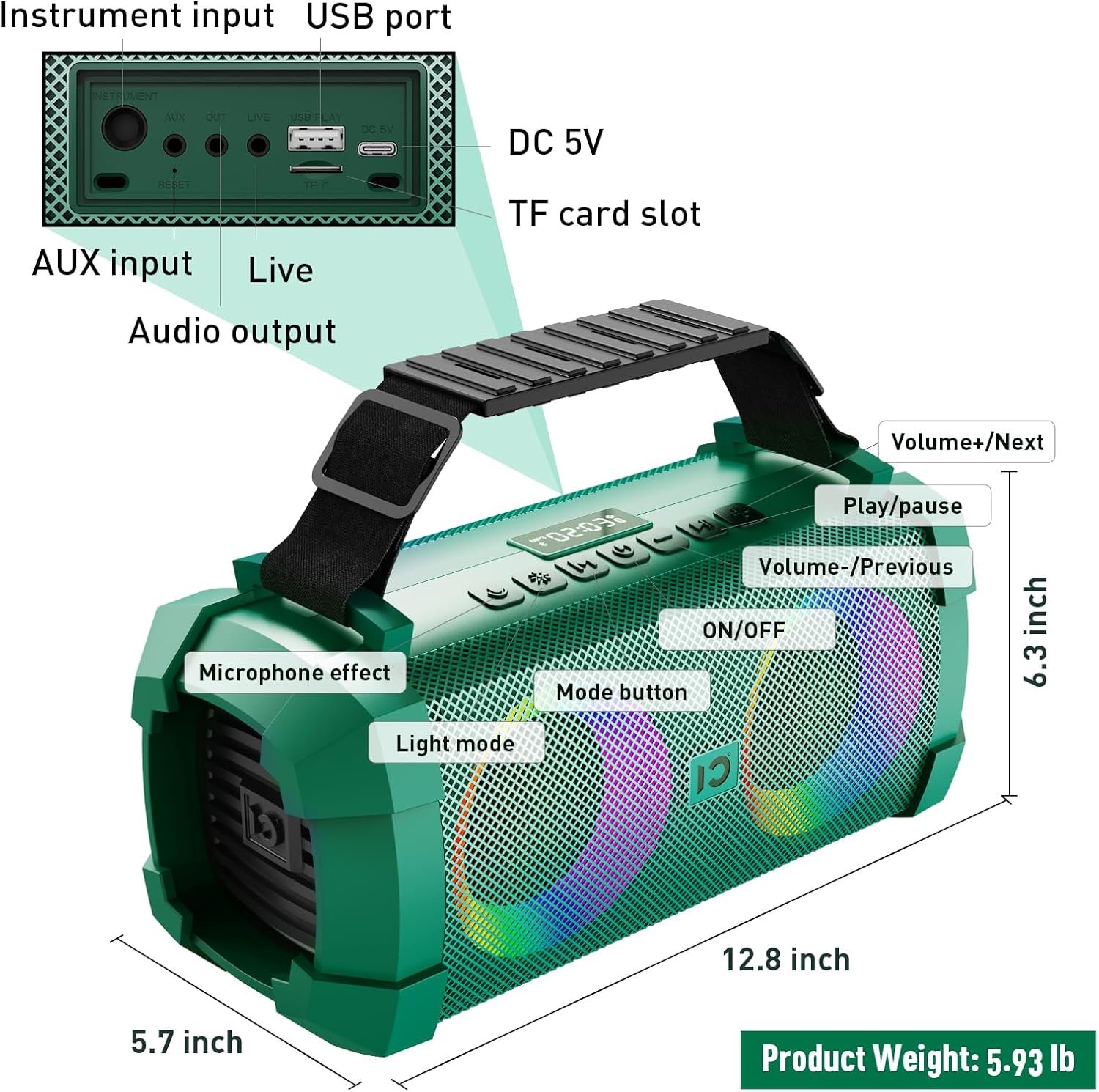
Image: SHIDU X1 Portable Bluetooth Speaker Control Panel Diagram
The speaker features a top-mounted control panel for easy access to various functions:
- ON/OFF tugmasi: Long press to power the speaker on or off.
- Rejim tugmasi: Short press to cycle through input modes (Bluetooth, AUX, TF Card, U-Disk).
- Yorug'lik rejimi tugmasi: Short press to switch between 5 dynamic LED light modes. Long press to turn the lights off.
- Microphone Effect Button: Short press to cycle through 3 sound effects (Popular, Professional, Original) for the microphone.
- Ovoz balandligi - / Oldingi trek tugmasi: Oldingi trek uchun qisqa bosing. Ovoz balandligini pasaytirish uchun uzoq bosing.
- Oʻynatish/Toʻxtatib turish tugmasi: Ovozni ijro etish yoki pauza qilish uchun qisqa bosing.
- Ovoz balandligi + / Keyingi trek tugmasi: Keyingi trek uchun qisqa bosing. Ovoz balandligini oshirish uchun uzoq bosing.
Wireless Microphone Controls
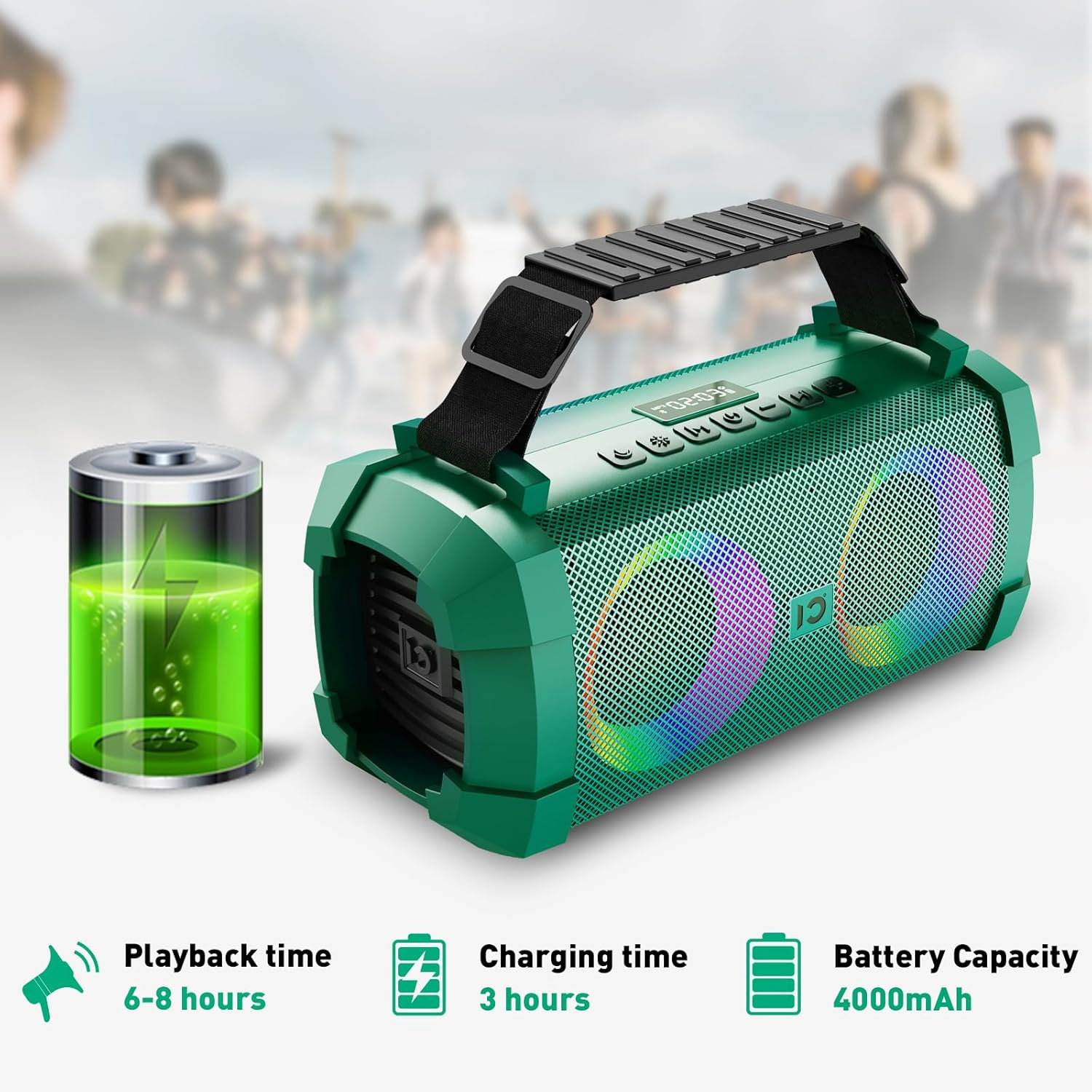
Image: SHIDU X1 Wireless Microphone Controls
The wireless microphone includes the following controls:
- Quvvat tugmasi: Mikrofonni yoqish yoki o'chirish uchun uzoq bosing.
- Frequency + Button: Short press to increase the microphone's frequency.
- Frequency - Button: Short press to decrease the microphone's frequency.
- Ovoz balandligi + tugmasi: Long press to increase microphone volume.
- Ovoz balandligi tugmasi: Long press to decrease microphone volume.
- LED ekrani: Displays current frequency and battery level.
Sozlash; o'rnatish
Karnayni zaryadlash
Before first use, fully charge the speaker. Connect the provided Type-C charging plug to the DC 5V port on the speaker and plug it into a power source. The charging indicator will show the charging status. A full charge takes approximately 3 hours.

Image: SHIDU X1 Portable Bluetooth Speaker battery life details: 6-8 hours playback, 3 hours charging, 4000mAh capacity.
Quvvatni yoqish/o‘chirish
ni uzoq bosib turing ON/OFF button on the speaker's control panel to power it on or off.
Bluetooth ulanishi
- Ensure the speaker is powered on and in Bluetooth mode (indicated by a flashing Bluetooth icon or voice prompt). If not, short press the Rejim Bluetooth rejimiga o'tish uchun tugma.
- Mobil qurilmangizda (smartfon, planshet va boshqalar) Bluetooth-ni yoqing.
- Ni qidirish available Bluetooth devices and select "SHIDU X1" from the list.
- Once connected, the speaker will indicate successful pairing, and the Bluetooth icon will stop flashing.
Mikrofonni ulash
The UHF wireless microphone is factory-paired with the speaker. Simply power on both the speaker and the microphone, and they should connect automatically. If pairing is lost, refer to the troubleshooting section.
Foydalanish bo'yicha ko'rsatmalar
Kirish rejimlarini almashtirish
ni qisqa bosing Rejim button on the speaker to cycle through available input sources: Bluetooth, AUX, TF Card, and U-Disk (USB flash drive).
Adjusting Volume and Tracks
- Ovozni boshqarish: ni uzoq bosib turing Ovoz + button to increase volume, and long press the Hajmi - ovoz balandligini pasaytirish tugmasi.
- Trek navigatsiyasi: ni qisqa bosing Keyingi trek button to skip to the next song, and short press the Oldingi trek button to go to the beginning of the current song or the previous song.
- Oʻynatish/toʻxtatib turish: ni qisqa bosing Oʻynatish/toʻxtatib turish ijroni toʻxtatib turish yoki davom ettirish uchun tugma.
Using Sound Effects
The speaker offers three distinct sound effects for the wireless microphone:

Image: SHIDU X1 Portable Bluetooth Speaker demonstrating Original, Popular, and Professional sound modes.
- Asl rejim: Standard vocal output.
- Popular Mode: Enhances vocals for a more vibrant sound.
- Professional rejim: Provides a refined vocal output suitable for performances.
ni qisqa bosing Mikrofon effekti button on the speaker to cycle through these effects.
LED chiroqlarini boshqarish
The speaker features 5 dynamic LED light modes to enhance the atmosphere.

Image: SHIDU X1 Portable Bluetooth Speaker showcasing 5 types of lighting modes.
ni qisqa bosing Nur rejimi button to cycle through the different lighting patterns. Long press the Nur rejimi button to turn the LED lights off.
Live Streaming Function
The SHIDU X1 includes a professional live streaming interface. Connect your device using the provided Live Stream Cable to enable karaoke live streaming functionality.

Image: SHIDU X1 Portable Bluetooth Speaker with professional live broadcast interface for karaoke.
Mahsulot xususiyatlari tugadiview
The SHIDU X1 is designed for versatile use, offering powerful sound and engaging features for various occasions.

Image: SHIDU X1 Portable Bluetooth Speaker with 60W output, Monstrous Bass, 3 Sound Effects, 5 Party Lights, Bluetooth 5.0, TF Card, 6.5mm Instrument Port, Live Streaming, UHF Wireless Mic, USB Flash Drive.
Experience deep bass and clear highs with 60W high-power stereo sound, suitable for both indoor and outdoor environments.

Image: SHIDU X1 Portable Bluetooth Speaker illustrating high-quality three-dimensional sound and overweight bass.
The speaker is ideal for various scenarios, including family karaoke, parties, band performances, and outdoor camping.

Image: SHIDU X1 Portable Bluetooth Speaker suitable for multiple scenarios: family karaoke, party interaction, band performance, outdoor camping.
Rasmiy mahsulot video
Video: Official SHIDU X1 Wireless Bluetooth Speaker with Wireless Microphone 60W Portable Karaoke Machine overview. This video demonstrates the product's features and functionality.
Texnik xususiyatlari
| Brend | SHIDU |
| Model raqami | X1 |
| Chiqish Vttage | 60 vatt (eng yuqori) / 40 vatt (RMS) |
| Ulanish texnologiyasi | Bluetooth 5.0, AUX, USB, TF Card |
| Buyum oʻlchamlari (U x G x Y) | 12.8 x 5.7 x 6.3 dyuym |
| Element og'irligi | 5.6 funt |
| Batareya quvvati | 4000mAh |
| Ijro vaqti | 6-8 soat (o'rtacha hajmda) |
| Zaryadlash vaqti | 3 soat |
| O'rnatilgan media | Mikrofon |
Muammolarni bartaraf qilish; nosozliklarni TUZATISH
If you encounter any issues with your SHIDU X1 speaker, please refer to the following common solutions:
- Quvvat yo'q: Ensure the speaker is fully charged. Connect the charging cable and allow it to charge for at least 30 minutes before attempting to power on again.
- Ovoz yo'q: Check the volume levels on both the speaker and your connected device. Ensure the correct input mode is selected. If using Bluetooth, verify successful pairing.
- Bluetooth bilan ulanish muammolari: Turn off Bluetooth on your device and the speaker, then restart both. Clear the speaker from your device's Bluetooth history and attempt to pair again. Ensure no other devices are actively connected to the speaker.
- Mikrofon ishlamayapti: Ensure the microphone is powered on and fully charged. Check the microphone's frequency settings and adjust if necessary. Re-pair the microphone if connection is lost (usually automatic).
- Buzilgan ovoz: Reduce the volume on both the speaker and the connected device. Ensure the audio source is of good quality.
Xizmat
To ensure the longevity and optimal performance of your SHIDU X1 speaker, follow these maintenance guidelines:
- Tozalash: Karnayning tashqi qismini tozalash uchun yumshoq, quruq matodan foydalaning. Abraziv tozalagichlar yoki erituvchilardan foydalanmang.
- Saqlash: Dinamikni quruq, salqin joyda, to‘g‘ridan-to‘g‘ri quyosh nuri va haddan tashqari haroratdan uzoqroq joyda saqlang.
- Batareya parvarishi: For optimal battery life, avoid fully discharging the battery frequently. Charge the speaker regularly, even if not in use, to maintain battery health.
- Suvga chidamliligi: While designed for outdoor use, avoid submerging the speaker in water or exposing it to heavy rain.
Kafolat va qo'llab-quvvatlash
The SHIDU X1 Portable Bluetooth Speaker comes with a standard manufacturer's warranty. Please refer to the warranty card included in your package for specific terms and conditions.
For technical support, troubleshooting assistance, or warranty claims, please contact SHIDU customer service through the retailer where you purchased the product or visit the official SHIDU webaloqa ma'lumotlari uchun sayt.