
RODOT KR2201W+KT1002-AB-4
RODOT WiFi Smart Switch User Manual
Model: KR2201W+KT1002-AB-4
1. Mahsulot tugadiview
The RODOT WiFi Smart Switch is a versatile home automation device designed to provide remote control and smart scheduling for your electrical appliances and lighting. It combines Wi-Fi connectivity with 433MHz RF remote control capabilities, offering multiple ways to manage your home devices.

Image: The RODOT WiFi Smart Switch module shown with its accompanying 433MHz RF remote control and a smartphone displaying the Smart Life app interface.
Nimalar kiradi:
- 1 x Tuya Smart Wi-Fi & RF Receiver (Smart Switch Module)
- 1 x Long-distance 433Mhz RF Remote Control
2. O'rnatish va o'rnatish
2.1 Ulanish sxemasi
Proper wiring is crucial for safe and effective operation. Ensure power is disconnected before proceeding with any wiring. The smart switch module connects between your power source (AC 90-250V) and the appliance or light fixture.

Image: A clear diagram illustrating the input (AC 90-250V) and output connections for the RODOT WiFi Smart Switch module, showing how it integrates with a light bulb circuit.
2.2 App Download and Wi-Fi Pairing
To enable smart control features, download the free Aqlli hayot or TUYA Smart ilovasi from your device's app store (iOS App Store or Google Play Store). Follow the in-app instructions to add your RODOT WiFi Smart Switch to your home Wi-Fi network. Ensure your Wi-Fi network is 2.4GHz, as the device does not support 5GHz networks during initial pairing.
2.3 RF Remote Pairing
The included 433MHz RF remote control can be paired with the smart switch module for direct control without Wi-Fi. The video below demonstrates the pairing process for different modes:
Video: This video demonstrates the unboxing of the RODOT Smart Switch and the various RF remote pairing modes, including toggle, latching, jog, and reset procedures. It visually guides users through the button press sequences for each mode.
RF Pairing Modes:
- Oʻchirish rejimi: Click the button on the smart switch module twice, then press any button on the RF remote once. Each press of the remote button will toggle the connected device on/off.
- Latching Mode: Click the button on the smart switch module three times, then press button 'A' on the RF remote once (for ON) and button 'B' once (for OFF).
- Yugurish rejimi: Click the button on the smart switch module four times, then press any button on the RF remote once. The connected device will turn on only while the remote button is held down.
- Reset RF Pairing: Click the button on the smart switch module eight times to clear all paired RF remote controls.
3. Operating the Smart Switch
3.1 Ilovani masofadan boshqarish
Once paired with the Smart Life or TUYA Smart App, you can remotely control your connected appliances from anywhere with an internet connection. The app allows for instant on/off control, status feedback, and advanced automation.

Image: A smartphone screen displaying the Smart Life app, showing device controls and options for smart home automation.
3.2 RF masofadan boshqarish pulti
Use the included 433MHz RF remote control for convenient local control of your smart switch. Depending on the pairing mode (Toggle, Latching, or Jog), the remote buttons will perform different actions as described in the RF Remote Pairing section.

Rasm: batafsil view of the 433MHz RF remote control, highlighting its compact design and two control buttons (A and B).
3.3 Ovozli boshqaruv
The RODOT WiFi Smart Switch is compatible with popular voice assistants like Amazon Alexa and Google Home. After linking your Smart Life/TUYA Smart account with your voice assistant, you can control your devices using simple voice commands, such as "Alexa, turn on the living room light" or "Hey Google, turn off the fan."
3.4 Timer & Schedule Functions
Utilize the Smart Life/TUYA Smart App to set up various timing schedules for your connected appliances. This includes countdown timers, scheduled on/off times, and recurring schedules, allowing for automated control and energy efficiency.
3.5 Wide Application
The smart switch is designed for broad compatibility with various household appliances and lamps. It can be used to control ceiling lamps, cabinet lights, wall lamps, stol lamps, fans, electric kettles, LED spotlights, and more, making it a versatile solution for smart home integration.

Image: An illustration showing various applications of the smart switch, including controlling ceiling fans, wall lamps, cabinet lights, and desk lamps, demonstrating its flexibility in expanding a lighting system.
4. Xizmat ko'rsatish
The RODOT WiFi Smart Switch is designed for durability and requires minimal maintenance. To ensure optimal performance and longevity:
- Qurilmani quruq muhitda, namlik va haddan tashqari haroratdan uzoqroq joyda saqlang.
- Tashqi qismini yumshoq, quruq mato bilan tozalang. Qattiq kimyoviy moddalar yoki abraziv tozalash vositalaridan foydalanmang.
- Agar yopiq joyga o'rnatilgan bo'lsa, to'g'ri shamollatilishini ta'minlang.
- For the RF remote, replace the 12V 23A battery when its performance degrades. (Battery not included with product).
5. Muammolarni bartaraf qilish; nosozliklarni TUZATISH
If you encounter issues with your RODOT WiFi Smart Switch, consider the following common solutions:
- Qurilma javob bermayapti:
- Check power supply to the smart switch module.
- Verify the connected appliance or light fixture is working correctly.
- Ensure the RF remote battery is not depleted.
- Wi-Fi ulanishi bilan bog'liq muammolar:
- Confirm your Wi-Fi network is 2.4GHz. The device does not support 5GHz.
- Ensure the smart switch is within range of your Wi-Fi router.
- Restart your Wi-Fi router and the smart switch module.
- Attempt to re-pair the device with the Smart Life/TUYA Smart App.
- RF Remote Not Pairing/Working:
- Ensure the RF remote has a fresh 12V 23A battery.
- Repeat the RF pairing steps carefully as shown in the video in Section 2.3.
- If multiple remotes are causing interference, try resetting the smart switch's RF pairing (click button 8 times) and re-pairing only the desired remote.
For more detailed troubleshooting steps, please refer to the official User Guide PDF: RODOT WiFi Smart Switch User Guide (PDF).
6. Texnik shartlar
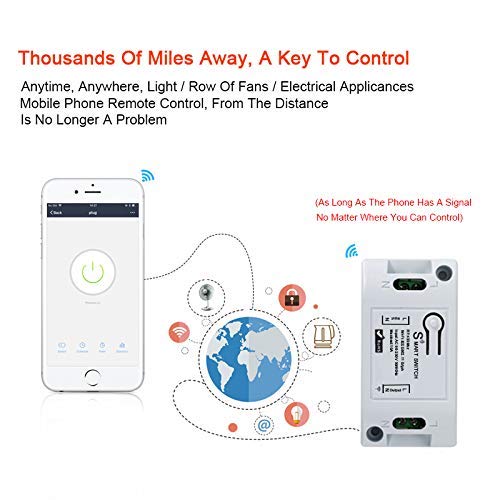
Image: An infographic detailing the dimensions of the smart switch module and RF remote, along with key features like 433MHz RF and various applications.
| Xususiyat | Tafsilot |
|---|---|
| Receiver Model Number | KR2201W-4 |
| Kirish hajmitage | AC 90-250V |
| Maksimal oqim | 10A |
| Simsiz turi | Wi-Fi 2.4GHz (IEEE 802.11 b/g/n) |
| Receiver Product Size | 3.19 x 1.64 x 1.01 dyuym |
| Transmitter Model Number | KT1002-AB-4 |
| Operating RF Frequency | 433 MGts |
| Coded System | 1527 Learning Code |
| Transmitterning ish jildtage | DC 12V |
| Simsiz ishlash masofasi | 400 m (Bo'sh joy) |
| Aloqa materiali | Mis |
| Ishlab chiqaruvchi | RODOT |
| Birinchi mavjud sana | 1 yil 2021 fevral |
7. Kafolat va qo'llab-quvvatlash
For comprehensive warranty information and customer support, please refer to the official product documentation. A detailed User Guide is available in PDF format:
Foydalanuvchi qo'llanmasini yuklab oling (PDF)
You can also visit the official RODOT Store on Amazon for more products and support: RODOT Store.
Ask a question about this manual
Ask about setup, troubleshooting, compatibility, parts, safety, or missing instructions. Manuals+ will review the question and use this page’s manual context to help answer it.