
Mahsulot tugadiview
The DYNAVIN D9-DMI Ultra Flex is an advanced Android car radio navigator designed to upgrade your in-car entertainment and navigation experience. It features a 6.5-inch high-resolution anti-glare touchscreen, integrated GPS navigation, wireless CarPlay, and Android Auto compatibility. This unit seamlessly integrates with your vehicle's existing systems, including steering wheel controls, climate control, and parking sensors, for a cohesive user experience.
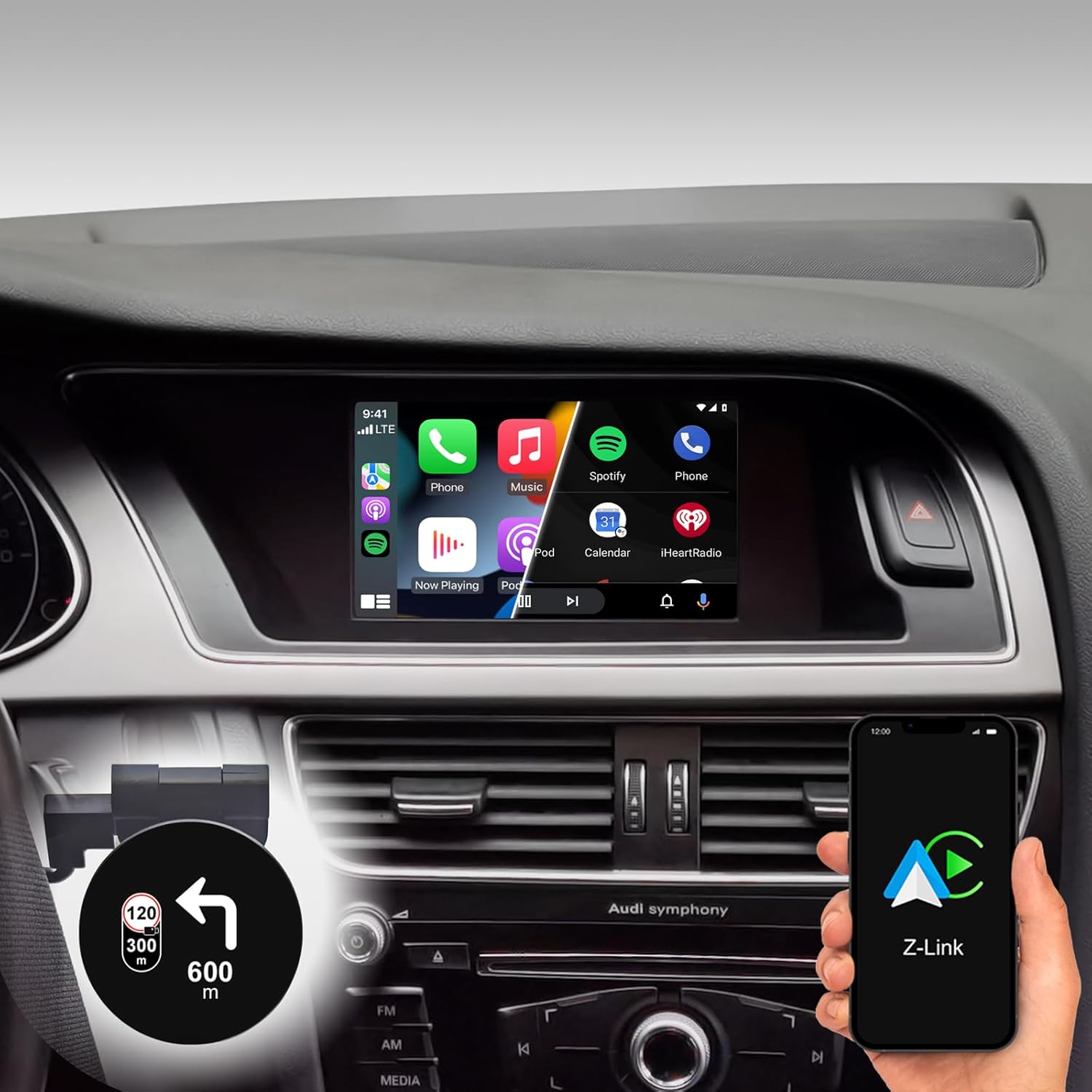
Figure 1: DYNAVIN D9-DMI Ultra Flex Car Radio Navigator installed in an Audi dashboard, showcasing its CarPlay interface and integration with navigation features.
Moslik
This Android Navi Radio is specifically designed for Audi vehicles equipped with a Concert or Symphony radio. Please verify your vehicle's radio type before installation to ensure compatibility.
- Audi A4: 2007 – 2015
- Audi A5: 2007 – 2016
- Audi Q5: 2008 – 2017
- Audi S4: 2009 – 2016
- Audi S5: 2009 – 2016
The unit is compatible with the original AUDI sound system and can receive the AUDI vehicle menu.

Figure 2: Compatible Audi Concert and Symphony radio units.

Figure 3: How to check your car's system version for compatibility.
Asosiy xususiyatlar
- Displey: 6.5-inch high-resolution (1024 x 600 pixels) anti-glare touchscreen.
- Operatsion tizim: Android 11 OS with quad-core CPU and 4 GB RAM.
- Ulanish: Wireless CarPlay, Android Auto, and Smartphone Mirroring.
- Navigatsiya: Integrated GPS navigation with Dynaway app (31-day trial, activation code required), including speed camera information.
- Audio: Highly sensitive FM-RDS tuner with 15 presets for clear, noise-free playback. Supports audio streaming via smartphone/USB.
- Mikrofon: Compact digital dual microphone with noise reduction for excellent call quality.
- Integratsiya: Integrated CANBUS solution for seamless control via steering wheel, air conditioning display, and parking sensor information.
- Head-up Display (HUD): Included HUD shows navigation directions, vehicle speed, and speed camera alerts.
- Dynapp Pack: Access to Google Playstore, third-party app installation, and display of speed limits (31-day trial, activation code required).

Figure 4: DYNAVIN's commitment to quality and experience.

Figure 5: The innovative Dynavin Digital Dual-Microphone.

Figure 6: Upgrade your Audi system with the DYNAVIN DMI Ultra Flex.
O'rnatish va o'rnatish
Installation of the DYNAVIN D9-DMI Ultra Flex requires careful attention to detail. It is recommended to have the installation performed by a qualified professional. The unit integrates with your vehicle's existing wiring and CAN-BUS system.
Kiritilgan komponentlar:
Ensure all components listed below are present in your package before beginning installation.

Figure 7: Complete list of accessories included in the package.
- Dynavin Radio Unit
- Ulanish kabeli
- DAB antennasi
- DAB / CAN Interface
- Orqa kamera kabeli
- GPS antenna
- USB uzatma kabeli
- Antenna adapteri
- Mikrofon
- Climate Control Cable
- HUD 150 (Head-up Display)
- BT/Wi-Fi antennasi
- Demontaj asboblari
- Tez qo'llanma
O'rnatish bosqichlari (umumiy):
Refer to the included Quick Guide for detailed, step-by-step installation instructions specific to your Audi model. Professional installation is highly recommended.
- Tayyorlanishi: Disconnect the vehicle's battery. Use the provided disassembly tools to carefully remove the original radio unit and trim.
- Elektr simlari: Connect the Dynavin radio unit using the supplied connection cables, ensuring all connections are secure. Integrate the DAB/CAN interface and connect the GPS antenna, DAB antenna, and BT/Wi-Fi antenna.
- Microphone Installation: Install the compact digital dual microphone in a suitable location, typically near the rearview mirror or steering column, for optimal call quality.
- Head-up Display Installation: Mount the HUD 150 unit on your dashboard or windshield as per the instructions, ensuring it does not obstruct your view.
- CAN-BUS Integration: Ensure the CAN-BUS connections are correctly made to enable steering wheel control, climate display, and parking sensor integration.
- Sinov: Reconnect the vehicle's battery. Power on the unit and perform initial function tests for radio, navigation, CarPlay/Android Auto, and vehicle system integration.
- Qayta yig'ish: Boshqaruv paneli qismlarini ehtiyotkorlik bilan qayta yig'ing.
Foydalanish bo'yicha ko'rsatmalar
Asosiy operatsiya:
- Quvvatni yoqish/oʻchirish: The unit typically powers on and off with the vehicle's ignition.
- Sensorli ekranni boshqarish: Navigate menus and select functions using the responsive 6.5-inch touchscreen.
- Rulni boshqarish elementlari: Utilize your vehicle's existing steering wheel controls for volume, track skipping, and call management, thanks to CAN-BUS integration.
Navigatsiya tizimi:
The integrated GPS navigation system uses the Dynaway app. A 31-day trial is included, after which an activation code must be purchased.
- Manzil kiritish: Enter destinations via the touchscreen.
- Ovozli ko'rsatma: Follow clear voice instructions for turn-by-turn navigation.
- Yo'nalish bo'yicha ko'rsatma: Select preferred route options (e.g., fastest, shortest).
- Speed Camera Alerts: The navigation software includes alerts for speed cameras.
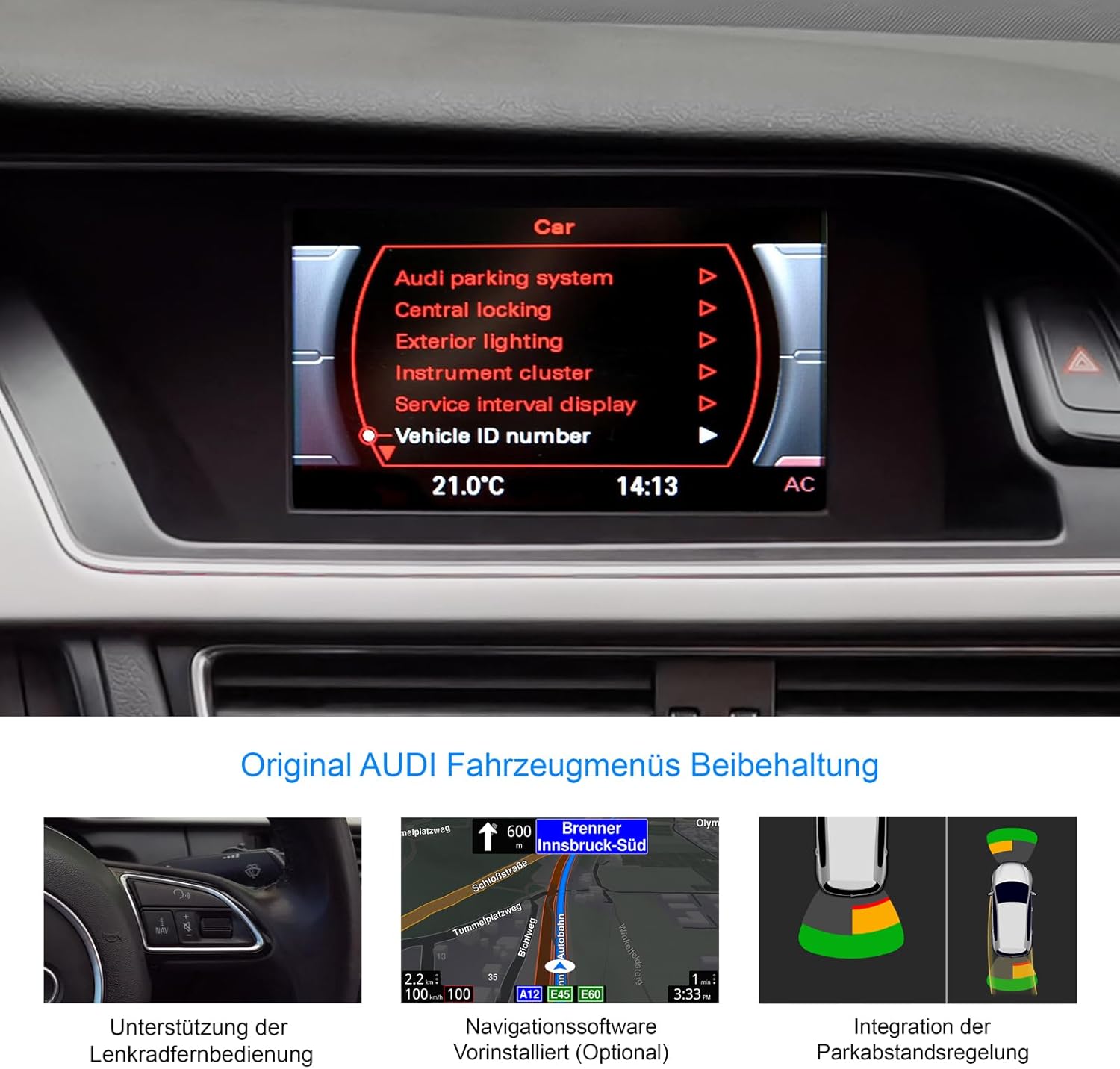
Figure 8: Retention of original Audi vehicle menus and integrated features.
CarPlay va Android Auto:
Connect your smartphone wirelessly to access CarPlay (for iOS devices) or Android Auto (for Android devices). A 31-day trial is included, after which an activation code must be purchased.
- Simsiz ulanish: Pair your phone via Bluetooth and follow the on-screen prompts to establish a wireless CarPlay or Android Auto connection.
- Ilovaga kirish: Use compatible apps for navigation (Apple Maps, Google Maps), music streaming (Spotify, Apple Music), messaging, and calls directly from the unit's display.
Head-up Display (HUD):
The included HUD 150 projects key information onto your windshield, allowing you to keep your eyes on the road.
- Information Displayed: Navigation directions (from Dynaway, Apple Maps, Google Maps), vehicle speed, and Blitzer.de speed camera information.
- Joylashtirish: Position the HUD unit to ensure clear visibility without obstructing your driving view.

Figure 9: Head-up Display in action, showing navigation and time.
Xizmat
To ensure the longevity and optimal performance of your DYNAVIN D9-DMI Ultra Flex, follow these maintenance guidelines:
- Ekranni tozalash: Elektron ekranlar uchun maxsus mo'ljallangan yumshoq, tuksiz matodan foydalaning. Abraziv tozalagichlar yoki erituvchilardan foydalanmang. Chang va barmoq izlarini tozalash uchun ekranni muloyimlik bilan arting.
- Dasturiy ta'minot yangilanishlari: Periodically check for software updates from DYNAVIN to ensure the system runs efficiently and has the latest features and bug fixes. Updates can typically be performed via Wi-Fi or USB.
- Umumiy parvarish: Jihozni haddan tashqari harorat, uzoq vaqt davomida to'g'ridan-to'g'ri quyosh nuri yoki haddan tashqari namlik ta'siridan saqlaning.
- Kabel ulanishlari: Ensure all cables remain securely connected. Avoid pulling on cables forcefully.
Muammolarni bartaraf qilish; nosozliklarni TUZATISH
This section addresses common issues you might encounter with your DYNAVIN D9-DMI Ultra Flex. For more complex problems, contact customer support.
| Muammo | Mumkin sabab | Yechim |
|---|---|---|
| Qurilma yoqilmaydi. | Bo'shashgan quvvat ulanishi, yonib ketgan sug'urta, avtomobil akkumulyatori muammosi. | Check all power cables and connections. Inspect vehicle fuses. Ensure vehicle battery is charged. |
| Ovoz chiqishi yo'q. | Volume too low, mute activated, incorrect audio source selected, wiring issue. | Increase volume. Check if mute is active. Select correct audio source. Verify speaker wiring connections. |
| CarPlay/Android Auto ulanmayapti. | Bluetooth not paired, Wi-Fi disabled, trial period expired, activation code not entered. | Ensure Bluetooth and Wi-Fi are enabled on both devices. Re-pair the phone. Check trial status and enter activation code if necessary. |
| GPS signali yo'qoldi yoki noto'g'ri. | GPS antenna obstructed or disconnected, poor satellite reception. | Ensure GPS antenna is properly installed and has a clear view of the sky. Check antenna connection. Move to an open area. |
| Steering wheel controls not working. | CAN-BUS connection issue, incorrect vehicle configuration. | Verify CAN-BUS wiring. Check unit settings for correct vehicle model configuration. |
Texnik xususiyatlari
| Xususiyat | Tafsilot |
|---|---|
| Brend | DYNAVIN |
| Model | D9-DMI Ultra Flex |
| Mos keluvchi transport vositalari | Audi A4 (2007-2015), A5 (2007-2016), Q5 (2008-2017), S4 (2009-2016), S5 (2009-2016) with Concert/Symphony radio |
| Ekran o'lchami | 6.5 dyuym |
| Displey turi | LCD, Anti-glare |
| Rezolyutsiya | 1024 x 600 piksel |
| Operatsion tizim | Android 11 |
| Markaziy protsessor | To'rt yadroli |
| Ram | 4 GB |
| Ulanish | Wireless CarPlay, Android Auto, Bluetooth, USB |
| Audio chiqish rejimi | Stereo (2.0 kanalli) |
| Radio tyuner | FM-RDS with 15 presets |
| Maxsus xususiyatlar | Integrated GPS Navigation, Head-up Display (HUD), CAN-BUS Integration (steering wheel, climate, parking sensors), Digital Dual Microphone |
| Paket o'lchamlari | 28 x 23 x 10 sm |
| Element og'irligi | 2 kg |
| ASIN | B0CS67GQKN |
Kafolat va qo'llab-quvvatlash
For warranty information, please refer to the documentation provided with your purchase or contact DYNAVIN customer service directly. DYNAVIN offers customer support for product inquiries, technical assistance, and troubleshooting.
For the Dynapp package, CarPlay, and Android Auto features, a 31-day trial phase is included. An activation code must be purchased online to continue using these features after the trial period.
Please visit the official DYNAVIN website or contact your retailer for the most up-to-date support information and contact details.