
1. Kirish
Thank you for choosing the JAZAVA 72-inch Smart Ceiling Fan with Lights. This manual provides detailed instructions for the safe installation, operation, and maintenance of your new ceiling fan. Please read this manual thoroughly before installation and keep it for future reference.

1.1-rasm: tugadiview of the JAZAVA 72-inch Smart Ceiling Fan with included accessories.
2. Xavfsizlik ma'lumotlari
OGOHLANTIRISH: Yong'in, elektr toki urishi yoki shaxsiy jarohatlar xavfini kamaytirish uchun har doim quyidagi asosiy ehtiyot choralariga rioya qiling:
- Fanni o'rnatishdan oldin barcha ko'rsatmalarni o'qing.
- Ensure the installation site is suitable for supporting the fan's weight (approximately 26.6 pounds).
- Barcha simlar milliy va mahalliy elektr qoidalariga muvofiq bo'lishi kerak. Agar siz simlar bilan tanish bo'lmasangiz, malakali elektrikchiga murojaat qiling.
- Disconnect power at the circuit breaker or fuse box before beginning installation or performing any maintenance.
- Ventilyatorni shikastlangan elektr simi yoki vilkasi bilan ishlatmang.
- Fan pichoqlari yo'liga narsalarni qo'yishdan saqlaning.
- Ventilyatorning pichoqlari poldan kamida 7 fut (2.1 metr) balandlikda o'rnatilganligiga ishonch hosil qiling.
3. Paket tarkibi
Quyida keltirilgan barcha komponentlar paketingizga kiritilganligini tekshiring:
- 1 x DC Motor and Housing
- 1 x LED Light and Lamp Soyalar
- 9 x yog'och pichoqlar
- 1 x masofadan boshqarish pulti
- Installation Accessories (including 5", 10", and 24" downrods)

Image 3.1: Product details and included components diagram.
4. O'rnatish va o'rnatish
The JAZAVA smart ceiling fan is designed for straightforward installation. A video guide and comprehensive instructions are included in the package. Ensure you have all necessary tools before beginning.
- O'rnatish joyini tayyorlang: Turn off power at the circuit breaker. Ensure the ceiling junction box is securely mounted and capable of supporting the fan's weight.
- Braketni o'rnatish: Attach the mounting bracket to the ceiling junction box using the provided screws and washers.
- Pastki novda va motorni yig'ing: Select the appropriate downrod (5", 10", or 24") for your ceiling height. Securely attach it to the fan motor housing.
- Fanni osib qo'ying: Ehtiyotkorlik bilan fan moslamasini ko'taring va uni o'rnatish moslamasiga osib qo'ying.
- Fanni sim bilan ulang: Connect the electrical wires according to the wiring diagram provided in the detailed manual. Ensure all connections are secure. Note: Some units may have reversed yellow and white wires in the light kit connector. If the light does not function correctly, verify wire alignment or consult customer support.
- Pichoqlarni biriktiring: Securely attach the nine wooden blades to the motor housing.
- Install LED Light Kit: Connect and install the LED light kit and lamp soyalar.
- Yakuniy tekshiruvlar: Barcha vintlar mahkamlanganligiga va ulanishlar mahkamlanganligiga ishonch hosil qiling. Elektr o'chirgichdagi quvvatni qayta tiklang.
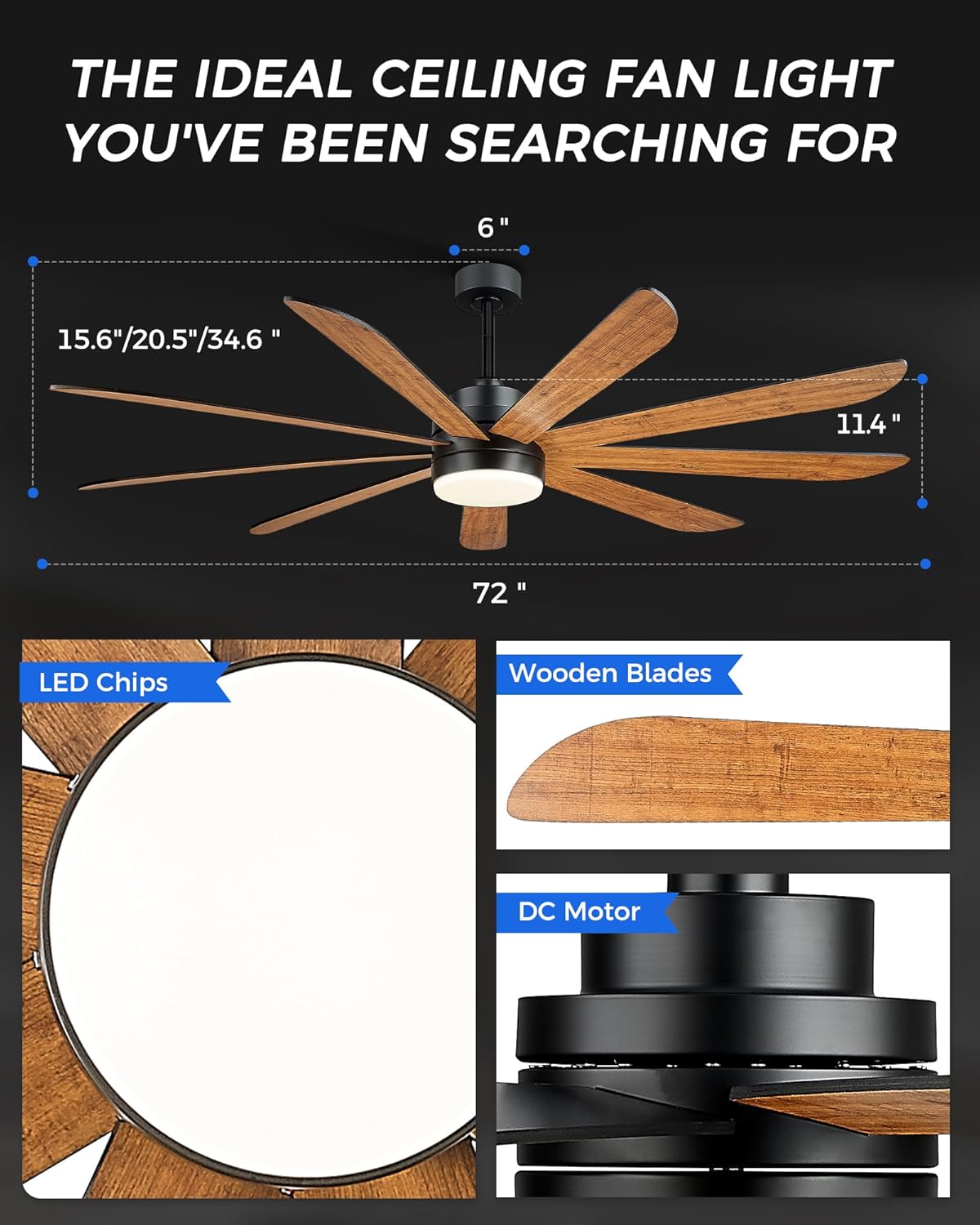
Image 4.1: Key components of the ceiling fan, including LED light, wooden blades, and DC motor.
5. Foydalanish bo'yicha ko'rsatmalar
Your JAZAVA ceiling fan offers multiple control methods for convenience.
5.1. Masofadan boshqarish pulti
The included remote control allows full functionality of the fan and light. Insert batteries (not included) into the remote. Follow the pairing instructions in the detailed manual if the remote does not respond immediately.
- Ventilyatorni yoqish/o‘chirish: Fanni yoqish yoki o'chirish uchun fan tugmasini bosing.
- Fan tezligi: Adjust fan speed from 1 to 6 using the speed buttons.
- Chiroqni yoqish/o‘chirish: Chiroqni yoqish yoki o'chirish uchun yorug'lik tugmasini bosing.
- Ochiq rang harorati: Cycle through 3000K (Warm Light), 4000K (Natural Light), and 5000K (Cool Light) settings.
- Yorug'lik yorqinligi: Yorqinlikni 10% dan 100% gacha sozlang.
- Taymer: Set the fan to turn off after 1, 2, or 4 hours.
- Oldinga/teskari: Switch between summer (forward, clockwise) and winter (reverse, counter-clockwise) modes.
5.2. TUYA Smart App Control
Download the TUYA Smart App (compatible with 2.4GHz WIFI) from your device's app store. Follow the in-app instructions to connect your fan to your home network. The app provides comprehensive control over all fan and light functions, including scheduling.
5.3. Ovozli boshqaruv
Once connected to the TUYA Smart App, you can link your fan to voice assistants like Amazon Alexa or Google Assistant. Use voice commands to control fan speed, light settings, and turn the fan on/off.

Image 5.1: Demonstrating the three intelligent control systems: remote, app, and voice control.

Image 5.2: Explanation of the fan's reversible motor for summer and winter use.

Image 5.3: Customizable color temperature and brightness settings.

Image 5.4: Six wind speed settings for varied comfort levels.
6. Xizmat ko'rsatish
Muntazam texnik xizmat ko'rsatish ship foniyingizning optimal ishlashi va uzoq umr ko'rishini ta'minlaydi.
- Tozalash: Vaqti-vaqti bilan ventilyator pichoqlari va motor korpusini yumshoq, damp mato. Abraziv tozalash vositalarini yoki erituvchilarni ishlatmang. Tozalashdan oldin quvvat o'chirilganligiga ishonch hosil qiling.
- Pichoq balansi: If the fan wobbles, check that all blade screws are tight. A balancing kit (not included) can be used if necessary.
- Nur to'plami: The LED light kit is designed for long life and typically does not require replacement. If issues occur, refer to troubleshooting or contact support.
7. Muammolarni bartaraf qilish; nosozliklarni TUZATISH
Umumiy muammolar va ularning yechimlari uchun ushbu bo'limga qarang.
| Muammo | Mumkin sabab | Yechim |
|---|---|---|
| Fan ishga tushmaydi | No power; Loose wiring; Remote not paired or dead batteries. | Check circuit breaker; Verify all wire connections; Replace remote batteries or re-pair remote. |
| Nur ishlamaydi | Loose wiring; Incorrect wiring of light kit; LED failure. | Check light kit wiring (ensure yellow to yellow, white to white); Verify connections; Contact customer support if LED is faulty. |
| Muxlis qimirlayapti | Loose blades or mounting; Unbalanced blades. | Ensure all blade screws and mounting screws are tight; Use a blade balancing kit if necessary. |
| Fan shovqinli | Loose screws; Motor issue; Obstruction. | Check all screws for tightness; Ensure no wires or objects are touching the fan; If noise persists, contact support. |
| Smart features (App/Voice) not working | Incorrect Wi-Fi connection; App not configured; Voice assistant not linked. | Ensure fan is connected to 2.4GHz Wi-Fi; Reconfigure fan in TUYA Smart App; Relink app to voice assistant. |
8. Texnik shartlar
| Xususiyat | Tafsilot |
|---|---|
| Brend | JAZAVA |
| Model nomi | CF03-BK |
| Rang | Matte Black & Dark Walnut |
| Mahsulot o'lchamlari | 72"D x 72"W x 34.6"Y |
| Element og'irligi | 26.6 funt |
| Quvvat manbai | Simli elektr |
| jildtage | 120 volt (DC) |
| Wattage (yorug'lik) | 24 vatt |
| Lampochka turi | LED |
| Rang harorati | 3000K, 4000K, 5000K (Dimmable) |
| Pichoqlar soni | 9 |
| Quvvat darajalari soni | 6 (Ventilyator tezligi) |
| Nazorat usuli | Ilova, masofadan boshqarish pulti, ovoz |
| Ichki/tashqi makonda foydalanish | Indoor, Outdoor (Patio) |
| Havo oqimining hajmi | 7674 Cubic Centimeters Per Minute |
9. Kafolat va qo'llab-quvvatlash
9.1. Kafolat haqida ma'lumot
Every product purchased from our Amazon store is eligible for a 30-day replacement parts policy to ensure optimal performance. Furthermore, these items are protected by a one-year warranty from the date of shipment. This warranty encompasses all terms and conditions outlined in the original manufacturer's warranty. However, it does not extend to issues such as theft, loss, water-related damages, misuse by the customer, or deterioration of the product’s finish due to exposure to UV rays or coastal environments.
9.2. Mijozlarni qo'llab-quvvatlash
For any questions, technical assistance, or warranty claims, please contact our customer service team. We offer 24-hour support and maintain local stock for faster delivery of replacement parts if needed.
Refer to the contact information provided with your purchase or visit the JAZAVA official webqo'llab-quvvatlash tafsilotlari uchun sayt.


