
1. Kirish
Thank you for choosing the TECLAST Mini PC N15. This compact and powerful mini computer is designed for a wide range of applications, from home entertainment and office tasks to creative work and light gaming. Featuring an Intel N5095 processor, 16GB DDR4 RAM, and a 512GB PCI-e 3.0 SSD, it offers efficient performance in a small form factor. This manual provides essential information for setting up, operating, maintaining, and troubleshooting your device.
2. Paket tarkibi
Please verify that all items listed below are included in your package. If any items are missing or damaged, please contact TECLAST customer support.
- 1x TECLAST N15 Mini PC
- 1x Foydalanuvchi uchun qo'llanma
- 1x HDMI kabeli
- 1x VESA o'rnatish moslamasi
- 1 x quvvat adapteri
- 1x quvvat kabeli

Image: Package contents of the TECLAST N15 Mini PC.
3. Mahsulot tugadiview
3.1. Asosiy xususiyatlar
- Protsessor: Intel N5095 (4 Cores, 4 Threads, up to 2.9GHz Turbo Frequency)
- Grafika: Intel UHD Grafikasi
- Xotira: 16 GB DDR4 operativ xotira
- Saqlash: 512GB PCI-e 3.0 SSD
- Ulanish: Dual 2.5GbE RJ45 Ethernet, Wi-Fi (2.4G+5G ac), Bluetooth 4.2
- Video chiqishi: Supports up to three 4K displays (HDMI, DisplayPort, Full-Function Type-C)
- Portlar: Multiple USB 3.2, USB 2.0, Full-Function Type-C, DisplayPort, HDMI, COM Port, Micro SD Card Reader, Headphone Output, Microphone Input
- Dizayn: Compact (0.53L volume, 400g weight), Aluminum Body, VESA Mountable

Image: Intel N5095 Processor specifications and architecture.
3.2. Portlar va interfeyslar
The TECLAST N15 Mini PC offers a comprehensive set of ports for versatile connectivity:
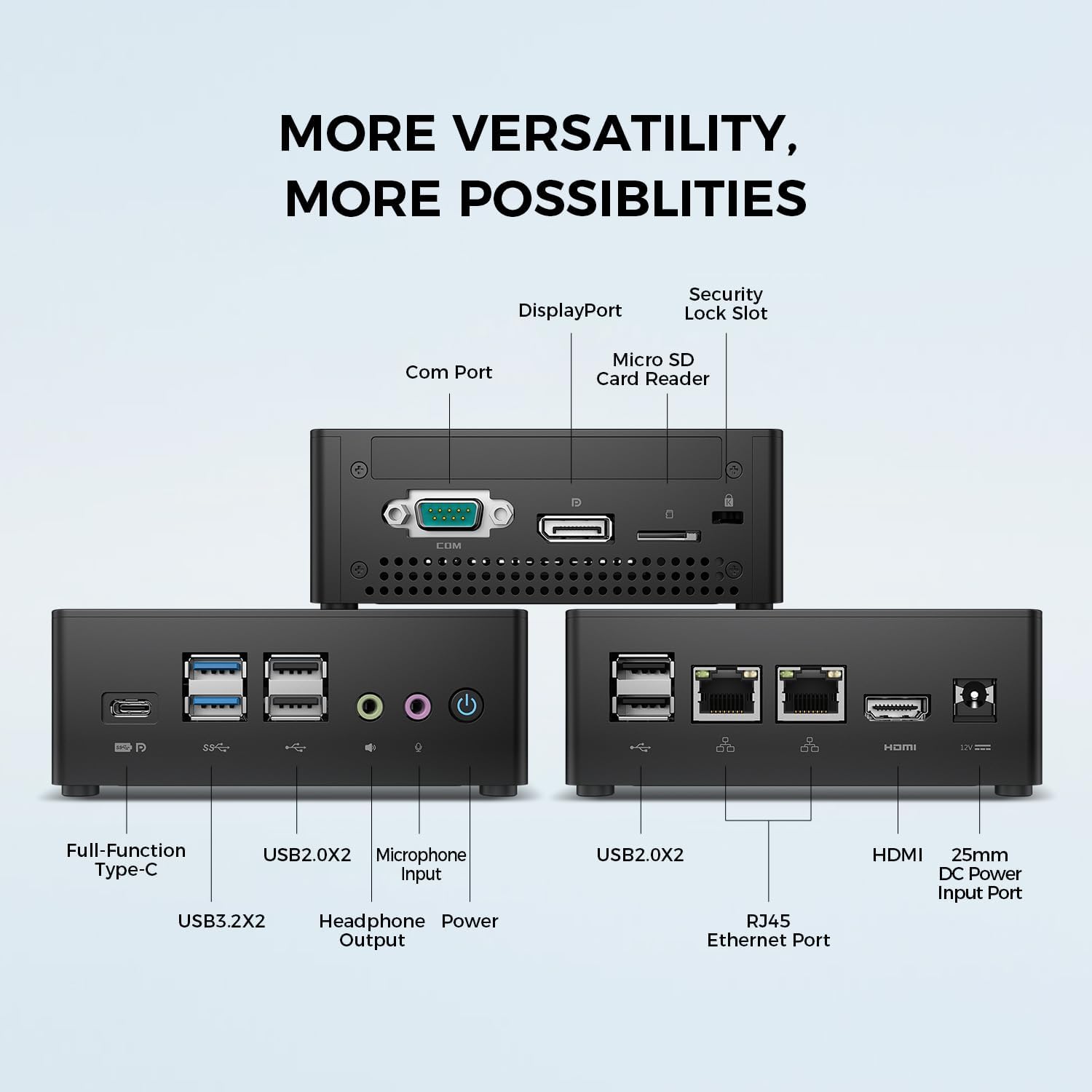
Rasm: batafsil view of the TECLAST N15 Mini PC's front, side, and rear ports.
- Old panel: Full-Function Type-C (supports charging, data, video, audio), 2x USB 3.2, 2x USB 2.0, Headphone Output, Microphone Input, Power Button.
- Yon panel: COM Port, DisplayPort, Micro SD Card Reader, Security Lock Slot.
- Orqa panel: 2x USB 2.0, 2x RJ45 Ethernet Ports (2.5GbE), HDMI, DC Power Input.

Image: Dual 2.5GbE RJ45 Ethernet Ports for high-speed networking.
3.3. Sovutish tizimi
The N15 Mini PC is designed for efficient heat dissipation to ensure stable and quiet operation. It features a 15W TDP, nickel-plated heat pipe, and a turbo fan, providing over 16000mm² of heat dissipation area.

Image: Internal cooling system design for quiet and efficient operation.
3.4. Kompakt dizayn
With a compact volume of approximately 0.53L and a weight of 400g, the N15 Mini PC is highly portable and can be easily integrated into any workspace. Its aluminum body ensures durability.

Image: Compact size and lightweight design of the Mini PC.
4. O'rnatish bo'yicha ko'rsatmalar
4.1. Periferik qurilmalarni ulash
- Monitorni ulash: Use the provided HDMI cable to connect your monitor to the HDMI port on the Mini PC. Alternatively, use a DisplayPort cable or a Full-Function Type-C cable for compatible monitors.
- Klaviatura va sichqonchani ulang: Plug your USB keyboard and mouse into any available USB ports on the Mini PC.
- Tarmoqqa ulanish (ixtiyoriy): For a wired connection, connect an Ethernet cable from your router or modem to one of the RJ45 ports on the Mini PC. For wireless, ensure your Wi-Fi network is available during initial setup.
- Quvvatni ulash: Connect the power adapter to the DC Power Input port on the Mini PC, then plug the power cable into a wall outlet.
4.2. Quvvatni yoqish va dastlabki sozlash
- Press the Power Button on the front of the Mini PC.
- The system will boot up. If it's the first time, it will guide you through the Windows operating system setup process. Follow the on-screen instructions to configure language, region, network, and user accounts.
- Ensure all drivers are installed. Windows Update typically handles this automatically.
5. Foydalanish bo'yicha ko'rsatmalar
5.1. Asosiy operatsiya
Once setup is complete, your TECLAST N15 Mini PC functions like a standard desktop computer. You can launch applications, browse the internet, and manage files using your connected keyboard and mouse.
5.2. Multi-Display Setup
The Mini PC supports connecting up to three 4K displays simultaneously, enhancing productivity and entertainment experiences.
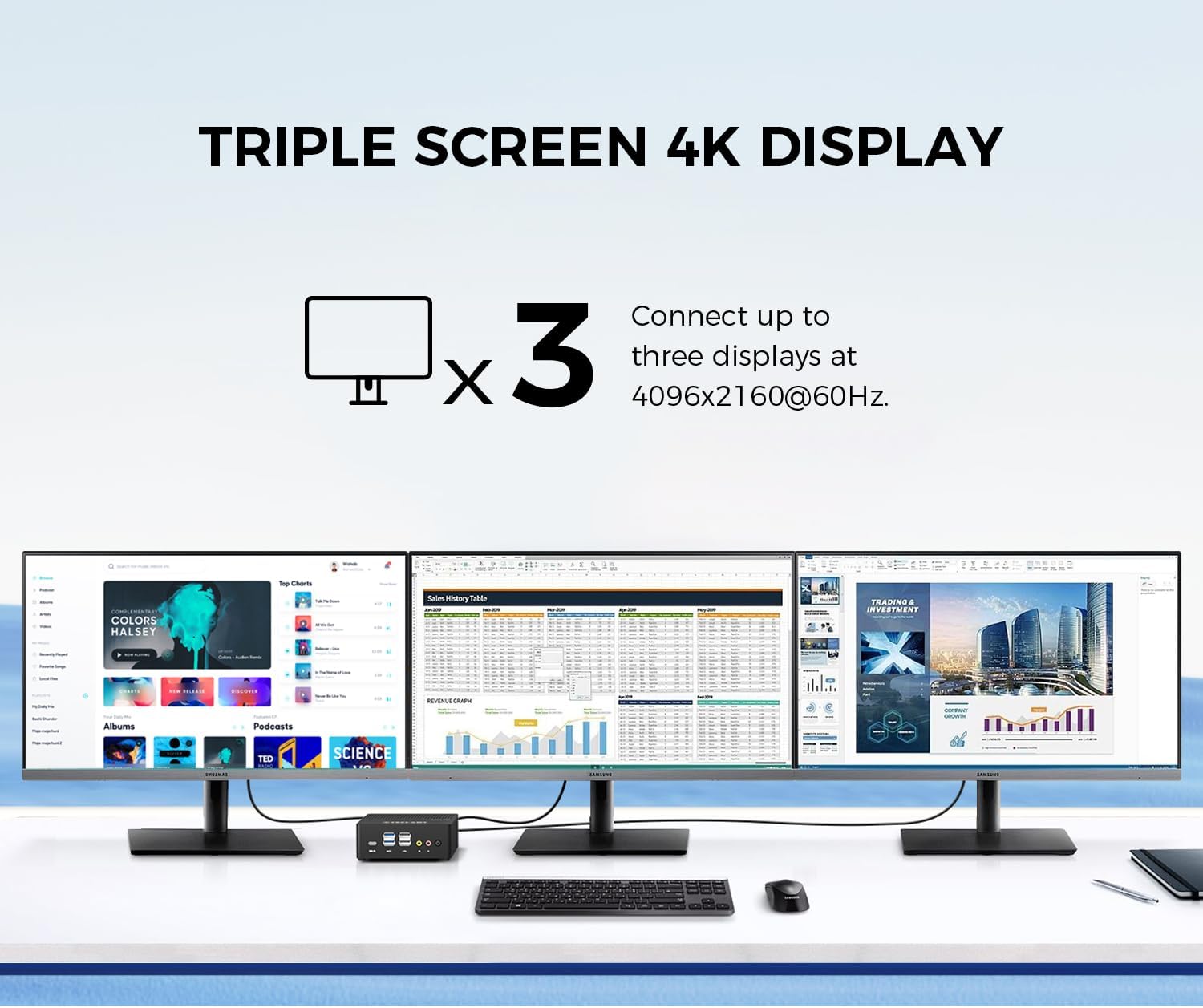
Image: Triple screen 4K display setup with the Mini PC.
- Connect your primary monitor via HDMI.
- Connect a second monitor via DisplayPort.
- Connect a third monitor via the Full-Function Type-C port (requires a compatible Type-C to DisplayPort/HDMI adapter or monitor).
- In Windows, right-click on the desktop and select "Display settings" to configure your multiple displays (extend, duplicate, or show only on one).
5.3. Simsiz ulanish
The Mini PC supports 2.4G+5G ac Wi-Fi and Bluetooth 4.2 for wireless connections.
- Wi-fi: Access Wi-Fi settings in Windows to connect to your preferred wireless network.
- Bluetooth: Pair Bluetooth devices like keyboards, mice, or headphones through Windows Bluetooth settings.
6. Xizmat ko'rsatish
Muntazam texnik xizmat ko'rsatish Mini kompyuteringizning uzoq umr ko'rishini va optimal ishlashini ta'minlashga yordam beradi.
- Tozalash: Tashqi qismini tozalash uchun yumshoq, quruq matodan foydalaning. Shamollatish teshiklarida chang to'planishi uchun siqilgan havodan foydalaning. Tozalashdan oldin qurilmaning o'chirilganligiga va elektrdan uzilganligiga ishonch hosil qiling.
- Dasturiy ta'minot yangilanishlari: Tizim xavfsizligi va ishlashini ta'minlash uchun Windows yangilanishlari va drayver yangilanishlarini muntazam ravishda tekshirib turing va o'rnating.
- Saqlash boshqaruvi: Vaqti-vaqti bilan keraksiz narsalarni tozalang files and applications to free up storage space and improve system responsiveness.
- Ventilyatsiya: Ensure the Mini PC is placed in a well-ventilated area and that its vents are not obstructed to prevent overheating.
7. Muammolarni bartaraf qilish; nosozliklarni TUZATISH
If you encounter issues with your TECLAST N15 Mini PC, refer to the following common troubleshooting steps:
| Muammo | Mumkin yechim |
|---|---|
| Monitorda displey yo'q | Check all cable connections (HDMI, DisplayPort, Type-C). Ensure the monitor is powered on and set to the correct input source. Try a different cable or monitor if possible. |
| Mini PC does not power on | Verify the power adapter is securely connected to both the Mini PC and a working power outlet. Try a different power outlet. |
| Internetga ulanish yo'q (Wi-Fi) | Check if Wi-Fi is enabled in Windows settings. Ensure you are connected to the correct network and have entered the password correctly. Restart your router/modem. |
| No internet connection (Wired) | Ensure the Ethernet cable is securely connected to both the Mini PC and your router/modem. Check the network status in Windows. Restart your router/modem. |
| Sekin ishlash | Close unnecessary applications. Check for background processes consuming resources. Ensure sufficient free storage space. Run a system scan for malware. |
| Peripheral devices not recognized | Try connecting the device to a different USB port. Ensure device drivers are installed. Restart the Mini PC. |
If the issue persists after trying these steps, please contact TECLAST customer support for further assistance.
8. Texnik shartlar
Detailed technical specifications for the TECLAST N15 Mini PC:
| Xususiyat | Spetsifikatsiya |
|---|---|
| Brend | TECLAST |
| Model raqami | N15 |
| CPU modeli | Intel Celeron N5095 |
| CPU tezligi | Up to 2.9 GHz (Turbo Frequency) |
| Protsessorlar soni | 4 |
| O'rnatilgan RAM xotirasi | 16 GB DDR4 |
| RAM xotirasining maksimal hajmi | 16 GB |
| Xotirani saqlash hajmi | 512 GB PCI-e 3.0 SSD |
| Grafik protsessor | Intel UHD Grafikasi |
| Displeyning maksimal ruxsati | 3840 x 2160 piksel (4K) |
| Video chiqish interfeyslari | HDMI, DisplayPort, Type-C |
| Ulanish texnologiyasi | Ethernet (Dual RJ45 2.5GbE), HDMI, LAN, Wi-Fi (802.11ac), Bluetooth 4.2 |
| Jami USB portlari | 6 (2x USB 3.2, 4x USB 2.0) |
| Element og'irligi | 400 gramm |
| Quvvat iste'moli | 15 vatt |
| Sovutish usuli | Air (with Turbo Fan and Nickel-Plated Heat Pipe) |
| Rang | Qora |
9. Kafolat va qo'llab-quvvatlash
TECLAST products are designed for quality and reliability. For any product-related inquiries, technical support, or warranty claims, please contact TECLAST customer service. Most questions are answered within 24 hours.
For further assistance, please visit the official TECLAST website or contact their support channels directly.
10. Mahsulot videosi
Mahsulot haqida batafsil ma'lumot olish uchun ushbu rasmiy videoni tomosha qilingview of the TECLAST N15 Mini PC's features and connectivity.
Video: tugadiview of the TECLAST N15 Mini PC, showcasing its design, ports, and internal components.