
1. Kirish
This manual provides detailed instructions for the safe and effective use of your iJoy Disney Winnie The Pooh Wireless Bluetooth Speaker. Please read this manual thoroughly before operating the device and retain it for future reference.
2. Qutida nima bor
Carefully unpack your speaker and ensure all items are present:
- iJoy Disney Winnie The Pooh Wireless Bluetooth Speaker
- USB zaryadlovchi kabeli
- Backup AUX Cable
- Egalari uchun qo'llanma (ushbu hujjat)

Image: The speaker shown next to its retail packaging, illustrating the product and its box.
3. Mahsulot tugadiview
3.1 Boshqarish tugmalari
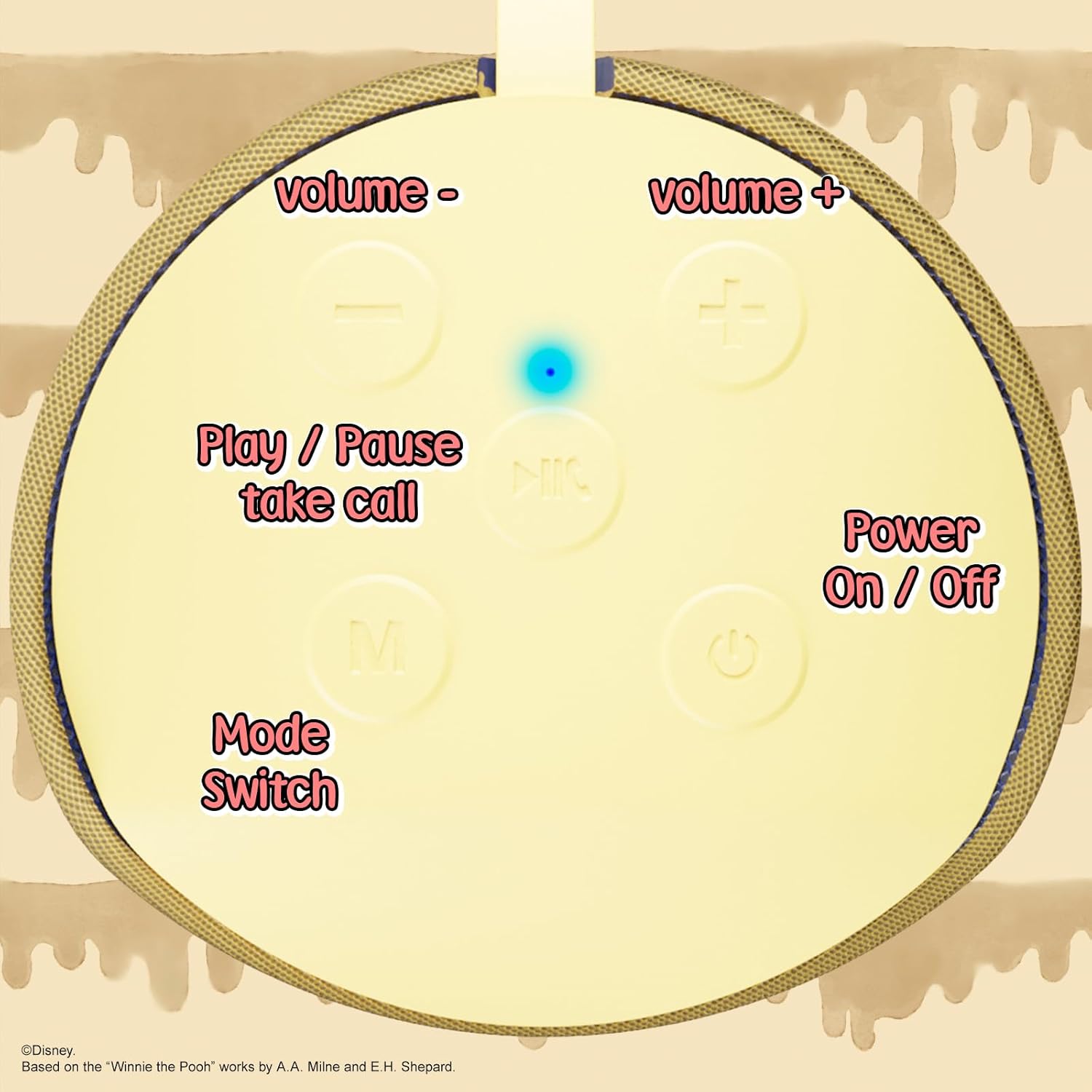
Image: A close-up of the speaker's top panel, displaying the control buttons.
- Yoqish / o'chirish tugmasi: Karnayni yoqish yoki o‘chirish uchun bosing va ushlab turing.
- Oʻynatish/Toʻxtatib turish tugmasi: Press to play or pause audio. Also used to answer or end phone calls.
- Ovozni oshirish (+) tugmasi: Ovoz balandligini oshirish uchun bosing. Keyingi trekka o'tish uchun bosib turing.
- Ovozni pasaytirish (-) tugmasi: Ovoz balandligini pasaytirish uchun bosing. Oldingi trekka o'tish uchun bosib turing.
- Mode Switch (M) Button: Press to switch between Bluetooth, FM Radio, SD Card, and USB modes.
3.2 Portlar va ko'rsatkichlar

Rasm: batafsil view of the speaker's rear panel, highlighting the AUX port, SD card slot, USB port, and Micro USB charging port.
- AUX porti: For connecting external audio devices via the provided 3.5mm AUX cable.
- SD karta uyasi: Insert a microSD card for direct audio playback.
- USB port: To'g'ridan-to'g'ri audio ijro etish uchun USB flesh-diskini joylashtiring.
- Micro USB zaryadlash porti: Connect the USB charging cable here to charge the speaker.
- LED ko'rsatkich chirog'i: Indicates charging status and Bluetooth pairing status.
4. Sozlash
4.1 Karnayni zaryadlash
- Connect the Micro USB end of the charging cable to the speaker's Micro USB charging port.
- Kabelning standart USB uchini USB quvvat adapteriga (qo'shilmagan) yoki kompyuterning USB portiga ulang.
- The LED indicator light will illuminate during charging and turn off once fully charged.
- To'liq zaryadlash odatda taxminan 2 soat davom etadi.
4.2 Bluetooth ulanishi
- Karnay to'liq zaryadlanganligiga ishonch hosil qiling.
- Press and hold the Power On/Off button to turn on the speaker. You will hear an audible prompt, and the LED indicator will flash, indicating it's in pairing mode.
- Mobil qurilmangizda (smartfon, planshet va boshqalar) Bluetooth-ni yoqing.
- Ni qidirish available Bluetooth devices. The speaker will appear as "iJoy Winnie The Pooh Speaker" or similar.
- Select the speaker from the list to pair. Once successfully paired, you will hear a confirmation sound, and the LED indicator will stop flashing and remain solid.
- Agar qurilma Bluetooth faol va diapazonda bo'lsa, karnay yoqilganda oxirgi ulangan qurilmaga avtomatik ravishda qayta ulanadi.
5. Foydalanish bo'yicha ko'rsatmalar
5.1 Bluetooth rejimi
After successful pairing, you can stream audio wirelessly from your device to the speaker. Use your device's controls or the speaker's Play/Pause, Volume Up/Down buttons to manage playback.
5.2 FM radio rejimi
- Press the Mode (M) button to switch to FM Radio mode.
- Press the Play/Pause button to automatically scan and save available FM stations.
- Use the Volume Up (+) and Volume Down (-) buttons (short press) to navigate between saved stations.
5.3 SD Card / USB Playback
- Insert a microSD card into the SD card slot or a USB flash drive into the USB port.
- The speaker will automatically switch to the corresponding mode and begin playing audio files. If not, press the Mode (M) button to select the correct mode.
- Use the speaker's Play/Pause, Volume Up/Down buttons to control playback.
5.4 AUX rejimi
- Connect one end of the provided 3.5mm AUX cable to the speaker's AUX port.
- Boshqa uchini audio qurilmangiz eshitish jakiga ulang.
- The speaker will automatically switch to AUX mode. If not, press the Mode (M) button.
- Ijro etish va ovoz balandligini asosan ulangan audio qurilmangizdan boshqaring.
5.5 Qo'ng'iroqlarsiz qo'ng'iroq qilish
Bluetooth orqali smartfonga ulanganda:
- Qo'ng'iroqqa javob berish: Play/Pauza tugmasini bir marta bosing.
- Qo‘ng‘iroqni tugatish: Qo'ng'iroq paytida Play/Pauza tugmasini bir marta bosing.
- Qo'ng'iroqni rad etish: O'ynatish/To'xtatib turish tugmasini bosing va ushlab turing.
6. Xizmat ko'rsatish
- Karnayni yumshoq, quruq mato bilan tozalang. Abraziv tozalash vositalarini yoki erituvchilarni ishlatmang.
- The speaker is IPX4 splashproof, meaning it can withstand splashes of water. Do not submerge it in water.
- Foydalanilmayotganda karnayni salqin va quruq joyda saqlang.
- Karnayni haddan tashqari harorat, to'g'ridan-to'g'ri quyosh nuri yoki yuqori namlik ta'siridan saqlaning.
7. Muammolarni bartaraf qilish; nosozliklarni TUZATISH
| Muammo | Mumkin sabab | Yechim |
|---|---|---|
| Karnay yoqilmaydi | Kam batareya | Karnayni to'liq quvvatlang. |
| Bluetooth orqali ulanib bo'lmadi | Speaker not in pairing mode / Device Bluetooth off / Too far from device | Ensure speaker is in pairing mode (flashing LED). Turn on Bluetooth on your device. Move speaker closer to device (within 30 feet). |
| Ovoz yo'q | Volume too low / Incorrect mode / Device not playing audio | Increase speaker and device volume. Press 'M' button to select correct mode. Ensure audio is playing on your connected device. |
| FM radio qabul qilish darajasi past | Weak signal / Interference | Move the speaker to a different location. The AUX cable can act as an antenna; try connecting it. |
8. Texnik shartlar

Image: The speaker with visual indicators showing its height of 6.3 inches and width of 2.9 inches.
| Xususiyat | Tafsilot |
|---|---|
| Model raqami | SS-KH7C-FS4O |
| Ulanish texnologiyasi | Bluetooth |
| Simsiz aloqa diapazoni | 30 futgacha (10 metr) |
| Karnay turi | Minora |
| Karnay maksimal chiqish quvvati | 20 vatt |
| Audio chiqish rejimi | Mono |
| Batareya quvvati | 800 mlnamp Soat |
| Zaryadlash vaqti | Taxminan 2 soat |
| O'yin vaqti | Up to 3 Hours (depending on volume and usage) |
| Suvga chidamlilik darajasi | IPX4 (chaqmoqqa chidamli) |
| Mahsulot o'lchamlari | 3"D x 3"W x 6"Y (7.62 sm D x 7.62 sm W x 15.24 sm H) |
| Element og'irligi | 8 untsiya (226.8 gramm) |
| Kiritilgan komponentlar | Bluetooth Speaker, USB Charging Cable, Backup AUX Cable, Owners Manual |
| Maxsus xususiyatlar | Built-in Microphone, LED Indicator Lights, Portable, SD Card Slot, USB Port, FM Radio |
9. Kafolat va qo'llab-quvvatlash
9.1 Kafolat haqida ma'lumot
This iJoy Disney Winnie The Pooh Wireless Bluetooth Speaker comes with a 90-day manufacturer's warranty from the date of purchase. This warranty covers manufacturing defects and workmanship under normal use. It does not cover damage caused by misuse, accidents, unauthorized modifications, or normal wear and tear.
9.2 Mijozlarni qo‘llab-quvvatlash
For technical assistance, warranty claims, or further inquiries, please contact iJoy customer support through their official website or the retailer where the product was purchased. Please have your model number (SS-KH7C-FS4O) and proof of purchase ready.