
Kirish
The Backbone One transforms your iPhone 15 Series or Android device into a powerful mobile gaming console. This accessory is designed to provide a seamless and enhanced gaming experience, supporting a wide range of games and streaming services that are compatible with controllers.
Asosiy xususiyatlarga quyidagilar kiradi:
- Uzluksiz o'yinlar: Easily connect your smartphone to transform it into a gaming console.
- Kengaytirilgan nazorat: Features a reshaped D-pad and magnetic phone adapters for superior responsiveness and feel across various game genres.
- Organized Gaming Experience: The dedicated Backbone app integrates your content library and game streaming services for convenient access.
- Yengil va portativ: Designed for on-the-go gaming, weighing approximately 296 grams.
- Umumiy muvofiqlik: Supports both iPhone 15 Series and Android devices with USB-C connectivity.
Ishni boshlash: sozlash
Follow these steps to set up your Backbone One USB-C Mobile Gaming Accessory:
- Qurilmani o'ramidan chiqarib oling: Carefully remove the Backbone One controller from its packaging. Ensure all components, including the magnetic adapters, are present.
- Smartfoningizni ulang: Gently extend the Backbone One controller to fit your iPhone 15 Series or compatible Android device. The USB-C connector on the controller should align with your phone's USB-C port. Snap your phone into place. The magnetic adapters help secure the phone for an optimal fit.
- Download the Backbone App: For the best experience, download the official Backbone app from the Apple App Store or Google Play Store. The app organizes your games and streaming services.
- Dastlabki ulanish: Once your phone is connected, the Backbone One should be automatically recognized. The app will guide you through any necessary firmware updates or initial setup procedures.
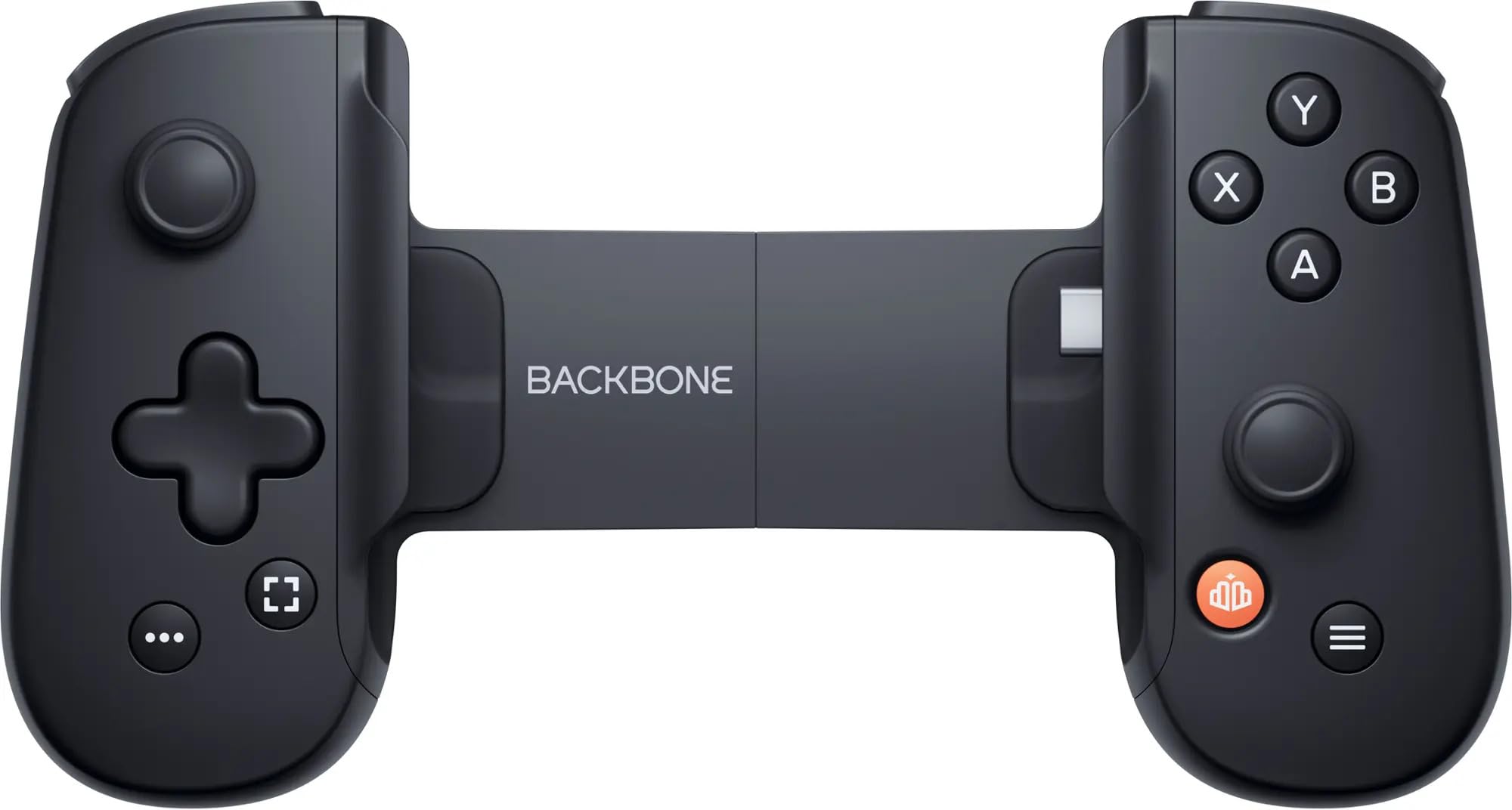
Image: A user engaged in mobile gaming with the Backbone One controller. The smartphone is securely attached to the controller, demonstrating its ergonomic design for comfortable play.
Foydalanish bo'yicha ko'rsatmalar
Once your Backbone One is set up, you can begin playing games:
- O'yinlarni ishga tushirish: Open the Backbone app to browse and launch games from your library or supported streaming services. You can also launch controller-compatible games directly from your phone's home screen.
- Qo'llab-quvvatlanadigan platformalar: The Backbone One is compatible with any game or service that supports controllers, including:
- Apple Arkada
- Google Play Store games with controller support
- Xbox Game Pass Ultimate
- Cloud streaming services (e.g., Xbox Cloud Gaming, GeForce NOW)
- Remote Play from your Xbox, PlayStation, or PC
- Tekshirgichning joylashuvi: Familiarize yourself with the standard controller button layout. The reshaped D-pad offers improved tactile feedback for precise movements.
- Zaryadlash: The Backbone One draws minimal power from your phone. It also features a pass-through charging port, allowing you to charge your phone while playing.
- Eshitish vositasi uyasi: Utilize the integrated 3.5mm headphone jack for an immersive audio experience without disturbing others.
Xizmat va texnik xizmat ko'rsatish
To ensure the longevity and optimal performance of your Backbone One, follow these care guidelines:
- Tozalash: Use a soft, dry, lint-free cloth to clean the surface of the controller. Avoid abrasive cleaners, solvents, or aerosol sprays.
- Saqlash: When not in use, store the Backbone One in a cool, dry place, away from direct sunlight and extreme temperatures. Consider using a protective case for travel.
- Ishlov berish: Avoid dropping the device or subjecting it to strong impacts. Do not attempt to disassemble the controller, as this may void your warranty.
- Namlik: Keep the controller away from water and other liquids. If it comes into contact with liquid, disconnect it immediately from your phone and allow it to dry completely before reuse.
Muammolarni bartaraf qilish; nosozliklarni TUZATISH
If you encounter issues with your Backbone One, try the following solutions:
- Nazoratchi javob bermayapti:
- Ensure your smartphone is securely connected to the USB-C port.
- Restart your smartphone and reconnect the Backbone One.
- Check if the Backbone app requires an update.
- Game Not Recognizing Controller:
- Verify that the game you are playing supports external controllers.
- Check the game's settings for controller input options.
- Ensure the Backbone app is running in the background.
- Phone Not Fitting Correctly:
- Ensure you are using the correct magnetic adapters for your specific phone model.
- Remove any bulky phone cases that might prevent a proper connection.
- Audio bilan bog'liq muammolar:
- Eshitish vositalarining 3.5 mm raz'emga to'liq ulanganligiga ishonch hosil qiling.
- Check your phone's audio settings.
Mahsulot spetsifikatsiyalari
| Model raqami | BB-51-PBR |
| Moslik | iPhone 15 Series, Android devices with USB-C |
| Ulanish | USB-C |
| Og'irligi | Taxminan 10.6 untsiya (296 gramm) |
| Ishlab chiqaruvchi | Backbone Labs, Inc. |
| Ishlab chiqarilish sanasi | 24 yil 2024 may |
Qo'llab-quvvatlash ma'lumotlari
For further assistance, warranty information, or to access frequently asked questions, please visit the official Backbone support website. You can typically find detailed support resources and contact options there.
Manufacturer: Backbone Labs, Inc.
Note: Specific warranty terms and conditions may vary by region and retailer. Please refer to your purchase documentation for details.


