
1. Kirish
Thank you for choosing the LEVOIT LPF-R432-WEU Pedestal Fan. This fan is designed to provide powerful and efficient air circulation, ensuring a comfortable environment in your home or office. With its quiet operation, versatile oscillation, and smart features, it offers a superior cooling experience. Please read this manual thoroughly before use to ensure proper operation and maintenance.
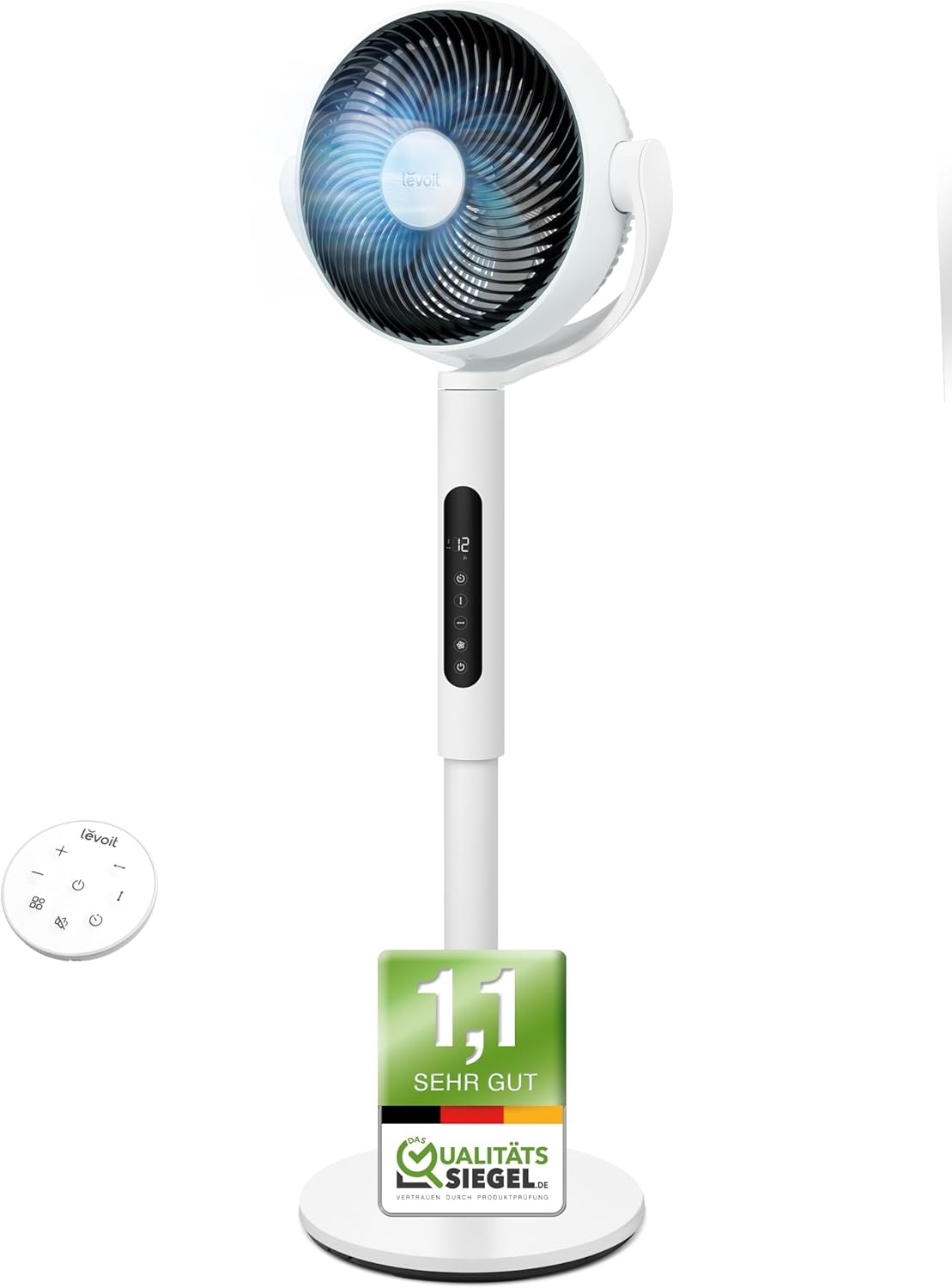
Image: The LEVOIT LPF-R432-WEU Pedestal Fan, showcasing its sleek white design and integrated remote control.
2. Xavfsizlik bo'yicha muhim ko'rsatmalar
Yong'in, elektr toki urishi yoki shikastlanish xavfini kamaytirish uchun quyidagi xavfsizlik choralariga rioya qiling:
- Tozalashdan, texnik xizmat ko'rsatishdan oldin yoki ishlatilmayotganda har doim ventilyatorni elektr rozetkasidan uzib qo'ying.
- Do not operate the fan with a damaged cord or plug. If the cord or plug is damaged, contact customer support.
- Elektr simini isitiladigan yuzalardan uzoqroq tuting.
- Ventilyatorni suvga yoki boshqa suyuqliklarga botirmang.
- Do not insert fingers or foreign objects into any openings of the fan.
- Ventilyatorning ag'darilishiga yo'l qo'ymaslik uchun barqaror, tekis yuzaga qo'yilganligiga ishonch hosil qiling.
- Ushbu jihoz jismoniy, hissiy yoki aqliy qobiliyatlari cheklangan yoki tajribasi va bilimi kam bo'lgan shaxslar (jumladan, bolalar) tomonidan foydalanish uchun mo'ljallanmagan, agar ular xavfsizligi uchun mas'ul shaxs tomonidan nazorat qilinmagan yoki jihozdan foydalanish bo'yicha ko'rsatma berilmagan bo'lsa.
- Bolalar qurilma bilan o'ynamasliklari uchun ularni nazorat qilish kerak.
- Ventilyatorni ochiq havoda yoki nam joylarda ishlatmang.
3. Paket tarkibi
Paketda quyidagi elementlar mavjudligini tekshiring:
- LEVOIT Pedestal Fan (Main Unit)
- Asosiy yig'ilish
- Masofadan boshqarish
- Quvvat kabeli
- Foydalanuvchi qo'llanmasi (ushbu hujjat)
4. O'rnatish va yig'ish
The LEVOIT Pedestal Fan requires minimal assembly. Follow these steps to set up your fan:
- Paketdagi barcha komponentlarni ehtiyotkorlik bilan olib tashlang.
- Attach the main fan unit to the base assembly. Ensure it clicks securely into place.
- Ventilyatorni qattiq, tekis yuzaga qo'ying.
- Elektr simini fanga ulang va keyin uni standart elektr rozetkaga ulang.

Image: Diagram illustrating the simple assembly process of the LEVOIT Pedestal Fan, showing the main unit connecting to the base.
5. Foydalanish bo'yicha ko'rsatmalar
Your LEVOIT Pedestal Fan offers various settings for optimal comfort.
5.1. Quvvatni yoqish/o‘chirish
Ventilyatorni yoqish yoki o'chirish uchun ventilyatorning boshqaruv panelidagi yoki masofadan boshqarish pultidagi quvvat tugmasini bosing.
5.2. Tezlik sozlamalari
Adjust the fan speed using the '+' and '-' buttons on the control panel or remote. The fan features 12 adjustable speed levels to suit your preference, from a gentle breeze to powerful air circulation.
5.3. Tebranish
Activate the oscillation feature to distribute air across a wider area. The fan supports both horizontal (up to 90°) and vertical (up to 120°) oscillation for comprehensive room coverage.

Image: Visual representation of the LEVOIT Pedestal Fan's automatic oscillation capabilities, showing 90° horizontal and 120° vertical movement for wide air distribution.
5.4. Taymer funksiyasi
Set the fan to automatically turn off after a specified period using the timer button. This is useful for energy saving or for use during sleep.
5.5. Tungi rejim
For undisturbed sleep, activate the Night Mode. In this mode, the fan operates at a very low noise level (as low as 20 dB) and the display lights can be turned off.

Image: The LEVOIT Pedestal Fan operating in a bedroom setting, illustrating its quiet 20 dB operation and screen dimming feature for peaceful sleep.
5.6. Aqlli sensor
The integrated smart sensor can automatically adjust the fan speed based on the room's temperature, optimizing comfort and energy consumption.
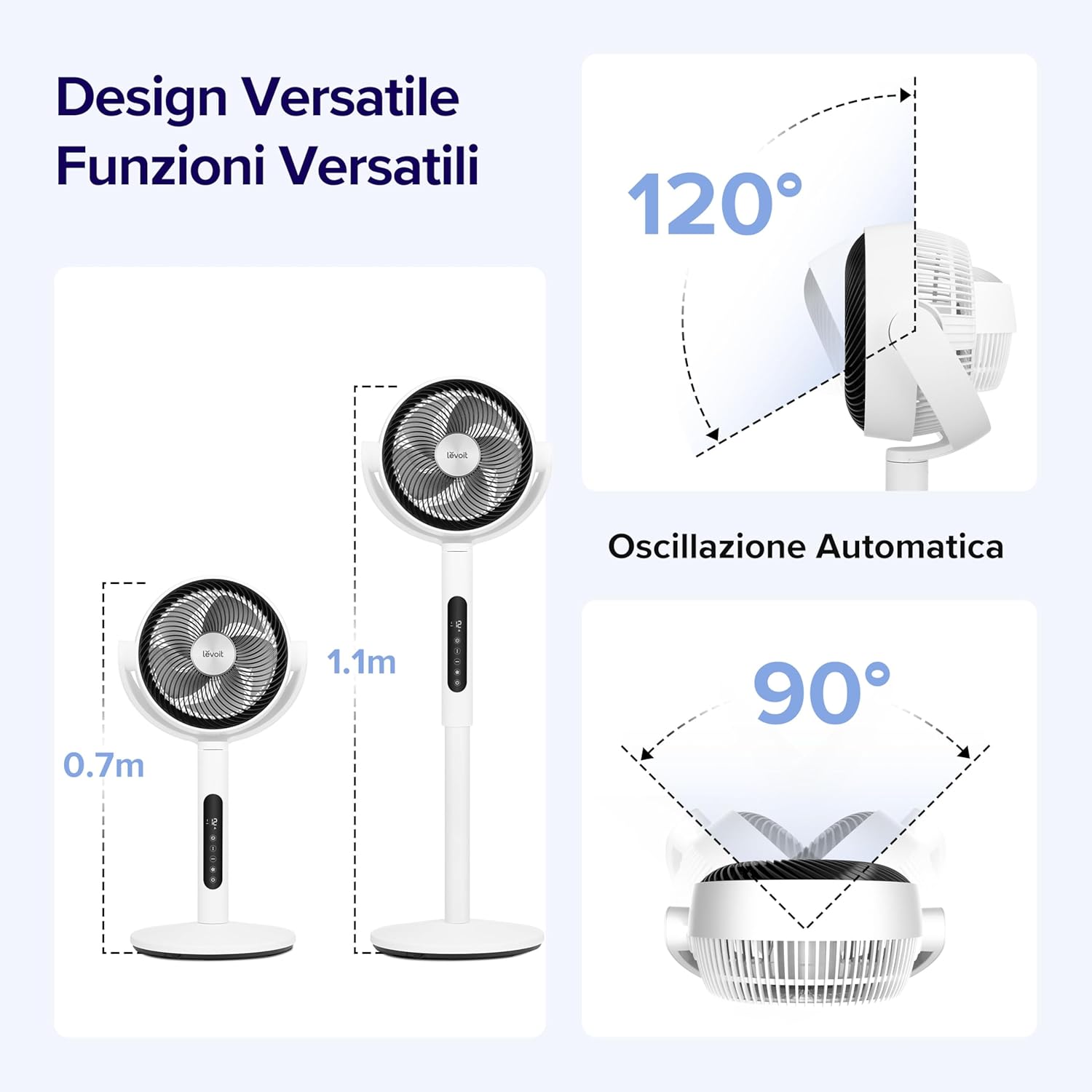
Image: A visual demonstrating the smart sensor technology of the LEVOIT Pedestal Fan, which intelligently adjusts fan speed according to ambient room temperature for energy efficiency.
5.7. Masofadan boshqarish pulti
The fan comes with a convenient remote control for easy operation from a distance. The remote control is magnetic and can be stored securely on the fan unit itself.

Rasm: yaqindan view of the magnetic remote control for the LEVOIT Pedestal Fan, showing it being attached to the fan for convenient storage.
6. Xizmat ko'rsatish
Muntazam tozalash va texnik xizmat ko'rsatish ventilyatoringizning ishlash muddatini uzaytiradi va optimal ishlashini ta'minlaydi.
6.1. Cleaning the Fan
- Tozalashdan oldin har doim fanni elektr tarmog'idan uzing.
- Ventilyatorning tashqi qismini yumshoq, d bilan artingamp mato. Abraziv tozalash vositalarini yoki erituvchilarni ishlatmang.
- For thorough cleaning, the front grille and fan blades can be easily detached. Rotate the front grille to unlock and remove it.
- Wash the detached grille and blades with mild soap and water. Ensure they are completely dry before reattaching.
- Reassemble the fan by aligning the components and rotating the grille back into its locked position.

Image: Illustration showing the ease of disassembling the LEVOIT Pedestal Fan's front grille and blades for cleaning, emphasizing the simple rotation and washing process.
6.2. Saqlash
Ventilyator uzoq vaqt ishlatilmaganda, uni chang va shikastlanishdan himoya qilish uchun salqin va quruq joyda, iloji bo'lsa asl o'ramida saqlang.
7. Muammolarni bartaraf qilish; nosozliklarni TUZATISH
Agar fanatingiz bilan bog‘liq muammolarga duch kelsangiz, quyidagi umumiy muammolar va yechimlarga murojaat qiling:
| Muammo | Mumkin sabab | Yechim |
|---|---|---|
| Fan yoqilmaydi. | Rozetkaga ulanmagan; Elektr rozetkasi ishlamayapti; Quvvat tugmasi bosilmadi. | Ensure the fan is securely plugged into a working outlet. Press the power button. |
| Zaif havo oqimi. | Fan speed too low; Air intake/outlet blocked; Fan blades dirty. | Increase fan speed. Ensure no obstructions. Clean fan blades and grilles. |
| Fan shovqinli. | Ventilyator tekis yuzada emas; Bo'shashgan qismlar; Obstruktsiya. | Place fan on a stable, level surface. Check for any loose components or foreign objects. |
| Masofadan boshqarish pulti ishlamayapti. | Batteries dead; Obstruction between remote and fan. | Masofadan boshqarish pulti batareyalarini almashtiring. Ventilyator qabul qilgichi aniq ko'rinib turishini ta'minlang. |
8. Texnik shartlar
| Xususiyat | Tafsilot |
|---|---|
| Brend | Levoit |
| Model raqami | LPF-R432-WEU |
| Rang | Oq |
| Olchamlari (U x G x Y) | 31.75 x 36.83 x 111 sm |
| Og'irligi | 7.5 kilogramm |
| Quvvat | 21 vatt |
| jildtage | 120.0 volt |
| Material | Plastik |
| Shovqin darajasi | 20 dB (minimal) |
| Maxsus xususiyatlar | Portable, Lightweight, Oscillating, Timer, Remote Controlled, Smart Sensor |
| Tebranish | Up to 90° Horizontal, Up to 120° Vertical |
| Quvvat manbai | Simli elektr |
9. Kafolat va qo'llab-quvvatlash
For warranty information and customer support, please refer to the warranty card included with your product or visit the official LEVOIT website. Do not attempt to repair the fan yourself, as this may void the warranty.