
1. Kirish
The OSD Audio DAC-X200 is a powerful 2-channel Class D stereo amplifier designed to deliver high-fidelity audio. It features a built-in Hi-Res 24bit/192khz DAC, offering superior digital audio conversion. With versatile input options including USB, Optical, and RCA, and A/B speaker switching, this amplifier is suitable for various home audio setups, from driving bookshelf speakers to powering floorstanding units.
2. Xavfsizlik bo'yicha ko'rsatmalar
- Quvvat manbai: Jihozni faqat belgilangan quvvat manbaiga ulangtage.
- Ventilyatsiya: Tegishli ventilyatsiyani ta'minlang. Shamollatish teshiklarini to'sib qo'ymang.
- Suv va namlik: Jihozni yomg'ir, namlik yoki haddan tashqari namlik ta'siriga qo'ymang.
- Issiqlik manbalari: Jihozni radiatorlar, isitish moslamalari, pechkalar yoki boshqa issiqlik chiqaradigan asboblar kabi issiqlik manbalaridan uzoqroq tuting.
- Tozalash: Faqat quruq mato bilan tozalang.
- Xizmat ko'rsatish: Ushbu mahsulotga o'zingiz xizmat ko'rsatishga urinmang. Barcha xizmatlarni malakali xizmat ko'rsatuvchi xodimlarga topshiring.
- Joylashtirish: Place the unit on a stable, flat surface. Avoid placing heavy objects on top of the amphayotiyroq.
3. Paket tarkibi
Paketda barcha elementlar mavjudligiga ishonch hosil qiling:
- OSD Audio DAC-X200 Amphayotiyroq
- Tez boshlash uchun qo'llanma
- Quvvat kabeli
- Masofadan boshqarish pulti (agar modelingiz bilan birga kelgan bo'lsa)
4. Mahsulot tugadiview
4.1 Old panel
The front panel provides access to essential controls for daily operation.

4.1-rasm: Old view of the DAC-X200 amplifier, showing the power button, speaker selectors, balance, and volume controls.

4.2-rasm: Detail of the front panel, highlighting the Power button and Speaker A/B selection buttons.

4.3-rasm: Detail of the front panel, showing the Balance and Volume control knobs.
4.2 Orqa panel
The rear panel houses all input and output connections for audio sources and speakers.
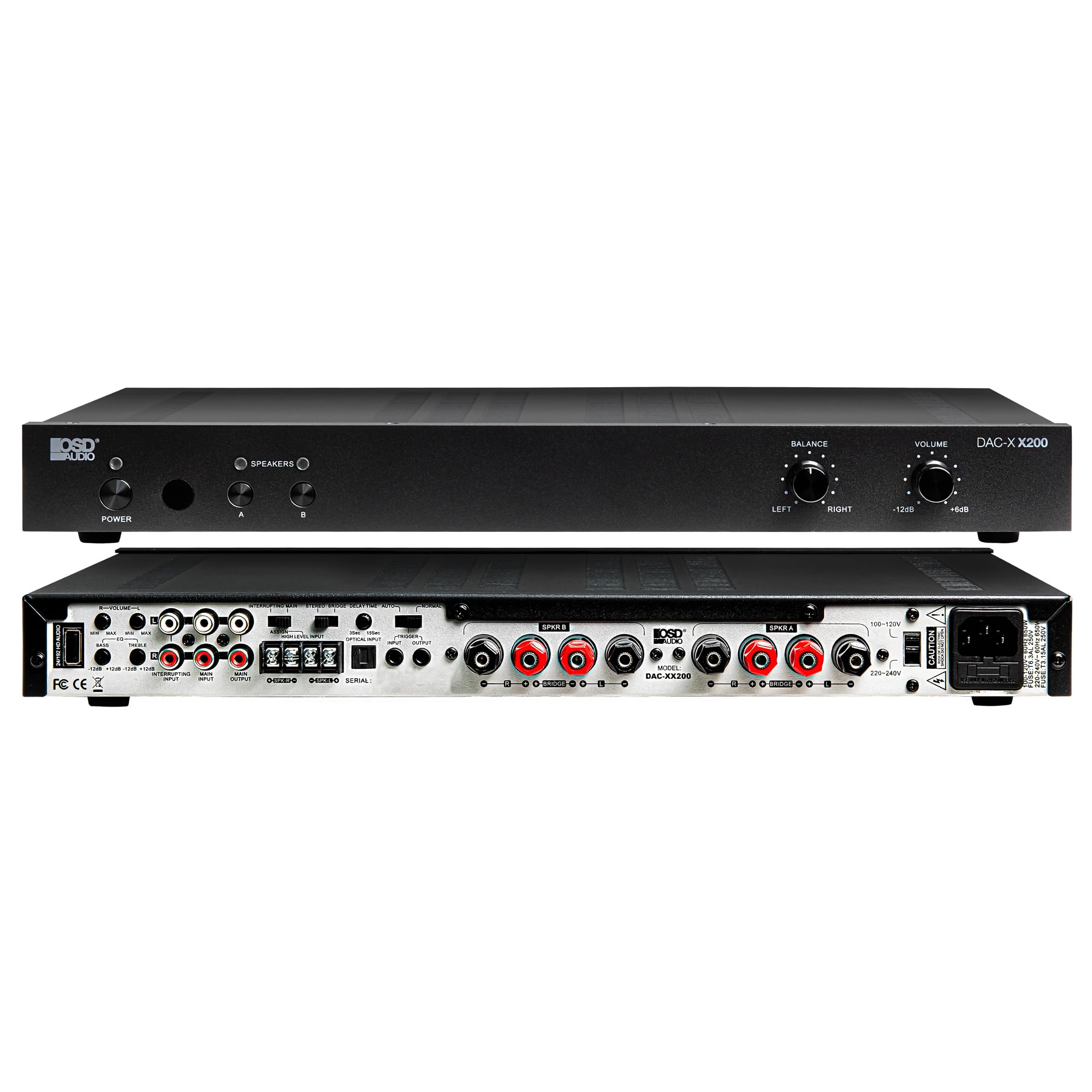
4.4-rasm: Orqa view of the DAC-X200 amplifier, displaying various audio inputs (USB, Optical, RCA), speaker outputs, and power input.

4.5-rasm: Detail of the rear panel inputs, including USB, Optical, and RCA connections.

4.6-rasm: Detail of the rear panel speaker output terminals for Speaker A and Speaker B.
5. Sozlash
5.1 Joylashtirish
Place the DAC-X200 on a flat, stable surface with adequate space around it for ventilation. Avoid enclosed cabinets or areas with poor airflow to prevent overheating.
5.2 Dinamiklarni ulash
- ni ta'minlash amplifier is powered off and unplugged.
- Passiv dinamiklaringizni ga ulang SO‘Z BO‘YICHA A va/yoki SO'Z BO'LGAN B terminals on the rear panel. Observe correct polarity (+ to + and - to -).
- For optimal performance, use high-quality speaker wire.
5.3 Ovoz manbalarini ulash
The DAC-X200 supports multiple input types:
- USB usuli: Connect a computer or other USB audio source using a Type A to Type A USB 2.0 cable.
- Optik kirish: Connect digital audio sources like TVs or CD players using an optical cable.
- RCA kirishlari: Connect analog audio sources such as music streamers, turntables (with a pre-amp), or other devices using RCA cables.
5.4 Quvvatga ulanish
After all audio and speaker connections are made, connect the supplied power cable to the ampko'targichning quvvat kirish joyiga va keyin mos keladigan o'zgaruvchan tok rozetkasiga ulang.
6. Foydalanish bo'yicha ko'rsatmalar
6.1 Quvvatni yoqish/o‘chirish
ni bosing KUCH old paneldagi tugmani bosib, uni yoqing amplifier on or off. The power indicator light will illuminate when the unit is on.
6.2 Kirish tanlash
The DAC-X200 features smart source switching, automatically detecting and switching to an active input. If multiple inputs are active, you may need to manually select the desired input using the remote control (if applicable) or by cycling through inputs.
6.3 Ovoz balandligini boshqarish
Adjust the overall output volume using the Ovoz knob on the front panel. Rotate clockwise to increase volume and counter-clockwise to decrease it.
6.4 Ovozni boshqarish
dan foydalaning BALANS knob to adjust the left/right channel balance. The DAC-X200 also includes bass and treble adjustment knobs (located on the rear panel or accessible via remote, depending on model variation) to fine-tune the sound to your preference or room acoustics.
6.5 A/B Speaker Switching
ni bosing A or B buttons on the front panel to select which set of speakers (Speaker A, Speaker B, or both) are active. This allows for multi-room audio configurations.
7. Xizmat ko'rsatish
- Tozalash: Tashqi qismini tozalash uchun yumshoq, quruq matodan foydalaning ampko'taruvchi. Suyuq tozalagichlar yoki aerozollardan foydalanmang.
- Ventilyatsiya: Vaqti-vaqti bilan shamollatish teshiklarining chang va axlatdan tozalanganligini tekshirib turing.
- Saqlash: Jihozni uzoq vaqt saqlasangiz, uni elektr rozetkasidan uzing va salqin va quruq joyda saqlang.
8. Muammolarni bartaraf qilish; nosozliklarni TUZATISH
| Muammo | Mumkin sabab | Yechim |
|---|---|---|
| Quvvat yo'q | Power cable not connected; Power outlet not active; Amphayotdan uzoqroq. | Check power cable connection; Test power outlet; Press the Power button. |
| Ovoz yo'q | Incorrect input selected; Speaker cables loose; Volume too low; Speakers A/B not selected. | Select correct input; Check speaker connections; Increase volume; Ensure Speaker A or B is active. |
| Buzilgan ovoz | Input signal too high; Speaker impedance mismatch; Faulty cable. | Reduce source volume; Verify speaker impedance (8̣ or 4̣); Replace audio cables. |
| Input not switching automatically | Multiple active sources; Specific source not detected. | Manually select input; Ensure only one source is playing if auto-switching is desired. |
9. Texnik shartlar
- Model: DAC-X200
- Chiqish quvvati: 100W RMS per channel at 8̣; 225W RMS per channel at 4̣; 450W bridged mono
- Kanallar soni: 2
- DAC: Hi-Res 24bit/192khz, DSD formats supported
- Kirishlar: USB, Optical, RCA
- Speaker Zones: A/B Switching
- Olchamlari (U x G x Y): 16.7 x 10 x 2 dyuym
- Material turi: Plastik
- UPC: 810074881173
10. Kafolat haqida ma'lumot
OSD Audio products are designed for reliability and performance. This product is covered by a limited warranty against defects in materials and workmanship. Please refer to the official OSD Audio website or your purchase documentation for specific warranty terms and conditions, including duration and coverage details. Keep your proof of purchase for warranty claims.
11. Qo'llab-quvvatlash
For technical assistance, troubleshooting not covered in this manual, or service inquiries, please contact OSD Audio customer support. You can find contact information, FAQs, and additional resources on the official OSD Audio websayt.
Websayt: www.osdaudio.com