
LEVOIT 5ddce951-f1e5-4fc2-b790-0e25bd06f240
LEVOIT 36" Bladeless Tower Fan & Air Purifier User Manual
Model: 5ddce951-f1e5-4fc2-b790-0e25bd06f240
Brand: LEVOIT
Kirish
This manual provides detailed instructions for the safe and efficient operation, maintenance, and troubleshooting of your LEVOIT 36" Bladeless Tower Fan and LEVOIT Core Mini-P Air Purifier. Please read this manual thoroughly before use and retain it for future reference.
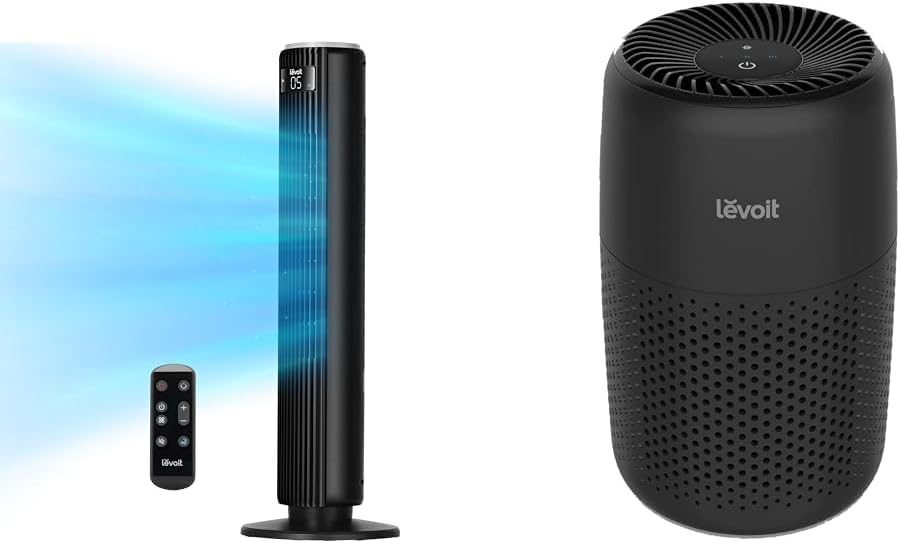
Image: The LEVOIT 36-inch Bladeless Tower Fan and the LEVOIT Core Mini-P Air Purifier shown together, highlighting their compact and modern design.
Xavfsizlik bo'yicha muhim ma'lumotlar
Yong'in, elektr toki urishi yoki shikastlanish xavfini kamaytirish uchun quyidagi xavfsizlik choralariga rioya qiling:
- Tozalashdan yoki biron bir texnik xizmat ko'rsatishdan oldin har doim jihozni elektrdan uzing.
- Shikastlangan shnur yoki vilka bilan hech qanday fanni ishlatmang. Ventilyatorni tashlang yoki tekshirish va/yoki ta'mirlash uchun vakolatli xizmat ko'rsatish muassasasiga qayting.
- Shnurni gilam ostida o'tkazmang. Shnurni gilamchalar, yuguruvchilar yoki shunga o'xshash qoplamalar bilan yopmang. Shnurni harakatlanish joyidan uzoqroqda va u qoqilib ketmaydigan joyda joylashtiring.
- Do not insert or allow fingers or foreign objects to enter any ventilation or exhaust opening as this may cause an electric shock or damage the appliance.
- Havo qabul qilish yoki chiqindilarni hech qanday to'sqinlik qilmang.
- Ushbu jihozni faqat ushbu qo'llanmada tasvirlanganidek foydalaning. Ishlab chiqaruvchi tomonidan tavsiya etilmagan har qanday boshqa foydalanish yong'inga, elektr toki urishiga yoki odamlarning shikastlanishiga olib kelishi mumkin.
- Ochiq havoda foydalanmang.
- Ushbu qurilma polarizatsiyalangan vilkaga ega (bir pichoq ikkinchisidan kengroq). Elektr toki urishi xavfini kamaytirish uchun ushbu vilka qutblangan rozetkaga faqat bitta yo'l bilan o'rnatilishi uchun mo'ljallangan. Agar vilka rozetkaga to'liq sig'masa, vilkani teskari tomonga burang. Agar u hali ham mos kelmasa, malakali elektrchi bilan bog'laning. Ushbu xavfsizlik xususiyatini buzishga urinmang.
Paket tarkibi
- LEVOIT 36" Bladeless Tower Fan
- Minora foniy uchun masofadan boshqarish pulti
- LEVOIT Core Mini-P Air Purifier
- 3-in-1 Filtration Filter (Pre-installed in Air Purifier)
- Aroma Pad (Pre-installed in Air Purifier)
- Power Adapter for Air Purifier
- Foydalanuvchi uchun qo'llanma
Mahsulot tugadiview
LEVOIT 36" Bladeless Tower Fan

Image: The LEVOIT 36-inch Bladeless Tower Fan standing upright with its remote control. Blue lines illustrate the powerful airflow emanating from the fan's vertical vent.
The tower fan features a sleek, bladeless design for safety and easy cleaning. It includes a digital display on top, indicating settings such as speed and timer. The base provides stability, and the unit comes with a remote control for convenient operation.
LEVOIT Core Mini-P Air Purifier

Rasm: yaqindan view of the LEVOIT Core Mini-P Air Purifier. It is a compact, cylindrical device with a matte black finish and perforated sides for air intake, featuring control buttons on its top surface.
The Core Mini-P Air Purifier is a compact, cylindrical device designed for small to medium-sized rooms. It features a 3-stage filtration system and a fragrance sponge for aromatherapy. Control buttons are located on the top panel.
Sozlash; o'rnatish
Setting up the Tower Fan
- Carefully remove the tower fan from its packaging.
- Ensure the base is securely attached. If not, align the base with the fan body and twist clockwise until it locks into place.
- Ventilyatorni qattiq, tekis yuzaga qo'ying.
- Elektr simini standart elektr rozetkaga ulang.
Havo tozalagichni sozlash
- Havo tozalagichni o'ramidan olib tashlang.
- Havo tozalagichni teskari tomonga burang va qulfini ochish va chiqarib olish uchun taglik qopqog'ini soat miliga teskari tomonga burang.
- Remove the plastic packaging from the 3-in-1 filtration filter.
- Place the filter back into the air purifier, ensuring it is seated correctly.
- Replace the base cover and twist clockwise to lock it.
- Quvvat adapterini havo tozalagichga ulang va keyin uni standart elektr rozetkasiga ulang.
- To use the aromatherapy feature, add 2-3 drops of essential oil (not included) onto the aroma pad located at the bottom of the air purifier.
Foydalanish bo'yicha ko'rsatmalar
Minora fanining ishlashi
The tower fan can be operated using the control panel on top of the unit or the included remote control.
- Quvvat tugmasi: Fanni yoqish yoki o'chirish uchun bosing.
- Rejim tugmasi: Cycle through 4 modes: Normal, Turbo, Sleep, and Auto.
- Oddiy rejim: Tanlangan tezlikda doimiy havo oqimi.
- Turbo rejimi: Maximum airflow for quick cooling.
- Kutish rejimi: Gradually decreases fan speed for quiet operation.
- Avtomatik rejim: Adjusts fan speed based on ambient room temperature (detected by smart sensors).
- Tezlikni sozlash: Use the '+' and '-' buttons to select from 5 speed settings.
- Tebranish tugmasi: Press to activate or deactivate 90° oscillation, allowing the fan to sweep air across a wider area.
- Taymer tugmasi: Set the fan to automatically turn off after a specified period (up to 12 hours). Each press adds 1 hour.
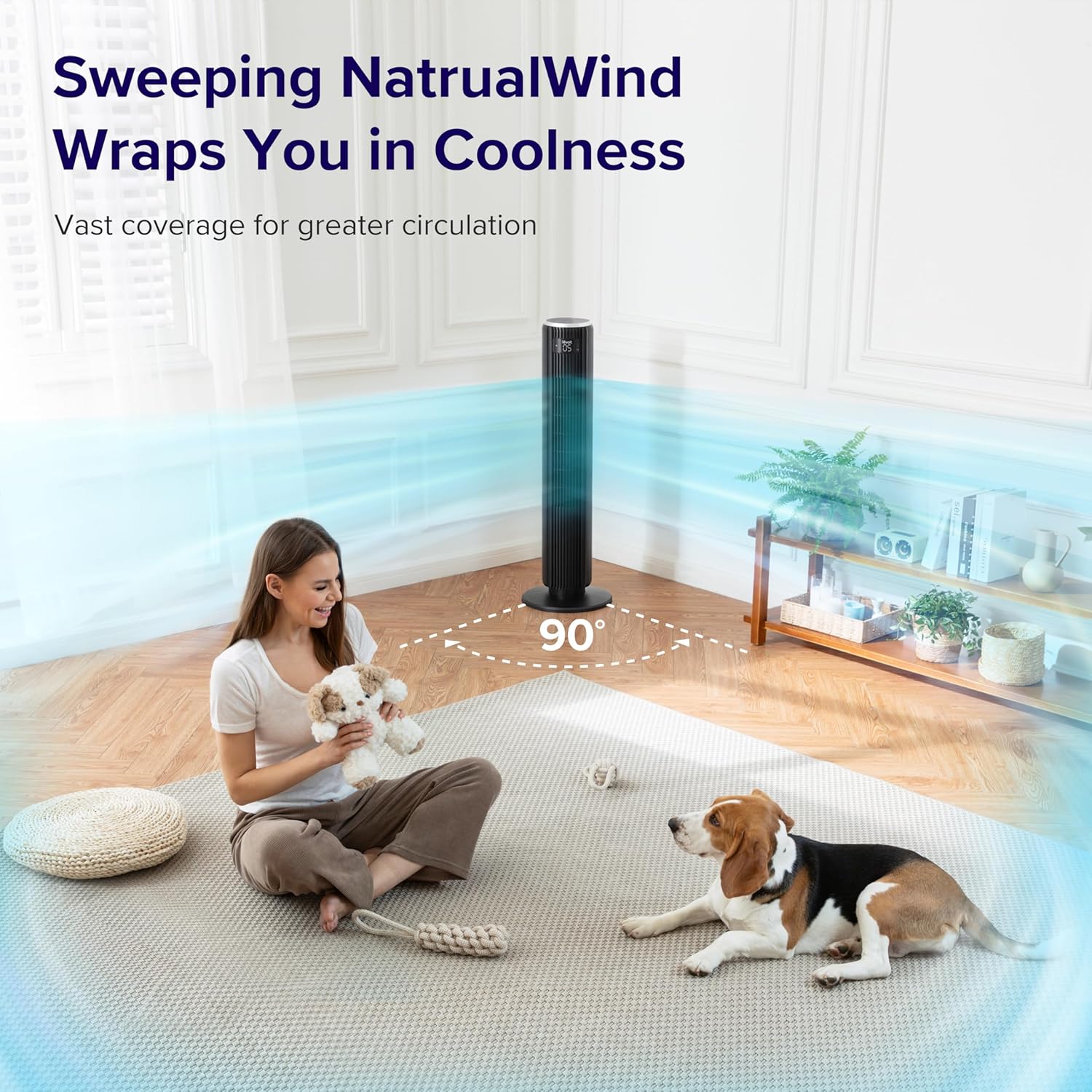
Image: The LEVOIT 36-inch Bladeless Tower Fan is shown oscillating 90 degrees, indicated by blue airflow lines covering a wide area in a living room setting. A person and a dog are comfortably within the fan's cooling range.

Image: The LEVOIT 36-inch Bladeless Tower Fan is positioned in a bedroom, emitting a gentle, natural-feeling breeze, illustrated by light blue airflow lines. A person is meditating peacefully in the background, emphasizing the fan's quiet operation and comfortable airflow.
Havo tozalagichni ishlatish
The air purifier is controlled via the touch buttons on its top panel.
- Quvvat tugmasi: Press to turn the air purifier on or off.
- Fan tezligi tugmasi: Cycle through 3 quiet fan speeds (Low, Medium, High).
- Aroma Feature: The aroma pad allows for the diffusion of essential oils. Add 2-3 drops of essential oil to the pad located at the bottom of the unit. The fan will then circulate the scent.

Image: The LEVOIT Core Mini-P Air Purifier is shown on a nightstand in a bedroom, with a mother and child in the background. Text overlays emphasize "Multi-Layered Protection" including Pre-Filter, Efficient Filter, and Activated Carbon Filter, illustrating its air purification capabilities.

Image: The LEVOIT Core Mini-P Air Purifier is placed on a table in a living room. A hand is shown adding essential oil drops to the aroma pad, demonstrating the "Refresh With Fragrance" feature for destressing and staying focused.
Xizmat
Minora fanini tozalash
- Tozalashdan oldin har doim fanni elektr tarmog'idan uzing.
- Yumshoqdan foydalaning, damp fanning tashqi yuzalarini artish uchun mato.
- Abraziv tozalash vositalarini yoki erituvchilarni ishlatmang.
- Havo kirish/chiqish joyida chang to'planishi uchun changni yumshoq tozalash uchun cho'tkasi biriktirgichli changyutgichdan foydalaning.
Cleaning and Filter Replacement for Air Purifier
- Unplug the air purifier before cleaning or replacing the filter.
- Tashqi qismini yumshoq, quruq mato bilan artib oling.
- The 3-in-1 filtration filter should be replaced every 6-8 months, or sooner depending on air quality and usage.
- Filtrni almashtirish uchun:
- Turn the air purifier upside down and twist the base cover counter-clockwise to unlock.
- Eski filtrni olib tashlang va uni to'g'ri tashlang.
- Insert a new LEVOIT Core Mini-P replacement filter (ensure plastic packaging is removed).
- Replace the base cover and twist clockwise to lock.
- Clean the aroma pad as needed with a damp cloth and allow it to dry completely before reapplying essential oils.
Muammolarni bartaraf qilish; nosozliklarni TUZATISH
| Muammo | Mumkin sabab | Yechim |
|---|---|---|
| Fan/Purifier does not turn on. | Rozetkaga ulanmagan; elektr rozetkasi ishlamayapti; quvvat tugmasi bosilmagan. | Ensure unit is securely plugged in. Test outlet with another device. Press the power button firmly. |
| Weak airflow from fan. | Fan speed too low; air inlet/outlet blocked. | Increase fan speed. Check for obstructions and clean air inlets/outlets. |
| Air purifier not effectively cleaning air. | Filter is dirty or expired; plastic packaging not removed from filter. | Replace the filter. Ensure all plastic packaging is removed from the new filter before installation. |
| Fan shovqinli. | Unit not on a level surface; internal obstruction. | Place the fan on a flat, stable surface. Check for any foreign objects inside the fan. |
| Masofadan boshqarish pulti ishlamayapti. | Batteries are dead or incorrectly inserted; remote too far from fan. | Replace batteries. Ensure correct polarity. Use remote within range and point towards the fan's receiver. |
Texnik xususiyatlari
LEVOIT 36" Bladeless Tower Fan
- Model: 5ddce951-f1e5-4fc2-b790-0e25bd06f240
- Quvvat manbai: Simli elektr
- Havo oqimi quvvati: 1062 kub fut/daqiqa (CFM)
- Havo tezligi: 25 fut/s gacha
- Tebranish: 90°
- Shovqin darajasi: 28dB gacha
- Tartiblar: Normal, Turbo, Sleep, Auto
- Tezliklari: 5
- Taymer: 1-12 soat
- Tekshirish usuli: Masofadan boshqarish pulti, sensorli panel
- Maxsus xususiyatlar: Bladeless, Temperature Sensor
LEVOIT Core Mini-P Air Purifier
- Model: Core Mini-P (part of bundle)
- Filtrlash: 3-in-1 (Pre-Filter, Efficient Filter, Activated Carbon Filter)
- Qoplash hududi: 129 fut² gacha
- Shovqin darajasi: 25-44 dB
- Tezliklari: 3
- Maxsus xususiyatlar: Fragrance Sponge for Aromatherapy, Portable
Kafolat va qo'llab-quvvatlash
LEVOIT provides a limited warranty for this product. For detailed warranty information, including duration and coverage, please refer to the warranty card included in your product packaging or visit the official LEVOIT websayt.
For technical support, troubleshooting assistance, or to inquire about replacement parts (such as air purifier filters), please contact LEVOIT Customer Support:
- Websayt: www.levoit.com
- Email: support@levoit.com
- Telefon: (Refer to LEVOIT website for regional contact numbers)
Please have your model number (5ddce951-f1e5-4fc2-b790-0e25bd06f240) and purchase information ready when contacting support.
Ask a question about this manual
Ask about setup, troubleshooting, compatibility, parts, safety, or missing instructions. Manuals+ will review the question and use this page’s manual context to help answer it.