
Kirish
This manual provides detailed instructions for the AULCMEET RC80B replacement remote control, designed for use with Edifier R1280DBs active speakers. Please read this manual carefully to ensure proper operation and to maximize your experience with the product.
Mahsulot tugadiview
The AULCMEET RC80B remote control offers a comprehensive set of functions for your Edifier R1280DBs speakers. Its ergonomic design ensures comfortable handling and intuitive button placement.
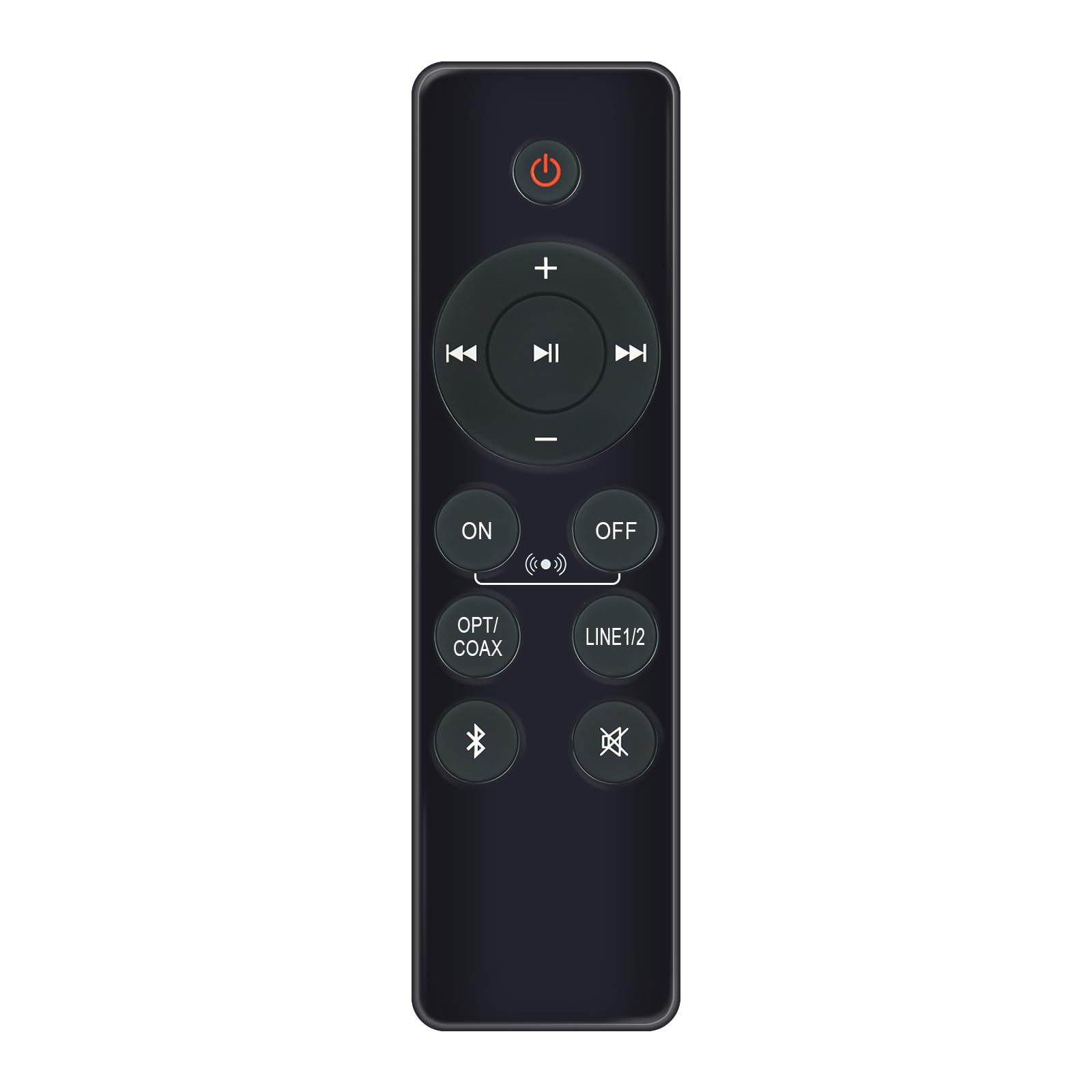
Image: AULCMEET RC80B Replacement Remote Control. The remote measures approximately 13.8 cm (5.43 inches) in length and 3.8 cm (1.5 inches) in width.
Tugma funktsiyalari:
- Quvvat tugmasi (⏻): Turns the speakers ON or OFF.
- Volume Up (+) / Volume Down (-): Adjusts the speaker volume.
- Oldingi trek (⏮) / Next Track (⏭): Skips to the previous or next audio track.
- Oʻynatish/Toʻxtatib turish (⏯): Plays or pauses audio playback.
- ON / OFF (Input Selection): Toggles between different input modes.
- OPT/KOAKS: Selects Optical or Coaxial input.
- LINE1/2: Selects Line In 1 or Line In 2 input.
- Bluetooth (☋): Activates or selects Bluetooth input.
- Ovozsiz (🛇): Mutes or unmutes the speaker audio.
Sozlash; o'rnatish
The AULCMEET RC80B remote control is designed for immediate use without complex setup procedures. Simply install the batteries, and it is ready to operate your compatible Edifier R1280DBs speakers.
Batareyani o'rnatish:
- Masofadan boshqarish pultining orqa tomonidagi batareya bo'linmasini toping.
- Batareya bo'limi qopqog'ini oching.
- Insert two AAA alkaline batteries, ensuring the correct polarity (+ and -) as indicated inside the compartment.
- Batareya bo'limi qopqog'ini mahkam yoping.
Eslatma: No programming or pairing is required for this replacement remote control. It functions directly with the specified Edifier R1280DBs active speakers.
Foydalanish bo'yicha ko'rsatmalar
To operate your Edifier R1280DBs speakers using the AULCMEET RC80B remote control, point the remote directly towards the speakers' infrared receiver. Ensure there are no obstructions between the remote and the speakers.
- Quvvatni yoqish/o‘chirish: tugmasini bosing ⏻ button to turn the speakers on or off.
- Ovoz balandligini sozlash: dan foydalaning + va - buttons to increase or decrease the volume.
- Kirish tanlash: tugmasini bosing ON/OFF, OPT/KOAKS, LINE1/2, yoki Bluetooth buttons to switch between the available audio input sources.
- Ijroni boshqarish: When using Bluetooth or other compatible sources, use the ⏮ (Oldingi), ⏭ (Keyingi), va ⏯ (Play/Pause) buttons to control media playback.
- Ovozni o'chirish funktsiyasi: tugmasini bosing 🛇 button to temporarily silence the audio. Press it again to restore the sound.
Texnik xususiyatlari
| Brend | AULCMEET |
| Model | RC80B |
| Mos qurilmalar | Edifier R1280DBs Active Speakers |
| Rang | Qora |
| Xususiyatlari | Ergonomik dizayn |
| Aloqa interfeysi | Infraqizil (IR) |
| Tugmalar soni | 30 |
| Maksimal diapazon | Taxminan 33 fut (10 metr) |
| Batareya turi | 2 x AAA gidroksidi batareyalar (qo'shilmagan) |
| Olchamlari (U x W) | 13.8 sm x 3.8 sm (5.43 x 1.5 dyuym) |
Muammolarni bartaraf qilish; nosozliklarni TUZATISH
If you encounter issues with your AULCMEET RC80B remote control, please refer to the following common solutions:
- Masofadan javob bermaydi: Ensure the batteries are correctly installed and are not depleted. Replace batteries if necessary.
- Qisqa ish diapazoni: Check for any obstructions between the remote and the speaker's IR receiver. Ensure the remote is pointed directly at the speakers. Low battery power can also reduce range.
- Specific button not working: Clean the remote control surface and buttons. If the issue persists, the button may be faulty, or the remote may require battery replacement.
- Speakers not responding to any remote: Ensure the speakers are powered on and functioning correctly. Try using the manual controls on the speaker unit if available.
Xizmat
To'g'ri parvarish va texnik xizmat ko'rsatish masofadan boshqarish pultingizning ishlash muddatini uzaytiradi:
- Tozalash: Wipe the remote control with a soft, dry cloth. Do not use abrasive cleaners or solvents.
- Batareya parvarishi: Remove batteries if the remote control will not be used for an extended period to prevent leakage.
- Saqlash: Store the remote control in a cool, dry place, away from direct sunlight and extreme temperatures.
- Damlamalardan saqlaning: Protect the remote from physical impact, as drops can damage internal components.
Kafolat va qo'llab-quvvatlash
Specific warranty information for this AULCMEET RC80B replacement remote control is not provided in the product details. For warranty claims, technical support, or further assistance, please contact the seller or manufacturer directly through your purchase platform. Keep your purchase receipt or order number handy for faster service.