
1. Kirish
This manual provides essential instructions for the installation, setup, and operation of your TONGOU Wi-Fi Smart Switch 1P+N DIN Rail DIY with Power Monitoring. This device allows you to transform traditional household appliances into smart, connected devices, offering remote control, voice control, and energy consumption monitoring through the Smart Life or Tuya application.

Image 1.1: TONGOU Wi-Fi Smart Switch integrated into a smart home system, showing app control and Wi-Fi connectivity.
2. Xavfsizlik ma'lumotlari
WARNING: Electrical installation should only be performed by qualified personnel. Incorrect installation can lead to electric shock, fire, or property damage.
- Always disconnect power at the main circuit breaker before installation or maintenance.
- Ensure the device is installed in a dry environment, away from moisture and extreme temperatures.
- jild ekanligini tasdiqlangtage and current ratings of the switch match your electrical system requirements.
- Do not exceed the maximum current rating of 6A for this model.
- Barcha simli ulanishlar xavfsiz va to'g'ri izolyatsiya qilinganligiga ishonch hosil qiling.
3. Paket tarkibi
Paketda barcha elementlar mavjudligiga ishonch hosil qiling:
- 1 x TONGOU Wi-Fi Smart Switch (Model: With Power Monitoring 6A)
- 1 x foydalanuvchi qo'llanmasi
4. Texnik shartlar
| Xususiyat | Spetsifikatsiya |
|---|---|
| Brend | TONGU |
| Model raqami | With Power Monitoring 6A |
| Operatsion jildtage | AC 90 - 240 V, 50/60 Gts |
| Simsiz turi | Wi-Fi 2.4 GHz (5/4 GHz not supported) |
| Joriy reyting | 6 A |
| Maximum Wiring Capacity | 10 mm² (Power side and Load side) |
| O'rnatish turi | Dinga temir yo'l o'rnatish |
| Olchamlari (U x G x Y) | 9 x 2 x 8 sm |
| Og'irligi | 120 gramm |
| Aloqa materiali | Silver-plated relay contacts |
| Ishlash tartibi | Yoqish/o‘chirish |
| Sertifikatlar | CE |
| Ishlash harorati | Tselsiy bo'yicha 80 darajagacha |
5. O'rnatish
The TONGOU Wi-Fi Smart Switch is designed for DIN rail mounting. Follow these steps for proper installation:
- Quvvatni uzish: Before starting any electrical work, ensure the main power supply to the circuit is turned off at the circuit breaker.
- O'rnatish: Mount the smart switch onto a standard 35mm DIN rail. The device occupies one position (18mm width).
- Elektr simlari: Connect the power input (N for Neutral, L for Live) to the top terminals labeled 'Power'. Connect the load output (N for Neutral, L for Live) to the bottom terminals labeled 'Load'. The maximum wiring capacity is 10 mm² for both power and load sides. Ensure correct polarity.
- O'chirish muhofazasi: It is recommended to install an upstream residual current circuit breaker (RCBO/A type, 30mA/10kA) to protect the circuit.
- Xavfsiz ulanishlar: Use a screwdriver to securely tighten all wire connections.

Image 5.1: Wiring diagram illustrating the connection of the TONGOU Wi-Fi Smart Switch to a circuit with an upstream circuit breaker and a light bulb as a load.
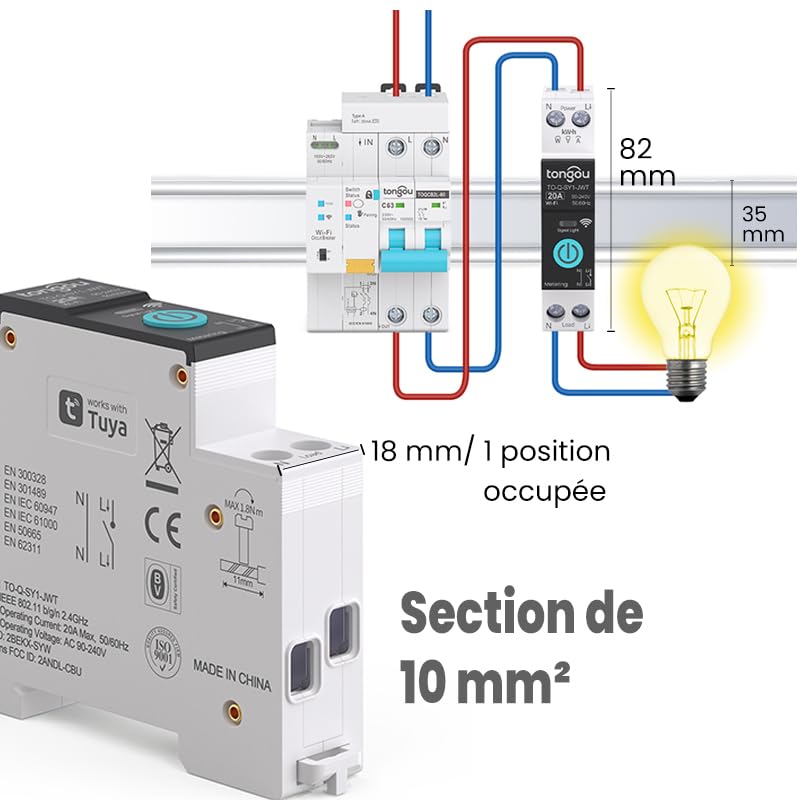
Image 5.2: Close-up of the smart switch showing its dimensions (82mm height, 35mm depth, 18mm width) and indicating a 10 mm² wiring section capacity.
6. Sozlash
To enable smart functionalities, connect your TONGOU Wi-Fi Smart Switch to the Smart Life or Tuya application.
- Ilovani yuklab oling: Download the "Smart Life" or "Tuya Smart" application from the App Store (iOS) or Google Play Store (Android).
- Roʻyxatdan oʻtish/Kirish: Ilovani oching va yangi hisob uchun ro'yxatdan o'ting yoki mavjud hisob bilan tizimga kiring.
- Ulanish rejimiga kiring: After restoring power to the switch, press and hold the main button on the device for 5 to 10 seconds until the signal light blinks rapidly in blue. This indicates the device is in pairing mode.
- Qurilmani ilovaga qo'shish: In the Smart Life/Tuya app, tap the "+" icon (usually in the top right corner) to add a new device. The app should automatically discover the switch. If not, manually select "Electrical" > "Circuit Breaker (Wi-Fi)" or similar.
- Wi-Fi tarmog'iga ulanish: Follow the in-app instructions to connect the device to your 2.4 GHz Wi-Fi network. Eslatma: The device only supports 2.4 GHz Wi-Fi; 5 GHz networks are not compatible.
- Qurilma nomini oʻzgartirish: Once connected, you can rename the device for easier identification (e.g., "Living Room Light").

Image 6.1: Visual guide showing how to press and hold the button for 5-10 seconds until the blue indicator light blinks rapidly, signifying pairing mode.

Image 6.2: Screenshot of the Smart Life/Tuya app showing the login/register screen, a Wi-Fi router, and the process of adding a discovered "WiFi Din Rail Switch" device.
7. Operatsion
Once the smart switch is successfully paired, you can control it and monitor energy usage through the app or voice commands.
7.1. Ilova orqali masofadan boshqarish
Open the Smart Life or Tuya app. Select your TONGOU Smart Switch from the device list. You can:
- Turn the connected appliance On or Off remotely from anywhere.
- Set up various timer modes:
- Vaqt rejimi: Schedule specific on/off times for daily or weekly routines.
- Ortga hisoblash rejimi: Belgilangan vaqtdan keyin qurilma o'chib qolishi uchun ortga hisoblash taymerini o'rnating.
- Cyclic Timing Mode: Configure repetitive on/off cycles.
- Astronomical Timing Mode: Automate based on sunrise and sunset times.
7.2. Ovozli boshqaruv
The TONGOU Smart Switch is compatible with Amazon Alexa and Google Assistant. To enable voice control:
- Link your Smart Life/Tuya account to Amazon Alexa or Google Home app.
- Yangi qurilmalarni kashf eting.
- Ovozli buyruqlardan foydalaning, masalan:
- "Alexa, [Device Name] ni yoqing"
- “Ok Google, [Device Name] funksiyasini oʻchiring”

Image 7.1: An Amazon Echo device displaying a voice waveform, indicating it is processing a command to turn off a lamp.
7.3. Power Monitoring
The smart switch provides real-time and historical energy consumption data:
- View real-time current, voltage, and power consumption of the connected load.
- Access historical data (hourly, daily, monthly, yearly) to track energy usage patterns.
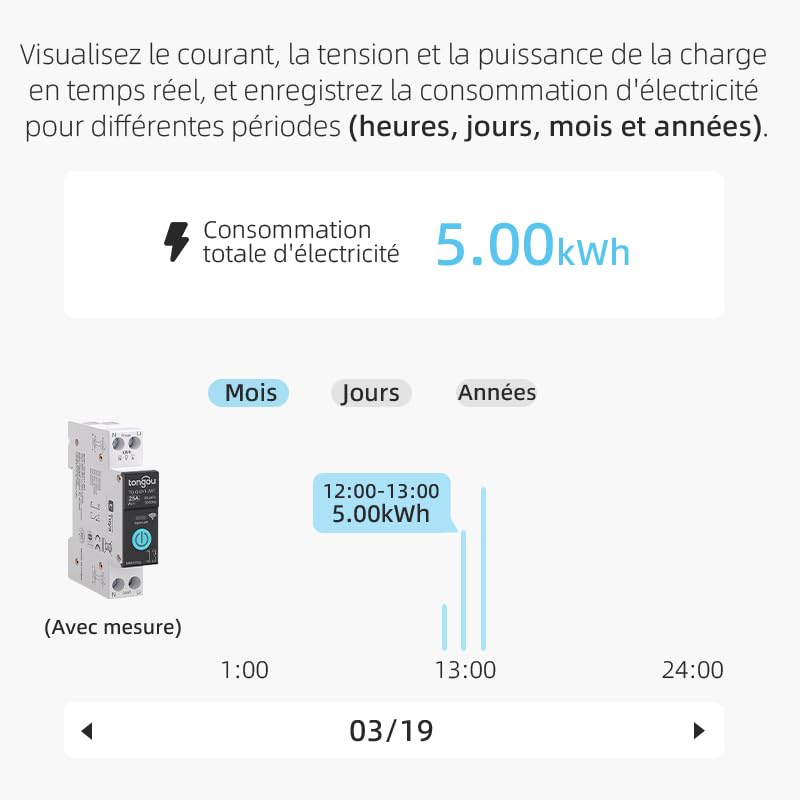
Image 7.2: A graphical representation within the app showing total electricity consumption (5.00 kWh) and a bar chart illustrating hourly consumption data for a specific date.
8. Xizmat ko'rsatish
To ensure optimal performance and longevity of your TONGOU Wi-Fi Smart Switch:
- Qurilmani toza va changdan xoli tuting. Tozalash uchun quruq, yumshoq matodan foydalaning.
- Suyuq tozalagichlar yoki erituvchilardan foydalanmang.
- Haddan tashqari qizib ketishining oldini olish uchun qurilma atrofida yetarli shamollatishni ta'minlang.
- Regularly check wiring connections for tightness, especially after initial installation.
9. Muammolarni bartaraf qilish; nosozliklarni TUZATISH
If you encounter issues with your TONGOU Wi-Fi Smart Switch, refer to the following common problems and solutions:
| Muammo | Mumkin sabab | Yechim |
|---|---|---|
| Qurilma Wi-Fi tarmog‘iga ulanmayapti | Incorrect Wi-Fi band (5GHz), weak signal, incorrect password, device not in pairing mode. | Ensure your Wi-Fi is 2.4 GHz. Move the device closer to the router. Re-enter Wi-Fi password carefully. Put the device back into pairing mode (rapid blue blinking). |
| Qurilma ilovada oflayn | Wi-Fi disconnected, power outage, router issues. | Check your Wi-Fi router and internet connection. Verify the device has power. Re-pair if necessary. |
| Ovozli boshqaruv ishlamayapti | Account not linked, device not discovered, incorrect commands. | Ensure Smart Life/Tuya account is linked to Alexa/Google Home. Discover devices in the voice assistant app. Use the exact device name. |
| Power monitoring data is inaccurate or missing | Incorrect wiring, device malfunction. | Double-check wiring according to the installation diagram. Contact support if the issue persists. |
| Device not responding to manual button press | No power, internal fault. | Check power supply to the device. If power is present and the device is unresponsive, contact support. |
10. Kafolat va qo'llab-quvvatlash
For warranty information and technical support, please refer to the documentation provided with your purchase or contact TONGOU customer service through their official channels. Keep your purchase receipt as proof of purchase.


