
1. Kirish
Sotib olganingiz uchun tashakkurasing the RCA SP550BT Portable Speaker. This manual provides important information regarding the setup, operation, and maintenance of your new speaker. Please read it thoroughly before use and keep it for future reference.
The RCA SP550BT is a versatile portable speaker featuring 50W output, Bluetooth connectivity, USB playback, FM radio, AUX input, True Wireless Stereo (TWS) function, LED lights, and a microphone input for an enhanced audio experience.
2. Paket tarkibi
Paketda quyidagi elementlar mavjudligini tekshiring:
- RCA SP550BT Portable Speaker
- Masofadan boshqarish
- Quvvat kabeli
- Foydalanuvchi uchun qo'llanma (ushbu hujjat)
3. Mahsulot tugadiview
Familiarize yourself with the main components and features of your RCA SP550BT speaker.

3.1-rasm: Old view of the RCA SP550BT portable speaker. This image displays the speaker in an upright position, highlighting the top control panel and the three prominent speaker cones with red illumination.

3.2-rasm: Yon view of the RCA SP550BT portable speaker. This perspective shows the depth of the speaker and the integrated handle for portability.

3.3-rasm: Gorizontal view of the RCA SP550BT portable speaker. This image illustrates the speaker's design when placed on its side, emphasizing the speaker grille and LED lighting.
3.1 masofadan boshqarish pulti
The included remote control allows for convenient operation of the speaker from a distance.
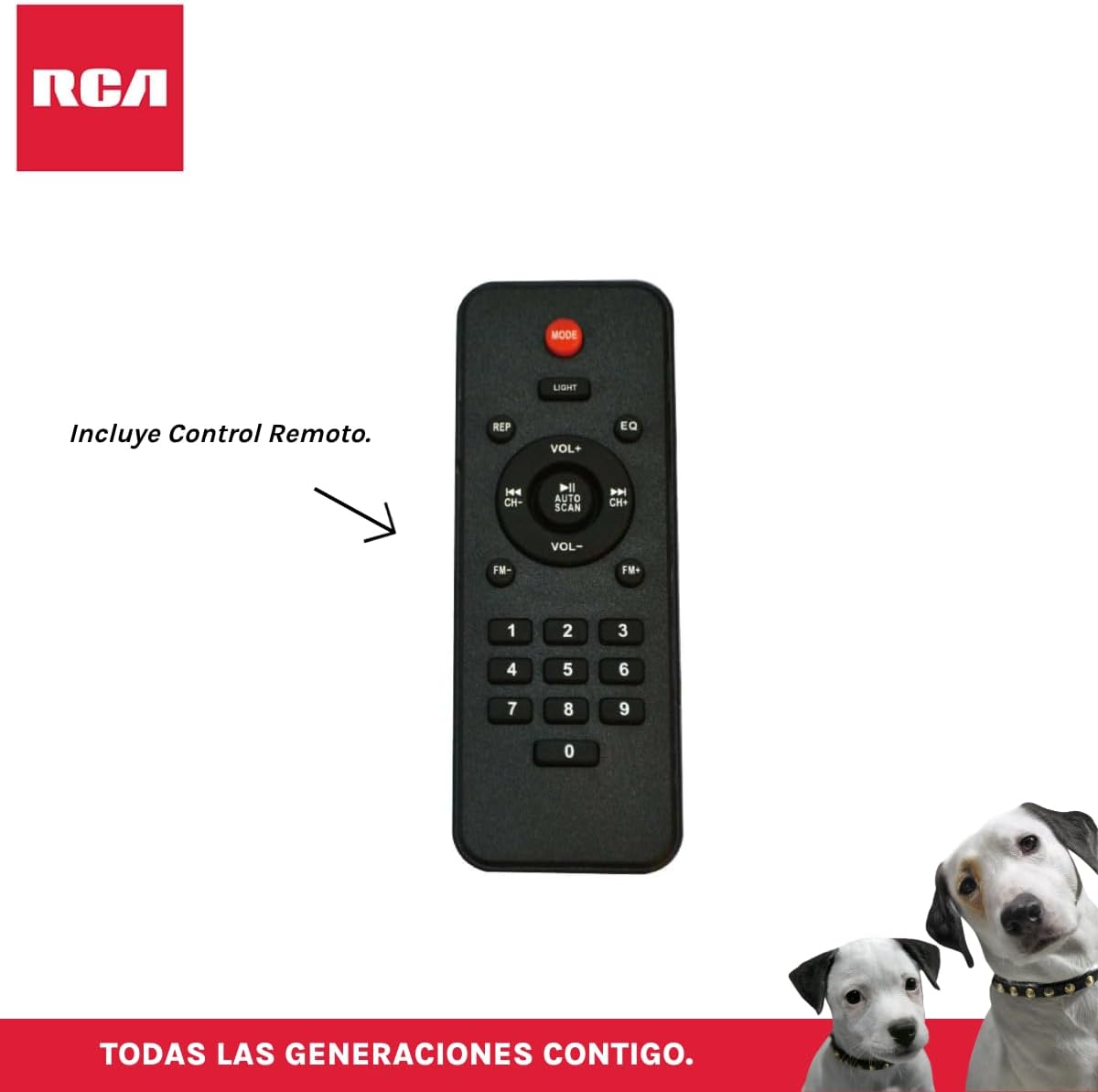
3.4-rasm: RCA SP550BT Remote Control. This image displays the full layout of the remote control, including buttons for power, mode selection, volume adjustment, track navigation, equalizer settings, and a numeric keypad.
4. Sozlash
4.1 Quvvatga ulanish
- Ensure the speaker is placed on a stable, flat surface.
- Connect the power cable to the speaker's power input port.
- Plug the other end of the power cable into a standard electrical outlet (AC 100-240V, 50/60Hz).
- Press the power button on the speaker or remote control to turn it on.
5. Foydalanish bo'yicha ko'rsatmalar
5.1 Quvvatni yoqish/o‘chirish
- Karnayni yoqish uchun tugmasini bosing KUCH button on the control panel or the remote control.
- Karnayni o'chirish uchun tugmasini bosing KUCH tugmasini yana bosing.
5.2 Rejim tanlash
ni bosing REJIM button on the control panel or remote control to switch between Bluetooth, USB, FM, and AUX input modes.
5.3 Bluetooth ulanishi
- Karnayni yoqing va Bluetooth rejimini tanlang REJIM button. The display will show "BLUE" and a pairing indicator will flash.
- Mobil qurilmangizda (smartfon, planshet va boshqalar) Bluetooth-ni yoqing.
- Ni qidirish "RCA SP550BT" in your device's Bluetooth list and select it to pair.
- Ulangandan so'ng, karnay tasdiqlovchi ovoz chiqaradi va Bluetooth indikatori miltillashni to'xtatadi.
- Endi siz qurilmangizdagi audioni karnay orqali ijro etishingiz mumkin.
5.4 USB orqali tinglash
- Insert a USB flash drive (FAT32 format, max 32GB) containing MP3 audio files USB portiga kiriting.
- The speaker will automatically switch to USB mode and begin playing the first track. If not, press the REJIM USB rejimini tanlash uchun tugmani bosing.
- dan foydalaning O‘YNAT/TO‘XTATISH, OLDINGI, va KEYINGISI buttons on the control panel or remote to control playback.
5.5 FM radiosi
- Turn on the speaker and select FM mode using the REJIM tugmasi.
- ni bosing va ushlab turing O‘YNAT/TO‘XTATISH tugmasi (yoki AVTOMONLASH on remote) to automatically scan and save available FM stations.
- dan foydalaning OLDINGI va KEYINGISI Saqlangan stantsiyalar bo'ylab harakatlanish uchun tugmalar.
5.6 AUX kirish
- Connect an external audio device (e.g., MP3 player, laptop) to the speaker's AUX input port using a 3.5mm audio cable (not included).
- AUX rejimini tanlang REJIM tugmasi.
- Ijro etish va ovoz balandligini ulangan qurilmangizdan boshqaring.
5.7 TWS (Haqiqiy simsiz stereo) funktsiyasi
The TWS function allows you to connect two RCA SP550BT speakers wirelessly for a stereo sound experience.
- Ensure both SP550BT speakers are powered on and in Bluetooth mode, but not yet paired with any device.
- On one of the speakers, press and hold the TWS button (if available, or a dedicated TWS pairing button) until you hear a confirmation tone. The speakers will attempt to pair with each other.
- Once successfully paired, one speaker will act as the master (left channel) and the other as the slave (right channel).
- Now, pair your mobile device with the master speaker via Bluetooth as described in section 5.3.
5.8 ta LED chiroq
ni bosing NOR button on the control panel or remote control to cycle through different LED light modes or to turn them off.
5.9 Mikrofondan foydalanish
Connect a wired microphone (not included) to the microphone input port on the speaker. Adjust the microphone volume using the dedicated knob (if available) or the main volume control.
6. Xizmat ko'rsatish
- Tozalash: Karnayning tashqi qismini tozalash uchun yumshoq, quruq matodan foydalaning. Abraziv tozalagichlar yoki erituvchilardan foydalanmang.
- Saqlash: Uzoq vaqt davomida foydalanilmaganda, karnayni to'g'ridan-to'g'ri quyosh nuri va haddan tashqari haroratdan uzoqroq, salqin va quruq joyda saqlang.
- Suvga ta'sir qilish: Bu karnay suv o'tkazmaydigan. Uni suvga yoki haddan tashqari namlikka duchor qilmang.
7. Muammolarni bartaraf qilish; nosozliklarni TUZATISH
Agar karnayingiz bilan bog'liq muammolarga duch kelsangiz, quyidagi keng tarqalgan muammolar va yechimlarga murojaat qiling:
| Muammo | Mumkin sabab | Yechim |
|---|---|---|
| Quvvat yo'q | Power cable not connected; Power outlet not working; Speaker off. | Check power cable connection; Try a different outlet; Press the POWER button. |
| Ovoz yo'q | Volume too low; Incorrect mode selected; Device not connected properly. | Ovoz balandligini oshiring; To'g'ri kirish rejimini tanlang (Bluetooth, USB, AUX); Qurilmani qayta ulang. |
| Bluetooth bilan ulanish amalga oshmadi | Speaker not in pairing mode; Device Bluetooth off; Speaker already paired. | Ensure speaker is in Bluetooth pairing mode; Turn on device Bluetooth; Disconnect from other devices. |
| USB orqali tinglash ishlamayapti | USB drive format incompatible; Corrupt files; USB drive not inserted correctly. | Ensure USB is FAT32 format; Check file integrity; Reinsert USB drive. |
| FM radio poor reception | Zaif signal; Interferentsiya. | Relocate speaker; Extend antenna (if applicable). |
8. Texnik shartlar
| Xususiyat | Spetsifikatsiya |
|---|---|
| Model | SP550BT |
| Brend | RCA |
| Dinamikning chiqish quvvati | 50 vatt (maksimal) |
| Ulanish texnologiyasi | Bluetooth, USB, AUX |
| Simsiz texnologiya | Bluetooth |
| Audio chiqish rejimi | Stereo |
| Karnay turi | Portativ, ochiq havoda |
| O'rnatish turi | Stol usti o'rnatish |
| Nazorat usuli | Masofadan boshqarish |
| Karnay hajmi | 6.5 dyuym |
| Woofer diametri | 6.5 dyuym |
| Batareya quvvati | 4400 mlnamp Soat |
| Quvvat manbai | Elektr kabeli |
| Mos qurilmalar | Noutbuk, MP3 pleyer, smartfon, planshet |
| GTIN / UPC | 044476152061 |
9. Kafolat va qo'llab-quvvatlash
This product comes with a limited warranty. Please refer to the warranty card included in your package for specific terms and conditions. For technical support or service inquiries, please contact RCA customer service through their official websayt yoki xaridingiz bilan ko'rsatilgan aloqa ma'lumotlari.
Note: Warranty terms may vary by region. Keep your proof of purchase for warranty claims.