
1. Kirish
The Auronic Electric Air Dehumidifier AU3270 is designed to effectively remove excess moisture from indoor environments, helping to prevent mold growth and maintain a healthy humidity level. This appliance is suitable for spaces up to 15 square meters and can extract up to 10 liters of moisture per day. This manual provides essential information for the safe and efficient use of your dehumidifier.

Image: The Auronic Electric Air Dehumidifier AU3270 positioned in a living room, illustrating its compact design and 10-liter daily capacity for optimal dehumidification.
2. Xavfsizlik bo'yicha ko'rsatmalar
Shikastlanish yoki shikastlanishning oldini olish uchun jihozni ishlatishdan oldin barcha xavfsizlik ko'rsatmalarini diqqat bilan o'qib chiqing.
- Elektr ta'minoti voltage namlikni yutgichdagi reyting yorlig'iga mos keladi.
- Namlik chiqaruvchi qurilmani shikastlangan elektr simi yoki vilkasi bilan ishlatmang.
- Jihozni issiqlik manbalaridan, to'g'ridan-to'g'ri quyosh nurlaridan va yonuvchan materiallardan uzoqroq tuting.
- Havoning kirish yoki chiqishini to'sib qo'ymang. Jihoz atrofida kamida 20 sm bo'shliqni saqlang.
- Always place the dehumidifier on a stable, level surface to prevent water spillage.
- Tozalashdan, texnik xizmat ko'rsatishdan oldin yoki uzoq vaqt ishlatilmaganda jihozni elektrdan uzing.
- Jihozni, quvvat simini yoki suvga yoki boshqa suyuqliklarga botirmang.
- Ushbu jihoz jismoniy, hissiy yoki aqliy qobiliyatlari cheklangan yoki tajribasi va bilimi kam bo'lgan shaxslar (jumladan, bolalar) tomonidan foydalanish uchun mo'ljallanmagan, agar ular xavfsizligi uchun mas'ul shaxs tomonidan nazorat qilinmagan yoki jihozdan foydalanish bo'yicha ko'rsatma berilmagan bo'lsa.
- Bolalar qurilma bilan o'ynamasliklari uchun ularni nazorat qilish kerak.
3. Sozlash
3.1 O'ramni ochish va qadoq tarkibi
Carefully remove the dehumidifier from its packaging. Check that all components are present and undamaged. The package typically includes the dehumidifier unit, a drainage hose, and this user manual.

Image: Contents of the Auronic Dehumidifier package, displaying the main unit, continuous drainage hose, and user manual, along with key product dimensions.
3.2 Joylashtirish
Place the dehumidifier on a firm, level surface in the desired location. Ensure there is at least 20 cm of free space around the air inlet and outlet for optimal airflow. The unit is effective for rooms up to 15 square meters. Avoid placing it in direct sunlight or near heat-emitting appliances.
3.3 Quvvatga ulanish
Plug the power cord into a grounded electrical outlet. Ensure the outlet meets the power requirements specified on the appliance's rating label.
3.4 Drenaj imkoniyatlari
The dehumidifier offers two drainage methods:
- Suv idishi: The unit collects condensed water in its internal 2-liter water tank. The appliance will automatically stop operating when the tank is full, and an indicator will illuminate.
- Uzluksiz drenaj: For uninterrupted operation, attach the included drainage hose to the continuous drainage port on the back of the unit. Route the hose to a suitable drain or larger container, ensuring it is sloped downwards to allow water to flow freely by gravity.
4. Foydalanish bo'yicha ko'rsatmalar
4.1 Boshqaruv paneli tugadiview
The dehumidifier features an intuitive digital LED display and control buttons for easy operation.
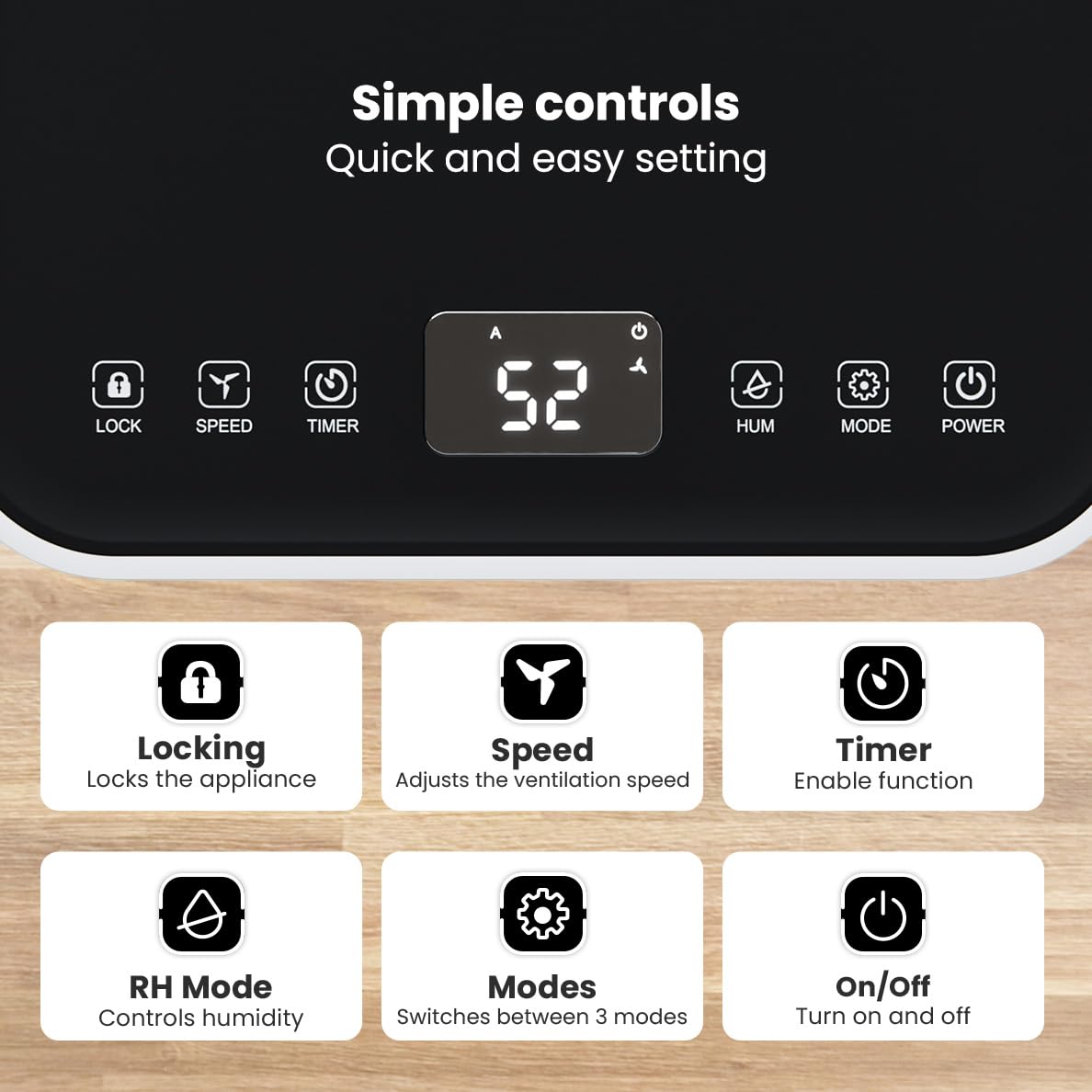
Rasm: batafsil view of the dehumidifier's control panel, highlighting each button's function for easy setting adjustments.
- Quvvat tugmasi (⏻): Qurilmani yoqadi yoki o'chiradi.
- Rejim tugmasi (⚙): Switches between the three operating modes: Automatic, Continuous, and Quiet.
- RH Mode Button (💧): Controls the desired relative humidity level. Press to set the target humidity.
- Taymer tugmasi (⏱): Enables the timer function for scheduled operation.
- Tezlik tugmasi (⇋): Adjusts the ventilation speed (fan speed).
- Qulflash tugmasi (🔒): Tasodifiy o'zgarishlarni oldini olish uchun boshqaruv panelini qulflaydi.
4.2 Ishlash rejimlari
Press the Mode button to cycle through the available operating modes:
- Avtomatik rejim: The device automatically adjusts its operation based on the current room humidity to maintain a comfortable level.
- Uzluksiz rejim: Ideal for very damp environments like wet basements. The dehumidifier operates continuously regardless of the humidity level until the water tank is full or continuous drainage is active.
- Sokin rejim: Designed for night-time use or in areas where low noise is preferred. The dehumidifier operates at a reduced fan speed, ensuring a peaceful environment with a noise level below 36dB.

Image: A chart comparing the noise level of the Auronic Dehumidifier (42dB) to common sounds like breathing, whispering, and loud conversation, highlighting its quiet operation.
4.3 Humidity Sensor and Display
The integrated humidity sensor monitors the room's humidity level, which is displayed on the digital screen. The color of the display indicates the current humidity status:
- Moviy: Humidity level is below 45%.
- Yashil: Humidity level is between 45% and 64%.
- Qizil: Humidity level is above 65%.
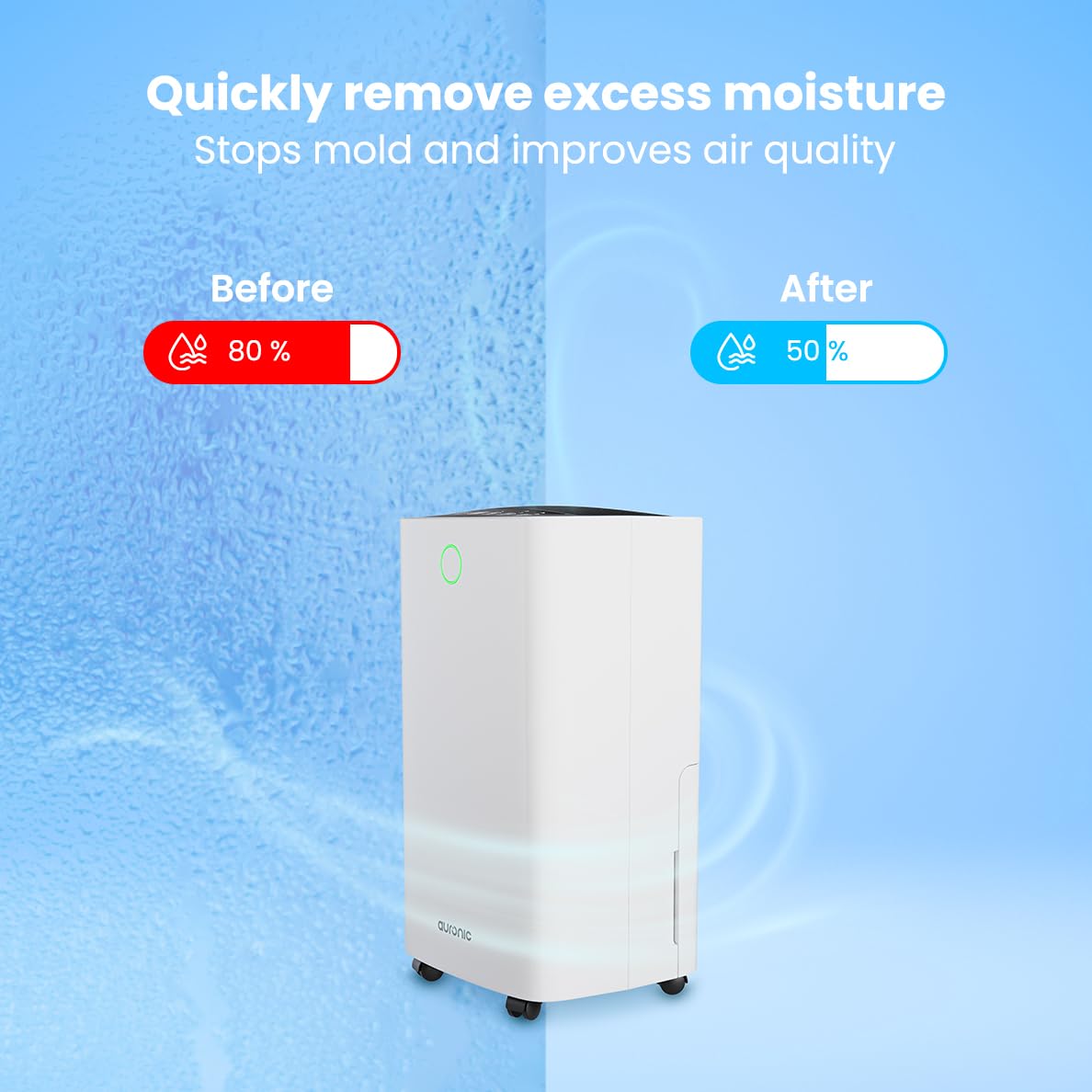
Image: A visual representation demonstrating the dehumidifier's effectiveness, showing a reduction in humidity from 80% to 50% in a room.
4.4 Kir yuvish uchun quritish funksiyasi
The Auronic dehumidifier includes a laundry drying function to assist in reducing the drying time of clothes, sheets, and towels. Place the appliance in your laundry room or near drying clothes to utilize this feature, which helps to remove moisture from the air and accelerate the drying process.

Image: The dehumidifier in a bathroom setting, demonstrating its ability to extract up to 10 liters of moisture and its suitability for rooms up to 15 square meters, alongside its intelligent humidity meter, wash-dry function, and silent operation.
5. Xizmat ko'rsatish
Muntazam texnik xizmat ko'rsatish sizning namlagichingizning uzoq umr ko'rishini va samarali ishlashini ta'minlaydi.
5.1 Suv idishini bo'shatish
When the water tank is full, the dehumidifier will stop operating, and an indicator light will turn on. Carefully pull out the water tank from the unit, empty the collected water, and then reinsert the tank firmly until it clicks into place. Ensure the tank is properly seated to resume operation.
5.2 Havo filtrini tozalash
The air filter should be cleaned regularly (e.g., every two weeks or as needed) to maintain optimal performance. A dirty filter can reduce efficiency and increase energy consumption.
- Namlik quritgichni elektr rozetkasidan uzing.
- Locate and remove the air filter (typically on the back or side of the unit).
- Clean the filter using a vacuum cleaner to remove dust and debris. For heavily soiled filters, wash gently with lukewarm water and a mild detergent.
- Allow the filter to air dry completely before reinserting it into the dehumidifier.
5.3 Umumiy tozalash va saqlash
Namlagichning tashqi qismini yumshoq mato bilan artib oling, damp cloth. Do not use abrasive cleaners or solvents. For long-term storage, ensure the water tank is empty and clean, the filter is clean and dry, and the unit is unplugged. Store the dehumidifier in a cool, dry place, preferably in its original packaging.
6. Muammolarni bartaraf qilish; nosozliklarni TUZATISH
Namlagich bilan bog'liq muammolarga duch kelsangiz, quyidagi keng tarqalgan muammolar va echimlarga murojaat qiling:
| Muammo | Mumkin sabab | Yechim |
|---|---|---|
| Namlagich yoqilmaydi. | No power supply; Power cord not plugged in; Power button not pressed. | Check power connection; Ensure outlet is functional; Press the Power button. |
| Suv yig'ilmaydi yoki kam namlik. | Room temperature too low; Humidity level already low; Air filter clogged; Air inlet/outlet blocked; Water tank not properly inserted. | Ensure room temperature is above 5°C; Check current humidity; Clean the air filter; Clear any obstructions; Reinsert water tank correctly. |
| Birlik shovqinli. | Jihoz tekis yuzada emas; Havo filtri tiqilib qolgan; Ichki komponentlar tebranadi. | Place on a stable, level surface; Clean the air filter; If noise persists, contact customer support. |
| Suv idishi to'lgan indikatori yoqilgan, lekin idish to'la emas. | Float switch malfunction; Water tank not properly seated. | Remove and reinsert the water tank; Check float switch for obstructions. |
| Displey xato kodini ko'rsatadi. | Ichki sensor xatosi yoki noto'g'ri ishlashi. | Jihozni elektr tarmog‘idan 5 daqiqa uzib, so‘ng qaytadan ulang. Agar xatolik davom etsa, mijozlarni qo‘llab-quvvatlash xizmatiga murojaat qiling. |
7. Texnik shartlar
Technical specifications for the Auronic Electric Air Dehumidifier AU3270:
| Xususiyat | Tafsilot |
|---|---|
| Brend | Auronik |
| Model nomi | AU3270 |
| Imkoniyat | 10 litr / kun |
| Suv idishining sig'imi | 2 litr |
| Zamin maydoni qoplamasi | Up to 15 m² (150000 Square Centimeters) |
| Wattage | 185 vatt |
| Mahsulot o'lchamlari (D x G x Y) | 50D x 30.5W x 26.5H Santimetre |
| Element og'irligi | 10 kilogramm |
| Rang | Oq |
| Shovqin darajasi | Below 36dB (in Quiet Mode) |
8. Kafolat va qo'llab-quvvatlash
8.1 Kafolat haqida ma'lumot
Your Auronic Electric Air Dehumidifier AU3270 comes with a standard manufacturer's warranty. Please refer to the warranty card included in your package for specific terms, conditions, and duration. Keep your proof of purchase for warranty claims.
8.2 Mijozlarni qo‘llab-quvvatlash
For any questions, technical assistance, or warranty claims, please contact Auronic customer support. Contact details can typically be found on the product packaging, the official Auronic websayt yoki kafolat kartasi.