
1. Mahsulot tugadiview
The QRD Wireless Controller (Model: US-T5-JB02) is a high-performance replacement controller designed for Nintendo Switch, Switch Pro, Lite, and OLED models. It features advanced technologies such as Hall Effect joysticks for precise, drift-free control, dual vibration motors for immersive feedback, and a 6-axis gyroscope for accurate motion sensing. This controller also includes programmable back buttons and customizable LED backlighting, enhancing your gaming experience.
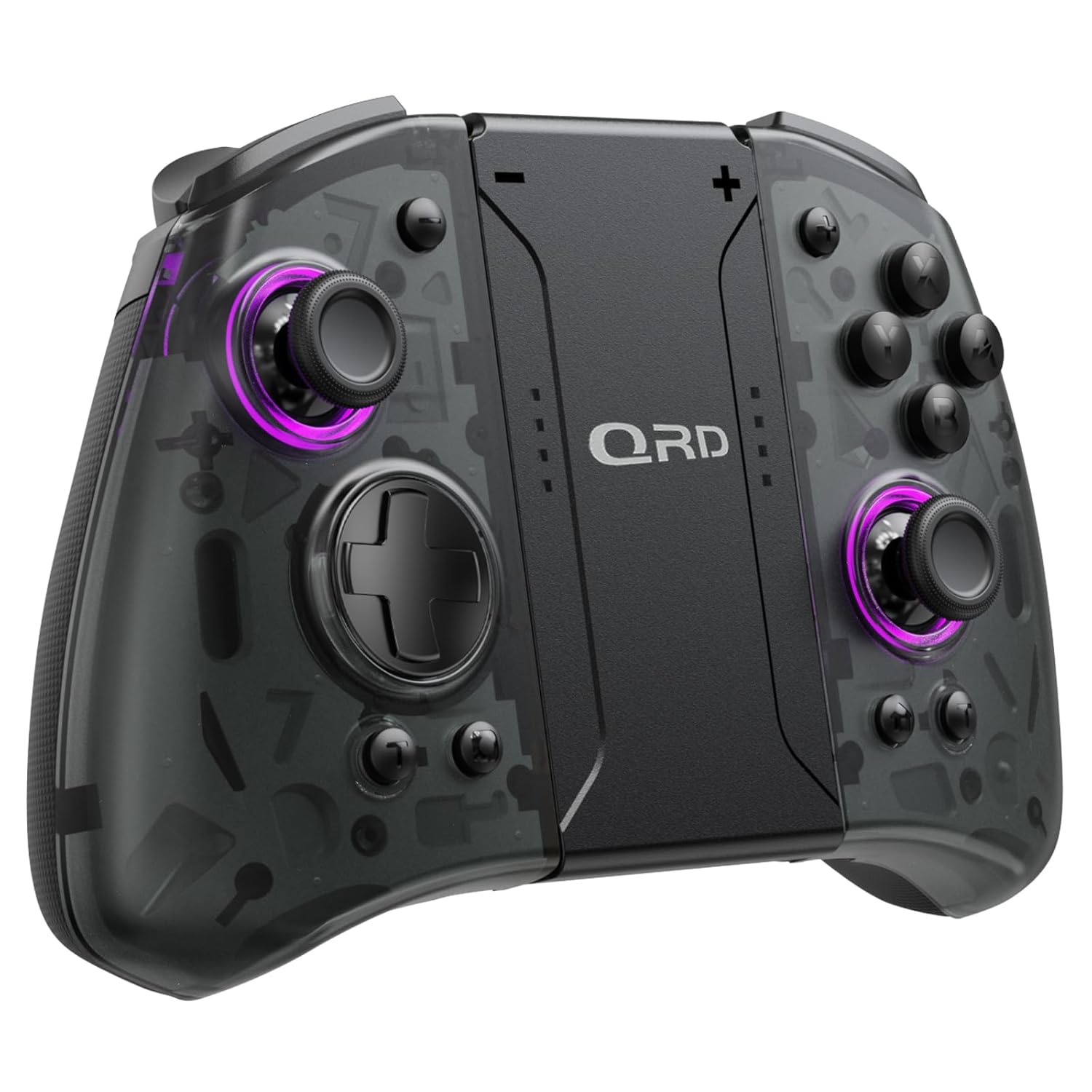
1.1-rasm: Old view of the QRD Wireless Controller, showcasing uning ergonomik dizayni va tugmalar joylashuvi.
2. Asosiy xususiyatlar
- Simsiz Bluetooth 5.3 ulanishi: Ensures stable, lag-free connection for seamless gameplay.
- Hall effektli joystiklar: Provides 360° precise, drift-free control and extended lifespan.
- Ikki tomonlama tebranish motorlari: Offers 3 levels of adjustable vibration for enhanced tactile feedback.
- 6 o'qli giroskop harakat sensori: Enables accurate tilt detection for precise aiming and movement in compatible games.
- Dasturlashtiriladigan orqaga tugmalar: Customize controls with single or multiple mappings for efficient combo execution.
- Turbo funktsiyasi: Allows for rapid firing of buttons.
- LED yoritgichi: Features 8 different colors with static, breathing, and flashing modes for personalized aesthetics.
- Uzoq batareya muddati: Up to 10 hours of uninterrupted gameplay on a single charge (2 hours charging time).
- Ergonomik dizayn: Comfortable grip for extended gaming sessions, includes a screenshot function.

Image 2.1: Diagram highlighting key features such as Bluetooth 5.3, Dual Vibration, 6-Axis Gyro, Turbo, Macro Back Paddles, and Colorful Options.

Image 2.2: Illustration demonstrating the Hall Effect Joysticks, emphasizing drift-free and accurate control.
3. Sozlash va ulanish
3.1 Initial Pairing with Nintendo Switch
- Nintendo Switch konsolingiz yoqilganligiga va eng so'nggi tizim versiyasiga yangilanganligiga ishonch hosil qiling.
- BOSH SAHIFA menyusidan "Kontrollerlar" > "Tutqichni/Tartibni o'zgartirish" ni tanlang.
- On the QRD Wireless Controller, press and hold the HOME tugmasi (usually located in the center) for 3-5 seconds until the LED indicators start flashing rapidly.
- Once the controller is successfully paired, the corresponding player LED(s) on the controller will light up solid.
- The controller can also be connected by sliding it into the Nintendo Switch Dock while the console is attached.
3.2 Reconnecting the Controller
To reconnect a previously paired controller, simply press the HOME tugmasi once. The controller will automatically attempt to connect to the last paired console.
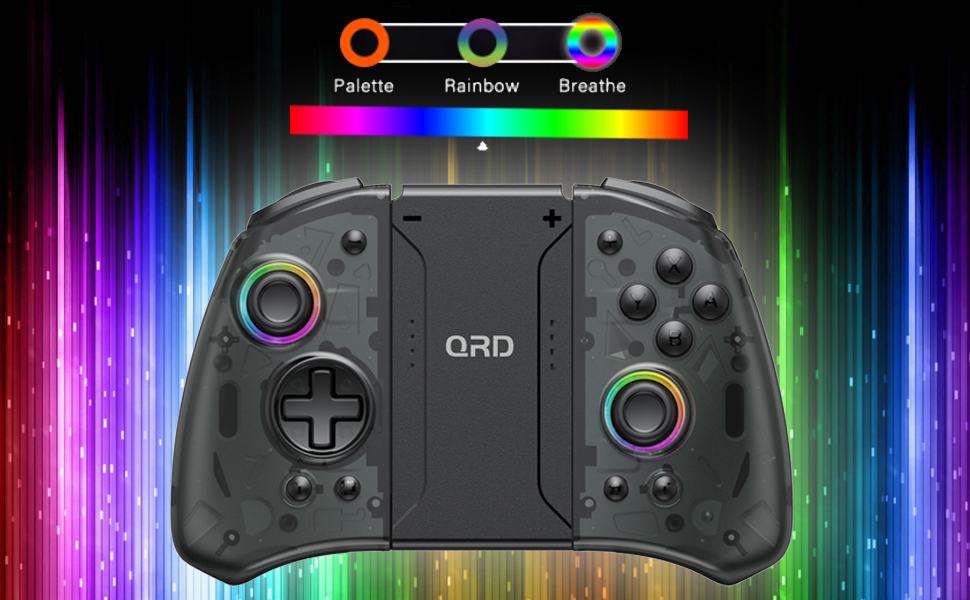
Image 3.1: Visual representation of controller compatibility with Nintendo Switch and Switch OLED models. Note: Not compatible with Switch Lite.
4. Foydalanish bo'yicha ko'rsatmalar
4.1 Tugmachalar tartibi
Tekshirish moslamasining tugmachalar joylashuvi bilan tanishib chiqing:
- Chap joystik: Movement control.
- O'ng joystik: Camera or aiming control.
- D-Pad: Yo'nalishli kiritish.
- A/B/X/Y tugmalari: Harakat tugmalari.
- L/R tugmalari: Yelka tugmalari.
- ZL/ZR tugmalari: Trigger tugmalari.
- HOME tugmasi: Returns to the HOME Menu, powers on/off the controller.
- Skrinshot tugmasi: Skrinshotlarni oladi.
- +/- tugmalari: Plus and Minus buttons for in-game functions.
- M1/M2 (Back Buttons): Programmable macro buttons.
4.2 Adjusting Vibration Intensity
The controller supports 3 levels of vibration intensity. To adjust, press and hold the Turbo tugmasi va keyin tugmasini bosing D-Pad Up or D-Pad pastga to cycle through intensity levels (Low, Medium, High, Off).
4.3 Turbo Function Setup
To set a button to Turbo mode:
- ni bosing va ushlab turing Turbo tugmasi.
- While holding Turbo, press the desired action button (e.g., A, B, X, Y, L, R, ZL, ZR). The button will now continuously register input when held down.
- To clear Turbo for a specific button, repeat the process. To clear all Turbo settings, press and hold the Turbo tugmasi 5 soniya davomida.
4.4 Programming Back Buttons (Macro)
The M1 and M2 back buttons can be programmed to execute a sequence of button presses (macro). Each macro can store up to 16 button presses.
- ni bosing va ushlab turing M1 or M2 button you wish to program.
- While holding the M button, press the SET tugmasi (refer to manual diagram for location, typically a small button on the back). The indicator light will flash slowly.
- Enter the desired sequence of button presses (e.g., A, B, X, Y, D-Pad directions).
- ni bosing SET tugmasi Makrosni saqlash uchun yana bosing. Ko'rsatkich chiroqchasi miltillashdan to'xtaydi.
- To clear a macro, press and hold the programmed M button and then press the SET tugmasi ikki marta.
4.5 LED Backlight Adjustment
The controller features customizable RGB lighting. To cycle through modes and colors:
- ni bosing LED tugmasi (refer to manual diagram for location) to change between static color, breathing, and flashing modes.
- In static mode, press the LED tugmasi repeatedly to cycle through the 8 available colors.

Image 4.1: Display of the controller's LED backlight options, including Palette (static colors), Rainbow, and Breathe modes.
5. Zaryadlash va batareyaning ishlash muddati
The QRD Wireless Controller is equipped with a built-in rechargeable Lithium Polymer battery. A 2.5m USB-C cable is included for charging.
- Connect the USB-C end of the cable to the controller's charging port and the USB-A end to a power source (e.g., Nintendo Switch Dock, USB wall adapter, computer USB port).
- To'liq zaryadlash uchun zaryadlash taxminan 2 soat davom etadi.
- A full charge provides up to 10 hours of continuous gameplay.
- The LED indicators on the controller will show charging status and battery level.
6. Xizmat ko'rsatish
To ensure the longevity and optimal performance of your QRD Wireless Controller, follow these maintenance guidelines:
- Tozalash: Tekshirish moslamasini tozalash uchun yumshoq, quruq matodan foydalaning. O'jar axloqsizlik uchun, bir oz dampsuv bilan mato. Qattiq kimyoviy moddalar, erituvchilar yoki abraziv tozalash vositalaridan foydalanmang.
- Saqlash: Tekshirish moslamasini salqin, quruq joyda, to'g'ridan-to'g'ri quyosh nuri, haddan tashqari harorat va yuqori namlikdan uzoqroq joyda saqlang.
- Ishlov berish: Avoid dropping the controller or subjecting it to strong impacts. Do not disassemble the controller, as this may void the warranty and cause damage.
- Zaryadlash: Do not leave the controller charging for excessively long periods after it is fully charged.
7. Muammolarni bartaraf qilish; nosozliklarni TUZATISH
| Muammo | Mumkin sabab | Yechim |
|---|---|---|
| Tekshirish moslamasi ulanmayapti. | Low battery; Not paired; Interference. | Charge the controller; Re-pair the controller following Section 3.1; Move closer to the console or away from other wireless devices. |
| O'yin paytida kirish kechikishi yoki uzilish. | Wireless interference; Distance from console; Low battery. | Ensure no strong wireless signals are nearby; Reduce distance to console; Charge the controller. |
| Joysticks drift or are unresponsive. | Calibration issue; Physical debris. | Go to Switch System Settings > Controllers and Sensors > Calibrate Control Sticks. Clean around the joystick base. |
| Tugmalar javob bermayapti. | Stuck button; Software glitch. | Ensure buttons are not physically stuck. Try resetting the controller (if a reset button is present, otherwise power cycle). |
| Vibratsiya ishlamayapti. | Vibration setting off; Game does not support vibration. | Adjust vibration intensity (Section 4.2). Verify game compatibility. |
8. Texnik shartlar
| Xususiyat | Tafsilot |
|---|---|
| Model raqami | US-T5-JB02 |
| Ulanish | Bluetooth 5.3 |
| Moslik | Nintendo Switch, Switch Pro, Switch OLED |
| Joystik turi | Hall effekti |
| Tebranish | Ikkita motor, 3 ta sozlanishi daraja |
| Harakatni boshqarish | 6 o'qli giroskop |
| Dasturlashtiriladigan tugmalar | Yes (Back Buttons) |
| Batareya turi | Lityum polimer |
| Zaryadlash vaqti | Taxminan 2 soat |
| O'yin vaqti | 10 soatgacha |
| Zaryadlash porti | USB-C |
| O'lchamlari | 7.95 x 5.51 x 2.36 dyuym (taxminan) |
| Og'irligi | 12.35 untsiya (taxminan) |
9. Kafolat va qo'llab-quvvatlash
9.1 Kafolat haqida ma'lumot
QRD products are manufactured with high-quality materials and undergo rigorous testing. This product comes with a standard manufacturer's warranty against defects in materials and workmanship. Please refer to the product packaging or the official QRD website for specific warranty terms and duration.
9.2 Mijozlarni qo‘llab-quvvatlash
For technical assistance, troubleshooting, or warranty claims, please contact QRD Customer Support. Have your product model number (US-T5-JB02) and purchase information ready when contacting support.
- Onlayn qo'llab-quvvatlash: Visit the official QRD website for FAQs, updated manuals, and support contact forms.
- Elektron pochta orqali yordam: [Insert QRD Support Email Address Here - if available, otherwise omit]
- Telefon qo'llab-quvvatlash: [Insert QRD Support Phone Number Here - if available, otherwise omit]
We are committed to providing excellent customer service and ensuring your satisfaction with QRD products.