
Kirish
Thank you for choosing the Yoidesu Cordless Phone System. This system combines a corded base unit with a cordless handset, offering advanced features such as a digital answering machine, photo dialing, smart call blocking, and an expandable design. This manual will guide you through the setup, operation, and maintenance of your new phone system to ensure optimal performance.
Paket tarkibi
Iltimos, quyida keltirilgan barcha narsalar sizning paketingizga kiritilganligini tekshiring. Agar biron bir narsa yo'qolgan yoki shikastlangan bo'lsa, iltimos, mijozlarni qo'llab-quvvatlash xizmatiga murojaat qiling.
- Corded Base Unit with Handset
- Simsiz telefon
- Cordless Handset Charging Base
- AC Power Adapters (2)
- Telefon liniyasi simi
- Simsiz telefon uchun qayta zaryadlanuvchi batareya
- Foydalanuvchi uchun qo'llanma (ushbu hujjat)
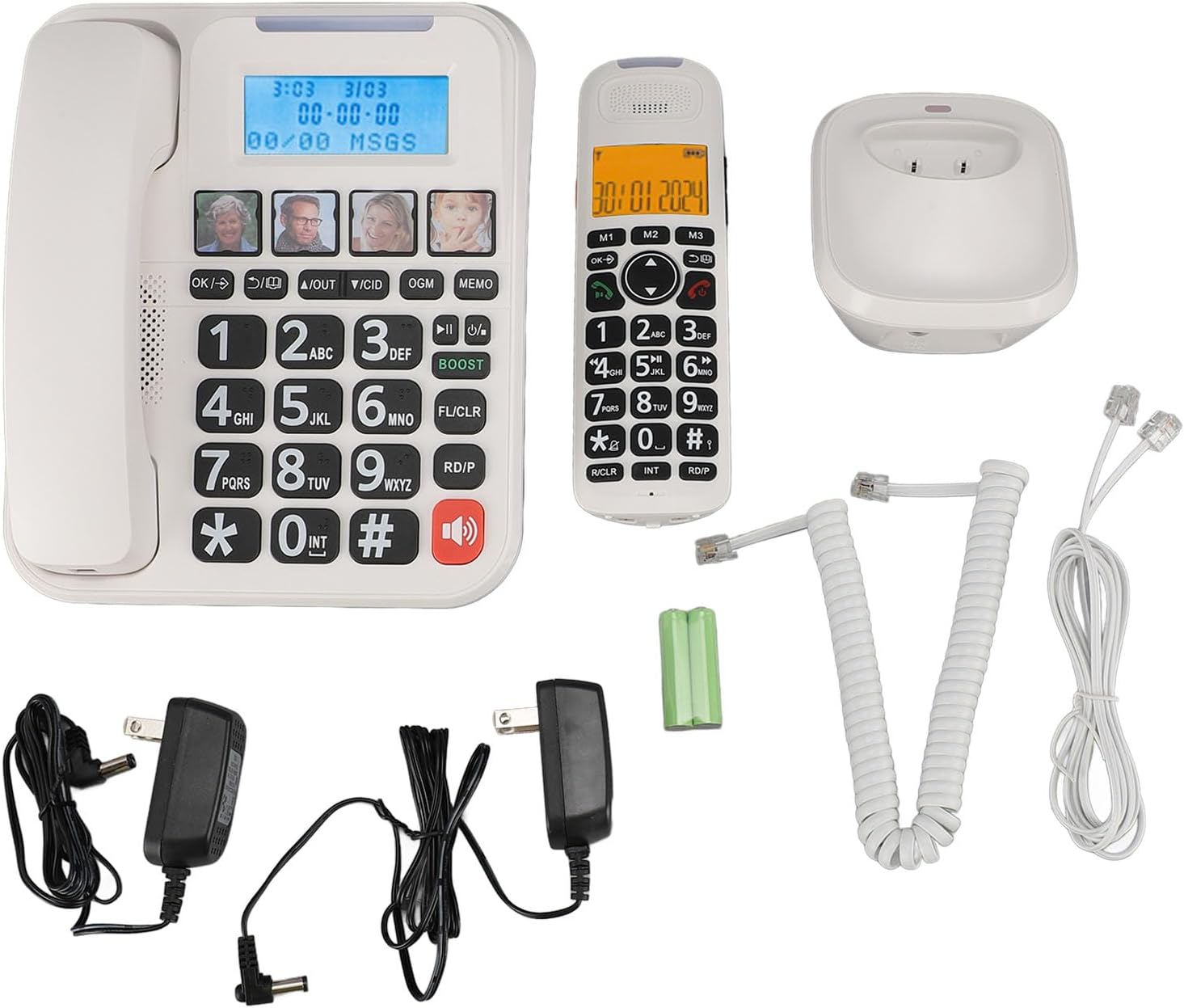
1-rasm: Complete package contents of the Yoidesu Cordless Phone System.
Mahsulot tugadiview
Simli tayanch blok
The base unit serves as the central hub for your phone system, featuring a large display, keypad, and dedicated buttons for answering machine functions and photo dialing.
- Katta 2 dyuymli ekran: Displays caller ID, call history, and answering machine status with high-contrast text.
- Large Keypad: Oversized buttons for easy dialing, especially in low-light conditions.
- Photo Dialing Buttons: Four customizable buttons for quick access to frequently dialed numbers with associated photos.
- AMP Tugma: Enhances call volume by up to 28dB for improved clarity.
- Answering Machine Controls: Play/Stop, Skip, Record, and Memo functions.

2-rasm: Old view of the Corded Base Unit.
Simsiz telefon
The cordless handset provides mobility and convenience, allowing you to make and receive calls away from the base unit.
- Displey ekrani: Shows caller information, menu options, and battery status.
- Navigatsiya tugmalari: For menu navigation and volume adjustment.
- Talk/End Buttons: To initiate and terminate calls.
- Intercom (INT) Button: For internal calls between handsets or base unit.

3-rasm: Old view of the Cordless Handset.
Sozlash; o'rnatish
1. Asosiy blokni ulash
- Telefon liniyasi simining bir uchini asosiy blok orqasidagi TEL LINE uyasiga ulang.
- Telefon liniyasi simining ikkinchi uchini devordagi telefon ulagichiga ulang.
- Plug one AC power adapter into the DC IN 6V jack on the back of the base unit.
- AC quvvat adapterining ikkinchi uchini standart elektr rozetkasiga ulang.

4-rasm: Rear connections of the Base Unit.
2. Telefon batareyasini o'rnatish
- Simsiz telefonning orqa tarafidagi batareya bo'limi qopqog'ini oching.
- Insert the supplied rechargeable battery, ensuring correct polarity (+/-).
- Batareya bo'limi qopqog'ini yoping.
3. Telefonni zaryadlash
- Plug the second AC power adapter into the DC IN 6V jack on the cordless handset charging base.
- AC quvvat adapterining ikkinchi uchini standart elektr rozetkasiga ulang.
- Place the cordless handset onto its charging base. The charging indicator on the handset should illuminate.
- Batareyaning to'liq quvvatini ta'minlash uchun uni dastlabki ishlatishdan oldin kamida 12 soat zaryadlang.

5-rasm: Cordless Handset on Charging Base.
4. Registering Additional Handsets (Optional)
The system supports up to five handsets. Refer to the specific instructions provided with additional handsets for registration procedures. Typically, this involves placing the base unit in registration mode and then initiating registration from the new handset.
Foydalanish bo'yicha ko'rsatmalar
Qo'ng'iroqlar qilish va qabul qilish
- Qo'ng'iroq qilish uchun: Simli telefonni ko'taring yoki tugmasini bosing GAPIRISH Simsiz go'shakdagi tugmani bosing, so'ngra raqamni tering.
- Qo'ng'iroqni qabul qilish uchun: Simli telefonni ko'taring yoki tugmasini bosing GAPIRISH telefon jiringlaganda simsiz telefondagi tugmani bosing.
- Qo'ng'iroqni tugatish uchun: Place the corded handset back on the base or press the OXIRI simsiz telefondagi tugmani bosing.
Qo'ng'iroq tovushini sozlash
Qo'ng'iroq paytida, tugmasini bosing AMP button on the base unit to increase the volume by 28dB. On the cordless handset, use the navigation buttons to adjust the earpiece volume.
Using the Digital Answering Machine
The integrated answering machine can record up to 60 minutes of messages, outgoing announcements, and memos.
- Play Xabarlar: ni bosing PLAY/TOʻXT asosiy blokdagi tugma.
- Chiquvchi xabarni yozib olish (OGM): ni bosing OGM button and follow the voice prompts.
- Record Memo: ni bosing MEMO button and speak after the tone.
Photo Dialing
Set up four frequently dialed numbers with associated photos for quick access.
- Dasturga: Select an empty photo slot on the base unit. Follow the on-screen prompts to enter the contact's name and phone number. You can then insert a printed photo into the designated slot.
- Terish uchun: Simply press the desired photo button on the base unit.

6-rasm: Using the Photo Dialing feature.
Smart Call Blocker and Caller ID
The system can store up to 30 incoming call numbers on handsets and 29 on the base unit. The call block function helps prevent unwanted calls.
- Qo'ng'iroq qiluvchining identifikatori: Incoming call numbers are displayed on both the base unit and handset screens.
- Qo'ng'iroqlarni bloklash: Access the call block menu to add numbers manually or block numbers from the caller ID history. You can set it to manual or automatic mode, allowing only calls from saved contacts.
Phonebook and Call History
Store up to 50 phonebook entries. Review 10 outgoing call numbers and incoming call numbers (30 on handset, 29 on base).
- Kontakt qo'shish: Navigate to the phonebook menu and enter the name and number.
- Review Tarix: Use the navigation buttons to scroll through incoming and outgoing call lists.
Intercom and 3-Way Calling
The expandable system allows for internal communication and conference calls.
- Interkom: ni bosing INT button on a handset or base unit to call another registered handset or the base unit.
- 3 tomonlama qo'ng'iroq: Supports conference calls between a landline, a sub-phone (handset), and a third-party phone. Refer to the system menu for initiating this feature.
Xizmat
Tozalash
Telefon tizimini yumshoq mato bilan arting, damp mato. Qattiq kimyoviy moddalar yoki abraziv tozalagichlardan foydalanmang. Tozalashdan oldin jihozning elektrdan uzilganligiga ishonch hosil qiling.
Batareya parvarishi
To prolong battery life, always return the cordless handset to its charging base when not in use. If the phone will be unused for an extended period, remove the battery from the handset.
Muammolarni bartaraf qilish; nosozliklarni TUZATISH
| Muammo | Mumkin sabab | Yechim |
|---|---|---|
| Terish ohangi yo'q | Telefon simi uzilgan yoki noto'g'ri. | Ensure the telephone line cord is securely connected to both the base unit and the wall jack. Test with another phone if possible. |
| Telefon quvvatlanmayapti | Handset not properly seated on charging base; charging base not powered; faulty battery. | Ensure the handset is correctly placed on the charging base. Check that the charging base's power adapter is plugged in. Replace battery if necessary. |
| Javob berish mashinasi yozmayapti | Answering machine is off; memory is full. | Ensure the answering machine is turned on. Delete old messages to free up memory. |
| Poor call quality/static | Interference from other electronic devices; handset too far from base unit. | Move the base unit away from other electronics. Ensure the handset is within range of the base unit. |
Texnik xususiyatlari
- Model raqami: Yoidesuav12iq6wt4-14
- Javob berish mashinasini yozib olish vaqti: 60 daqiqagacha
- Handset Expansion: Up to 5 handsets per base unit
- Rington ovozi: 90 dB gacha (sozlanishi)
- Qo'ng'iroq ovozini kuchaytirish: +28dB via AMP tugmasi
- Ekran hajmi: 2 inches (handset and base unit)
- Caller ID Storage: 30 incoming calls (handset), 29 incoming calls (base unit)
- Phonebook Entries: 50
- Chiquvchi qoʻngʻiroqlar xotirasi: 10
- Paket o'lchamlari: 12.99 x 9.06 x 3.94 dyuym
- Mahsulot og'irligi: 2.84 funt
Kafolat va qo'llab-quvvatlash
For warranty information or technical assistance, please contact Yoidesu customer support. Keep your purchase receipt as proof of purchase for any warranty claims.
Ishlab chiqaruvchi: Yoidesu
Birinchi mavjud sana: 5 yil 2024 sentyabr