
Kirish
This instruction manual provides detailed guidance for the Anderic RR787T Replacement Remote Control. Designed as a direct replacement for RH787T and UC787T remotes, it offers comprehensive control for Casablanca DC motor ceiling fans and other compatible high-end models. Features include six fan speeds, reverse airflow, and dimmable light control (for incandescent bulbs). This remote is specifically engineered for ceiling fans utilizing receivers with 4 dip switches, including those originally paired with the RH786R receiver.
Paket tarkibi
Paketingizda barcha narsalar mavjudligini tekshiring:
- Anderic RR787T Remote Control
- Devorga o'rnatish uchun qavs
- O'rnatish vintlari va devor ankrajlari
- Eslatma: Ikkita AAA batareya talab qilinadi va qo'shilmagan.

Image: Anderic RR787T remote control securely placed in its wall mount holder.
Sozlash; o'rnatish
Follow these steps to set up your new remote control:
- Batareyalarni o'rnatish: Open the battery compartment on the back of the remote. Insert two AAA batteries (not included), ensuring correct polarity.
- Set Dip Switches: Locate the 4 dip switches inside the battery compartment. Match the dip switch settings on your new Anderic RR787T remote to the settings on your existing ceiling fan receiver or old remote. This step is crucial for proper communication between the remote and the fan.
- Devorga o'rnatish moslamasi: Use the provided screws and wall anchors to securely mount the wall bracket in a convenient location.
- Insert Remote: Slide the remote control into the mounted wall bracket.

Rasm: orqa view of the Anderic RR787T remote, highlighting the battery compartment and dip switches for configuration.
O'rnatish ko'rgazmali video
Video: A demonstration of a similar Anderic remote (UC7225T) showing its features and operation, which can provide general guidance for setup and use. Note that this video is for a different model (UC7225T) but from the same brand.
Foydalanish bo'yicha ko'rsatmalar
The Anderic RR787T remote offers intuitive control over your ceiling fan and light:
- Quvvatni yoqish/oʻchirish: Ventilyator va chiroqni yoqish yoki o'chirish uchun quvvat tugmasini bosing.
- Fan tezligini nazorat qilish: Use the fan speed buttons (typically marked I, II, III, IV, V, VI or Low, Med, High) to adjust the fan's rotation speed. The RR787T supports 6 fan speeds.
- Teskari havo oqimi: Press the reverse button to change the direction of the fan blades, allowing for seasonal comfort (downward airflow for cooling, upward for circulating warm air).
- Nurni boshqarish:
- Chiroqni yoqish yoki o'chirish uchun yorug'lik tugmasini bosing.
- To dim the light (with incandescent bulbs), press and hold the light button. Release when the desired brightness is reached.
- Note: For LED, CFL, or other non-incandescent bulbs, the dimming function can be disabled inside the battery compartment to prevent issues.
- Taymer funktsiyasi: The remote includes timer buttons (e.g., 1H, 2H, 4H, 8H) to set the fan to operate for a specific duration before automatically turning off.
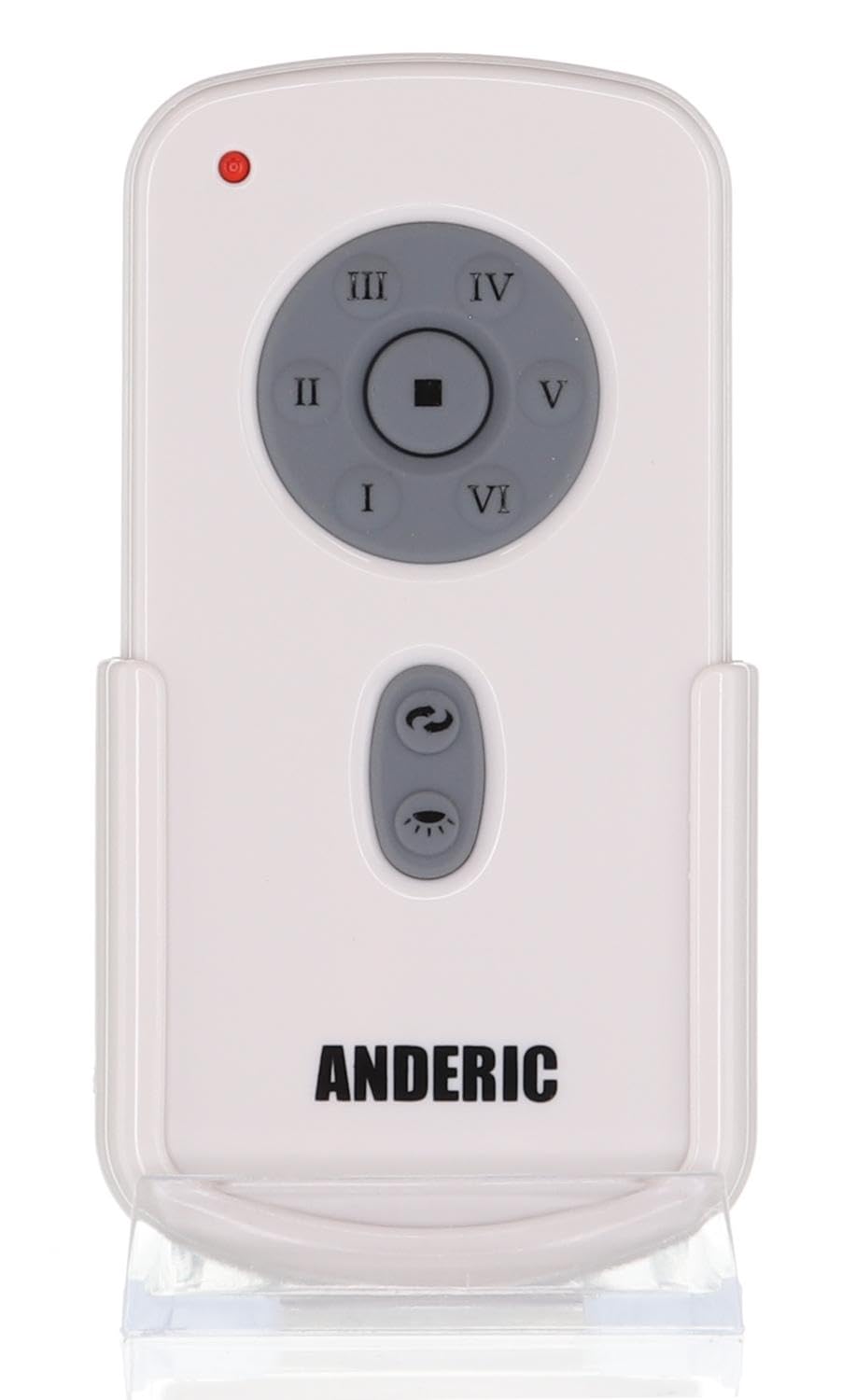
Rasm: old view of the Anderic RR787T remote control, displaying its intuitive button layout for easy operation.
Moslik
The Anderic RR787T is designed for broad compatibility with specific ceiling fan systems:
- Qabul qiluvchilar: Designed for ceiling fans that use receivers with 4 dip switches, including models originally paired with RH786R, RH787T, and UC787T remotes.
- Fan Brands: Compatible with high-end ceiling fans from brands such as Casablanca, Monte Carlo, Fanimation, Regency, and Home Decorators Collection.
- Qo'llab-quvvatlanadigan modellar: Includes Casablanca Panama, Stealth, Stingray, Fellini, and Monte Carlo Vision, Arcade, Hicks, and Dover series.
- Muhim eslatma: Not compatible with Fanimation Slinger fans (especially newer models), fans requiring 5 dip switch receivers, or 315 MHz systems like Harbor Breeze ZJF-HH-YK-A008. Always verify your fan's receiver type before purchase.
Xizmat
Masofadan boshqarish pultining uzoq umr ko'rishini va optimal ishlashini ta'minlash uchun quyidagi texnik ko'rsatmalarga rioya qiling:
- Batareyani almashtirish: Replace batteries when the remote's performance diminishes. Ensure correct battery type (2 AAA) and polarity.
- Tozalash: Pultni yumshoq, quruq mato bilan arting. Agressiv kimyoviy moddalar yoki abraziv tozalagichlardan foydalanishdan saqlaning.
- Saqlash: Masofadan boshqarish pultini to'g'ridan-to'g'ri quyosh nuri va haddan tashqari haroratdan uzoqda, salqin va quruq joyda saqlang.
Muammolarni bartaraf qilish; nosozliklarni TUZATISH
Masofadan boshqarish pulti bilan bog'liq muammolarga duch kelsangiz, quyidagi umumiy echimlarga murojaat qiling:
- Masofadan boshqarish pulti javob bermayapti:
- Batareya darajasini tekshiring va agar kerak bo'lsa almashtiring.
- Ensure the dip switch settings on the remote match the receiver.
- Verify the fan's power supply is active.
- Light Not Dimming:
- Confirm that incandescent bulbs are being used.
- Check if the dimming function is enabled inside the battery compartment.
- Fan Not Changing Speed/Direction:
- Ensure the remote is within range of the receiver.
- Re-check dip switch settings.
Texnik xususiyatlari
| Brend | Anderik |
| Model raqami | RR787T (replaces RH787T) |
| Paket o'lchamlari | 4.96 x 4.92 x 2.8 dyuym |
| Element og'irligi | 3.2 untsiya |
| Batareyalar | 2 ta AAA batareya (qo'shilmagan) |
| Maxsus xususiyat | Devorga o'rnatish |
| Rang | Oq |
| Qo'llab-quvvatlanadigan qurilmalarning maksimal soni | 1 |
| Mos qurilmalar | Muxlis |
Kafolat va qo'llab-quvvatlash
For warranty information or technical support, please refer to the product packaging or contact Anderic customer service directly. Keep your proof of purchase for any warranty claims.