
1. Kirish
The BOYA V35 is a compact and easy-to-use 2.4GHz wireless microphone system designed for capturing clear, high-quality audio. It is ideal for content creators, journalists, and anyone needing a reliable wireless audio solution for cameras and camcorders with a 3.5mm input. This manual provides detailed instructions for setting up, operating, and maintaining your BOYA V35 system.
2. Qutida nima bor
Iltimos, barcha narsalar mavjudligiga ishonch hosil qilish uchun paket tarkibini tekshiring:
- BY-V35 Transmitter (TX) x 2
- BY-V35 RX Receiver x 1
- BY-V35 Foam Windscreen x 2
- USB-C to USB-A Charging Cable x 1
- 3.5 mm TRS to TRS Audio Cable x 1
- Zaryadlash qutisi x 1
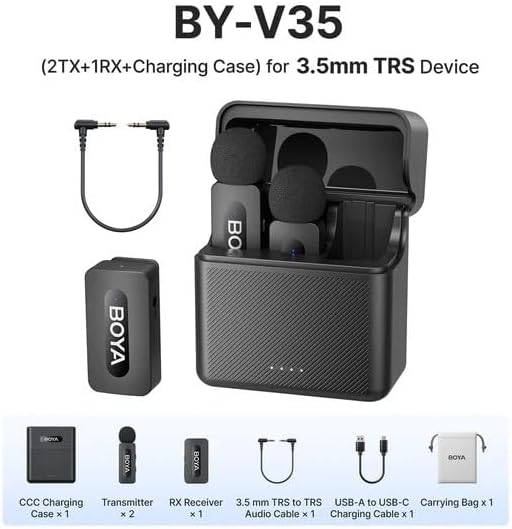
2.1-rasm: Diagram showing all components included in the BOYA V35 package, including two transmitters, one receiver, a charging case, foam windscreens, and cables.
3. Mahsulot tugadiview
3.1. Transmitter (TX)

3.1-rasm: Old view of the BY-V35 Transmitter with the foam windscreen attached, showing the BOYA logo and indicator light.

3.2-rasm: Yon view of the BY-V35 Transmitter, illustrating the integrated clip for attachment to clothing and the foam windscreen.
The transmitter is a compact unit with an integrated microphone and clip. It features a power button, a status indicator light, and a USB-C charging port. The omnidirectional microphone is designed to capture sound from all directions.
3.2. Qabul qiluvchi (RX)

3.3-rasm: Yon view of the BY-V35 Receiver, showing the USB-C port, power button, and 3.5mm output jack.
The receiver connects to your recording device (camera, camcorder). It includes a 3.5mm TRS output jack, a power button, a status indicator light, and a USB-C charging port. The receiver is designed for easy connection and stable signal reception.
3.3. Zaryadlovchi sumkasi
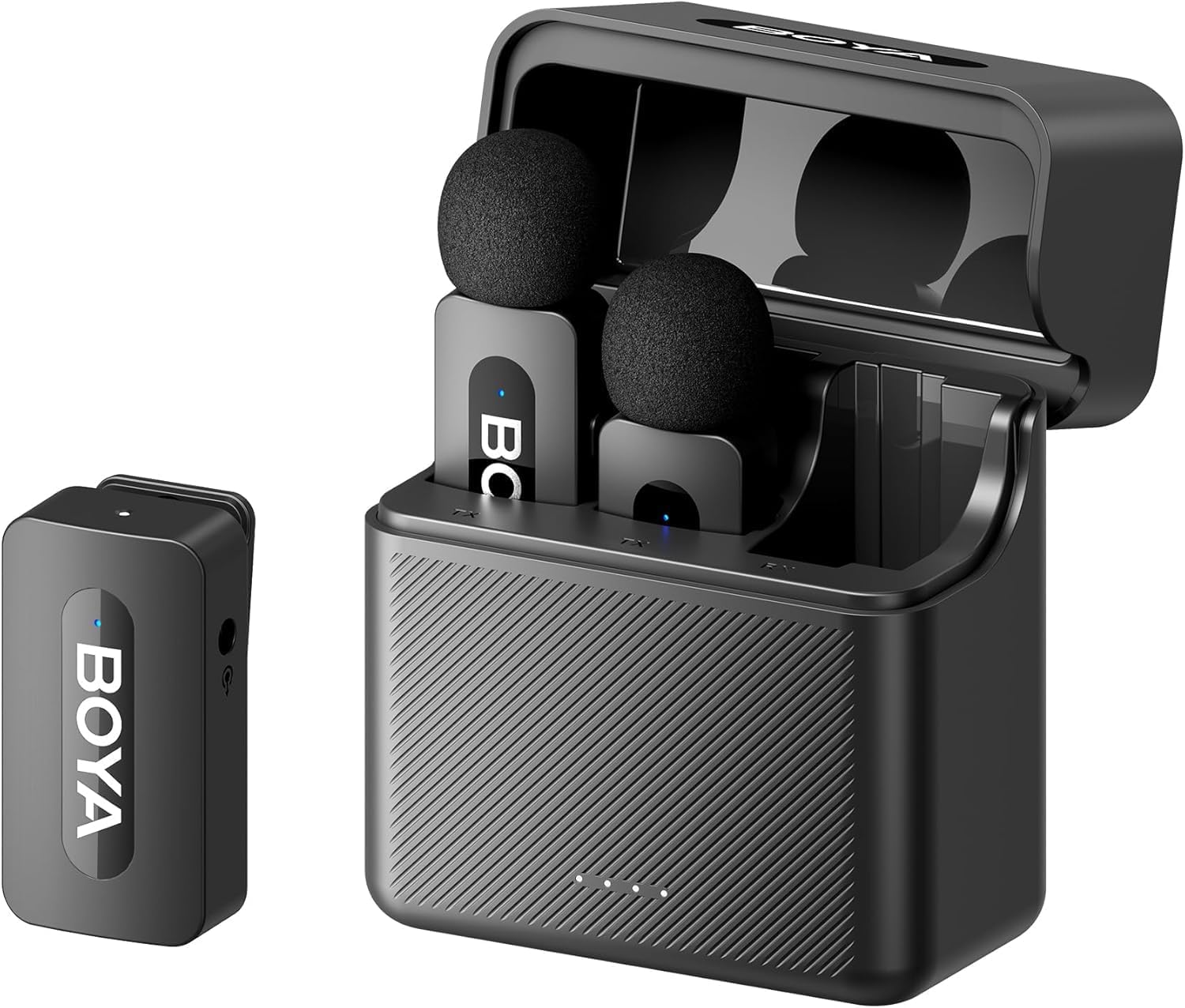
3.4-rasm: The complete BOYA V35 system, including the charging case, two transmitters, and one receiver, ready for storage or charging.
The charging case provides convenient storage and charging for both transmitters and the receiver. It has its own USB-C charging port and LED indicators to show the charging status of the case and the devices inside.
4. O'rnatish bo'yicha qo'llanma
4.1. Qurilmalarni zaryadlash
- Place the transmitters and receiver into the charging case.
- Connect the USB-C to USB-A charging cable to the charging case and a USB power adapter (not included).
- The LED indicators on the charging case will show the charging status. The device indicators will also light up during charging.
- Ensure all devices are fully charged before first use for optimal battery life.
4.2. Quvvatni yoqish va ulash
- Press and hold the power button on both the transmitter(s) and the receiver for a few seconds until the indicator lights turn on.
- The devices will automatically attempt to pair. A solid blue light on both the transmitter and receiver indicates a successful connection. A blinking light indicates searching for a connection.
4.3. Connecting to a Recording Device
- Connect one end of the 3.5mm TRS to TRS audio cable to the 3.5mm output jack on the BY-V35 receiver.
- Connect the other end of the 3.5mm TRS to TRS audio cable to the microphone input jack on your camera or camcorder.
- Ensure your recording device's audio input is set to external microphone if applicable.
4.4. Transmitterni ulash
- Attach the foam windscreen to the transmitter's microphone to reduce wind noise and plosives.
- Use the integrated clip on the back of the transmitter to securely attach it to the speaker's clothing, ideally about 6-8 inches (15-20 cm) from the mouth.
5. Foydalanish bo'yicha ko'rsatmalar
5.1. Quvvatni yoqish/o‘chirish
To power on or off the transmitter or receiver, press and hold the power button for approximately 3 seconds. The indicator light will illuminate or turn off accordingly.
5.2. Audio yozib olish
- Ensure the transmitter(s) and receiver are powered on and successfully paired (solid blue indicator light).
- Start recording on your connected camera or camcorder.
- Monitor the audio levels on your recording device to ensure proper sound capture.
5.3. Status Indicator Lights
- Qattiq ko'k: Device is powered on and successfully paired.
- Miltillovchi ko'k: Device is powered on and searching for a connection.
- Qattiq qizil: Kam batareya.
- Blinking Red (while charging): Zaryadlanmoqda.
- Solid Green (while charging): Toʻliq zaryadlangan.
6. Xizmat ko'rsatish
6.1. Tozalash
- Qurilmalarni yumshoq, quruq mato bilan artib oling.
- Qattiq kimyoviy yoki abraziv tozalash vositalarini ishlatmang.
- Ensure the foam windscreens are clean and free of debris. Replace if damaged.
6.2. Saqlash
- Store the BOYA V35 system in its charging case when not in use to protect it from dust and damage.
- Salqin, quruq joyda, to'g'ridan-to'g'ri quyosh nurlaridan va haddan tashqari haroratdan uzoqroq joyda saqlang.
6.3. Batareyani parvarish qilish
- Charge the devices regularly, even if not used frequently, to maintain battery health.
- Uzoq vaqt davomida batareyalarni to'liq zaryadsizlantirishdan saqlaning.
7. Muammolarni bartaraf qilish; nosozliklarni TUZATISH
| Muammo | Mumkin sabab | Yechim |
|---|---|---|
| Ovoz yo'q yoki past ovoz | Devices not powered on; Not paired; Incorrect cable connection; Recording device volume too low. | Ensure TX and RX are on and paired. Check 3.5mm cable connection. Increase recording device's input volume. |
| Ovoz sifati past (statik, ovozning pasayishi) | Interference; Out of range; Low battery; Damaged windscreen. | Move closer to the receiver. Charge devices. Replace windscreen. Avoid strong electromagnetic fields. |
| Qurilmalar ulanmayapti | Devices too far apart; Interference; One device not powered on. | Ensure TX and RX are close to each other. Power cycle both devices. Check battery levels. |
| Charging case not charging devices | Charging case battery empty; Poor contact; Faulty cable. | Charge the charging case. Ensure devices are correctly seated. Try a different USB-C cable. |
8. Texnik shartlar
| Xususiyat | Tafsilot |
|---|---|
| Brend | BOYA |
| Model raqami | BY-V35 |
| Ulanish texnologiyasi | Simsiz 2.4GHz |
| Ulagich turi | 3.5 mm raz'em |
| Polar naqsh | Ko'p yo'nalishli |
| Chastota diapazoni | 20Hz-16kHz |
| Signaldan shovqin nisbati | 80 dB |
| Quvvat manbai | Batareyadan quvvatlanadi |
| Element og'irligi | 0.2 Kilograms (approximate, for entire kit) |
| Element o'lchamlari | 6.1 x 2.2 x 3.4 inches (approximate, for entire kit) |
| Mos qurilmalar | Videokamera, kamera |
9. Kafolat va qo'llab-quvvatlash
Kafolat haqida ma'lumot va texnik yordam olish uchun rasmiy BOYA ga murojaat qiling websaytiga tashrif buyuring yoki mahalliy distribyutoringizga murojaat qiling. Har qanday kafolat da'volari uchun sotib olish hujjatingizni saqlang.