
1. Kirish
Thank you for choosing the coobeast 1/2-inch Drive Digital Torque Wrench. This electronic torque wrench is designed for precise torque application in various automotive, motorcycle, and industrial repair tasks. It offers high accuracy, multiple measurement units, and advanced features such as preset values, peak/track modes, and data storage. Please read this manual thoroughly before use to ensure proper operation and to maximize the lifespan of your tool.

Image 1.1: The coobeast 1/2-inch Drive Digital Torque Wrench and its protective storage case.
2. Xavfsizlik ma'lumotlari
Always observe the following safety precautions to prevent injury or damage to the tool and workpiece:
- Wear appropriate personal protective equipment, such as safety glasses, when operating the torque wrench.
- Ensure the workpiece is securely fastened before applying torque.
- Do not exceed 120% of the maximum torque value specified for this tool. Overloading can cause sensor damage and inaccurate readings.
- Keep the tool clean and dry. Avoid exposure to moisture, dust, or corrosive substances.
- Do not use the torque wrench as a pry bar or hammer.
- For prolonged periods of non-use, remove the batteries to prevent leakage and damage.
- Store the torque wrench in its protective case when not in use to prevent damage.
3. Mahsulot tugadiview va komponentlar
Familiarize yourself with the main components and features of your digital torque wrench:
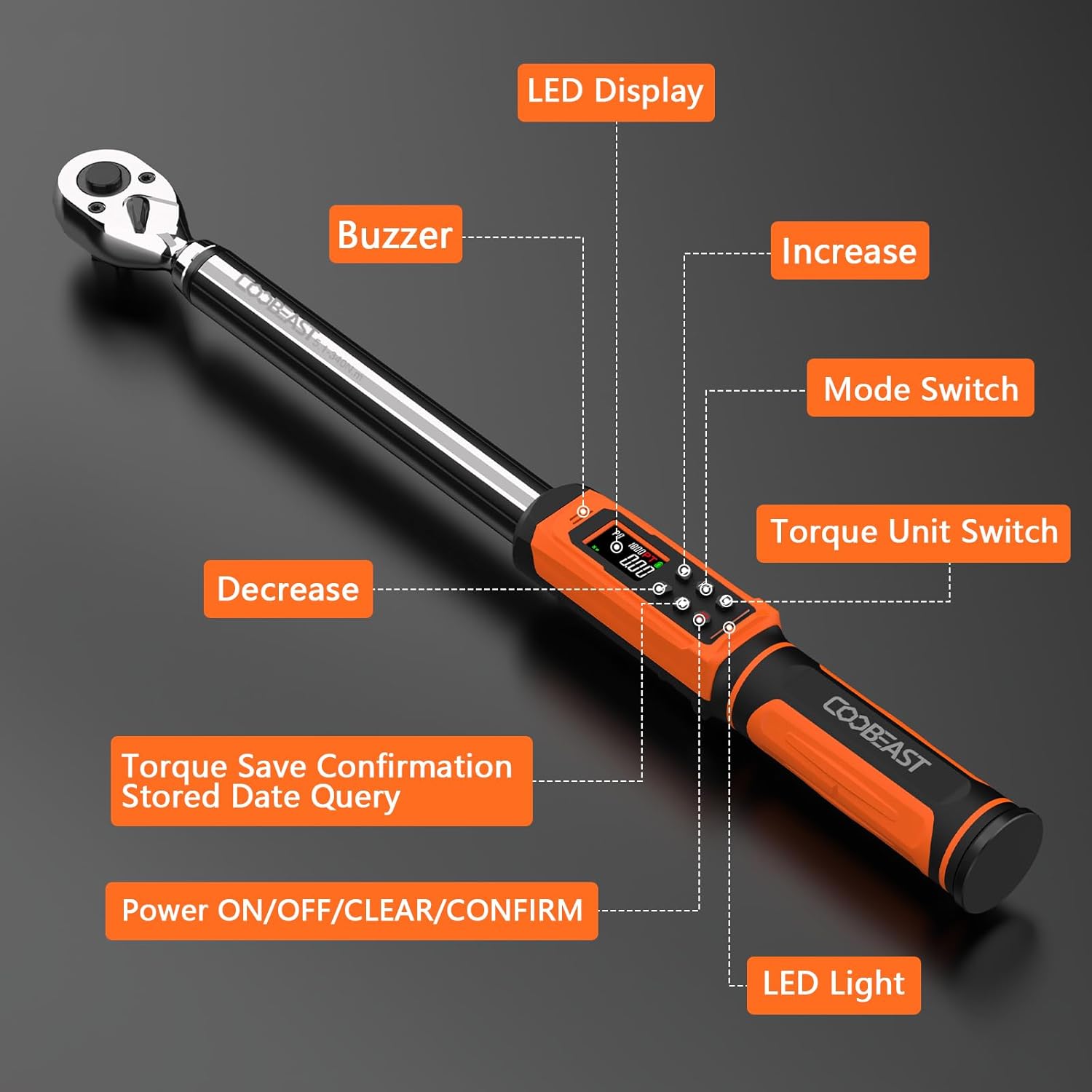
Image 3.1: Key components of the digital torque wrench, including the LED display, buzzer, LED light, and control buttons.
- LED displeyi: Shows torque values, units, and mode.
- Buzzer: Provides audible alerts when approaching or reaching target torque.
- LED yorug'lik: Visual indicator for torque status (green for 85-90%, red for 100%).
- Kattalashtirish tugmasi: Adjusts values upwards.
- Kamaytirish tugmasi: Adjusts values downwards.
- Mode Switch (M): Toggles between Peak and Track modes, and accesses preset values.
- Torque Unit Switch (U): Changes measurement units (ft-lbs, in-lbs, Nm, kg-cm, kg-m).
- Power ON/OFF/CLEAR/CONFIRM (C) Button: Powers the device, clears data, and confirms settings.
- Quick-Release Head: Allows for effortless accessory changes.
- Reversible Ratchet Head: Enables use in both clockwise and counter-clockwise directions.
- Sirpanmaydigan tutqich: Ergonomically designed for comfort and secure grip.

Rasm 3.2: Batafsil view of the quick-release mechanism and reversible ratchet head.
4. Sozlash
4.1 Batareyani o'rnatish
The torque wrench requires two AA batteries (included). Follow these steps to install them:
- Locate the battery cover at the base of the handle.
- Rotate the battery cover counter-clockwise to open it.
- To'g'ri kutupluluğa (+/-) ishonch hosil qilib, ikkita AA batareyasini joylashtiring.
- Replace the battery cover and rotate it clockwise to secure.
- Press the 'C' button to power on the device.

Image 4.1: Step-by-step guide for installing AA batteries into the torque wrench handle.
5. Foydalanish bo'yicha ko'rsatmalar
5.1 Quvvatni yoqish/o‘chirish
- Yoqish uchun: tugmasini bosing C tugmasi.
- Oʻchirish uchun: tugmasini bosing va ushlab turing C button for a few seconds until the display turns off. The wrench will also automatically power off after a period of inactivity.
5.2 Selecting Measurement Units
The wrench supports five units of measure: ft-lbs, in-lbs, Nm, kg-cm, and kg-m.
- ni bosing U button to cycle through the available units. The selected unit will be displayed on the screen.

Image 5.1: Display examples for different torque measurement units.
5.3 Setting Torque Values (Preset Mode)
The wrench allows for setting up to 9 groups of preset torque values.
- ni bosing M button to enter preset mode (indicated by 'P' on the display, e.g., P1, P2).
- dan foydalaning Up va Pastga arrow buttons to select the desired preset group (P1-P9).
- ni bosing C button to confirm the selected preset group.
- dan foydalaning Up va Pastga arrow buttons to adjust the target torque value for that preset.
- ni bosing C button again to save the value and exit setting mode.
5.4 Operating Modes: Peak and Track
The wrench offers two operating modes:
- Kuzatuv rejimi: Displays the torque value in real-time as it is being applied.
- Yuqori rejim: Captures and displays the maximum torque value achieved during the application.
To switch between modes, press the M button until the desired mode (Track or Peak) is indicated on the display.

Image 5.2: Visual representation of Track Mode (real-time display) and Peak Mode (maximum value display).
5.5 Momentni qo'llash
Once your desired torque value and unit are set:
- Attach the appropriate socket or accessory to the quick-release head.
- Place the wrench onto the fastener.
- Apply steady, smooth force. The display will show the real-time torque (in Track mode) or the peak torque (in Peak mode).
- As you approach the preset torque value, the wrench will provide visual and audible alerts:
- Yashil LED: Illuminates when 85%-90% of the target torque is reached.
- Red LED & Buzzer: Activates when 100% of the target torque is reached.
- Stop applying force immediately when the red LED illuminates and the buzzer sounds to avoid over-torquing.

Image 5.3: Visual alerts (green and red LEDs) indicating torque progression.
5.6 Ma'lumotlarni saqlash va eslab qolish
The wrench can store up to 500 groups of data. To check historical data:
- In operating mode, press and hold the M button to enter data query mode.
- dan foydalaning Up va Pastga arrow buttons to scroll through stored data records.
- ni bosing C button to exit data query mode.
- To clear all stored data, press and hold the C button while in data query mode until "CLR" appears on the display.
6. Xizmat ko'rsatish
- Tozalash: Wipe the wrench with a clean, dry cloth after each use. Do not use abrasive cleaners or solvents.
- Saqlash: Store the wrench in its original protective case in a dry, cool place, away from direct sunlight and extreme temperatures.
- Batareya parvarishi: Remove batteries if the wrench will not be used for an extended period to prevent corrosion. Replace batteries when the low battery indicator appears on the display.
- Kalibrlash: For optimal accuracy, it is recommended to have the torque wrench calibrated periodically, especially after 12 months or 5000 uses.
7. Muammolarni bartaraf qilish; nosozliklarni TUZATISH
| Muammo | Mumkin sabab | Yechim |
|---|---|---|
| Wrench does not power on. | O'lik yoki noto'g'ri o'rnatilgan batareyalar. | Batareyaning kutupluluğunu tekshiring. Yangi AA batareyalari bilan almashtiring. |
| Inaccurate torque readings. |
|
|
| Buzzer/LED alerts not working. | Batareya quvvati kam yoki ichki nosozlik. | Batareyalarni almashtiring. Agar muammo davom etsa, mijozlarni qo'llab-quvvatlash xizmatiga murojaat qiling. |
| Display shows "ERO" or error message. | Haddan tashqari yuklanish holati aniqlandi. | Reduce applied force. Do not exceed 120% of the maximum torque value. |
8. Texnik shartlar
| Xususiyat | Tafsilot |
|---|---|
| Model | 6-340NM |
| Drayv hajmi | 1/2 dyuym |
| Tork diapazoni | 6-340 Nm (3.76-250.8 Ft.lbs) |
| Aniqlik | ±2% (clockwise) |
| O'lchov birliklari | ft-lbs, in-lbs, Nm, kg-cm, kg-m |
| Ishlash rejimlari | Cho'qqi, trek |
| Ma'lumotlarni saqlash | 500 XNUMX tagacha yozuvlar |
| Preset Values | 9 ta guruh |
| Quvvat manbai | 2 x AA batareyalar (shu jumladan) |
| Material | Xrom vanadiyli po'lat |
| Element og'irligi | 4.4 funt |
| O'lchamlari | Approx. 560 mm (22 inches) length |

Image 8.1: The wrench is tested for accuracy, achieving ±2% in clockwise direction.
9. Kafolat va qo'llab-quvvatlash
For warranty information, technical support, or service inquiries, please refer to the contact information provided with your purchase or visit the official coobeast websayt. Kafolat da'volari uchun xarid kvitansiyasini xaridni tasdiqlovchi hujjat sifatida saqlang.
Ishlab chiqaruvchi: coobeast
Qism raqami: 24090004