
1. Kirish
Thank you for choosing the MOUNTUP Dual Monitor Arm MU8012-W-07. This instruction manual provides essential information for the safe and correct installation, operation, and maintenance of your new monitor arm. Please read this manual thoroughly before installation and keep it for future reference.
Xavfsizlik choralari
- Yig'ishdan oldin barcha komponentlarning mavjudligiga va shikastlanmaganligiga ishonch hosil qiling. Agar biron bir qism yo'q yoki nuqsonli bo'lsa, ishlatmang.
- Verify that your desk surface is strong enough to support the combined weight of the monitor arm and your monitors.
- Har bir qo'l uchun maksimal 10 kg (22 funt) og'irlik sig'imidan oshmang.
- Always follow the installation steps carefully. Improper installation may result in product damage or personal injury.
- Keep children away from the product during assembly. Small parts may be a choking hazard.
2. Paket tarkibi
Iltimos, paketingizda quyidagi barcha komponentlar mavjudligini tekshiring:
- Monitor Arm Assembly (x1)
- VESA plitasi (x2)
- Ish stoli Clamp Asosiy (x1)
- Grommet Base (x1)
- Mounting Hardware Kit (screws, washers, spacers)
- Hex Wrenches (various sizes)
- Qo'llanma (x1)
3. Texnik shartlar
| Xususiyat | Spetsifikatsiya |
|---|---|
| Model | MU8012-W-07 |
| Material | Qotishma po'lat |
| Rang | Oq |
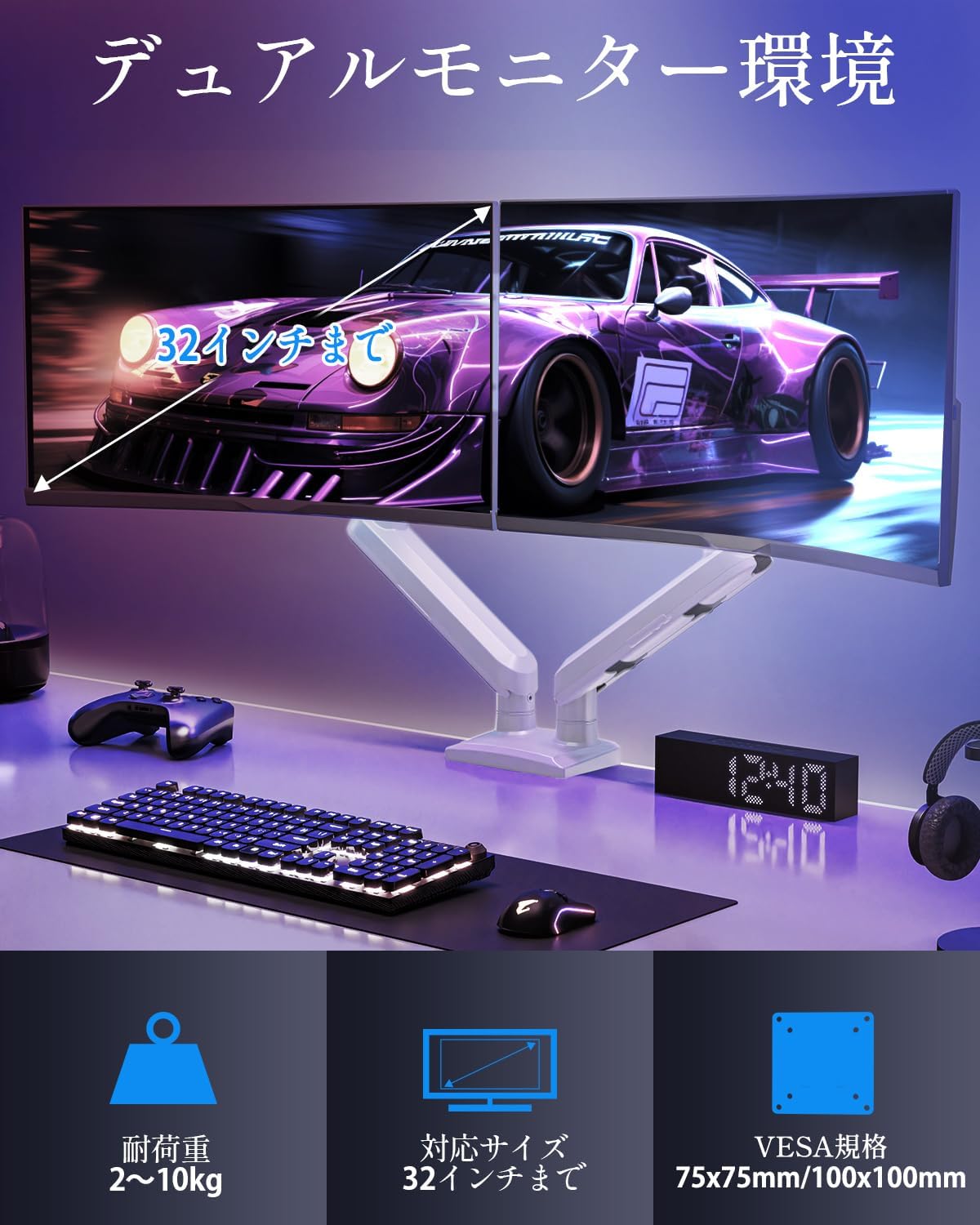
| Ekran o'lchamining mosligi | 13 - 32 dyuym |
| Og'irlik hajmi (har bir qo'l uchun) | 2 - 10 kg (4.4 - 22 funt) |
| VESA muvofiqligi | 75x75mm, 100x100mm |
| O'rnatish imkoniyatlari | Clamp, Grommet |
| Nishab diapazoni | +85° dan -45° gacha |
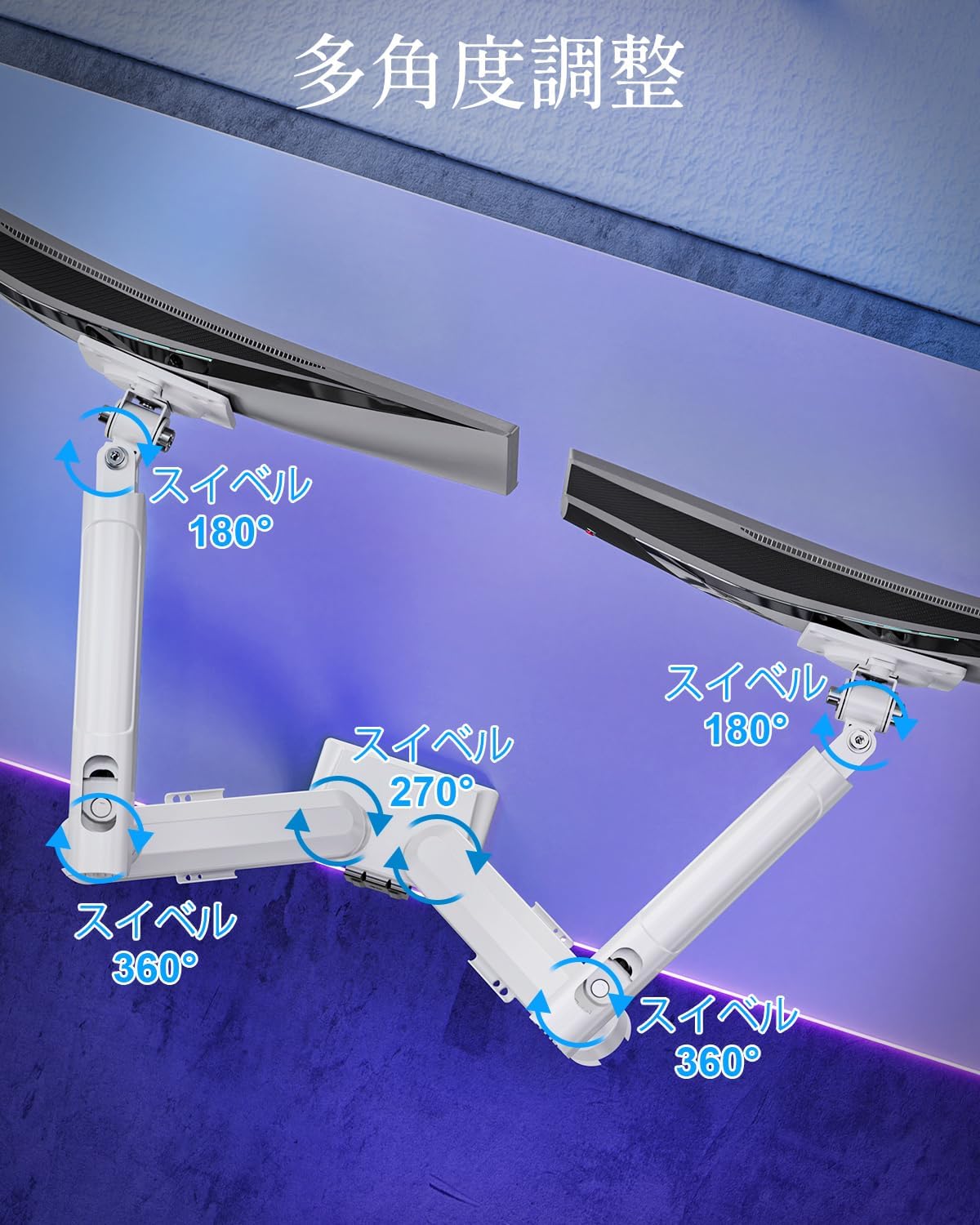
| Burilish oralig'i | 180° (monitor plate), 270° (middle joint), 360° (base) |
| Rotation (Pivot) | 360° |
| Maksimal balandlikni sozlash | 44 sm (17.3 dyuym) |
| Maks qo'l kengaytmasi | 50 sm (19.7 dyuym) |
| Mahsulot og'irligi | 3.1 kg (6.8 funt) |

4. O'rnatish va o'rnatish
1-qadam: O'rnatish usulini tanlang
The MOUNTUP Dual Monitor Arm supports two installation methods: Clamp Mount and Grommet Mount. Choose the method that best suits your desk.

Clamp O'rnatish o'rnatish
- cl ni biriktiringamp base to the main pole of the monitor arm.
- Clni joylashtiringamp onto the edge of your desk. Ensure the desk thickness is between 10-70mm (0.4-2.7 inches).
- Kl.ni tortingamp screw until the arm is securely fastened to the desk. Ensure it is stable and does not wobble.

Grommet o'rnatish o'rnatish
- If your desk has a grommet hole, ensure its diameter is between 10-60mm (0.4-2.4 inches) and the desk thickness is between 10-70mm (0.4-2.7 inches).
- Attach the grommet base to the main pole.
- Insert the grommet bolt through the desk hole and secure it from underneath with the provided plate and nut.
- Tighten the nut until the arm is firmly attached to the desk.
2-qadam: VESA plitalarini monitorlarga ulang
- Carefully lay your monitor face down on a soft, clean surface.
- VESA plitasini monitoringizning orqa tomonidagi o'rnatish teshiklari bilan tekislang.
- Use the appropriate screws (M4 or M5) and washers from the hardware kit to secure the VESA plate to the monitor. Do not overtighten.
3-qadam: Monitorlarni qurollarga o'rnating
- Slide the monitor (with the attached VESA plate) onto the VESA head of the monitor arm.
- Ensure the monitor clicks into place or is securely fastened by the quick-release mechanism.
- Ikkinchi monitor uchun takrorlang.

4-qadam: Kabelni boshqarish
Route your monitor cables through the integrated cable management clips on the underside of the arms. This helps maintain a tidy workspace.

5. Ishlash va sozlash
The MOUNTUP Dual Monitor Arm offers flexible adjustments to optimize your viewtajribasi.

Adjusting Arm Tension (Gas Spring)
The gas spring mechanism allows for smooth height adjustments. If your monitor sags or is difficult to move, you may need to adjust the tension.

- To increase tension (if monitor sags): Use the provided hex wrench to turn the adjustment screw clockwise.
- To decrease tension (if arm is too stiff): Turn the adjustment screw counter-clockwise.
- Always adjust tension with the arm held horizontally. Test the movement after each small adjustment until the monitor holds its position freely.
Monitor sozlamalari
- Balandlikni sozlash: Gently push or pull the monitor up or down to your desired height. The gas spring will assist in holding the position. Max height is 44cm (17.3 inches).
- Nishabni sozlash: Tilt the monitor screen up to +85° or down to -45° to reduce glare and optimize viewing angles. Loosen the tilt bolt, adjust, then re-tighten.
- Burilishni sozlash: The arm allows for 180° swivel at the monitor plate, 270° at the middle joint, and 360° at the base, providing wide range of motion.
- Rotation (Pivot): Landshaft va vertikal yo'nalishlar o'rtasida almashish uchun monitoringizni 360° aylantiring.

6. Xizmat ko'rsatish
- Tozalash: Monitor qo'lini yumshoq mato bilan arting, damp mato. Jihozni buzadigan abraziv tozalash vositalaridan yoki erituvchilardan saqlaning.
- Davriy tekshiruvlar: Vaqti-vaqti bilan barcha vintlardek va ulanishlarni tekshiring, ular mahkam va ishonchli bo'lib qoladi. Agar kerak bo'lsa, qayta torting.
- Gas Spring Longevity: The high-quality gas spring is tested for over 20,000 cycles. Proper tension adjustment will help maintain its performance over time.

7. Muammolarni bartaraf qilish; nosozliklarni TUZATISH
- Monitor Sags or Won't Stay Up: The gas spring tension is too low. Refer to the "Adjusting Arm Tension" section and turn the adjustment screw clockwise to increase tension.
- Arm is Too Stiff or Difficult to Move: The gas spring tension is too high. Refer to the "Adjusting Arm Tension" section and turn the adjustment screw counter-clockwise to decrease tension.
- Tebranishlarni kuzatib boring: Ensure all mounting screws (VESA plate to monitor, arm to desk) are securely tightened. Check that the desk clamp or grommet mount is firm.
- Monitor Tilt Angle Won't Hold: The tilt bolt may be loose. Tighten the tilt bolt on the VESA head.
8. Kafolat va qo'llab-quvvatlash
MOUNTUP provides a 2 yillik sifat kafolati from the date of purchase for this product. This warranty covers manufacturing defects and issues arising from normal use.
If you encounter any problems with your MOUNTUP Dual Monitor Arm, or if you have questions regarding installation or operation, please contact our customer support. You can typically find seller contact information through your purchase history on the platform where you bought the product (e.g., Amazon order details).
Please have your model number (MU8012-W-07) and purchase date ready when contacting support to ensure a swift resolution.