
1. Kirish
This manual provides detailed instructions for the safe and proper installation, operation, and maintenance of your MOUNTUP MU0057-L Full Motion TV Wall Mount. Please read all instructions carefully before installation to ensure correct setup and to prevent damage or injury. Keep this manual for future reference.
The MOUNTUP MU0057-L is designed to securely mount most 42-75 inch flat or curved screen televisions weighing up to 99 lbs (45 kg). It features a 30-inch extension arm, +/-90° swivel, +5°/-10° tilt, and +/-3° leveling for optimal viewmoslashuvchanlik.
2. Xavfsizlik ma'lumotlari
OGOHLANTIRISH: Ushbu ko'rsatmalarni o'qib chiqmaslik va ularga rioya qilmaslik jiddiy shikastlanishga, mulkka zarar etkazishga yoki kafolatning bekor qilinishiga olib kelishi mumkin.
- Og'irlik hajmi: Maksimal og'irlik sig'imi 99 funtdan (45 kg) oshmang. Ushbu o'rnatish moslamasi faqat ko'rsatilgan maksimal og'irliklar bilan foydalanish uchun mo'ljallangan. Ko'rsatilgan maksimal og'irliklardan og'irroq mahsulotlar bilan ishlatish beqarorlikka olib kelishi va shikastlanishga olib kelishi mumkin.
- Televizor hajmi: This mount is compatible with TVs from 42 to 75 inches.
- VESA mosligi: Ensure your TV's VESA pattern (mounting hole spacing) is within the range of 150x100mm to 600x400mm.
- Devor turi: This mount is designed for installation on solid concrete/brick walls or single wood studs. Faqat gipsokartonga o'rnatmang.
- Professional o'rnatish: If you have any doubts about your ability to safely install this mount, consult a qualified professional.
- Komponentni tekshirish: Before installation, verify that all components are present and undamaged. Do not use damaged or defective parts.
- Asboblar: O'rnatish uchun tegishli vositalardan foydalaning.
3. Paket tarkibi
Please check the package to ensure all parts are included and undamaged. If any parts are missing or damaged, contact MOUNTUP customer service.
- Devor plitalarini yig'ish
- Televizor qavslari (2)
- Mounting Hardware Kit (various screws, washers, spacers, anchors)
- Pufak darajasi
- Burg'ulash shabloni
- Qo'llanma
4. Texnik shartlar
| Spetsifikatsiya | Qiymat |
|---|---|
| Model | MU0057-L |
| Televizor o'lchamlari mosligi | 42 - 75 dyuym |
| Og'irlik sig'imi | 99 funtgacha (45 kg) |
| VESA muvofiqligi | 150x100mm dan 600x400mm gacha |
| Devordan kengaytma | 3 dyuym (orqaga tortilgan) dan 30 dyuymgacha (kengaytirilgan) |
| Burilish oralig'i | +/-90° |
| Nishab diapazoni | +5° / -10° |
| Darajani sozlash | +/-3° |
| Material | Metall |
| Rang | Qora |
| Element og'irligi | 13.77 funt |
Eslatma: The TV plate is offset approximately 8.5 inches (215mm) from the wall plate center. Consider this when positioning your TV on the wall.

Image: TV Plate Offset Diagram
5. O'rnatish bo'yicha ko'rsatmalar
5.1 O'rnatishdan oldingi tekshiruvlar
- Televizor mosligini tekshirish: Check your TV's size, weight, and VESA mounting pattern. The VESA pattern refers to the four mounting holes on the back of your TV.
- Devor turini aniqlang: Determine if your wall is solid concrete/brick or a single wood stud.
- Check TV Ports: Ensure the mount will not block any necessary ports on your TV.

Image: Available VESA Patterns and TV Mounting Holes

Image: Diverse Wall Compatibility

Image: Ensure Mount Won't Block Ports
5.2 Bosqichma-bosqich o'rnatish
The installation process involves three main steps:
- Mount Brackets to TV: Attach the TV brackets to the back of your television using the appropriate screws, washers, and spacers from the hardware kit. Ensure they are securely fastened.
- Devor plitasini o'rnatish: Using the provided drilling template and bubble level, mark and drill pilot holes in your wall. Secure the wall plate assembly to the wall with the appropriate anchors and lag bolts.
- Televizorni devorga osib qo'ying: Carefully lift your TV with the attached brackets and hook them onto the wall plate. Secure the TV to the wall plate using the safety screws or locking mechanisms.


Image: Easy & Quick 3-Step Installation Overview
6. Ishlash va sozlash
6.1 Kengaytirish va qaytarib olish
The mount allows your TV to extend up to 30 inches from the wall and retract to approximately 3 inches, providing flexibility for various viewing positions and saving space when not in use.
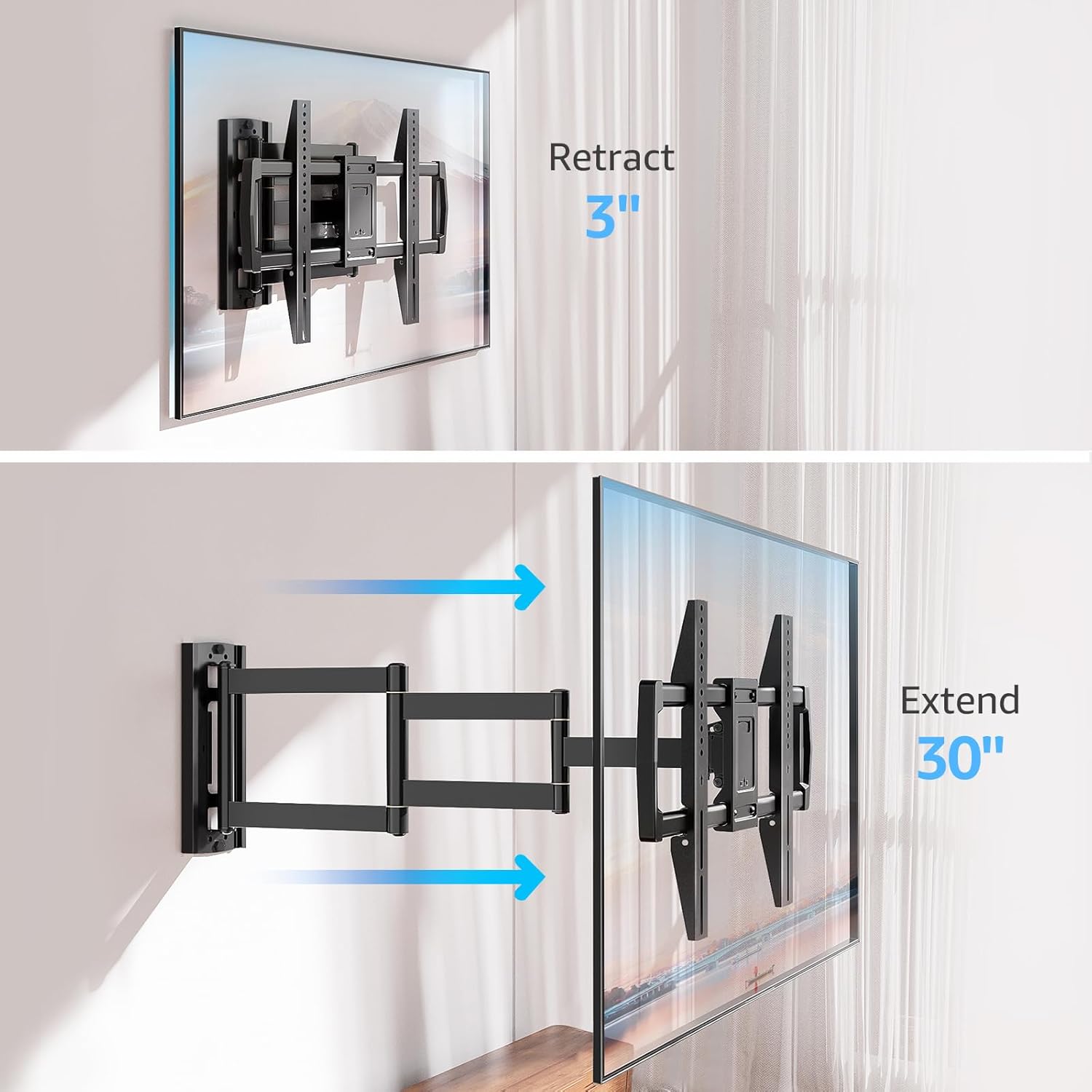
Image: Mount Extension and Retraction
6.2 Aylanishni sozlash
The articulating arm allows for a smooth +/-90° swivel, enabling you to adjust the TV's angle to suit different viewing areas within a room, including corner mounting scenarios.
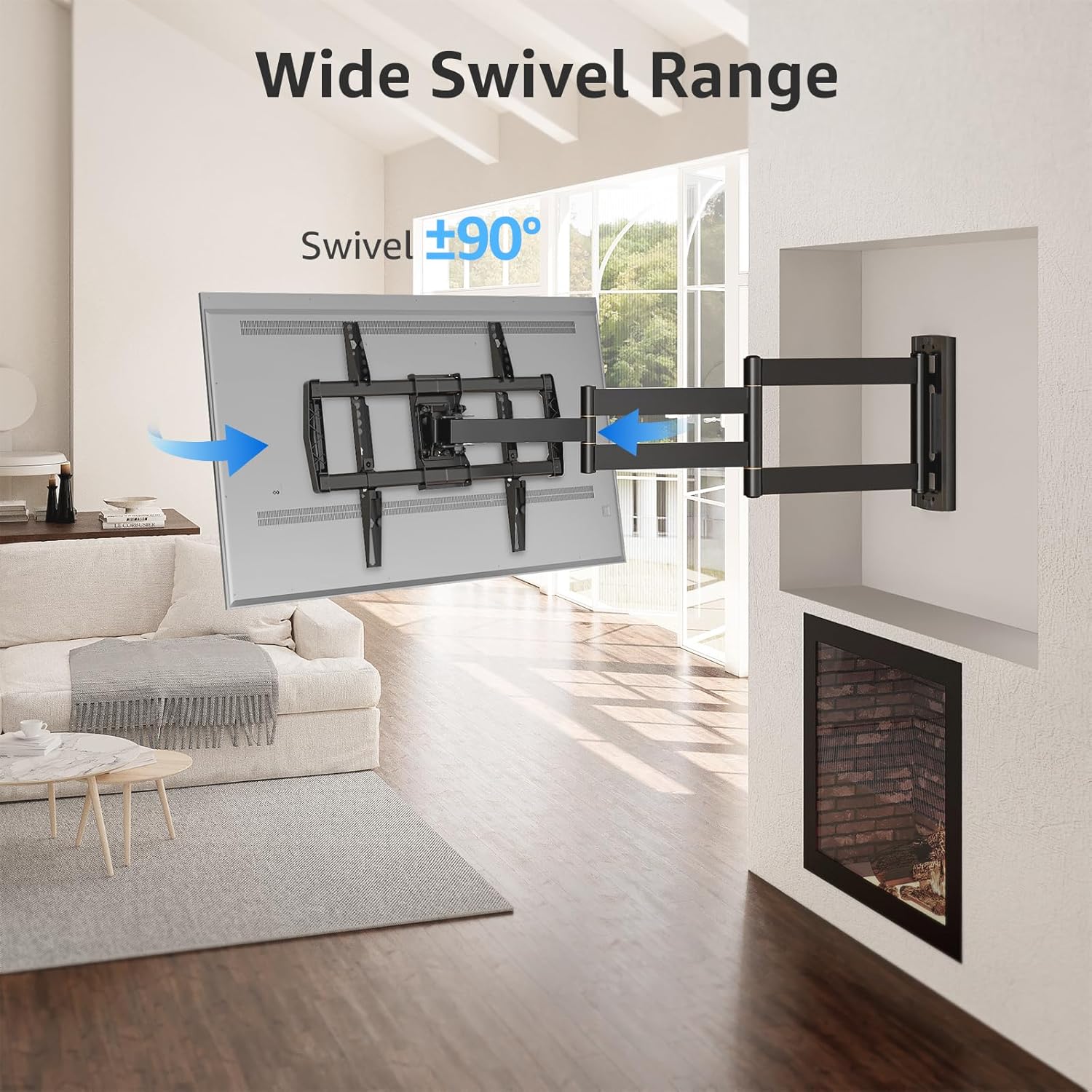
Image: Wide Swivel Range for Corner Mounting
6.3 Nishabni sozlash
Adjust the TV's vertical angle with a +5°/-10° tilt range. This feature helps reduce glare from lights or windows and provides a comfortable viewkirish burchagi.
6.4 Leveling Adjustment
After installation, you can make minor horizontal adjustments of +/-3° to ensure the TV is perfectly level.

Image: Level and Tilt Adjustments
7. Xizmat ko'rsatish
Televizoringizning devorga o'rnatilishini muntazam ravishda ta'mirlash uning uzoq umr ko'rishini va xavfsiz ishlashini ta'minlaydi.
- Tozalash: Wipe the mount with a soft, dry cloth. Avoid abrasive cleaners or solvents that could damage the finish.
- Mahkamlagichni tekshirish: Periodically check all screws and bolts to ensure they remain tight and secure. Re-tighten if necessary.
- Harakatni tekshirish: Test the mount's full range of motion (extension, retraction, swivel, tilt) occasionally to ensure smooth operation.
8. Muammolarni bartaraf qilish; nosozliklarni TUZATISH
O'rnatish paytida yoki undan keyin muammolarga duch kelsangiz, quyidagi keng tarqalgan muammolar va yechimlarga murojaat qiling:
- Televizor tekis emas: Use the +/-3° post-installation leveling feature to adjust the TV's horizontal position.
- Tog' bo'shashgandek tuyuladi: Re-check all wall and TV fasteners to ensure they are securely tightened. Do not overtighten.
- Difficulty moving the arm: The mount's joints may be stiff initially. Apply gentle force. If persistent, ensure no cables are snagged.
- TV not fitting VESA pattern: Double-check your TV's VESA pattern against the mount's specifications (150x100mm to 600x400mm). If incompatible, the mount cannot be used.
9. Kafolat va qo'llab-quvvatlash
MOUNTUP is dedicated to providing quality products and customer satisfaction. While specific warranty details are not provided in this document, MOUNTUP offers comprehensive support.
If you have any questions, require assistance with installation, or need to report a missing/damaged part, please contact MOUNTUP customer service. Experts are available 7 days a week to provide support and advanced technology solutions.
For more information or to contact support, please visit the official MOUNTUP store or websayt.