
1. Kirish
This manual provides essential information for the safe and effective use of the Generic JBD 8S-24S, 100A Smart Battery Management System (BMS). This BMS is designed for LiFePO4 and LFP prismatic battery packs, supporting configurations from 8S to 24S (24V to 72V) with a continuous discharge current of up to 100 Amperes and a charge current of up to 50 Amperes. It features an active balancer and Bluetooth connectivity for monitoring and control.
The Smart BMS protects your battery pack from overcharge, over-discharge, overcurrent, and over-temperature conditions, ensuring optimal performance and extending battery life.
2. Xavfsizlik ma'lumotlari
WARNING: Improper installation or use can lead to serious injury, fire, or damage to the battery pack and BMS. Always follow safety guidelines.
- Yuqori jildtage va joriy: Battery packs operate at high voltages and currents. Exercise extreme caution to avoid short circuits.
- Professional o'rnatish: Installation should be performed by qualified personnel with experience in battery systems.
- Izolyatsiya: Ensure all connections are properly insulated to prevent accidental contact.
- Ventilyatsiya: Install the BMS in a well-ventilated area.
- Suv va namlik: Keep the BMS dry and away from water or high humidity.
- To'g'ri kutupluluk: Always connect wires with correct polarity. Reversing polarity can cause irreversible damage.
- Himoya vositalari: Izolyatsiya qilingan qo'lqoplar va ko'z himoyasi kabi tegishli shaxsiy himoya vositalarini (SHV) taqing.
3. Paket tarkibi
Paketda barcha elementlar mavjudligiga ishonch hosil qiling:
- JBD Smart BMS Unit
- Balance Connector Wires (P- and B- leads)
- NTC Temperature Sensors
- Bluetooth Module (or communication module)
- Tashqi kalit

Figure 3.1: JBD Smart BMS unit with included balance wires, NTC sensors, and switch.
4. O'rnatish va o'rnatish
Follow these steps carefully for proper installation of the BMS. Refer to the wiring diagrams provided with your specific unit for exact pinouts.
- Prepare the Battery Pack: Ensure your LiFePO4/LFP battery cells are balanced and at a safe voltage level before connecting the BMS.
- Connect Balance Wires:
- Start by connecting the B- (negative) wire of the balance harness to the negative terminal of the first cell (Cell 1).
- Connect the next wire to the positive terminal of Cell 1 (which is also the negative of Cell 2), and continue this sequence until all cell positive terminals are connected to the corresponding balance wires.
- Ensure the last balance wire connects to the positive terminal of the last cell (Cell N).
- Tomni ikki marta tekshiringtage of each balance wire against the B- terminal to confirm correct sequencing. The voltage should increase incrementally.
- Connect Balance Harness to BMS: Once all balance wires are connected to the battery cells and verified, plug the balance harness connector into the designated port on the BMS.
- Connect NTC Temperature Sensors: Attach the NTC sensors to appropriate locations on the battery pack to monitor cell temperatures. Plug the sensor wires into the NTC ports on the BMS.
- Connect Main Power Wires:
- Asosiyni ulang B- (Battery Negative) wire from the battery pack's overall negative terminal to the B- terminal on the BMS.
- Asosiyni ulang P- (Load/Charge Negative) wire from the BMS to your load/charger negative terminal. The battery pack's overall positive terminal connects directly to the load/charger positive terminal, bypassing the BMS.
- Connect External Switch: If your BMS includes an external switch, connect it to the designated switch port. This switch can be used to activate/deactivate the BMS.
- Connect Bluetooth Module: Plug the Bluetooth module into its dedicated port on the BMS.

Figure 4.1: JBD Smart BMS with balance wires, NTC sensors, and main power connections.
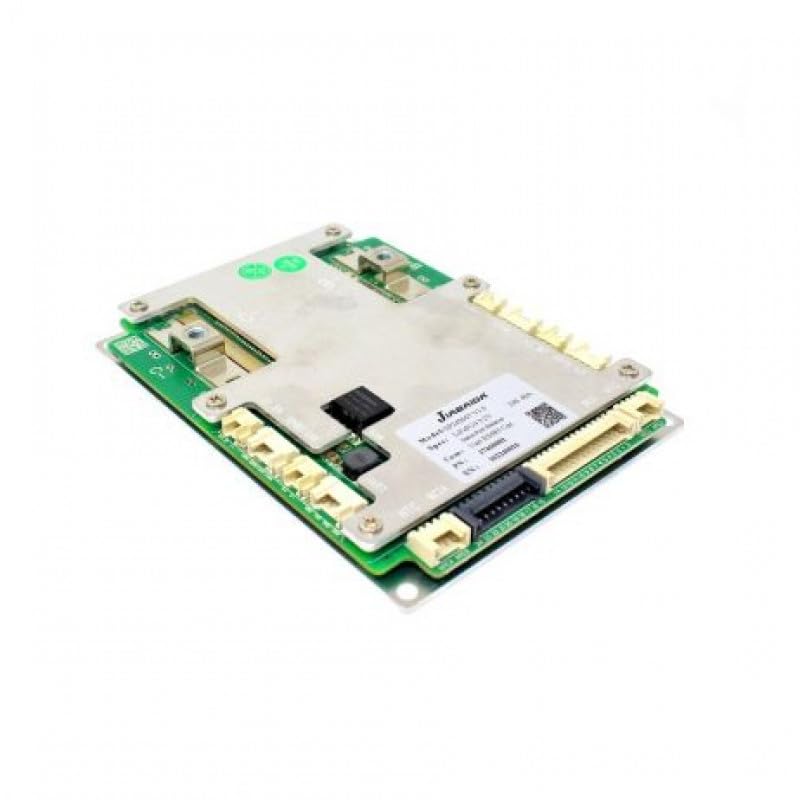
4.2-rasm: Yaqindan view of the JBD Smart BMS board, showing connection points.
5. Foydalanish bo'yicha ko'rsatmalar
The JBD Smart BMS utilizes Bluetooth connectivity for monitoring and configuration via a dedicated mobile application.
- Ilovani yuklab oling: Ni qidirish the official JBD BMS application on your smartphone's app store (e.g., "Xiaoxiang BMS" or similar, as specified by the manufacturer).
- Bluetooth orqali ulanish:
- Smartfoningizda Bluetooth yoqilganligiga ishonch hosil qiling.
- Open the JBD BMS app. The app should automatically scan for nearby BMS devices.
- Select your BMS from the list of available devices. You may need to enter a default password (refer to the app's instructions or manufacturer documentation).
- Batareya holatini kuzatish: Once connected, the app will display real-time data, including:
- Overall battery pack voltage
- Individual hujayra jildtages
- Zaryadlash / tushirish oqimi
- Battery temperature (from NTC sensors)
- Zaryad holati (SOC)
- BMS status (protection triggers, balancing status)
- Faol muvozanatlash: The BMS features an active balancer to equalize cell voltages. This process typically occurs automatically when cell voltage differences exceed a set threshold. You can monitor the balancing status through the app.
- Configuration (Advanced Users): The app may allow configuration of various parameters such as over-voltage, jild ostidatage, overcurrent thresholds, and temperature limits. Exercise extreme caution when modifying these settings, as incorrect values can damage the battery or BMS.
6. Xizmat ko'rsatish
Regular maintenance ensures the longevity and reliable operation of your BMS and battery pack.
- Vizual tekshirish: Periodically inspect the BMS and all wiring for any signs of damage, corrosion, or loose connections.
- Tozalik: BMS qurilmasini toza va chang va qoldiqlardan toza tuting. Tozalash uchun quruq, yumshoq matodan foydalaning.
- Atrof-muhit sharoitlari: Ensure the BMS operates within its specified temperature and humidity ranges. Avoid extreme conditions.
- Dasturiy ta'minotni yangilash: Ishlab chiqaruvchini tekshiring website or app for any available firmware updates for the BMS. Follow update instructions carefully.
7. Muammolarni bartaraf qilish; nosozliklarni TUZATISH
If you encounter issues with your JBD Smart BMS, refer to the following common problems and solutions:
- BMS Not Powering On:
- Check all main power connections (B- and P-) for secure contact and correct polarity.
- Verify the battery pack voltage is within the BMS operating range.
- Ensure the external switch (if present) is in the 'ON' position.
- Bluetooth ulanishi yo'q:
- Confirm the Bluetooth module is correctly plugged into the BMS.
- Ensure Bluetooth is enabled on your smartphone and the app has necessary permissions.
- Ilovani yoki telefoningizni qayta ishga tushirishga harakat qiling.
- Move closer to the BMS unit.
- Noto'g'ri jildtage O'qishlar:
- Recheck all balance wire connections to ensure they are in the correct sequence and securely attached to each cell.
- Inspect balance wires for damage or breaks.
- BMS Triggering Protection (e.g., Over-discharge, Overcurrent):
- Identify the specific protection triggered via the app.
- Haddan tashqari zaryadsizlanish: Batareya paketini zaryadlang.
- Haddan tashqari oqim: Reduce the load or check for short circuits in the system. Ensure your load does not exceed the BMS's continuous current rating.
- Haddan tashqari jildtage/Under-jildtage: Check charger settings and cell balance.
- Haddan tashqari harorat: Ensure adequate ventilation and check NTC sensor placement.
If problems persist after attempting these solutions, contact technical support.
8. Texnik shartlar

Figure 8.1: JBD Smart BMS board showing model and specification details.
| Xususiyat | Spetsifikatsiya |
|---|---|
| Brend | Generic (Manufacturer: JBD -Jaibada) |
| Model nomi | SMART BMS 24-72V -100A |
| Model raqami | 8S-24S,100A SMART |
| Batareya xujayrasi tarkibi | Lithium-Phosphate (LiFePO4, LFP) |
| Cell Count Range | 8S-24S |
| jildtage diapazoni | 24V - 72V (Nominal) |
| Maksimal uzluksiz zaryadsizlanish oqimi | 100 Amps |
| Maksimal zaryad oqimi | 50 Amps |
| Balancing Type | Faol balanslashtiruvchi |
| Ulanish | Bluetooth |
| Olchamlari (U x G x Y) | 15 x 6 x 3 santimetr |
| Element og'irligi | 500 gramm |
| Ishlab chiqaruvchi mamlakat; ta'minotchi mamlakat | Xitoy |
9. Kafolat haqida ma'lumot
This product is sold without an explicit warranty. Please refer to your point of purchase for any return or exchange policies.
10. Qo'llab-quvvatlash
Texnik yordam yoki savollar uchun quyidagi manzilga murojaat qiling:
OLEIO SHOPZ
Telefon: 8137035522