
MechMaxx Farming HD Backup 1080P Camera System
MechMaxx Farming HD Backup 1080P Camera System User Manual
Model: Farming HD Backup 1080P Camera System
Brend: MechMaxx
1. Kirish
This manual provides detailed instructions for the installation, operation, and maintenance of your MechMaxx Farming HD Backup 1080P Camera System. This system is designed to enhance visibility and safety for agricultural and heavy-duty commercial vehicles, offering a high-resolution 1080P camera and a 7-inch LCD monitor. Please read this manual thoroughly before using the product to ensure proper function and longevity.
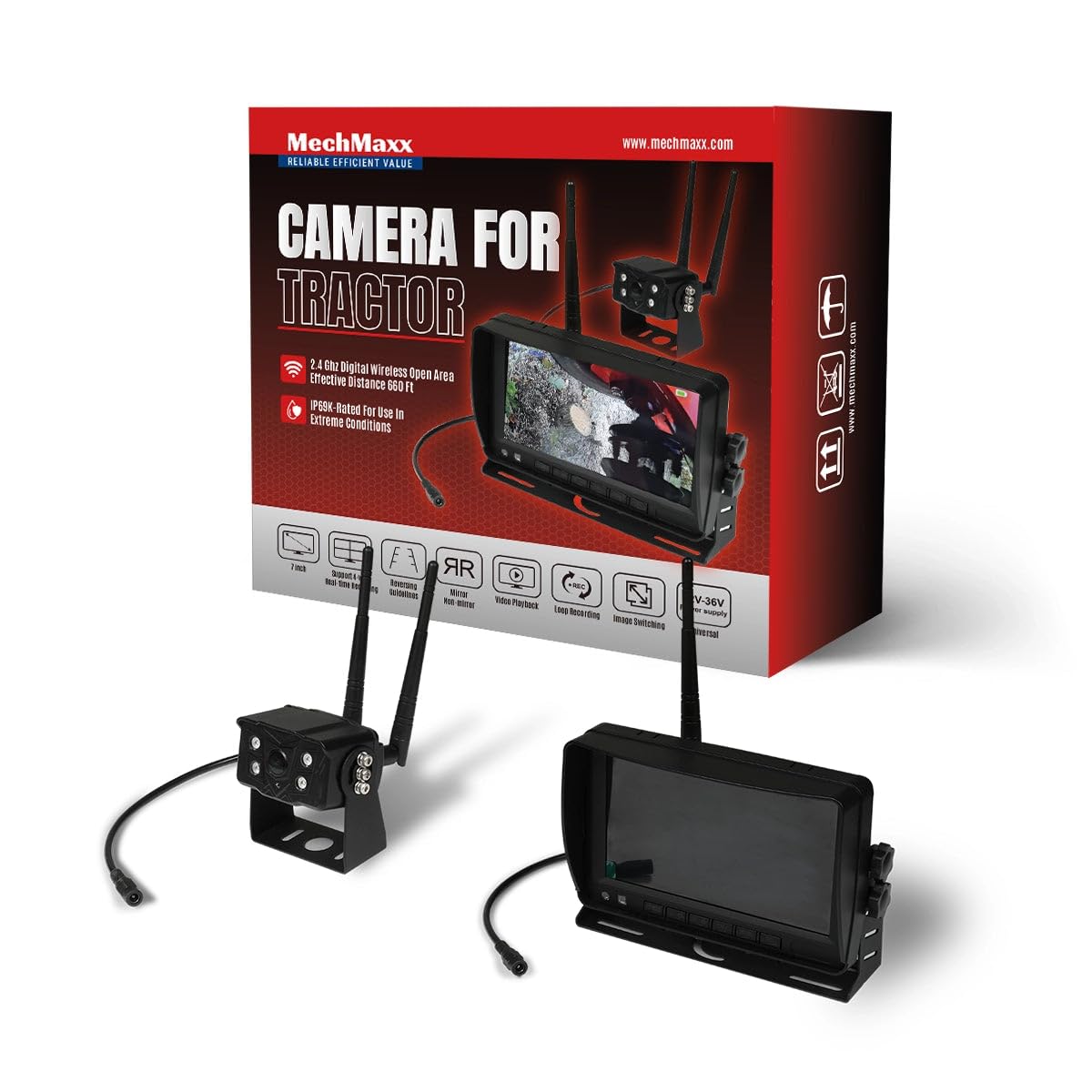
Figure 1: MechMaxx Farming HD Backup 1080P Camera System
2. Paket tarkibi
Quyida sanab o'tilgan barcha narsalar paketingizga kiritilganligini tekshiring:
- 7 dyuymli HD LCD monitor
- 1080P HD Camera Unit with IR Lights
- Power Cable for Monitor (Cigarette Lighter Adapter)
- Power Cable for Camera (Direct Battery Connection)
- Antennas for Wireless Transmission
- Monitor uchun o'rnatish braketi
- Mounting Hardware (Screws, wrench)
- Masofadan boshqarish
- Foydalanuvchi uchun qo'llanma

2-rasm: Paket tarkibi
3. Oʻrnatish va oʻrnatish
The MechMaxx camera system is designed for straightforward installation. Follow these steps for optimal performance.
3.1 Camera Unit Installation
- O'rnatish: Securely attach the camera unit to the rear or desired location on your vehicle using the provided mounting hardware. Ensure a clear line of sight for the camera.
- Antenna ulanishi: Screw the antennas firmly onto the designated ports on the camera unit.
- Quvvat ulanishi: Connect the camera's power cable to a 12-36V DC power source. This can be directly to the vehicle's battery or an ignition-switched power source.
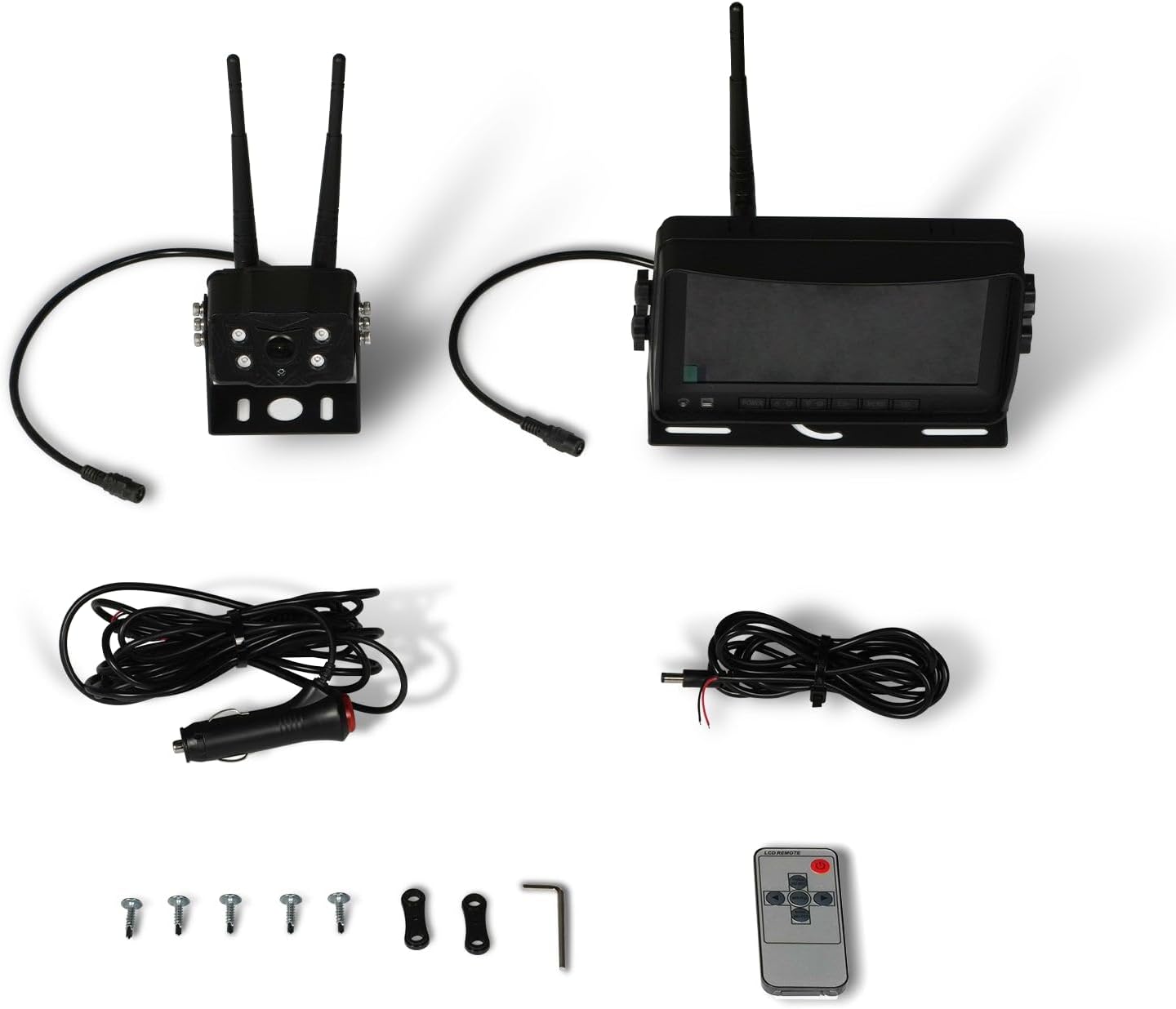
Figure 3: Camera Unit with Antennas

Figure 4: Camera Unit Detail
3.2 Monitorni o'rnatish
- O'rnatish: Attach the 7-inch LCD monitor to your dashboard or windshield using the provided suction cup or surface mount bracket. Adjust the angle for optimal viewing.
- Quvvat ulanishi: Connect the monitor's power cable to your vehicle's cigarette lighter socket. The monitor will power on/off with the vehicle's ignition.

Figure 5: 7-inch LCD Monitor
3.3 Ulanish sxemasi
The system offers a simple 1-step installation for power. The monitor can be powered via a cigarette lighter, and the camera can be wired directly to the vehicle's battery or an ignition-controlled fuse.

Figure 6: Simplified Wiring Diagram
4. Foydalanish bo'yicha ko'rsatmalar
Once installed, the system is ready for use. The monitor will automatically display the camera feed when powered on.
4.1 Asosiy operatsiya
- Quvvatni yoqish/oʻchirish: The system powers on automatically with the vehicle's ignition. You can also use the power button on the monitor or remote control.
- Viewkirish usullari: The 7-inch LCD provides a clear, full-color display. The camera offers a wide 120-degree field of view.
- Tungi ko'rish: The camera features strong IR lights for enhanced visibility in low-light conditions.
4.2 Monitorni boshqarish
The monitor includes buttons for various settings and adjustments. Refer to the on-screen menu for detailed options.
- Menyu (M): Tizim sozlamalariga kirish.
- OK: Tanlovlarni tasdiqlang.
- CH (kanal): Switch between multiple cameras if additional units are connected (not included in standard package).
- +/-: Adjust brightness, contrast, or navigate menu options.
5. Xizmat ko'rsatish
Kamera tizimingizning uzoq umr ko'rishi va optimal ishlashini ta'minlash uchun quyidagi texnik ko'rsatmalarga amal qiling:
- Tozalash: Regularly clean the camera lens and monitor screen with a soft, damp cloth. Avoid abrasive cleaners that may scratch surfaces.
- Kabel tekshiruvi: Periodically check all cables and connections for wear, damage, or loose fittings. Secure any loose connections.
- Atrof-muhitni muhofaza qilish: While the camera is heavy-duty and designed for outdoor use, extreme weather conditions may affect performance. Ensure proper mounting to prevent vibration damage.
6. Muammolarni bartaraf qilish; nosozliklarni TUZATISH
If you encounter issues with your MechMaxx camera system, refer to the following common problems and solutions:
| Muammo | Mumkin sabab | Yechim |
|---|---|---|
| Monitorda tasvir yo'q | Loose power connection; Camera/monitor not powered; Interference | Check all power connections; Ensure vehicle ignition is on; Reduce distance between camera and monitor or check for obstructions. |
| Tasvir sifati past | Dirty lens; Low light conditions; Signal interference | Clean camera lens; Ensure IR lights are active in low light; Check for strong signal interference sources. |
| Monitor yoqilmayapti | No power from cigarette lighter; Faulty power cable | Check vehicle's cigarette lighter fuse; Test power cable with another device if possible. |
If the problem persists after attempting these solutions, please contact MechMaxx customer support.
7. Texnik shartlar
Key technical specifications for the MechMaxx Farming HD Backup 1080P Camera System:
| Xususiyat | Tafsilot |
|---|---|
| Ekran o'lchami | 7 dyuym |
| Displey texnologiyasi | LCD |
| Optik sensor texnologiyasi | CMOS |
| Ob'ektiv turi | Keng burchak |
| Maydoni View | 120 daraja |
| Ulagich turi | AHD |
| O'rnatish turi | Yuzaki o'rnatish |
| Mos qurilmalar | Monitor |
| Element og'irligi | 12 funt |
| Rang | Qora |

Figure 7: Additional Specifications
8. Kafolat va qo'llab-quvvatlash
For warranty information, technical support, or service inquiries, please refer to the contact details provided with your product packaging or visit the official MechMaxx websayt. Kafolat da'volari uchun xarid kvitansiyasini xaridni tasdiqlovchi hujjat sifatida saqlang.
Ask a question about this manual
Ask about setup, troubleshooting, compatibility, parts, safety, or missing instructions. Manuals+ will review the question and use this page’s manual context to help answer it.