
Bietrun DX-GAC2000W
Bietrun 2000W Pure Sine Wave Inverter User Manual
Model: DX-GAC2000W
1. Kirish
This manual provides essential information for the safe and efficient operation of your Bietrun 2000W Pure Sine Wave Inverter. Please read it thoroughly before installation and use, and retain it for future reference.
Paket tarkibi
Paketda barcha elementlar mavjudligiga ishonch hosil qiling:
- 1 x Bietrun 2000W Pure Sine Wave Inverter
- 2 x 10AWG 3-foot Battery Cables (Red and Black)
- 1 x Ground Cable
- 1 x masofadan boshqarish pulti
- 4 x Sigortalar
- 1 x Small Wrench
- O'rnatish vintlari

Image 1.1: The Bietrun 2000W Pure Sine Wave Inverter with its remote control, battery cables, ground cable, fuses, and wrench.
2. Xavfsizlik bo'yicha ko'rsatmalar
Observe the following safety precautions to prevent injury and damage to the inverter or connected devices:
- Inverterni ochmang casing. Ichkarida foydalanuvchi tomonidan xizmat ko'rsatadigan qismlar yo'q.
- Inverter atrofida to'g'ri shamollatishni ta'minlang. Sovutish teshiklarini to'sib qo'ymang.
- Keep the inverter away from water, moisture, flammable materials, and direct sunlight.
- Connect the inverter only to a 12V DC power source. Connecting to other voltages zarar etkazishi mumkin.
- Ensure correct polarity when connecting battery cables (Red to Positive, Black to Negative). Reverse polarity will cause damage.
- Always connect the ground cable to a proper earth ground.
- Do not exceed the inverter's rated continuous power output (2000W) or peak surge power (4000W).
- Disconnect the inverter from the battery before performing any maintenance or cleaning.
Integratsiyalashgan himoya xususiyatlari
The inverter includes multiple protection mechanisms:
- Haddan tashqari yuk himoyasi
- Kam hajmlitage Himoya
- GFCI himoyasi
- Haddan tashqari kuchlanishtage Himoya
- Haddan tashqari haroratdan himoya qilish
- Qisqa tutashuvdan himoya qilish
- Teskari ulanishni himoya qilish
- Haddan tashqari oqimdan himoya qilish

Image 2.1: Visual representation of the inverter's comprehensive safety protection system.
3. Mahsulot xususiyatlari
The Bietrun 2000W Pure Sine Wave Inverter is designed for reliable power conversion with advanced features:
- Sof sinus to'lqin chiqishi: Provides high-quality AC power (THD < 3%) suitable for sensitive electronics, ensuring stable operation and minimizing damage risk.
- Yuqori samaradorlik: Conversion efficiency exceeding 90% reduces energy loss.
- Doimiy quvvat: Delivers 2000W continuous power with a 4000W peak surge capacity.
- Ko'p tomonlama chiqish: Features 4 AC outlets, 1 AC wiring terminal, 2 USB ports (5V/2.1A), and 1 Type-C port (5V/2.1A).
- HD LED Display: Provides real-time status updates including input/output voltage, charging status, battery status, current power, and fault codes.
- Masofadan boshqarish: Allows for convenient power management from a distance.
- Sokin operatsiya: High-efficiency cooling system with a low-noise fan maintains optimal operating temperature.
- Yilni va bardoshli dizayn: Encased in rugged Aluminum Alloy, with dimensions of 19 x 10 x 7 inches and a weight of 12.5 lbs.

Image 3.1: Key features of the Bietrun 2000W Pure Sine Wave Inverter.
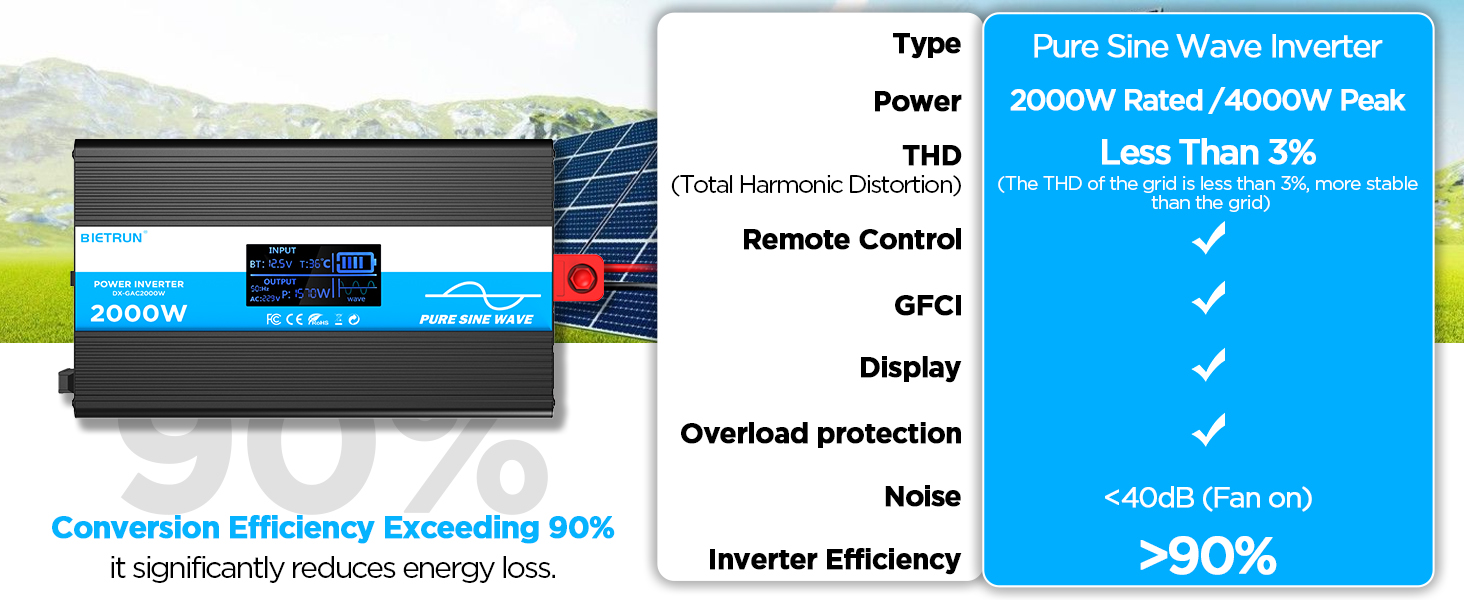
Image 3.2: Illustrates the stable, grid-like output of a pure sine wave inverter compared to unstable power from other types.
4. O'rnatish va o'rnatish
Joylashuv va o'rnatish
Choose a dry, well-ventilated location away from direct sunlight, heat sources, and flammable materials. The inverter can be wall-mounted using the provided screws.
Batareya mosligi
The inverter is compatible with various 12V battery types, including LiFePO4, LI, SLD, GEL, FLD, and AGM batteries.

Image 4.1: The inverter supports multiple 12V battery chemistries.
Ulanish bosqichlari
- Kabellarni tayyorlang: Use the provided 10AWG 3-foot cables. Ensure all connections are secure.
- Yer kabelini ulang: Attach the green/yellow ground cable to the inverter's ground terminal and to a reliable earth ground point.
- Connect Battery Cables:
- ni ulang qizil battery cable to the inverter's ijobiy (+) terminal.
- ni ulang qora battery cable to the inverter's salbiy (-) terminal.
- Boshqa uchini ulang qizil cable to the battery's ijobiy (+) terminal.
- Boshqa uchini ulang qora cable to the battery's salbiy (-) terminal.
Muhim: Ensure correct polarity. A spark may occur during the final connection, which is normal due to capacitor charging.
- Xavfsiz ulanishlar: Double-check all connections for tightness to prevent loose contacts and overheating.
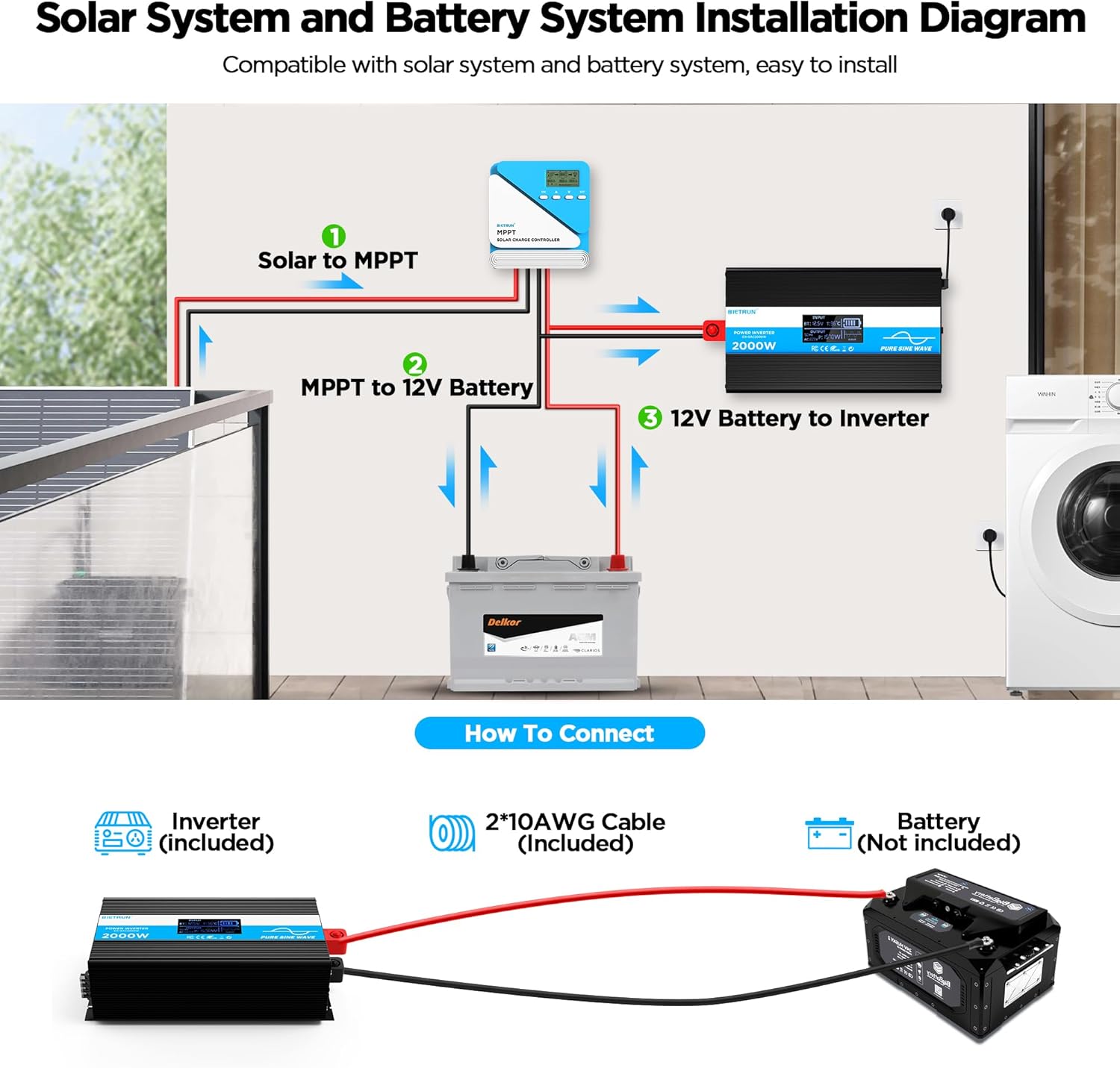
Image 4.2: Basic wiring diagram for connecting the inverter to a 12V battery.
Inverter Interface Overview

Image 4.3: Front panel layout with output interfaces and controls.

Image 4.4: Rear panel layout with battery input terminals and cooling fans.
5. Operatsiya
Quvvatni yoqish/o‘chirish
- Qo'lda ishlash: Flip the ON/OFF switch on the inverter to the 'ON' position to power on. Flip to 'OFF' to power off.
- Masofadan boshqarish pultining ishlashi: Ensure the inverter's 'REMOTE' switch is in the 'ON' position. Use the ON/OFF buttons on the remote control to operate the inverter.
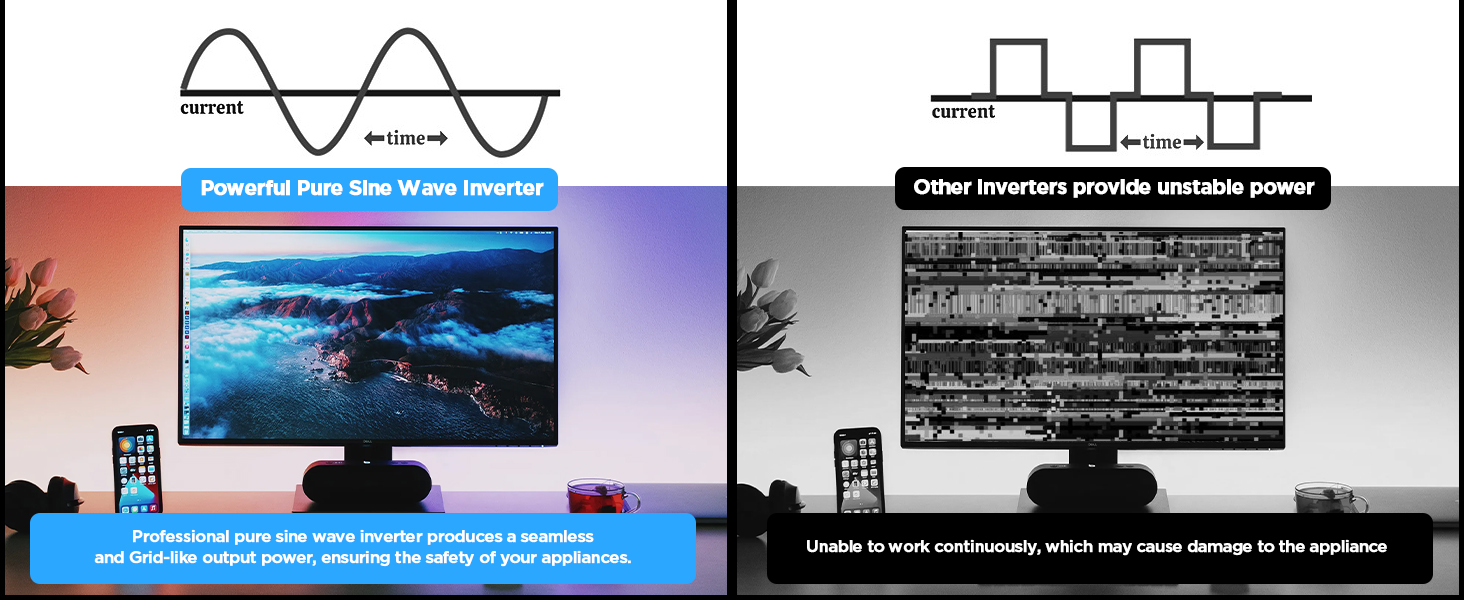
Image 5.1: The remote control allows for convenient operation.
Ulanish qurilmalari
Once the inverter is powered on, plug your AC devices into the AC outlets or connect to the AC wiring terminal. USB devices can be connected to the USB or Type-C ports.
Ensure the total power consumption of all connected devices does not exceed 2000W continuously.
6. HD Display Information
The integrated HD display provides real-time operational data and fault indications:
- Kirish: Batareya hajmini ko'rsataditage (BT) and internal temperature (T).
- Chiqish: Shows output frequency (Hz), AC voltage (AC), and current power consumption (P).
- Batareya holati: Visual indicator of battery charge level.
- To'lqin shakli: Indicates pure sine wave output.
- Xato kodlari: Numeric codes appear for specific issues, aiding in troubleshooting.

Image 6.1: The HD display provides comprehensive status updates and fault codes.
Xato kodi tavsiflari
- 2: Kam hajmlitage Ogohlantirish
- 3: Haddan tashqari kuchlanishtage Himoya
- 4: Kam hajmlitage Himoya
- 5: Haddan tashqari yuk haqida ogohlantirish
- 6: Haddan tashqari yuk himoyasi
- 7: Haddan tashqari haroratdan himoya qilish
- 8: Chiqish qisqa tutashuvidan himoya qilish
7. Muammolarni bartaraf qilish; nosozliklarni TUZATISH
If the inverter is not functioning correctly, refer to the display for fault codes and consult the table below:
| Muammo | Mumkin sabab | Yechim |
|---|---|---|
| Inverter does not turn on | Bo'shashgan batareya ulanishlari, batareya quvvati pasttage, nosoz sug'urta. | Check battery cable connections. Recharge or replace battery. Check and replace fuses if blown. |
| No AC output (Fault Code 8) | Chiqish qisqa tutashuvi. | Disconnect all AC loads. Check for short circuits in connected devices or wiring. Reconnect one by one. |
| Overload warning/protection (Fault Code 5/6) | Ulangan yuk inverterning quvvatidan oshib ketdi. | Reduce the total power of connected devices. Disconnect high-power appliances. |
| Kam hajmtage warning/protection (Fault Code 2/4) | Batareya hajmitage juda past. | Recharge the battery. Check battery health. |
| Haddan tashqari kuchlanishtage protection (Fault Code 3) | Kirish hajmitage juda baland. | Batareya quvvatini tekshiringtage is within the 12V range. Disconnect from charging source if overcharging. |
| Overtemperature protection (Fault Code 7) | Inverter is overheating. | Ensure adequate ventilation. Reduce load. Allow inverter to cool down. Clean fan vents if obstructed. |
If the fault persists after attempting the solutions, contact customer support.
8. Texnik shartlar
| Xususiyat | Spetsifikatsiya |
|---|---|
| Model raqami | DX-GAC2000W |
| Doimiy quvvat | 2000 Vt |
| Eng yuqori kuchlanish kuchi | 4000 Vt |
| Kirish hajmitage | DC 12V |
| Chiqish hajmitage | AC 110V-120V |
| Chiqish to'lqin shakli | Sof sinfiy to'lqin |
| Umumiy garmonik buzilish (THD) | < 3% |
| Konvertatsiya samaradorligi | > 90% |
| AC rozetkalari | 4 |
| USB portlari | 2 (5V/2.1A) |
| Type-C porti | 1 (5V/2.1A) |
| Olchamlari (U x G x Y) | 19 x 10 x 7 dyuym |
| Element og'irligi | 11.13 funt |
| Sovutish tizimi | Ikki tomonlama sovutish ventilyatorlari |
9. Xizmat ko'rsatish
Regular maintenance ensures optimal performance and longevity of your inverter:
- Tozalash: Periodically clean the exterior of the inverter with a dry, soft cloth. Ensure cooling vents are free from dust and debris. Do not use liquid cleaners.
- Ulanishni tekshirish: Regularly inspect battery cable connections for tightness and corrosion. Clean any corrosion with a wire brush and baking soda solution.
- Ventilyatsiya: Ensure the inverter always has adequate airflow. Do not operate in enclosed spaces without ventilation.
- Sigortani almashtirish: If a fuse blows, replace it only with a fuse of the same type and rating as specified in the package contents.
10. Kafolat va qo'llab-quvvatlash
For warranty information or technical support, please refer to the contact details provided with your purchase or visit the official Bietrun websayt. Xarid kvitansiyasini xaridni tasdiqlovchi hujjat sifatida saqlang.
Ask a question about this manual
Ask about setup, troubleshooting, compatibility, parts, safety, or missing instructions. Manuals+ will review the question and use this page’s manual context to help answer it.