
Kirish
Thank you for choosing the Casio MWA-300H Series watch. This manual provides essential information regarding the setup, operation, and maintenance of your new timepiece. Please read this manual carefully to ensure proper use and to fully understand the features of your watch.
The Casio MWA-300H is an analog watch featuring a chronograph, 100-meter water resistance, and luminous hands for enhanced readability. It is designed for versatile wear, suitable for both daily use and recreational water activities.
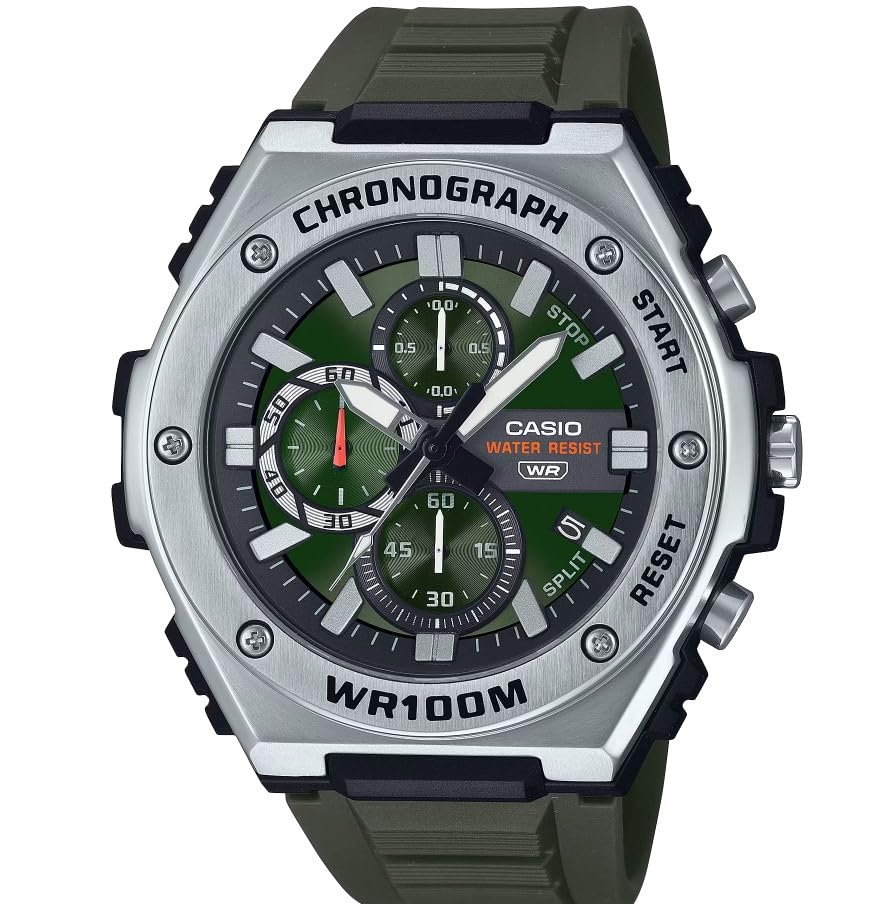
Rasm: old view of the Casio MWA-300H Series watch, highlighting its green dial, chronograph sub-dials, and black resin band.
Setup: Initial Settings
Vaqtni belgilash
- Pull the crown out to the second click (time setting position). The second hand will stop.
- Rotate the crown to set the hour and minute hands. Ensure the AM/PM setting is correct if your watch has a 24-hour indicator or date changes at midnight.
- Tojni asl holatiga qaytaring. Ikkinchi qo'l harakatni davom ettiradi.
Sana belgilash
- Pull the crown out to the first click (date setting position).
- Rotate the crown to set the date. Avoid setting the date between 9:00 PM and 1:00 AM, as this may interfere with the automatic date change mechanism.
- Tojni normal holatiga qaytarib suring.
Batareya haqida ma'lumot
Your Casio MWA-300H watch is powered by 1 LR44 battery, which is included. The battery life is approximately 3 years. When the battery runs low, the watch may exhibit irregular movement or stop. It is recommended to have the battery replaced by a qualified watch technician to maintain water resistance.
Operating: Watch Functions
Xronografdan (sekundomer) foydalanish
The chronograph function allows for precise timing of events. Your watch features a 1/10-second stopwatch that captures elapsed, split, and 1st/2nd place times across three dedicated sub-dials.
- Starting the Stopwatch: Press button A (typically the upper right button) to start the stopwatch.
- Stopping the Stopwatch: Press button A again to stop the stopwatch.
- Resetting the Stopwatch: After stopping, press button B (typically the lower right button) to reset the stopwatch hands to zero.
- Ajratilgan vaqtni o'lchash: While the stopwatch is running, press button B to measure split times. The stopwatch hands will momentarily stop to indicate the split time, then resume timing. Press button B again to release the split time and display the current elapsed time.
Note: Refer to the specific button layout on your watch for exact button assignments.
Water Resistance (100 Meters)
Your Casio MWA-300H watch is water resistant up to 100 meters (330 feet). This rating means the watch is suitable for swimming, showering, and recreational water activities. It is not suitable for diving or snorkeling where significant water pressure changes occur.
- Soat ho'l yoki suv ostida bo'lganida toj yoki tugmalarni ishlatmang.
- Sho'r suvga ta'sir qilgandan so'ng, soatni toza suv bilan yuvib tashlang va uni quriting.
Yorqin qo'llar va markerlar
The watch features luminous hands and markers that absorb light and glow in the dark, providing readability in low-light conditions. The intensity and duration of the glow depend on the amount and type of light exposure.
Xizmat
Umumiy parvarish
- Soatni axloqsizlik va namlikdan tozalash uchun muntazam ravishda yumshoq, quruq mato bilan artib turing.
- Soatni haddan tashqari harorat, uzoq vaqt davomida to'g'ridan-to'g'ri quyosh nuri yoki kuchli magnit maydonlarga ta'sir qilishdan saqlaning.
- Keep the watch away from solvents, detergents, perfumes, and cosmetics, as these can damage the resin materials.
Batareyani almashtirish
When the battery needs replacement, it is highly recommended to take your watch to an authorized Casio service center or a reputable watch repair shop. This ensures that the watch is properly sealed and its water resistance is maintained after battery replacement.
Water Resistance Checks
To maintain the water resistance of your watch, it is advisable to have it inspected periodically (e.g., every 2-3 years) by an authorized service center, especially if it is frequently exposed to water.
Muammolarni bartaraf qilish; nosozliklarni TUZATISH
| Muammo | Mumkin sabab | Yechim |
|---|---|---|
| Watch hands do not move or move irregularly. | Kam batareya. | Batareyani almashtiring. Professional soat mutaxassisi bilan maslahatlashing. |
| Vaqt noto'g'ri. | Time not set correctly; watch has stopped and restarted. | Vaqtni "Vaqtni sozlash" ko'rsatmalariga muvofiq qayta o'rnating. |
| Sana yarim tun o'rniga tushda o'zgaradi. | AM/PM sozlamasi noto‘g‘ri. | Vaqtni 12 soat oldinga suring. |
| Xronograf qo'llari nolga qaytarilmaydi. | Chronograph hands misalignment. | Consult the full Casio module manual for chronograph hand adjustment procedures, or contact customer support. |
| Soat ichidagi namlik. | Crown or buttons operated underwater; seals compromised. | Keyingi shikastlanishning oldini olish uchun soatni tekshirish va ta'mirlash uchun darhol vakolatli xizmat ko'rsatish markaziga olib boring. |
Texnik xususiyatlari
| Model nomi | MWA-300H |
| Displey turi | Analog |
| Harakat turi | Kvarts |
| Suvga chidamlilik chuqurligi | 100 metr (330 fut) |
| Qo'shimcha xususiyatlar | Chronograph, Date Display, Luminous Hands |
| Quvvat manbai | Battery Powered (1 x LR44 included) |
| Ish materiali | Qatronlar |
| Band materiali | Qatronlar |
| Kristalli material | Qatronlar |
| Koson diametri | 50.9 millimetr |
| Koson qalinligi | 14.3 millimetr |
| Band kengligi | 22 millimetr |
| Qulflash turi | Toka |
Kafolat va qo'llab-quvvatlash
Cheklangan Kafolat
Your Casio MWA-300H watch comes with a limited warranty. Please refer to the warranty card included with your purchase for specific terms, conditions, and duration of coverage. The warranty typically covers manufacturing defects under normal use.
Mijozlarni qo‘llab-quvvatlash
For further assistance, technical support, or warranty claims, please contact Casio customer service. You can find contact information on the official Casio websaytida yoki soatingiz bilan birga taqdim etilgan hujjatlarda.
For more detailed information, including specific module operations or advanced settings, please visit the official Casio support website or refer to the full module manual for your watch.