
Kirish
This manual provides essential information for the setup, operation, maintenance, and troubleshooting of your Onn 22 inch 1080P 100 Hz FHD LED Monitor. Please read this guide thoroughly before using the product to ensure optimal performance and safety.
The Onn 22 inch FHD LED Monitor is designed for a variety of applications, offering a vivid 1920x1080 resolution, a 100Hz refresh rate, and a 6.5ms response time for efficient performance. Its slim profile and T-shaped base are ideal for saving desk space.
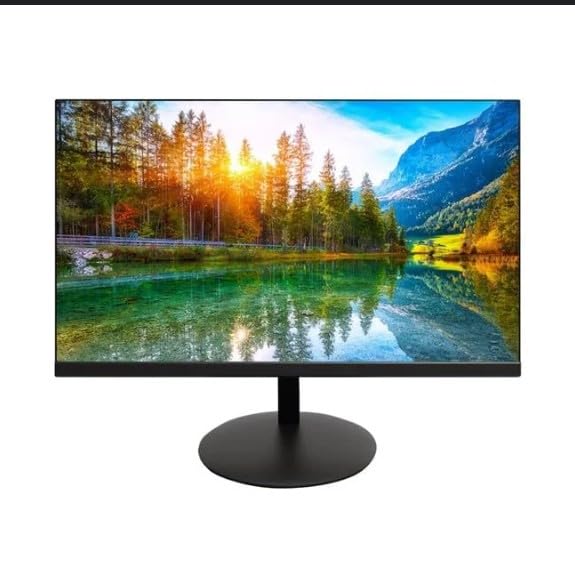
The image shows the Onn 22 inch FHD LED Monitor, highlighting its 100Hz refresh rate and 1080p resolution. The monitor features a slim design and a T-shaped base.
O'rnatish bo'yicha ko'rsatmalar
- Paketdan chiqarish: Carefully remove the monitor and all accessories from the packaging. Ensure all components are present: monitor, T-shaped base, HDMI cable, and power adapter.
- Stendni yig'ish: Attach the T-shaped base to the monitor. The design is screw-less for easy assembly. Ensure it is securely fastened.
- Qurilmaga ulanish:
The monitor supports both HDMI and VGA inputs. Connect the provided HDMI cable from your computer's HDMI output to the HDMI IN port on the monitor. Alternatively, use a VGA cable for VGA input.

This image displays the rear panel of the Onn monitor, illustrating the available input ports: HDMI IN, VGA IN, and the DC 12V power input. These ports are essential for connecting the monitor to a computer or other devices.
- Quvvat ulanishi: Connect the power adapter to the DC 12V input port on the monitor, then plug the adapter into a power outlet.
- Monitorni sozlash: The monitor is capable of swivel, tilt, rotation, and height adjustment. Adjust the screen to your preferred viewergonomik qulaylik uchun burchak burchagi.
- Ikkilamchi monitorni sozlash: This monitor is suitable for a fully functioning dual monitor setup. Connect a second monitor using the appropriate cables and configure your operating system's display settings.
Foydalanish bo'yicha ko'rsatmalar
- Quvvatni yoqish/oʻchirish: Press the power button, usually located on the bottom or back of the monitor, to turn it on or off.
- Kirish tanlovi: If the monitor does not automatically detect the input source, use the On-Screen Display (OSD) menu buttons to manually select between HDMI and VGA inputs.
- OSD menyusi navigatsiyasi: Use the physical buttons on the monitor (typically on the back or bottom edge) to navigate the OSD menu. This allows you to adjust settings such as brightness, contrast, color temperature, and input source.
- Ruxsat va yangilanish tezligi: The monitor supports a native resolution of 1920x1080 at a 100Hz refresh rate. Ensure your computer's display settings are configured to these specifications for the best visual experience.
- Moslashuvchan sinxronlash: The monitor features Adaptive Sync for gaming, which helps to reduce screen tearing and stuttering. Ensure this feature is enabled in your graphics card settings if supported.
Xizmat
- Ekranni tozalash: Ekranni yumshoq, tuklarsiz mato bilan sekin artib oling. O'jar belgilar uchun engil dampen the cloth with water or a non-abrasive, monitor-specific cleaning solution. Avoid spraying liquids directly onto the screen.
- C ni tozalashasing: Monitorni tozalash uchun yumshoq, quruq matodan foydalaning casing. Do not use strong detergents or solvents, as they may damage the finish.
- Ventilyatsiya: Haddan tashqari qizib ketishning oldini olish uchun monitorning ventilyatsiya teshiklari bloklanmaganligiga ishonch hosil qiling.
- Saqlash: Uzoq vaqt davomida foydalanilmaganda, monitorni salqin, quruq joyda, to'g'ridan-to'g'ri quyosh nuri va haddan tashqari haroratdan uzoqroq joyda saqlang.
Muammolarni bartaraf qilish; nosozliklarni TUZATISH
- Quvvat yo'q:
- Quvvat kabeli monitorga ham, rozetkaga ham mahkam ulanganligini tekshiring.
- Elektr rozetkasi to'g'ri ishlayotganligini tekshiring.
- Signal yo'q:
- Ensure the video cable (HDMI or VGA) is firmly connected to both the monitor and the computer.
- Monitorning OSD menyusidan foydalanib, to'g'ri kirish manbasini tanlang.
- Kompyuteringiz yoqilganligini va uyqu rejimida emasligini tekshiring.
- Flickering Screen or Poor Image Quality:
- Video kabelni shikastlangan yoki bo'shashgan ulanishlarni tekshiring.
- Adjust the resolution and refresh rate settings on your computer to match the monitor's specifications (1920x1080, 100Hz).
- OSD menyusi orqali monitor sozlamalarini zavod parametrlariga qaytaring.
- Javob bermaydigan tugmalar:
- Unplug the monitor from the power outlet, wait for 30 seconds, and then plug it back in.
If problems persist, please refer to the support information provided in the "Support and Warranty" section.
Texnik xususiyatlari
| Brend | Onn |
| Model raqami | 100140681 |
| Model nomi | OTTO |
| Ekran o'lchami | 21.5 dyuym |
| Displey turi | LED, LCD |
| Rezolyutsiya | 1920 x 1080 (FHD 1080p) |
| Yangilanish tezligi | 100 Gts |
| Javob vaqti | 6.5 millisekund |
| Uskuna interfeysi | HDMI, VGA |
| Maxsus xususiyatlar | Balandlikni sozlash |
| Viewburchak | 160 daraja |
| Aspekt nisbati | 16:9 |
| Mahsulot o'lchamlari | 49.2 x 20 x 37.2 sm; 3.24 kg |
Qo'llab-quvvatlash va kafolat
For technical support, product inquiries, or warranty information, please visit the official Onn support websayt yoki mijozlarga xizmat ko'rsatish bilan bog'laning.
- Rasmiy yordam Websayt: onnsupport.ca
- Kafolat: Specific warranty details may vary by region and purchase date. Please refer to the documentation included with your product or visit the support webeng so'nggi kafolat ma'lumotlari uchun sayt.